I saw this on reddit, the track is written for the YMF262, or OPL3 fame which was popular on SoundBlaster 2.0, 16’s and AWE’s.
You can listen to the rest of his tracks on soundcloud.
I saw this on reddit, the track is written for the YMF262, or OPL3 fame which was popular on SoundBlaster 2.0, 16’s and AWE’s.
You can listen to the rest of his tracks on soundcloud.
need this walkthrough.
Basically, the entire install script is broken.
The good news is that it “works” on WinUAE with the emulated A2065 Ethernet board… Kind of, I can log onto my BBS ok, but I don’t see anything on the Amiga side. Â But the TCP works… very strange.
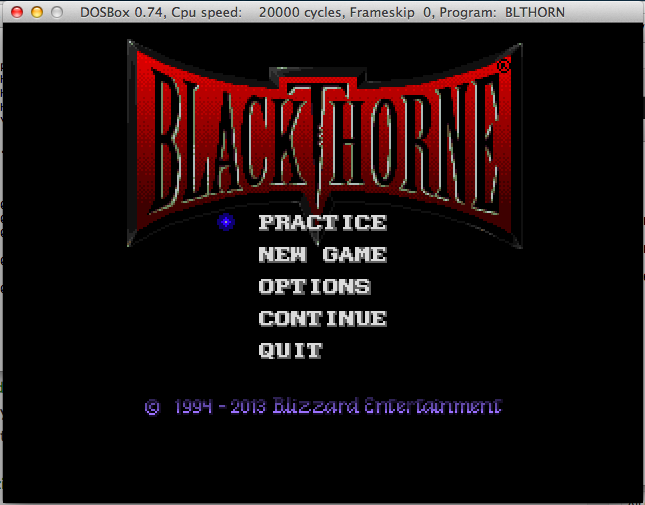
From DOS ain’t dead: the game was added to battle.net as a free download (1,2).  But you don’t need a battle.net account to download it, just get the ‘executable’ here.
Then unpack with 7zip and rename some files:
$ mv _7770311E01264484BDC66FB81E4EF650 blthorn.exe
$ mv _126448A72F4442D39DCD600746EE09F7 data.dat
$ mv _C987F762EF304955BB86AB432FF6F847 manual.pdf
I set DOSBox to run about 20,000 cycles so it’s not tooo bad.
As much as the whole ‘uptime’ wars passed with the ever increasing need for patching, this is pretty amazing.
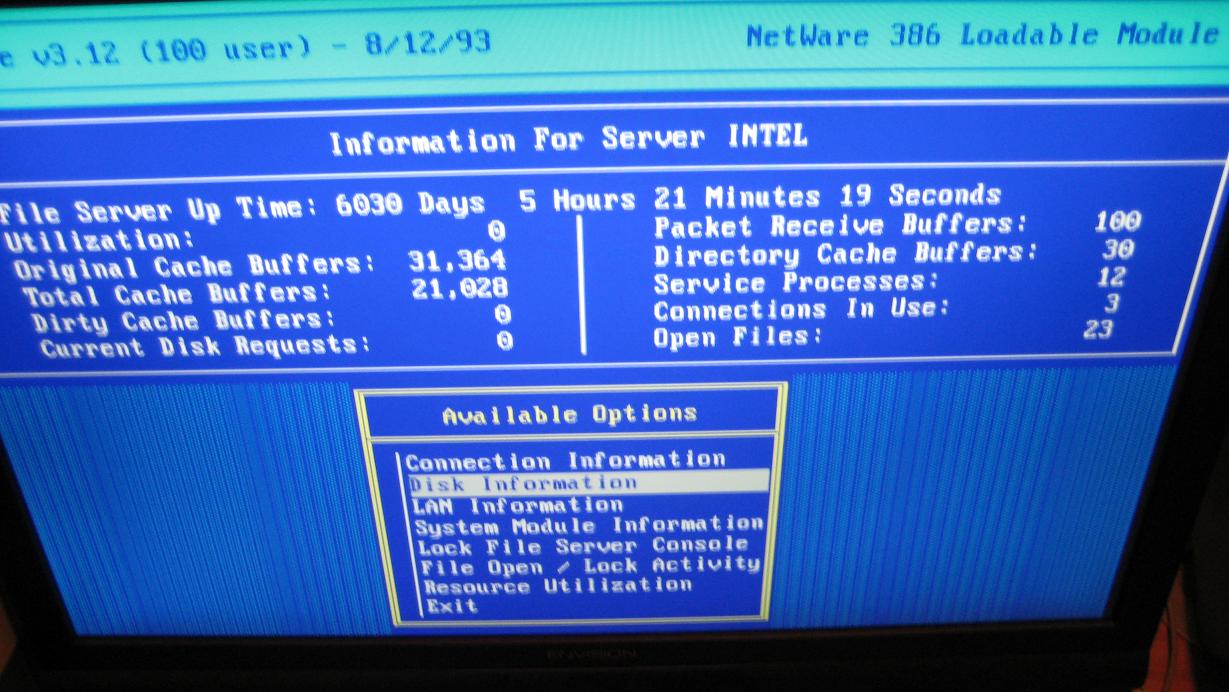
Over on arstechnica a Novell Netware 3.12 server by the name Intel had to be finally shut down after 16 and a half years.  Apparently the bearings in the two SCSI disks had gotten so loud it sounded like a car dragging it’s muffler.
It’s still pretty impressive, and in some ways that was one thing Novell got right with Netware was that it was unstoppable. Â Of course their big ‘goof’ was in the application space. Â While there was a version of Oracle for Novell Netware, it was a major pain to deal with, and the GUI simplicity of Windows NT pretty much put an end to Netware.
But in some shops they don’t fix it until it’s broke. Â Even if it takes a decade and a half.
A fun retrospective on arstechnica.com..  I’m still amazed at the greater leap from a 286 with a 2400 baud modem, to a 486 with a 19,200 baud modem…  It’s amazing we could do what seemed like so much with so little.
(note this is a guest post from tenox)
A long long ago, my father had a printing business. An emerging technology called Desktop Publishing (DTP) was just taking to the mainstream. I have been involved in migration from Linotronic typesetting machines (see above) to more modern and GUI driven Atari TT with Calamus. Those were fun times. Long story short, I became an avid fan of Atari. Unfortunately as time progressed, Ataris got in turn obsoleted by Macs with Quark Xpress and Photoshop. I myself started exploring world of Unix and ended up selling my Atari to be able to run Linux. Bit of shame from time perspective as there were plenty of Unix flavors for the Atari: Minix, Linux, NetBSD and MiNT. Unfortunately they were released after I parted with the platform.
Fast forward 20 years, Atari own UNIX version surfaced the earth. It was originally released in mid 1992 but died shortly after, no one ever heard about it. It has been lost to humanity. Only two good souls had working versions of the system and under pressure of the community finally made disk images of their installations. Some time after a documentation set has been found and digitized. Now I’m in process of trying to restore last existing set of damaged installation tapes. You can find little bit more history of the efforts on this thread.
Out of nostalgia and the fact that Atari TT has been designed as a Unix Workstation, but never got a chance to play with it in this role, I decided to purchase one for myself. I have turned to Best Electronics who is a local Atari dealer around the corner. They sell Ataris like brand new, assembled from spare or reconditioned parts. I paid a small fortune for it, but I got myself a brand spanking new Atari TT, factory sealed and smelling like new after 20 years. It was fitted with latest motherboard revision, TOS, 1.44 MB FDD, 4 MB ST RAM and 16 MB TT RAM.
I was told to just hook it up to a VGA monitor and viola, it will work. Which it did… except to my utter shock in a whopping resolution of 640×480. It looked absolutely horrible stretched on a 19″ LCD panel. I don’t have any pictures but it looked like this. For games maybe OK but not for Unix or any sensible applications.
Using TTs professionally in DTP I certainly didn’t remember them suffering in the resolution department. So what was I doing wrong? Aha! In the old days we used to use special high resolution VME graphic cards. So I went to search for one on eBay and Atari Forums. These obviously proven to be impossible to find… obviously. Additionally I learned that Atari UNIX does not support any of these as they required special TOS/NVDI drivers. In order to run ASV X11 with a decent resolution, one needs a special high resolution monitor called either TTM 194 or 195. These were “professional” 19″ monitors specifically for DTP work. They worked with the built-in graphics card in a special black and white mode at 1280×960, which is actually decent even in modern standards. In a fact we did have these monitors at the printing shop.
Unfortunately these are very old, bulky CRTs and weight 50 lbs. My wife would kill me if I brought one home and even if she didn’t I would hate having one of these on my desk. So why won’t the “TT High” mode work on a standard VGA LCD which normally supports 1280×1024? Well back in a day VGA standard didn’t support such resolutions and Atari had to make the monochrome monitors using ECL signal similar to old SUN/3 and HP monitors. Higher resolution modes were only added later by VESA BIOS extensions.
Researching the topic a lot of people were actually looking for an ECL to VGA signal converter but one did not exist. Some managed to use old EIZO CRTs with ECL support and with decent results, but still these are 50 lbs CRTs and I wanted to run ASV on a LCD panel. An adapter to convert ECL signal to a real VGA has actually been tried before but with rather awful results. Something had to be done!
TenoxVGA was born. And this will be covered in the next post… 😉
First run the ‘setup.exe’ from the prerequisite CD-ROM.
Set the supported application type to “Microsoft Office 2003”, and place it in a new bottle.
This will be counter intuitive.
Answer no, and the needed components will install.
Don’t worry the .net 1.1 runtime & the j# .net redistributable package will both fail. It is nothing to worry about as we need to install them manually.
CrossOver will then notice that something went wrong. We just tell it to ignore the step, and pretend everything is OK.
Just ‘Skip This Step’ and all is well.
Now that the bottle is ‘setup’ we manually install the .net 1.1 framework. First tell the installer that we are going to install the runtime component .NET Framework 1.1.
I just point the installer to the CD’s ‘dotNetFramework’ directory to the dotnetfx.exe.
And let it install.
Next, I install the J# Runtime. First select the ‘other’ application type, then I select the JSharpRedistCore directory and the vjredist.exe
This should install just fine.
Next, it’s time to install the MDAC 2.7 sp1 components. I select MDAC 2.71 Serivce Pack 1, then point the installer to the MDAC27SP1 directory, and select the mdac_typ.exe installer
And the MDAC components should install without issue.
Now for some reason I’ve had issues swapping CD’s so I ‘cheat’ and do the following:
Programs -> Run Command, then open up the ‘Debug Options’ and choose Open Shell.
From here I simply do this:
$ cd ‘/Users/neozeed/Library/Application Support/CrossOver/Bottles/Microsoft Visual Studio 2003/drive_c’
drive_c neozeed$ mkdir temp
drive_c neozeed$ mkdir vs2003
drive_c neozeed$ cd vs2003
vs2003 neozeed$ cp -R /Volumes/VSPROD2/* .
vs2003 neozeed$ cp -R /Volumes/VSPROD1/* .
cd ..
Now we can go ahead and install Visual Studio.
I find it easier to ‘Open the C: Drive’ which will take us to the 2003 folder, then we can choose the vs2003\setup\setup.exe executable. The vs2003\setup.exe will take note that the pre-requisites are installed, then just exit.
Use the ‘other application’ template, and make sure it is installing to the bottle you’ve been installing to so far!
Assuming you’ve done this right, it’ll take a while
And with any luck you’ll finally see this!
Now you can select what to install
And again this will take a few minutes.
Then it bombs out with a Failed LookupAccountNameW: … which I think a few installers bomb on stuff like this. So close.
Anyways it’ll install but not work. 🙁
Sorry to get your hopes up, I know I’m kinda disappointed.
Well I had no idea that the Tim Carleton Darrick Deel collaboration of Opus number 1 was so popular!  I had blogged about it a while ago when I was looking for the infamous hold music.
I got one quick heads up that the stereo version of the popular ‘hold’ track would be uploaded, but once it was I got 5 notifications! Â One from a Darrick! Â It sure sounds nicer than the mono version, but when you are on a phone what do you expect?
Apparently NPR will only host the mp3 for the weekend, so of course I’ll keep a mirror.
For anyone unfamiliar with the song, here is a little bit of history from here:
This was not a proprietary mix made by Cisco. It was licensed to Cisco for non-exclusive use in their CallManager product. Tim composed this song and is who performed it for this recording. I helped him record it one day in his garage. This recording is actually from the late Eighties.
I had the opportunity to submit the song to the guy compiling the music on hold CD and he included it in our upcoming product. The Synths used to record the song had very favorable acoustic qualities when transmitted over VoIP with a G.711 encoding. As a result Tim’s Opus No. 1 became the default hold music on Cisco’s product.
The original version has a nice stereo effect on the clapping and a real breathiness and richness in the Synths. There have been a number of people over the years that have tracked me down due to this music. It is always exciting for us to find more people that like the music enough to track it down after an encounter with it while on Hold. Tim and I will discuss the options for making this available and post back here.
I accidentally restored a CPIO on top of my root… oops.
So in case you are wondering why I’m going to be offline for a while, that is why.
for the two or three people left running SUA, and trying to rsync a UNIX box back on a corporate Windows server, you’ll probably wonder why rsync crashes…
$ ./rsync dbserver:: Memory fault (core dumped) $
Wonderful. Â So I know what you’re thinking, let’s debug it, right?!
$ gdb rsync
GNU gdb 2002-11-11-cvs Copyright 2002 Free Software Foundation, Inc. GDB is free software, covered by the GNU General Public License, and you are welcome to change it and/or distribute copies of it under certain conditions. Type “show copying” to see the conditions. There is absolutely no warranty for GDB. Type “show warranty” for details. This GDB was configured as “i586-pc-interix3″…
(gdb) set args dbserver::
(gdb) r
Starting program: /dev/fs/C/Users/neozeed/tmp/rsync-3.1.0/rsync dbserver:: procfs: init_inferior, get_traced_signals line 4856, /proc/1375: Value too large to be stored in data type.
Yeah. Fantastic.
Well it turns out the bundled libintl on Interix is all screwed up. Â So edit the config.h, and remove the line:
#define HAVE_ICONV_H 1
rebuild, and all will be well.