Sad day for people who signed onto SUN’s virtualization strategies.

From slashdot, Oracle to stop developing SUN virtualization technologies.  In a way I’m surprised this didn’t happen sooner, as chasing after VMWare isn’t part of Larry’s strategy to take over the world with databases.

How long does the SPARC have left to live?

Or Solaris for that matter?

—edit seems they are going to keep VirtualBOX afterall!

https://blogs.oracle.com/virtualization/entry/important_information_about_oracle_desktop


Going forward, Oracle’s desktop portfolio investments will be focused on continued development and new enhancements to both Oracle Secure Global Desktop and Oracle VM VirtualBox software.

Wolfenstein 3D for DOS/4GW!

After reading about the Blake Stone compile fixes, as it was a Wolf3d port, I came across a post on the forum Wolf3d Haven about trying to find the source code to something called wolf4gw.  Now wolf4gw is a port of the Borland C source of Wolfenstein 3d to Open Watcom C++‘s 32bit MS-DOS extender DOS/4GW, done by ‘ripper’.

The project eventually gave way to wolf4sdl, and as they say the rest is history.

Sadly, it seems that just about all the source copies of wolf4gw were lost, except I did manage to find an ‘improved’ version simply referred to as wolf3dx.  From the blurb:

Tricob has released the Wolf4GW-based source code of WolfDX. Included is a text file called (Tricob).TXT.

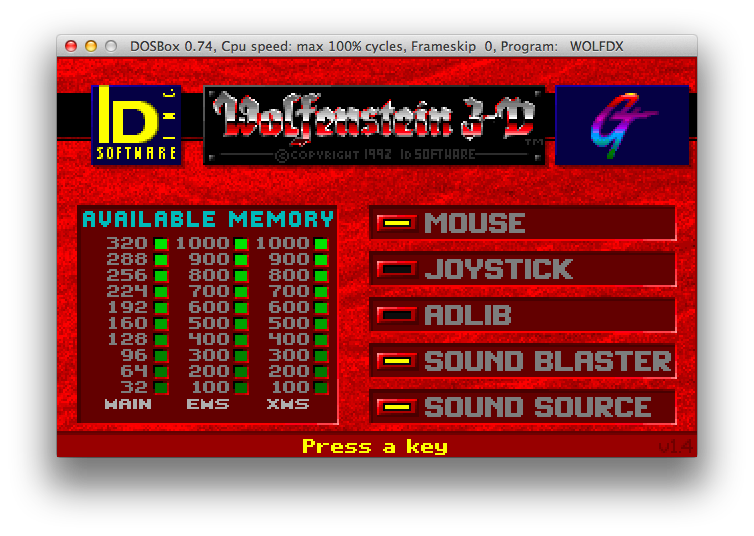
I have been using Watcom 10.0 for Duke Nukem 3d, however, this version relies on the _asm inline assembler which was introduced in Watcom 11.  However, Watcom 11c had issues with some of the assembly forcing me to go even further to OpenWatcom 1.3.  For me the install was easy, I used CrossOver to install OpenWatcom for DOS-DOS32bit only, copied the compiler into DOSBox, and played mostly with the makefiles, and finally got a working exe!
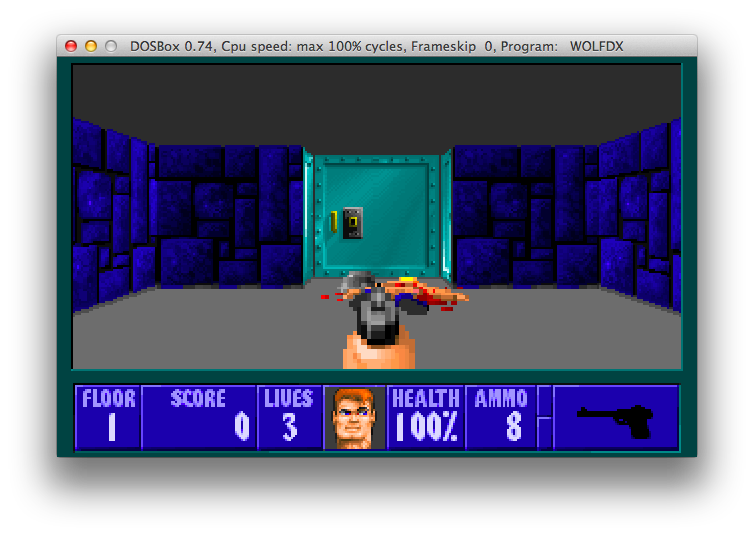
Screen Shot 2013-07-12 at 11.57.24 AM Screen Shot 2013-07-12 at 11.58.00 AM

I know it may not look like much, but really it is running in 32bit protected mode!

Since all of this is open/freeware/shareware I can redistribute OpenWatcom, the source to wolf3dx, and the shareware levels of Wolfenstein.  Naturally I’m using DOSBox to compile and test, but you can use anything that can run MS-DOS 32bit stuff.

Download my archive here.

Blake Stone source code released!

Blake Stone!

Blake Stone!


Honestly I never played Blake Stone, because as the wikipedia entry says DOOM came out a week later.  Blake is a Wolf3d variant, so I would imagine that the same build environment that can build Wolf3d can build Blake (Borland C 3.1 & TASM 3.1).

For those of you interested in this 20+ year old artifact, you can download the source code here.  And as mentioned Blake can be purchased through steam as part of the Apogee Throwback Pack.

An update to the whole thing, Marakaate has fixed the source well enough to compile!  You can read about his adventure here, and download his updated source here.  He’s also asked me to plug his BBS, marabbs.no-ip.org .. You can just telnet to the IP address.  There is some palette issues as they are compiled into the game, not read from the data files (wtf?) and have been extracted from an exe, however the starting logo is all wrong.. But the game works.

So, enjoy!

VMware PVSCSI under WinPE

(note this is a guest post from Tenox)

I needed to use Windows PE with paravirtualized SCSI driver under VMware. Most blog posts I came across mention the same very wrong thing: grab pvscsi driver folder from VMware Tools location and insert to WinPE .wim file using dism /add-driver. Wrong, on two levels!

First of all the mentioned folder C:\Program Files\VMware\VMware Tools\Drivers\ contains only one subfolder “hgfs” and does not contain pvscsi, vmxnet3 or mouse drivers. In order to find the required drivers you need to extract contents of the VMware Tools CD Image (windows.iso). Once you can grab setup.exe you need to extract it’s contents to a separate folder using a special switch. There is a KB article how to do it exactly.

Unfortunately above does not work either. Even with the pvscsi driver correctly inserted in to the .wim file, diskpart was still unable to see disks attached to PVSCSI controller. After some research I’ve found that one must have so called text-setup mode driver for it to work correct. For example if you are installing Dell PERC driver it will come with characteristic txtsetup.oem file.

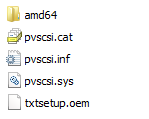
Fortunately VMware distributes text-setup drivers on a floppy disk image formerly called vmscsi.flp. My VMware Workstation has a file called pvscsi_windows2008.flp under “C:\Program Files (x86)\VMware\VMware Workstation\Resources” folder. Upon mounting the floppy image a correct pvscsi driver with txtsetup.oem showed up and I was able to copy and insert it to WinPE .wim file using dism /add-driver. Now I can see my paravirtualized hard disks.

pvscsi

I’m not going to go in to detail how to add these drivers to a .wim file as you can find it elsewhere on the web pretty easily.

Qemu 1.5.1 released

Too bad it is utterly broken on Win32, Win64, OS X platforms.

I guess it was fun while it lasted, but my enthusiasm for this emulator is basically all gone now.  I know they were screwed over with the changes from GCC 3.x to 4.x, but the 1.x versions move to GLIB not only destroyed their performance, but made it incredibly difficult to build.

Oh well.

Aclock needs your help

 (note this is a guest post from Tenox)

Lately I’ve been very busy with several projects and noticed Aclock was lacking love for quite a while. For those who don’t know Aclock is a tiny C application that a small number of trusted volunteers and myself have been compiling to run on as many computer platforms as possible. The number of unique binaries is approaching 200 but is still short by few. As summer time sets in, some more fortunate of you will get extra free time, so I’m calling for volunteers to help to bring the gap and possibly go beyond.

Additionally I see more people looking for some particular operating system or piece of software and unfortunately nothing new for me to trade for and the gap is ever growing. Here is a chance to trade your time for some otherwise unavailable pieces from my collection. 😉

Here is a list of most wanted builds:

Operating system are mostly available. For some I will supply the OS. For others you will know what to look for. Whats required is your time and determination.

Some house keeping rules. I’m looking for a large amount of platforms (CPU+OS combination) and not multiple versions of the same OS. Generally if you can compile for OS version 1 and this binary works through v2 and v3 I would prefer version 1. Only if the OS has changed dramatically between versions I would want to get a separate binary. Secondly I’m currently NOT looking to get aclock ported to language other than C. So if a particular operating system doesn’t have C comparator, I’m not interested.

If you decide to work on any of this please let me know ahead of time.

I’m always interested in more screenshots and pictures of aclock running on various terminals and windowing systems.