VMWare Vcenter/ESX 5.5

Well, it’s been a long while since I used Vcenter, and now it’s gone all web based.  Which is a damned shame IMHO.

But the plus is that ESX can now run nested!

The first stumbling block was installing vSphere.  The 2008r2 server that I’ve been given access to is part of a domain, but I’ve only got local access to the server.  The annoying part is trying to logon right after install.  My Windows user ID doesn’t work, and logging in as ‘admin’ or ‘Administrator’ doesn’t work.  Thankfully I found a hint, to install SQL Management Express to mine the VPX_ACCESS table (my SQL Express instance was \VIM_SQLEXP), and discover that the Administrator logon is

VSPHERE.LOCAL\Administrator

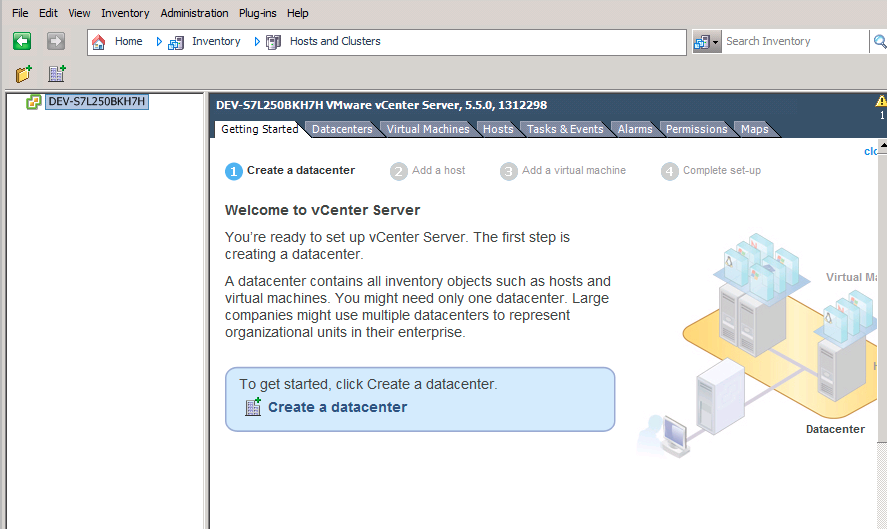
Now with that in place I can now logon to my vSphere.

Screen Shot 2014-02-20 at 7.30.14 PM

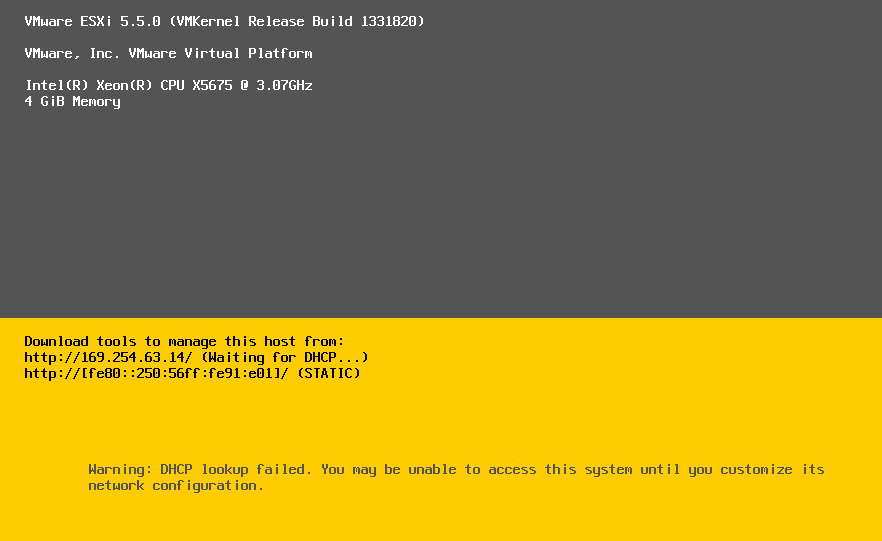
The next fun is configuring the ESX VM.

Screen Shot 2014-02-20 at 7.28.07 PM

By default, it’ll try to DCHP itself.  Which is great if you have DHCP, but in my small test area on the cloud I don’t have DHCP.

One huge pain I find is that you have to manage version 10 VM’s through the web UI, which let’s face it is dreadfully slow.  Also it looks like you still need the ‘fat’ client to manage storage.  Ugh.

I’ll probably update this more the further along I get.

Alpha Linux on Qemu

I got sent a quick heads up about a post on firstwork systems, where the author details the steps needed to install, and boot up the installer, and then get the rest of it running.

Very cool stuff!

I pulled down debian-5010-alpha-netinst.iso, and extracted /boot/vmlinuz & /boot/initrd.gz .. Decompressed vmlinuz, and booted away!  For anyone who want’s it, my minimal install is here.  All things considered, it works well!

$ ./qemu-system-alpha -hda alpha.disk -kernel vmlinux -append ‘console=ttyS0’ -initrd initrd.gz -L pc-bios/ -nographic -net nic -net user -drive file=debian-5010-alpha-netinst.iso,if=ide,media=cdrom
PCI: 00:00:0 class 0300 id 1013:00b8
PCI: region 0: 10000000
PCI: region 1: 12000000
PCI: 00:01:0 class 0200 id 8086:100e
PCI: region 0: 12020000
PCI: region 1: 0000c000
PCI: 00:02:0 class 0101 id 1095:0646
PCI: region 0: 0000c040
PCI: region 1: 0000c048
PCI: region 3: 0000c04c
[ 0.000000] Initializing cgroup subsys cpu
[ 0.000000] Linux version 2.6.26-2-alpha-generic (Debian 2.6.26-29) ([email protected]) (gcc version 4.1.3 20080704 (prerelease) (Debian 4.1.2-25)) #1 Sun Mar 4 21:08:03 UTC 2012
[ 0.000000] Booting GENERIC on Tsunami variation Clipper using machine vector Clipper from SRM
[ 0.000000] Major Options: MAGIC_SYSRQ
[ 0.000000] Command line: console=ttyS0
[ 0.000000] memcluster 0, usage 1, start 0, end 11
[ 0.000000] memcluster 1, usage 0, start 11, end 16384
[ 0.000000] freeing pages 11:2048
[ 0.000000] freeing pages 2987:16384
[ 0.000000] reserving pages 2987:2988
[ 0.000000] Initial ramdisk at: 0xfffffc0007b28000 (5076756 bytes)
[ 0.000000] Built 1 zonelists in Zone order, mobility grouping on. Total pages: 16272
[ 0.000000] Kernel command line: console=ttyS0
[ 0.000000] PID hash table entries: 512 (order: 9, 4096 bytes)
[ 0.000000] HWRPB cycle frequency bogus, and unable to estimate a proper value!
[ 0.000000] Using epoch = 2000
[ 0.000000] Turning on RTC interrupts.
[4194001.858529] Console: colour VGA+ 80×25
[4194001.860482] console [ttyS0] enabled
[4194001.865365] Dentry cache hash table entries: 16384 (order: 4, 131072 bytes)
[4194001.865365] Inode-cache hash table entries: 8192 (order: 3, 65536 bytes)
[4194001.871224] Memory: 117120k/131072k available (2162k kernel code, 13728k reserved, 3314k data, 304k init)
[4194001.899544] Security Framework initialized
[4194001.900521] Capability LSM initialized
[4194001.900521] Mount-cache hash table entries: 512
[4194001.905404] Initializing cgroup subsys ns
[4194001.907357] Initializing cgroup subsys cpuacct
[4194001.907357] Initializing cgroup subsys devices
[4194001.918099] net_namespace: 1208 bytes
[4194001.920052] NET: Registered protocol family 16
[4194001.926888] EISA bus registered
[4194001.928841] pci: enabling save/restore of SRM state
[4194001.939583] Linux Plug and Play Support v0.97 (c) Adam Belay
[4194001.953255] NET: Registered protocol family 2
[4194001.964974] IP route cache hash table entries: 1024 (order: 0, 8192 bytes)
[4194001.967904] TCP established hash table entries: 4096 (order: 3, 65536 bytes)
[4194001.967904] TCP bind hash table entries: 4096 (order: 2, 32768 bytes)
[4194001.968880] TCP: Hash tables configured (established 4096 bind 4096)
[4194001.968880] TCP reno registered
[4194001.972787] NET: Registered protocol family 1
[4194001.975716] checking if image is initramfs… it is
[4194003.320442] Freeing initrd memory: 4957k freed
[4194003.323372] VFS: Disk quotas dquot_6.5.1
[4194003.323372] Dquot-cache hash table entries: 1024 (order 0, 8192 bytes)
[4194003.325325] msgmni has been set to 238
[4194003.327278] Block layer SCSI generic (bsg) driver version 0.4 loaded (major 253)
[4194003.327278] io scheduler noop registered
[4194003.327278] io scheduler anticipatory registered
[4194003.329231] io scheduler deadline registered
[4194003.329231] io scheduler cfq registered (default)
[4194003.330208] isapnp: Scanning for PnP cards…
[4194003.750129] isapnp: No Plug & Play device found
[4194003.767708] Serial: 8250/16550 driver $Revision: 1.90 $ 4 ports, IRQ sharing enabled
[4194003.769661] serial8250: ttyS0 at I/O 0x3f8 (irq = 4) is a 16550A
[4194003.782356] brd: module loaded
[4194003.784309] serio: i8042 KBD port at 0x60,0x64 irq 1
[4194003.784309] serio: i8042 AUX port at 0x60,0x64 irq 12
[4194003.787239] mice: PS/2 mouse device common for all mice
[4194003.792122] TCP cubic registered
[4194003.792122] NET: Registered protocol family 17
[4194003.793098] registered taskstats version 1
[4194003.793098] drivers/rtc/hctosys.c: unable to open rtc device (rtc0)
[4194003.795051] Freeing unused kernel memory: 304k freed
[4194003.889778] input: AT Translated Set 2 keyboard as /class/input/input0
[4194011.195438] Uniform Multi-Platform E-IDE driver
[4194011.195438] ide: Assuming 33MHz system bus speed for PIO modes; override with idebus=xx
[4194011.204227] CMD646: IDE controller (0x1095:0x0646 rev 0x07) at PCI slot 0000:00:02.0
[4194011.204227] CMD646: UltraDMA capable
[4194011.205204] CMD646: 100% native mode on irq 28
[4194011.205204] CMD646: IDE port disabled
[4194011.206180] PCI: Setting latency timer of device 0000:00:02.0 to 64
[4194011.206180] ide0: BM-DMA at 0x8040-0x8047
[4194011.596805] hda: QEMU HARDDISK, ATA DISK drive
[4194012.325320] hdb: QEMU DVD-ROM, ATAPI CD/DVD-ROM drive
[4194012.378055] hda: UDMA/33 mode selected
[4194012.378055] hdb: UDMA/33 mode selected
[4194012.379031] ide0 at 0x8050-0x8057,0x8062 on irq 28
[4194012.554812] hda: max request size: 512KiB
[4194012.556766] hda: 4194304 sectors (2147 MB) w/256KiB Cache, CHS=4161/255/63
[4194012.558719] hda: cache flushes supported
[4194012.559695] hda: unknown partition table
[4194012.663211] hdb: ATAPI 4X DVD-ROM drive, 512kB Cache
[4194012.665164] Uniform CD-ROM driver Revision: 3.20
Starting system log daemon: syslogd, klogd.


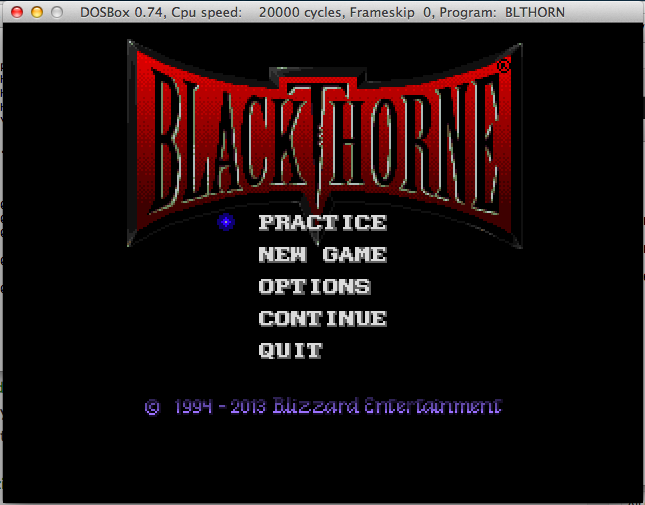
Blackthorne is now freeware!

From DOS ain’t dead: the game was added to battle.net as a free download (1,2).  But you don’t need a battle.net account to download it, just get the ‘executable’ here.

Then unpack with 7zip and rename some files:

$ mv _7770311E01264484BDC66FB81E4EF650 blthorn.exe
$ mv _126448A72F4442D39DCD600746EE09F7 data.dat
$ mv _C987F762EF304955BB86AB432FF6F847 manual.pdf

I set DOSBox to run about 20,000 cycles so it’s not tooo bad.

Blackthorne

Blackthorne

16 and a half years of uptime

As much as the whole ‘uptime’ wars passed with the ever increasing need for patching, this is pretty amazing.

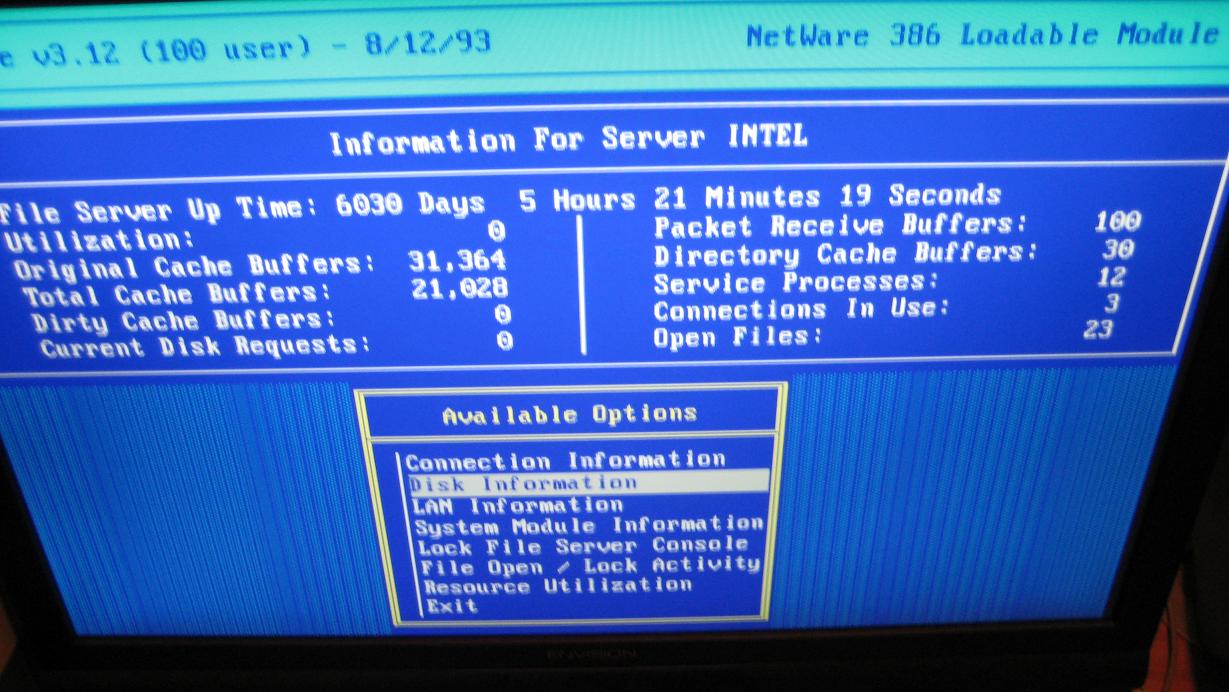
Over on arstechnica a Novell Netware 3.12 server by the name Intel had to be finally shut down after 16 and a half years.  Apparently the bearings in the two SCSI disks had gotten so loud it sounded like a car dragging it’s muffler.

xx days!

6030 days of uptime!

It’s still pretty impressive, and in some ways that was one thing Novell got right with Netware was that it was unstoppable.  Of course their big ‘goof’ was in the application space.  While there was a version of Oracle for Novell Netware, it was a major pain to deal with, and the GUI simplicity of Windows NT pretty much put an end to Netware.

But in some shops they don’t fix it until it’s broke.  Even if it takes a decade and a half.

Atari System V UNIX Saga – Part I – Intro

(note this is a guest post from tenox)

SONY DSCA long long ago, my father had a printing business. An emerging technology called Desktop Publishing (DTP) was just taking to the mainstream. I have been involved in migration from Linotronic typesetting machines (see above) to more modern and GUI driven Atari TT with Calamus. Those were fun times. Long story short, I became an avid fan of Atari. Unfortunately as time progressed, Ataris got in turn obsoleted by Macs with Quark Xpress and Photoshop. I myself started exploring world of Unix and ended up selling my Atari to be able to run Linux. Bit of shame from time perspective as there were plenty of Unix flavors for the Atari: Minix, Linux, NetBSD and MiNT. Unfortunately they were released after I parted with the platform.

Atari System V on Cebit

Fast forward 20 years, Atari own UNIX version surfaced the earth. It was originally released in mid 1992 but died shortly after, no one ever heard about it. It has been lost to humanity. Only two good souls had working versions of the system and under pressure of the community finally made disk images of their installations. Some time after a documentation set has been found and digitized. Now I’m in process of trying to restore last existing set of damaged installation tapes. You can find little bit more history of the efforts on this thread.

RUNTIME_PRODUCT-QIC

Out of nostalgia and the fact that Atari TT has been designed as a Unix Workstation, but never got a chance to play with it in this role, I decided to purchase one for myself. I have turned to Best Electronics who is a local Atari dealer around the corner. They sell Ataris like brand new, assembled from spare or reconditioned parts. I paid a small fortune for it, but I got myself a brand spanking new Atari TT, factory sealed and smelling like new after 20 years. It was fitted with latest motherboard revision, TOS, 1.44 MB FDD, 4 MB ST RAM and 16 MB TT RAM.

tt

I was told to just hook it up to a VGA monitor and viola, it will work. Which it did… except to my utter shock in a whopping resolution of 640×480. It looked absolutely horrible stretched on a 19″ LCD panel. I don’t have any pictures but it looked like this. For games maybe OK but not for Unix or any sensible applications.

Using TTs professionally in DTP I certainly didn’t remember them suffering in the resolution department. So what was I doing wrong? Aha! In the old days we used to use special high resolution VME graphic cards.  So I went to search for one on eBay and Atari Forums. These obviously proven to be impossible to find… obviously. Additionally I learned that Atari UNIX does not support any of these as they required special TOS/NVDI drivers. In order to run ASV X11 with a decent resolution, one needs a special high resolution monitor called either TTM 194 or 195. These were “professional” 19″ monitors specifically for DTP work. They worked with the built-in graphics card in a special black and white mode at 1280×960, which is actually decent even in modern standards. In a fact we did have these monitors at the printing shop.

Unfortunately these are very old, bulky CRTs and weight 50 lbs. My wife would kill me if I brought one home and even if she didn’t I would hate having one of these on my desk. So why won’t the “TT High” mode work on a standard VGA LCD which normally supports 1280×1024? Well back in a day VGA standard didn’t support such resolutions and Atari had to make the monochrome monitors using ECL signal similar to old SUN/3 and HP monitors. Higher resolution modes were only added later by VESA BIOS extensions.

Researching the topic a lot of people were actually looking for an ECL to VGA signal converter but one did not exist. Some managed to use old EIZO CRTs with ECL support and with decent results, but still these are 50 lbs CRTs and I wanted to run ASV on a LCD panel. An adapter to convert ECL signal to a real VGA has actually been tried before but with rather awful results. Something had to be done!

TenoxVGA was born. And this will be covered in the next post… 😉

Installing Visual Studio 2003 on CrossOver (OS X)

First run the ‘setup.exe’ from the prerequisite CD-ROM.

Set the supported application type to “Microsoft Office 2003”, and place it in a new bottle.

Step 1

Step 1

Pre-requisites install

Components install

This will be counter intuitive.

Screen Shot 2014-01-20 at 5.50.56 PM

Answer no, and the needed components will install.

Pre-requ

Pre-requisites

Don’t worry the .net 1.1 runtime & the j# .net redistributable package will both fail.  It is nothing to worry about as we need to install them manually.

Everything is fine!

Everything is fine!

CrossOver will then notice that something went wrong.  We just tell it to ignore the step, and pretend everything is OK.

Screen Shot 2014-01-20 at 5.53.02 PM

Just ‘Skip This Step’ and all is well.

Now that the bottle is ‘setup’ we manually install the .net 1.1 framework.  First tell the installer that we are going to install the runtime component .NET Framework 1.1.

I just point the installer to the CD’s ‘dotNetFramework’ directory to the dotnetfx.exe.

Install .net 1.1

Install .net 1.1

And let it install.

Next, I install the J# Runtime.  First select the ‘other’ application type, then I select the JSharpRedistCore directory and the vjredist.exe

J# Runtime Install

J# Runtime Install

This should install just fine.

Next, it’s time to install the MDAC 2.7 sp1 components.  I select MDAC 2.71 Serivce Pack 1, then point the installer to the MDAC27SP1 directory, and select the mdac_typ.exe installer

MDAC Installation

MDAC Installation

And the MDAC components should install without issue.

Now for some reason I’ve had issues swapping CD’s so I ‘cheat’ and do the following:

Screen Shot 2014-01-20 at 6.04.22 PMPrograms -> Run Command, then open up the ‘Debug Options’ and choose Open Shell.

From here I simply do this:

$ cd ‘/Users/neozeed/Library/Application Support/CrossOver/Bottles/Microsoft Visual Studio 2003/drive_c’
drive_c neozeed$ mkdir temp
drive_c neozeed$ mkdir vs2003
drive_c neozeed$ cd vs2003
vs2003 neozeed$ cp -R /Volumes/VSPROD2/* .
vs2003 neozeed$ cp -R /Volumes/VSPROD1/* .
cd ..

Now we can go ahead and install Visual Studio.

Choose

Lets choose the right setup.exe

I find it easier to ‘Open the C: Drive’ which will take us to the 2003 folder, then we can choose the vs2003\setup\setup.exe executable.  The vs2003\setup.exe will take note that the pre-requisites are installed, then just exit.

Use the ‘other application’ template, and make sure it is installing to the bottle you’ve been installing to so far!

Running Setup

Choosing Setup

Assuming you’ve done this right, it’ll take a while

Screen Shot 2014-01-20 at 6.13.34 PMAnd with any luck you’ll finally see this!

Visual

Visual Studio 2003 EULA

Now you can select what to install

Selecting components

Selecting components

And again this will take a few minutes.

Final Failure..

Final Failure..

Then it bombs out with a Failed LookupAccountNameW:   … which I think a few installers bomb on stuff like this.  So close.

Anyways it’ll install but not work. 🙁

Sorry to get your hopes up, I know I’m kinda disappointed.

Opus number 1 in stereo!

Well I had no idea that the Tim Carleton Darrick Deel collaboration of Opus number 1 was so popular!  I had blogged about it a while ago when I was looking for the infamous hold music.

Popularity of Opus #1

Popularity of Opus #1

I got one quick heads up that the stereo version of the popular ‘hold’ track would be uploaded, but once it was I got 5 notifications!  One from a Darrick!  It sure sounds nicer than the mono version, but when you are on a phone what do you expect?

Apparently NPR will only host the mp3 for the weekend, so of course I’ll keep a mirror.

For anyone unfamiliar with the song, here is a little bit of history from here:

This was not a proprietary mix made by Cisco. It was licensed to Cisco for non-exclusive use in their CallManager product. Tim composed this song and is who performed it for this recording. I helped him record it one day in his garage. This recording is actually from the late Eighties.

I had the opportunity to submit the song to the guy compiling the music on hold CD and he included it in our upcoming product. The Synths used to record the song had very favorable acoustic qualities when transmitted over VoIP with a G.711 encoding. As a result Tim’s Opus No. 1 became the default hold music on Cisco’s product.

The original version has a nice stereo effect on the clapping and a real breathiness and richness in the Synths. There have been a number of people over the years that have tracked me down due to this music. It is always exciting for us to find more people that like the music enough to track it down after an encounter with it while on Hold. Tim and I will discuss the options for making this available and post back here.