Chex Quest

Chex Quest

Chex Quest montagé

I’ve never heard of Chex Quest.  I guess because at the time, 1996 I wasn’t that big on kids cereal.  But as it turns out, Digital Café had been selected by WatersMolitor, care of Ralston Foods to create something for this new fangled digital age to get kids to eat Chex.

You can of course read all about it on wiki, or one of the many fan pages & forums..

So yeah, it’s Ultimate DOOM, done as a total conversion.  All licensed from iD in the days before Quake.

Unlike DOOM, and it’s feel for ultra-violence, you just zap green slime things back to their home dimension while you try to free your Chex people things.  I guess this shouldn’t be surprising, remember there is that horrid ‘Super 3d Noah’s Ark‘ thing that is built around Wolfenstein 3D.

And it was a few more years (1999) until we had to deal with Columbine, and how violent video games make people kill (just like loud music, role playing games, books, and other things before that).

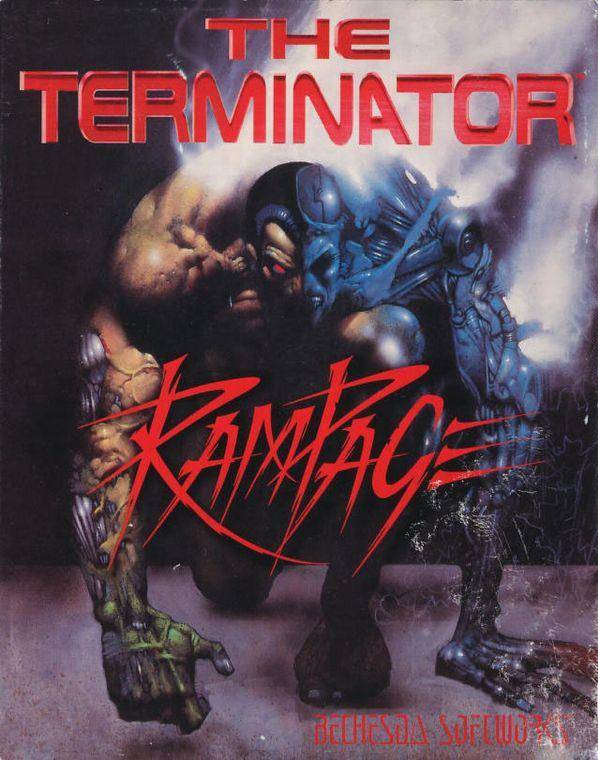
Terminator Rampage.

terminator rampage front

Terminator Rampage

Back in October of 1993, this cool looking game, The Terminator Rampage was released.

But sadly I had a lowly 4MB 386sx-16 with CGA, so things like this game with it’s awesome VGA graphics were an impossibility.

Even more sad at the time was that ‘primitive’ 3d games like wolfenstein 3d also required VGA.

But as we all know a few short months later, DOOM was released, and then Terminator Rampage was quickly swept off the face of the earth.

I recently came across this page,  and I thought I’d give it a shot.  The requirements are pretty ‘minimal’:

  • Minimal 386DX-25 with 4MB of Ram, VGA & 18MB of disk space
  •  Recommended 386DX-33 or 486DX-33

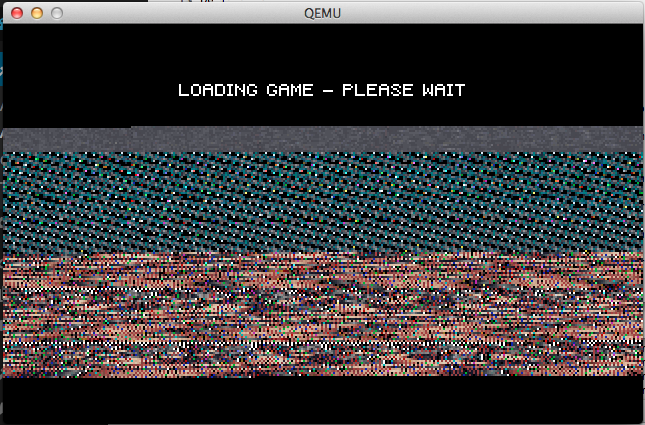
So I was thinking Qemu could easily run this game.  Long story short, it doesn’t work.  Turns out Rampage needs EMS.  And for whatever reasons, running emm386.exe on Qemu (I tried a handful of versions) just crash on Qemu after initialization.  Failing with stock Microsoft EMM386, I tried JEMM, which loaded, and ran it’s built in EMS diagnostics OK, but trying to run Rampage resulted in a nice crash.
Qemu crash

Qemu crash

So giving up on Qemu, I tried it on DOSBox.  It runs but it is incredibly jerky.  So I thought I’d try PCem, and see how it runs there.

So the plus side is that PCem, is able to run MS-DOS & EMM386.EXE without issues.  It only took a few minutes to install MS-DOS 5.0 and Rampage on my ‘virtual’ 486DX2/66 with 8MB, of ram, and load up Rampage to be greeted with it’s jerky motion.

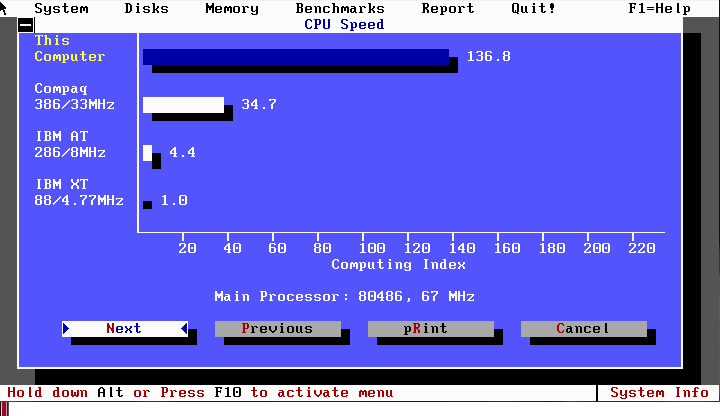
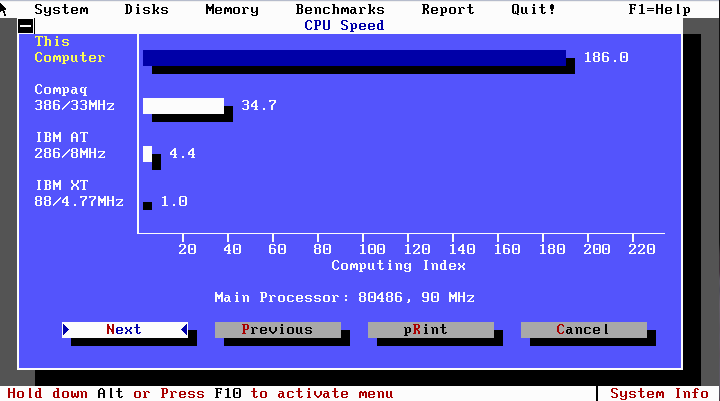
Thinking its something with emulation in general I fire up Norton SI to get some PCem scores how it benches against known good samples.
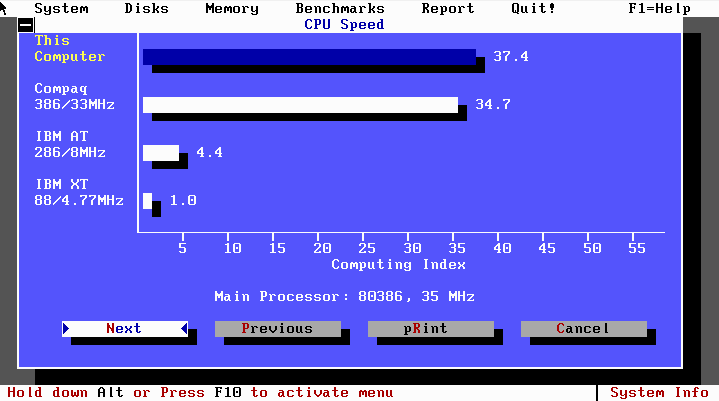
pcem 8.1 386DX33 Norton SI score

386DX-33Mhz 37.4

pcem 8.1 486DX2-66 Norton SI score

486DX/2-66Mhz 136.8

pcem 8.1 WinChip90 Norton SI score

WinChip-90 186

Then comparing the scores to this handy (if not ancient) Norton Si benchmark spread we see:

Pentium 60mhz
=============
IBM Clone               P5/60              256k              187.2
w/ Premiere MB

486 DX2/66mhz
=============
Elitegroup (ECS)       iDX2/66             256k              147.3
SA486P AIO-II
INTEL CDC,SIO&DPU

386 DX 33mhz
=============
Forex 36C100 iDX/33 128k 35.9

Well now that interesting, so at a ‘raw’ CPU level, PCem is delivering on what would be classical performance.  So for the heck of it, I load up DOOM, and it runs a bit choppy on the 386, but flies on the 486 & Winchip emulation.  Now that is strange.  And just to confirm…

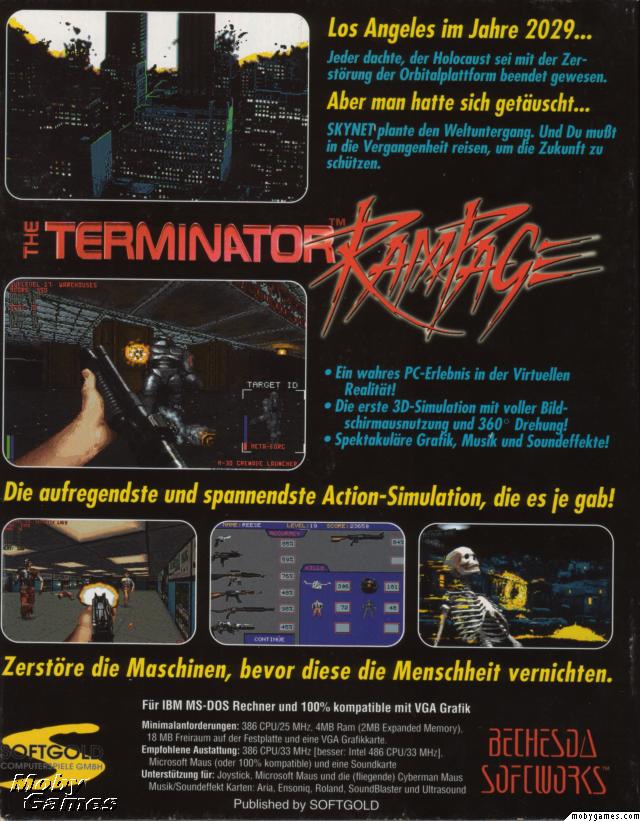
Terminator Rampage Box (back)

Terminator Rampage Box (back)

They really thought this would be playable on a 486 @ 33Mhz.

So how does it choke?  While going straight is ‘ok’ turning around is so utterly sluggish that there is no feeling of immersion.  It feels like you are driving an incredibly slow tank.  At the same time, the more realistic sprites, and textures serve to make it look even more unrealistic.

So what am I talking about?

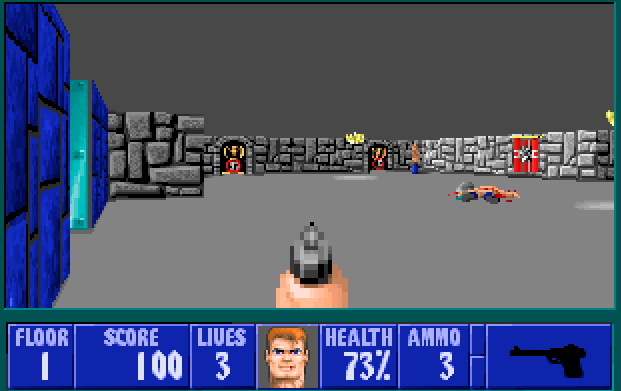
Well here is a screenshot of Wolfenstein 3d on the 386DX-33 (and more than playable).
Wolfenstein 3d

Wolfenstein 3d

As you can see, there is no ceiling, and no floor textures.  The walls are all uniform height, and the textures were clearly drawn by hand, giving it a very fake and ’16bit’ feeling.  I should also add on a capable 286, this game is playable.
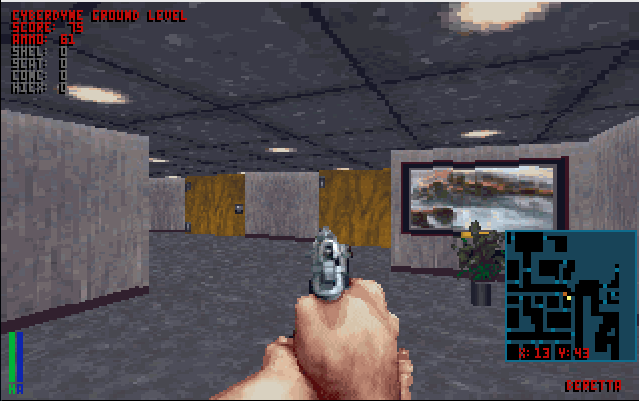
Terminator Rampage

Terminator Rampage

Now at first it looks like it has a lot in common with the soon to be release DOOM, with textured ceilings and floors.
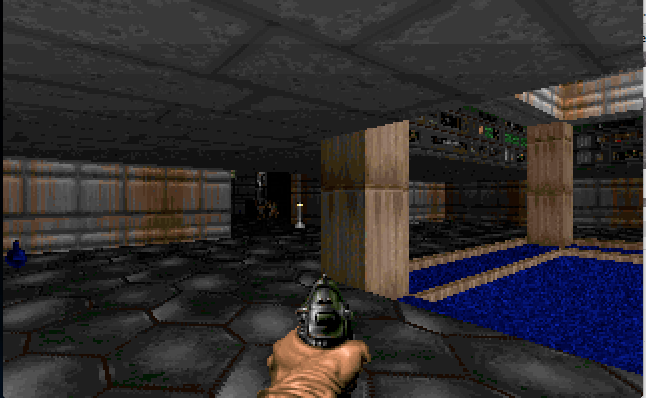
Doom

Doom

Now as you can see the difference in DOOM is the 2.5D effect of there being lower areas so you can go up and down stairs (while you cannot go under them).  Also Doom introduces dynamic lighting, and better sound rendering.

While I do like Rampage’s upfront map, as you can see thought, it is very square. In a small effort to ‘speed’ up Rampage you can turn off the ceilings and floors revealing a very Wolf3d like environment.  Unfortunately the more they tried to give the world  detail, the more it well just looks flat.
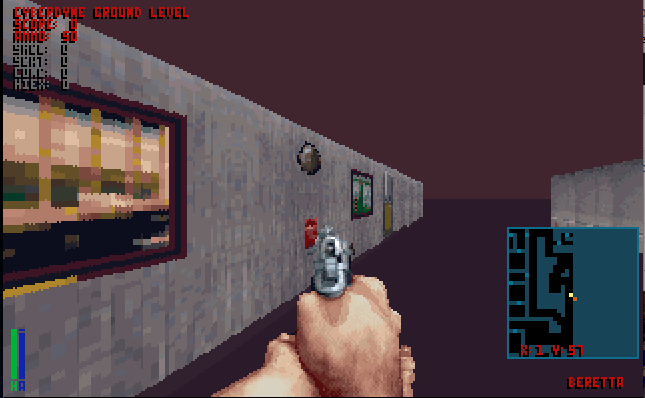
No ceilings, No floors.

No ceilings, No floors.

Which kind of kills the whole thing.  Maybe they should have left out things like water fountains.
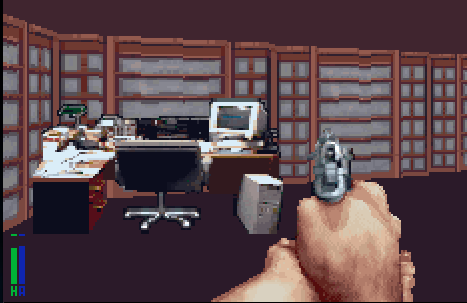
High detail sprites

High detail sprites

Then you get things like this computer setup (one of the programmers? The accountant’s lamp is a nice touch) but it’s a sprite, so as you rotate around it, you always see the same face.

Ironically it’s these high resolution background sprites that make the environment feel less real, as they make the rooms feel too open, and too sparse.
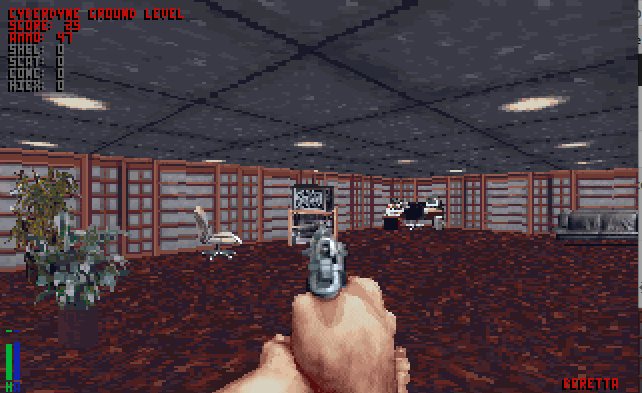
Too open, and yet too sparse

Too open, and yet too sparse

It is the real paradox that in a good shooter you have lots of room, and things to duck behind, but the rooms feel too large, and look bizarre with the massive open spaces.  But it is more so a limitation of the time, with the engine being more of an improved Wolf3d engine, than taking a larger leap into being something more 2.5d or 3d like Doom (or the distant Quake).

Another thing that really bugged me was the doors.
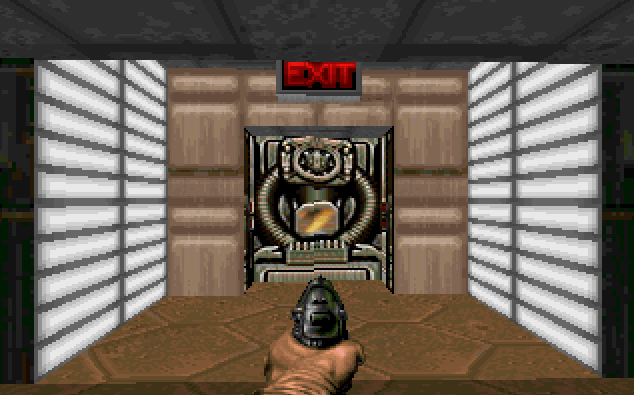
Doom door

Doom door

In doom, the doors felt more ‘natural’ in that they weren’t super wide.
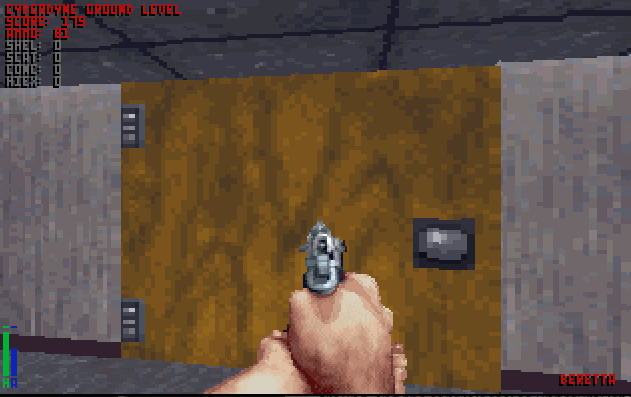
Screen Shot 2014-04-28 at 10.44.09 PM

Generic office door in Rampage

But in rampage they are stretched wide giving the impression of why you can’t turn is you are incredibly wide..
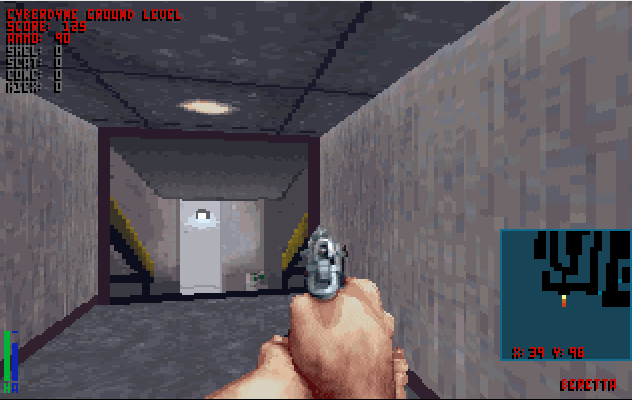
Screen Shot 2014-04-28 at 10.43.16 PM

Rampage ‘exit’ door

Even the ‘exit’ door texture still feels too wide.

I could probably get by the empty spaces, but it takes so long to turn around, and the controls feel so unnatural (they don’t even try to be a Wolf3d control-a-like) that it really feels klunky.  No matter what speed you play it at.

It really was an exercise in frustration.

Qemu 2.0 officially released!

And you can download & build the source “here“.

Some of the changes include:

* Initial support for KVM on AArch64 systems (some features such as migration are not yet implemented)
* Support for all 64-bit mode ARMV8 user-accessible instructions except for the optional CRC and crypto extensions
* Support for new 32-bit mode ARMv8 instructions in TCG
* Support for the allwinner-a10-based board “-M cubieboard”
* Support for POWER Altivec 2.07 and VSX instructions when running under TCG
* Support for boot order in pSeries emulation
* The Q35 x86 machine-type now supports CPU hotplug.
* On the PIIX x86 machine-type, PCI hotplug now supports devices behind a bridge (for bridges not added by hotplug; hot-plugged bridges can still use the PCI Standard Hot-Plug Controller)
* Support for the Hyper-V reference time counter via the “hv-time” suboption of “-cpu”. This can improve performance of Windows guests substantially for applications that do many floating-point or SIMD operations. (Requires KVM and Linux 3.14).
* ACPI tables generated by QEMU can now be used by OVMF (https://wiki.ubuntu.com/UEFI/OVMF) firmware. OVMF starting with SVN r15420 is needed. In particular hotplug, pvpanic device and other ACPI based features now work for OVMF
* PCI passthrough of devices with a ROM now work on Xen
* support for suspend-to-RAM in the XHCI USB controller
* GTK UI is now supported on Windows hosts
* New management interfaces for CPU and virtio-rng hotplug
* Improved reliability for live migration when using qcow2 images
* Live snapshot merging
* Experimental support in virtio-blk for M:N threading model: if you specify x-dataplane=on, you can also create I/O threads with “-object iothread” and point virtio-blk devices to the desired iothread with the “x-iothread” property. Properties of the running iothreads can be queried with the QMP command “query-iothreads”.
* Network block drivers (curl, iscsi, rbd, ssh, glusterfs) can be built as shared library modules with “–enable-modules” configure option.
* QEMU is now able to operate even if the underlying storage requires the buffer size to be a 4K multiple. This is the case for 4K-native disks (with cache=none or when accessed through iscsi:// URLs) and some raw devices
* QEMU can access NFSv3 shares directly from userspace using libnfs.
* Improvements to the TCG optimizer make it produce faster code
* Tracing QEMU via LTTng 2.x is now supported
* And lots more…

It never rains, but it pours.

f

fragready’s ticketing system.

So yeah, I’m still without my “dedicated” server,  and now even fragready’s portal is broken.  I just want to get on the box, and do a secure wipe myself.

So at least I have this super discount VM in Germany to keep my blog running.  Before I was hosting Exchange on KVM in the dedicated server.  However now I’m going to pull all my crap back home, as I setup an OpenVPN connection from my home to the VPS, and from there got some static routing working well enough that I can host an Exchange server at home, and use postfix to store & forward.  A pretty simple & standard setup.

Well I got to update my MX records, and what do I get?

websitespot

websitespot

Now the people I bought my domain names from, websitespot.com is down.  Even “Down for everyone or just me” has them down.

I swear, I can’t catch a break on this one.

Byte magazine now on archive.org!

This is super cool!  When I was a kid I loved reading Byte!

But now it’s all gone, and my attempt at getting a dead tree version… well while I had quite a few they were HEAVY, and sadly couldn’t be taken around the world with me.

But thankfully they are being digitized, and stored on archive.org so I can browse through them again!

Byte from 1985

Byte from 1985

You can find the archive here.  And of course, take note that there are many other magazines now available!

Virtual Machines for Internet Explorer

Collect them all?

Collect them all?

Something I kind of stumbled on, while playing ‘Escape from XP‘, a MS page with a tonne of virtual machines!

With downloads for Windows, Mac & Linux!

Up until now, I have been using Utilu’s IECollection (local mirror).

So this may be of interest to some of you, but there is XP, Vista, & Windows 7 downloads….

Escape from XP

Escape from XP

Meanwhile, try to escape from XP!

My fragready server has been taken offline because of a ‘virus’.

And let this be a warning to all.

The Data center has null routed because of virus complaints originating from 216.231.130.102.

Sadly I haven’t heard back as far as exactly what this virus is/was and what is going on.  Just that a ‘complaint’ had been logged against my ip address.

So googling my ipaddress + virus turns up more automation gone awry.

Virus Total...

Virus Total…

So as you can see this “virus total” is listing a bunch of my  files being infected.  The first thing I noticed is that it’s NetHACK, and for non i386 win32 platforms, both Windows CE for the i386 (it’s not a normal win32 exe), and nethack for the MIPS.

And looking on how they score me 2/52 well these are the sites that now scour around looking for “viruses” and false positives that will get your server blacklisted.

URL: http://vpsland.superglobalmegacorp.com/install/WindowsCE/nethack/nethack3.4.3-WinCE-2.11-x86.zip
Detection ratio: 2 / 52
Analysis date: 2014-04-13 05:37:54 UTC ( 1 day, 17 hours ago )
    URL Scanner Result
    CLEAN MX Malicious site
    Websense ThreatSeeker Malicious site
    ADMINUSLabs Clean site
    AegisLab WebGuard Clean site
    AlienVault Clean site
    Antiy-AVL Clean site
    AutoShun Unrated site
    Avira Clean site
    BitDefender Clean site
    C-SIRT Clean site
    CRDF Clean site
    Comodo Site Inspector Clean site
    CyberCrime Clean site
    Dr.Web Clean site
    ESET Clean site
    Emsisoft Clean site
    Fortinet Unrated site
    G-Data Clean site
    Google Safebrowsing Clean site
    K7AntiVirus Clean site
    Kaspersky Unrated site
    Malc0de Database Clean site
    Malekal Clean site
    Malware Domain Blocklist Clean site
    MalwareDomainList Clean site
    MalwarePatrol Clean site
    Malwarebytes hpHosts Clean site
    Malwared Clean site
    Netcraft Unrated site
    Opera Clean site
    PalevoTracker Clean site
    ParetoLogic Clean site
    Phishtank Clean site
    Quttera Clean site
    SCUMWARE.org Clean site
    SecureBrain Clean site
    Sophos Unrated site
    SpyEyeTracker Clean site
    StopBadware Unrated site
    Sucuri SiteCheck Clean site
    ThreatHive Clean site
    URLQuery Unrated site
    VX Vault Clean site
    WOT Clean site
    Webutation Clean site
    Wepawet Unrated site
    Yandex Safebrowsing Clean site
    ZCloudsec Clean site
    ZDB Zeus Clean site
    ZeusTracker Clean site
    malwares.com URL checker Clean site
    zvelo Clean site

    Which now makes hosting any kind of file that some random people with zero accountability can screw up your hosting.

    Worse for me, is that my automated backup hadn’t been running frequent enough.  I’m now suffering through low bandwidth, and replicating all my crap that I’ve acquired through the years on vpsland.superglobalmegacorp.com is just too much.  And with the possibility of being shut down “just because” is now too much.  I kind of liked having a dumping ground for old stuff but now that is no longer permissible.

    So where to go from here?

    I can password lock the site, and require people to contact me for access.  What a pain.  I’m sure I could automate it, but I don’t want these arbitrary systems to remove me again so that is out of the question.

    I could use some kind of certificate based encryption on everything, and provide a link to the certificate and give instructions on how to use it.  But obviously this will discourage people who are unfamiliar with the command line, and with OpenSSL (and all the great news it’s had the last week!).

    Another option is to use OpenVPN to permit people to access vpsland from within that.  This removes it from public search, but does allow people to connect in a somewhat easier method.  And it doesn’t involve something tedious like downloading OpenSSL, getting my servers’s key, downloading the wanted file, decrypting the file, and then decompressing it.

    I’ve pulled the latest posts out from google’s cache.  I’ll try to put up the comments but I can’t promise much there.  As it stands right now, I haven’t heard back from fragready in over 22 hours, and at this point I want to just get my blog back in operation.

    Sorry for the hassle.


    –update:

    Finally got a response, but not the one I was hoping for.

    In situations such as this, where a server has been compromised, we require the server to be reinstalled with a fresh OS installation. Please let us know how you would like to proceed

    So basically a false positive on the internet will get your data destroyed.  Well this sucks.

    Qemu enters the 2.0 release candidate phase!

    Lots of big changes headed for the 2.0 release.  From the change log:

    Incompatible changes

    • All onboard buses now have distinct names, so that all of them can be reached with -device bus=…”. As a result of this, some buses that used to have duplicates got renamed:
      • i2c-bus.0 to i2c-bus.1 for machines n800, n810;
      • virtio-mmio-bus.0 to virtio-mmio-bus.3 for vexpress-a15, vexpress-a9;
      • virtio-mmio-bus.0 to virtio-mmio-bus.31 for virt;
      • usb-bus.0 to usb-bus.1 for xilinx-zynq-a9, fulong2e;
      • ide.0 to ide.1 for isapc, mips, g3beige, mac99, prep;
    This change requires care when doing migration from 1.x to 2.x QEMU; you need to specify bus=NEW explicitly on the destination for devices on the renamed bus.
    • Another bus rename is pci to pci.0 for pseries. This does not require as much care on migration; if you were specifying bus=pci” explicitly, QEMU will not start unless you change that to bus=pci.0″.
    • qemu-system-arm no longer defaults to the obsolete integratorcp” if no machine is specified on the command line (this was a recurring source of confusion). Users with existing integratorcp images will need to add -M integratorcp” to the command line if it is not already present.

    Future incompatible changes

    • Three options are using different names on the command line and in configuration file. In particular:
      • The acpi” configuration file section matches command-line option acpitable”;
      • The boot-opts” configuration file section matches command-line option boot”;
      • The smp-opts” configuration file section matches command-line option smp”.
    Starting with QEMU 2.1, -readconfig will standardize on the name fo the command line option.

    ARM

    • Support for -M virt”, a board type that only uses virtio devices
    • Support for -cpu host” when running under KVM
    • Support for new 32-bit mode ARMv8 instructions in TCG
    • Support for all 64-bit mode ARMV8 user-accessible instructions except for the optional CRC and crypto extensions
    • Support for AArch64 disassembling (requires a C++ compiler to be installed on the host)
    • Initial support for KVM on AArch64 systems (some features such as migration are not yet implemented)
    • Support for the Canon PowerShot A1100 DIGIC board using -M canon-a1100″
    • Support for the allwinner-a10-based board -M cubieboard”
    • Support for flow control in the Cadence UART
    • integratorcp” is no longer the default machine (see the ‘incompatible changes’ section above)

    Power

    • Support for Altivec 2.07 and VSX instructions when running under TCG
    • Support for ISA 2.06 “load/store quadword instructions”, “divide extended instructions” and “floating-point test instructions” when running under TCG
    • PReP is not anymore (incorrectly) included in qemu-system-ppcemb
    • Improved support for “-nodefaults” on the pSeries machine. Display devices created with “-device VGA” will be handled correctly in the device tree.
    • Support for boot order in pSeries emulation

    s390

    • Support for adapter interrupts in virtio-cc2

    SPARC

    • Support for Sun CG3 framebuffer with the Sun4m machine. The CG3 framebuffer can be requested with “-vga cg3″.
    • Support for the CASA compare-and-swap instruction in TCG.

    x86

    • On the Q35 machine, the HPET interrupt can now be attached to GSIs 16-23, like on real hardware.
    • The Q35 machine now supports CPU hotplug.
    • Two flash chips can be specified using the “-drive if=pflash” or “-pflash” options twice.
    • Memory layout has changed slightly; to improve performance, the PIIX4 machine (“-M pc”) now has 3GB of low memory instead of 3.5GB if the guest has more than 3.5GB of memory. Similarly, the Q35 machine (“-M q35″) now has 2GB instead of 2.75GB of low memory if the guest has more than 2.75GB of overall memory.
    • Support for migration of Intel MPX registers.
    • The Apple SMC device is now exposed in the ACPI tables.
    • On the PIIX machine, PCI hotplug now supports devices behind a bridge (only for bridges not added by hotplug; hot-plugged bridges can still use the PCI Standard Hot-Plug Controller).
    • Support for the Hyper-V reference time counter via the “hv-time” suboption of “-cpu”. This can improve performance of Windows guests substantially for applications that do many floating-point or SIMD operations. (Requires KVM and Linux 3.14).
    • The distributed qemupciserial.inf file now allows installing multiport PCI serial devices on Windows too.
    • ACPI tables generated by QEMU can now be used by OVMF firmware. OVMF starting with SVN r15420 is needed. In particular hotplug, pvpanic device and other ACPI based features now work for OVMF.

    KVM

    • x2apic is now enabled by default when KVM is in use.

    Xen

    • PCI passthrough of devices with a ROM now works.

    Xtensa

    • added support for ML605 and KC705 FPGA boards.
    • Cache-related opcodes now correctly check privilege level/memory accessibility.

    Device emulation

    SCSI

    • the SCSI layer can offload the WRITE SAME command to the host storage. This is supported on XFS file systems, raw devices, and iSCSI targets.
    • SCSI disks can report a port WWN and port index, to make them look more like “real” SAS disks

    USB

    • support for suspend-to-RAM in the XHCI controller
    • support for Microsoft descriptors, to make Windows use remote suspend by default.

    GUI

    • Windows hosts support keyboard translation in the GTK+ interface
    • Support for SDL 2.0.

    VNC

    • Setting the password via monitor command will not enable password auth as side effect any more. Use “qemu -vnc ${display},password” on the command line to enable password authentication.
    • Improved performance.

    GTK+

    • Support for mouse wheel.
    • Support for enabling/disabling grab-on-hover from the command line using “-display gtk,grab-on-hover=on|off”.
    • QEMU for Windows now also supports GTK+ and uses it by default. Console windows (monitor, serial and parallel console) are not available with GTK+.

    Monitor

    • New HMP command cpu-add for CPU hotplug
    • New QMP commands object-add and object-del for generic object hotplug (enables virtio-rng hotplug)
    • New HMP commands object_add and object_del for generic object hotplug
    • Improved command-line completion for device_add and device_del (as well as the new commands object_add and object_del)
    • dump-guest-memory can produce kdump compressed format.

    Migration

    • Various fixes for migration with qcow2 images. Migration with qcow2 images is now reliable.
    • Reduction (or elimination) of guest stalls during migration
    • RDMA migration is now activated with the “rdma:HOST:PORT” syntax (used to be “x-rdma:HOST:PORT”)

    Network

    • New backend “netmap” on BSD systems

    Block devices in system emulation

    • Live snapshot merge (…-commit) can be used to merge the active layer of an image into one of the snapshots
    • Live and offline snapshot merge (“commit”) will resize the destination image if necessary.
    • The iSCSI and Gluster backends support snapshot merge.
    • “query-block-stats” provides statistics for all images in the chain of backing files
    • node-name, query-named-block-nodes: external snapshot, resize, change password (???)
    • Experimental support in virtio-blk for M:N threading model: if you specify x-dataplane=on, you can also create I/O threads with “-object iothread” and point virtio-blk devices to the desired iothread with the “x-iothread” property. Properties of the running iothreads can be queried with the QMP command “query-iothreads”.

    Various

    • -name now supports a “debug-threads” suboption. With this option, QEMU will assign names to each threads in order to simplify debugging. Note that thread names do not constitute a stable API.
    • Improved coverage for “make check”.
    • Lots of bugfixes reported by Coverity (mostly for non-x86 guests).

    Block devices and tools

    • Network block drivers (curl, iscsi, rbd, ssh, glusterfs) can be built as shared library modules with “–enable-modules” configure option.
    • When the destination of “qemu-img convert” is a raw device, qemu-img can ask the host storage to “discard” it instead of writing zeroes
    • “qemu-img convert” can be passed a “-S 0″ option to create a fully allocated image
    • “qemu-img convert” can use hints from the host storage to speed up the transfer
    • “qemu-img convert”, “qemu-img create”, “qemu-img amend” support multiple occurrences of the “-o” command line option.
    • The libcurl interface had bitrotted and has been fixed.
    • A new “quorum” driver for redundant storage is supported.
    • QEMU is able to operate even if the underlying storage requires the buffer size to be a 4K multiple. This is the case for 4K-native disks (with cache=none or when accessed through iscsi:// URLs) and some raw devices. When this happens, QEMU emulates unaligned accesses using read-modify-write cycles if necessary. On properly configured guests newer than ~2009 there should be no performance penalty.
    • qemu-io supports command editing via readline
    • Pseudo-protocols like blkdebug and blkverify can be nested arbitrarily
    • Improved error messages for many operations
    • QEMU can access NFSv3 shares directly from userspace using libnfs. The share must be configured to allow access from high-numbered ports

    TCG

    • Improvements to the TCG optimizer make it produce faster code
    • QEMU can use getauxval to detect the host instruction set for PPC64, ARM, s390
    • QEMU supports generating MOVBE, ANDN, instructions in the x86 backend
    • Improved code generation on AArch64 and SPARC hosts
    • Support for AArch64 disassembling (requires a C++ compiler to be installed on the host)

    Tracing

    • LTTng 2.x is now supported

    User-mode emulation

    • Support for AArch64 user-mode emulation
    • Target specific minimum kernel versions, –enable-uname-release configure parameter will be removed in next release.
    • Support for timer system calls: timer_create, timer_settime, timer_gettime, timer_getoverrun and timer_delete.
    • Support for accept4 socketcall
    • Support for sendmmsg/recvmmesg system calls
    • Support for capset/capget system calls
    • Bug fixes

    Known issues

    • On Win32, QEMU must be compiled with --disable-coroutine-pool to work around a suspected compiler bug.
    • The GTK+ terminal windows (monitor, serial console, parallel, …) are still unusable in TCG mode: they lose characters and can raise deadlocks.
    • QEMU for Windows does not support GTK+ terminal windows.
    • AArch64 disassembler support may cause linker errors when configuring with --cc= without matching --cxx= argument.

    I’ll have to see if I can build a win64 version.  And OS X as well…

    Virtual IIGS for Chrome, Active GS!

    It’s a simple pluggin for Chrome, download it and you are good to go.  As a bonus, check out The Lost Treasures of Infocom!

    No really!

    Besides the disk swapping, it’s pretty cool!

    Planetfall!

    Planetfall!