Venix/86 Challenge

(this is a guest post by Tenox)

I’m extremely busy with some matters and unable to spend much time with computer archaeology. I would like for some much overdue projects to progress independently of myself, so hopefully the community can participate and help out.

Let’s start with Venix/86 which has been awaiting my attention for a while. I have been recently contacted by Alex aka uav1606 who wanted to get it to work. I have since decided to open this up to anyone else interested.

To my knowledge actual install media did not surface so far. However a while ago I came in to possession of a boot disk and a backup of a live system, in form of nine floppy disks which look like a tar archive. In theory it should be possible to boot the xfer disk, format a hard disk and restore the backup system to get a working system.
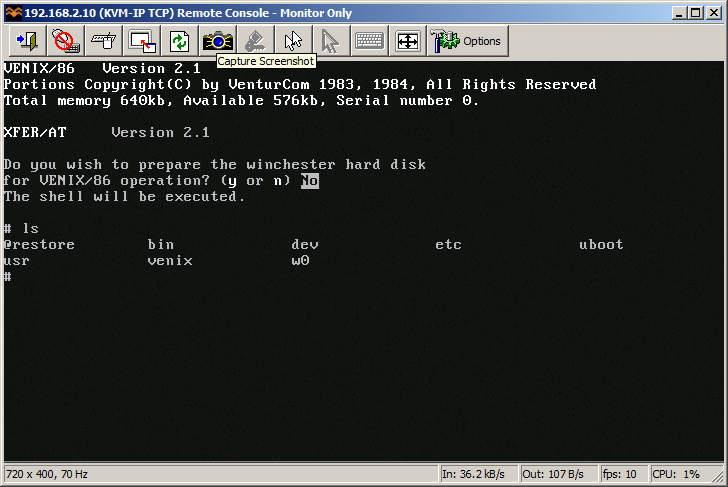
VenturCom Venix/x86

VenturCom Venix/x86 running on a real AT/286

I’m offering $100 prize via PayPal to the first person who will run Venix/86 on an emulator of any kind (PCE, PicoXT, QEMU, Bochs, Vbox, MESS/MAME, etc NOTE: it doesn’t have to be strictly XT emulator as long as the system works), compiles Aclock and sends me a binary + complete working virtual machine. I will also of course publish it on this blog featuring all your hard work! It will be awesome to see your progress and collaboration in the comments 😉

Everything I have is here: http://www.tenox.net/get/venix21.zip

Update #1: From Frode van der Meeren who is the owner of the floppy disks: “The disk images are not corrupted, the disks only use a different track arrangement. The disks image format arranges the tracks by cylinders, storing head 0 and then head 1, while the actual disks arrange tracks by all cylinders on head 0 then all cylinders on head 1. If you want to mount the images into something else than Venix/86 then you need to rearrange the tracks in the image file.”

Update #2: the competition has been won by Jim Carpenter! Congratulations! Jim has just received the $100 prize. I have received detailed install instructions and will post it in a follow up post 🙂

Update #3: The winning entry, how to install Venix/86 on MESS/MAME
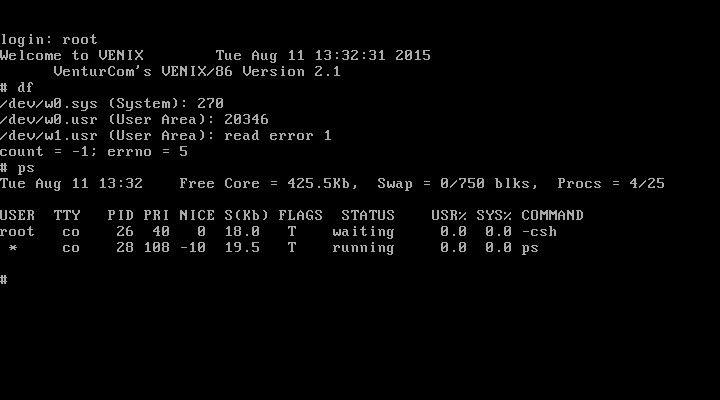
Venix running on MESS/MAME

Venix/x86 running on MESS/MAME by Jim Carpenter

It was a real pleasure to see great community response, participation and most importantly to see Venix/x86 run again!

Stay tuned for another one 😉

I accidentally upgraded vpsland to Debian 8

So yeah, dealing with Apache 2.4 vs 2.2 was… fun.  The security Order stuff is obsolete so that was fun editing all the virtual hosts.

The key parts being:

In this example, all requests are denied.

2.2 configuration:

Order deny,allow
Deny from all

2.4 configuration:

Require all denied

In this example, all requests are allowed.

2.2 configuration:

Order allow,deny
Allow from all

2.4 configuration:

Require all granted

In the following example, all hosts in the example.org domain are allowed access; all other hosts are denied access.

Boy was that fun!

Another bit of fallout was the hosts file.  I have spamd running and suddenly I was being bombarded with this message:

Jul 25 10:15:39 cheapvps spamc[683]: connect to spamd on ::1 failed, retrying (#1 of 3): Connection refused

Well it turns out after much digging around that Debian 8 is more IPv6 ready.  The hosts file from Debian 7 was something like this:

127.0.0.1 localhost
::1 localhost ip6-localhost ip6-loopback

And in 8, it changed to this:

fe00::0 ip6-localnet
ff00::0 ip6-mcastprefix
ff02::1 ip6-allnodes
ff02::2 ip6-allrouters
127.0.0.1 localhost.localdomain localhost
# Auto-generated hostname. Please do not remove this comment.
::1 localhost ip6-localhost ip6-loopback

Needless to say, having localhost point to ::1 made it dependant on all local daemons supporting IPv6, and spamd sadly is IPv4 only.  Luckily it’s a quick fix to remove localhost from ::1, which then let’s it work again with 127.0.0.1, and now it can connect over IPv4.

Well today (August 4th, 2015) there was a critical update to Apache.  And after updating I got this fine error:

# /etc/init.d/apache2 restart

[….] Restarting apache2 (via systemctl): apache2.serviceJob for apache2.service failed. See ‘systemctl status apache2.service’ and ‘journalctl -xn’ for details.

failed!

Great.  So what does the error actually say?

# systemctl status apache2.service
* apache2.service – LSB: Apache2 web server
Loaded: loaded (/etc/init.d/apache2)
Active: failed (Result: exit-code) since Tue 2015-08-04 13:52:13 HKT; 7s ago
Process: 6063 ExecStop=/etc/init.d/apache2 stop (code=exited, status=0/SUCCESS)
Process: 6427 ExecStart=/etc/init.d/apache2 start (code=exited, status=1/FAILURE)

systemd[1]: Starting LSB: Apache2 web server…
apache2[6427]: Starting web server: apache2 failed!
apache2[6427]: The apache2 configtest failed. …….
apache2[6427]: Output of config test was:
apache2[6427]: apache2: Syntax error on line 250 …y
apache2[6427]: Action ‘configtest’ failed.
apache2[6427]: The Apache error log may have more….
systemd[1]: apache2.service: control process exi…=1
systemd[1]: Failed to start LSB: Apache2 web server.
systemd[1]: Unit apache2.service entered failed …e.
Hint: Some lines were ellipsized, use -l to show in full.

Fantastic.

# apachectl configtest
apache2: Syntax error on line 250 of /etc/apache2/apache2.conf: Could not open configuration file /etc/apache2/mods-enabled/alias.load: No such file or directory
Action ‘configtest’ failed.
The Apache error log may have more information.

So, normally you’d check under modules-enabled, and link in the missing bits, right? Yeah except there is no MPM modules. Not anymore.  And yes I removed and re-installed the apache2-mpm-prefork module, to no avail.  So after much digging around it looks like the transition to 2.4 finally broke everything irrecoverably.  So I backed up the /etc/apache2 directory than ran the follwing:

apt-get purge apache2

Which then removes all the apache2 stuff from the system.  Then to finish it off, run a quick

rm -rf /etc/apache2

You did back it up, right?

now put it back in..

apt-get install apache2 libapache2-mod-php5

Now to re-enable the virtual sites.  For some reason they need to be enabled with a2ensite.  Except they don’t tell you that your sites now need to end in .conf in the /etc/apache2/sites-available (you did back it up right?)

Also if you run perl (src2html) be sure to run:

a2enmod cgi
service apache2 restart

Not to mention the joys of updating perl, and the cvsweb breaking, and I’m sure far more to break.  Oh well, at least it’ll be up to date.  That’s what I get for mixing ‘stable’ with ‘old stable’, when the local mirror out in the UK I was using moved up to 8.

Random links

No I’m not dead, just been busy.

But here is some interesting things I’ve seen the last while:

Infer: static code analysis from facebook of all people.  Supports C, Objective-C and Java.

Dr Jack Whitham’s blog, with some interesting stuff related to compiler optimizations and how they alter floating point results, along with ‘bug 323‘, and some DOOM fun!  Plus he has his updated source repositories online here.

And finally, Building A 10BASE5 “Thick ethernet” network.  A fun look at the first gen ethernet cabling on ‘slightly’ newer machines.

All aboard the VENOM hype train!

So here we go, another time for another major security threat, and this time it’s the “VIRTUALIZED ENVIRONMENT NEGLECTED OPERATIONS MANIPULATION” aka VENOM attack.  Yes it has a website, and even a logo! (Creative Commons Attribution-ShareAlike 4.0 International License)

Look at me!

Look at me!

So what is all the fuss about?  Well if you can compromise a Xen, or KVM (and QEMU) VM to run code that bangs against the floppy controller it can have a buffer overflow exploit.

fantastic.

But, I know what you are thinking, most people who KVM use guest OSs that either don’t have floppy drivers, or even explicitly disable the floppy controller.  And from the site:

an unrelated bug causes the vulnerable FDC code to remain active and exploitable by attackers.

Oops.

But let’s calm down, first the attacker has to get root level on the VM before they can think about doing anything.  Of course this is a BIG problem for VM resellers.  Hopefully the patches will be available quickly, and they will be moderately disruptive, especially for those of us who still use virtual floppies.

The source patch has been released on the Qemu mailing list right here.

Overheating boxes…

So apparently sometimes doing ‘stupid things(tm)’ can overheat your disks, and your box… So you should always keep an eye on the temperature.

So for my benefit more so in the future, and maybe others, here is a quick script to check the temperature of the processors, disk, and any changes in /var/log/messages to see what is going on.  I guess I should make it more modular, and not hardcode stuff, but here we are.

#!/bin/bash
#
#
# Read the disk temperature

disk="smartctl -d ata -A /dev/sda  | grep Temperature_Celsius | awk '{print \$10}'"
diskt=$(eval $disk)

if [ "$diskt"  -gt 40 ];
	then
	error=$"Disk temperature is hotter than 40c it's now $diskt\n"
	else
#	error=$"Disk temperature is fine, it's $diskt\n"
	:
	fi

sensors| grep Core|awk '{print $3}'>/tmp/dat.txt

j=0

while read line
do
number="echo $line |sed 's/\.\0\°C//g'|sed 's/\+//g'"
cpu=$(eval $number)
if [ "$cpu" -gt 82 ];
	then
	error=$"$error\nCPU core $j temperature is $cpu"
	else
	#error=$"$error\nCPU core $j temperature is $cpu"
	:
	fi
j=$(($j+1))
done < /tmp/dat.txt rm -f /tmp/dat.txt if [[ -f /tmp/messages.1 ]]; 	then 	tail /var/log/messages > /tmp/messages.2
	dstring="diff /tmp/messages.1 /tmp/messages.2" 
	logadd=$(eval $dstring)
	if [ ! -z "$logadd" ];
		then
		error=$"$error\n\n$logadd"
		else
		:
		fi
	mv /tmp/messages.2 /tmp/messages.1
	else
	tail /var/log/messages > /tmp/messages.1
	fi

if [ ! -z "$error" ];
	then
	echo "there are issues.."
	echo -e $error > /tmp/message.tmp
	mail your_name@your_domain.com -s "errors on machine_name" 

Of course, it can and should be expanded to check up on things like SMART disk errors, and other things going on.  And of course in the crontab, something like:

*/5  *    *   *   *   /root/report.sh

To run it every five minutes.  As always it’s lacking comments, full pathing to executables, and much of anything to keep it safe.  I’m sure if I was smart I could read more from pipes and variables, but I’m old so I read from files.  If you were looking for the bash shell script expert, it’s not me. lol

Going away for a bit

So Cloudflare is hitting my site like crazy, basically DOS’ing me.  So Im going back to the old way.  And then as luck has it my DNS guy has a fit once, I move the root enteries off Cloudflare.

websitespot...

websitespot…


Yeah, so looks like I’m going off line, but once I get the DNS sorted out I’ll be back.

OK I’m back.  Turns out it’s someone in Hungary that has their client misconfigured.

80.64.65.25 – – [11/May/2015:11:21:17 -0400] “GET /?feed=rss HTTP/1.1” 301 496 “-” “Mozilla/6.0 (compatible; Firefox 9.0; Windows NT 5.1; SV1)”
80.64.65.25 – – [11/May/2015:11:21:18 -0400] “GET /feed/ HTTP/1.1” 200 37325 “-” “Mozilla/6.0 (compatible; Firefox 9.0; Windows NT 5.1; SV1)”
80.64.65.25 – – [11/May/2015:11:21:20 -0400] “GET /?feed=rss HTTP/1.1” 301 496 “-” “Mozilla/6.0 (compatible; Firefox 9.0; Windows NT 5.1; SV1)”
80.64.65.25 – – [11/May/2015:11:21:21 -0400] “GET /feed/ HTTP/1.1” 200 37325 “-” “Mozilla/6.0 (compatible; Firefox 9.0; Windows NT 5.1; SV1)”

I’ve had to block you, 80.64.65.25, whomever you are.

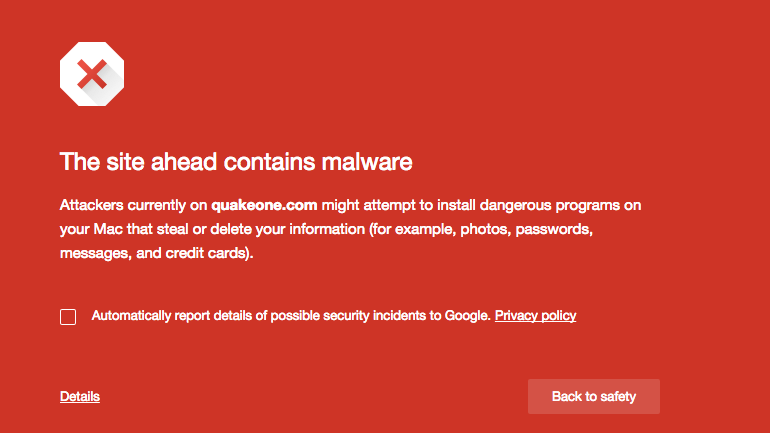
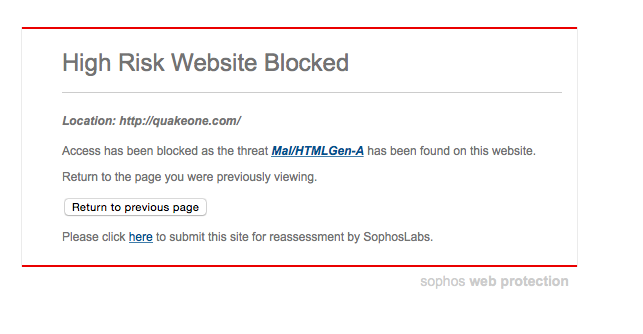
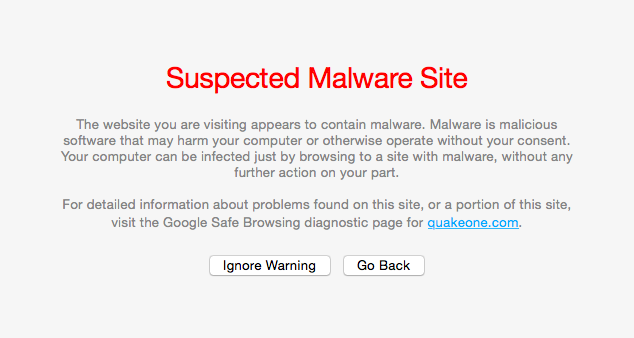
Quake One blocked

Is this happening to everyone else?

Screen Shot 2015-05-04 at 11.40.58 AM

Google blockinig

Screen Shot 2015-05-04 at 12.02.16 PM

Sophos warning

Apparently, according to Sophos, it’s Mal/HTMLGen-A, which is just some generic placeholder thing.

Safari blocking Quake One now

Safari blocking Quake One now

The generic blocked by Safari message.

Which is a shame, they just had an interesting interview with John Romero.  Oh well when this gets sorted out, for those who are brave (lol) the link is right here.

Screen Shot 2015-05-04 at 10.44.56 PM

It’s short, but an interesting read none the less.

It’s late but I think I’m back up

some things are still broken, and yeah… it’s been fun.

So, the disk in my colo el-cheapo box died. No problem, I have a backup right? After the last great disaster.  Well that disk DIED TOO.

Un-real.

So here we are running on some half baked incremental backup.  At least I did have this much here we are.

it’s late, I have updates, but I’m tired.