I get this from time to time, when trying to use 360kb disk images… Remember to add the flag:
-global isa-fdc.check_media_rate=off
To your CLI, and all will be well.

I get this from time to time, when trying to use 360kb disk images… Remember to add the flag:
-global isa-fdc.check_media_rate=off
To your CLI, and all will be well.
The main qemu page hasn’t been updated yet, but the download page has the source to the new version of Qemu.
I’ve gone ahead and built binaries for OS X, both a full version, and  a i386 minimal version.
As always testing is very minimal, all I’ve done is installed MS-DOS 6.22 & Doom 1.1, and tested the SoundBlaster 16 emulation. Â And as with the pre-release versions, the adlib code is still broken. Â And Ive done the ‘better’ fix in this code regarding that.
I haven’t run anything else, including fun things like the PowerPC & OS X emulation, MIPS with Windows NT, or even trying anything x64 based as I’m sure it is still broken from back in the Qemu 0.90 days.
SunOS 4.1.4 was the last version of the BSD based SunOS for the SPARC platform. I had received an email earlier asking if Qemu could run SunOS. Earlier it was ‘capable’ however there were issues with the serial ports. And the framebuffer stuff that the SUN Proms recognized was never mainlined (please tell me I’m wrong?).
But then with a quick google search I came across this wikibook page with detailed instructions on how to install SunOS 4.1.4.
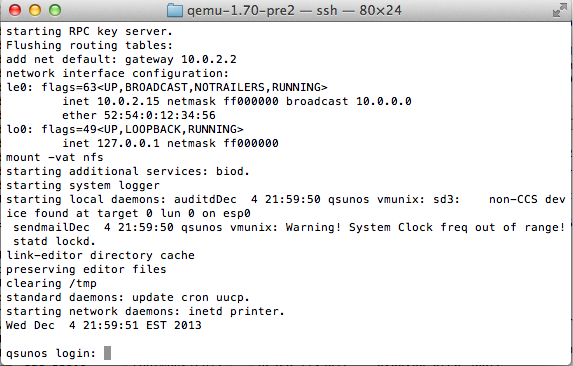
SunOS on Qemu 1.7.0rc2
So I quickly built a sparc version of Qemu 1.7.0rc2, and followed the instructions. I was amazed that now we are able to boot off the CD (still attached as a HD though) but label the main hard disk, and install SunOS. I have to say it is very impressive.
Another hint I came across is the more correct way to boot the Sparc Station 20’s
-bios /usr/local/share/qemu/ss20_v2.25_rom -M SS-20 -smp 2,cores=4 -cpu “TI SuperSparc 60”
Sadly there is no graphical output, but the PROM won’t crash. I think you can have 512MB of ram on the SS-20.
So I received an interesting tip, talking about the latest Qemu version, when it was mentioned that it isn’t the hardware that is at fault with Netware not running, but rather something in the emulated CPU.
Because, get this, Novell Netware runs in KVM.
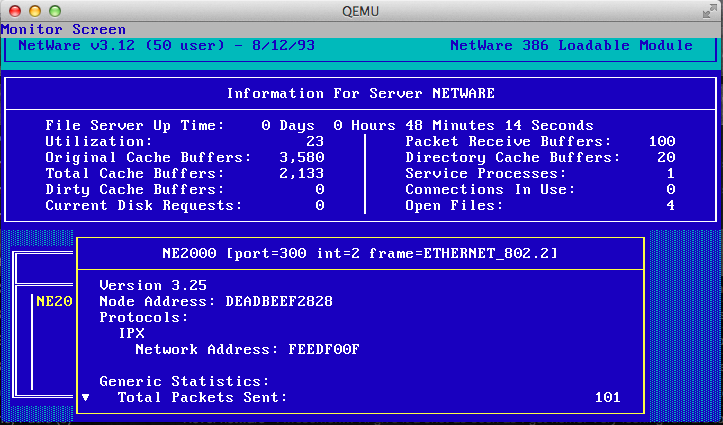
Novell Netware 3.12
I was taken back, all this time I thought it was something in the -M isapc definition that broke, but it’s the CPU! Â I even rebuilt Qemu with the TCG interpreter, and it too breaks. Â I even went one more crazy step, and installed with the ancient isadisk controller, and NE2000 on the ISA bus, and it works!
So for now my old copy of Netware I bought a million years ago lives in the cloud!
Gravis Ultrasound
Back when the Adlib & Sound Blaster cards were king, there also was the far more expensive, and far better sounding Gravis UltraSound. What really separated the GUS from the Adlib cards was a wavetable approach to midi file playback. The GUS was driven by a ‘soft’ table, meaning programs had to upload samples to the card before it could use them. Â This was unlike cards like the SoundBlaster AWE editions which stored their wavetables in ROM.
Qemu has included GUS emulation for some time now, however because of the softset files it is rather involved to get working.
The first thing you will need to do is download the soft files here. Â You will need to inject them into your MS-DOS disk image. Â I prefer to use the following method:
 -hdb fat:xfer/
Where xfer is the directory where I’ve extracted my files. This will make the directory show up as a second hard disk.  Now the drive is read-only so getting files OUT of the emulator still requires either virtual floppy disks (yuck) or a network client.  The archive contains two versions of the wavetables, one that is stock that I couldn’t get to work, and a ‘patched’ version.  Copy the ULTRASND411 directory to c:\ultrasound  .
Next we need to setup the environment variables.  The Gravis UltraSound in Qemu is setup for IO port 240, Irq 7, and DMA channel 3.  As you can see from gus.c in Qemu source:
static Property gus_properties[] = {
DEFINE_PROP_UINT32 (“freq”, GUSState, freq, 44100),
DEFINE_PROP_HEX32 (“iobase”, GUSState, port, 0x240),
DEFINE_PROP_UINT32 (“irq”, GUSState, emu.gusirq, 7),
DEFINE_PROP_UINT32 (“dma”, GUSState, emu.gusdma, 3),
DEFINE_PROP_END_OF_LIST (),
};
This means we need to setup the following environment varriables in the autoexec.bat
SETÂ ULTRASND=240,3,3,7,7
SET ULTRADIR=C:\ULTRASND
 Re-launch Qemu and specify the soundcard emulation something like this:
-soundhw gus,pcspk -parallel none
This will give us both the PC speaker, and the Gravis UltraSound.  Additionally this disables the parallel port which also uses IRQ 7.  We should be able to run games now.  For anyone interested, Maraakate has given me a link to share of his GUS archive.
I found this information on a Qemu patch page (before the GUS support was mainlined), and Vogons support for DOSBox & GUS emulation.
I’ve tested Doom, and Heretic which work fine on Qemu 1.6.1 on OS X.
For anyone who cares, this is what the SoundBlaster/Adlib sounds like, and this is the Gravis UltraSound emulation in Qemu.
Or even better, embedded audio!
UltraSound
SoundBlaster
First I just found out about the KVM Forum 2013, taking place in Edinburgh, Scotland.
You can find all kinds of information and videos of the presentation on the G+ page!
This is an incredible resource for anyone thinking of deploying KVM (Proxmox/VE!) in a serious setting. Â Unlike VMWare ESX this is a free solution with no insane license restrictions. Â Not to mention that KVM+Qemu is far more flexible than any traditional x86 focused hypervisor will ever be. Â And poor Microsoft still doesn’t yet offer x86_64 solution.
I also got a ping back from Linux Lifestyle, about a challenge to find an ancient version of Linux. Â Although the real credit goes to the excellent preservation work of oldlinux.org .
Personal note, I got the flu (again!) and have been sick.. which is why the lag in the network stuff, but I’ll bang more on it tomorrow. Â I’ll finally get to adding remote sites, routing protocols, and all that fun stuff. Â Internet/NAT/Firewalls afterwards. Â ASA stuff too, as much as I don’t like them.
As always, the source code is here.
New updates from the changelog:
This release contains 48 build/bug fixes, including an
important security fix for CVE-2013-4344 involving SCSI disk
emulation:

  http://www.openwall.com/lists/oss-security/2013/10/02/2

Fixed by:

  scsi: Allocate SCSITargetReq r->buf dynamically

Thank you to everyone involved!

62ecc3a: Update VERSION for 1.6.1 release (Michael Roth)
fdcbe7d: scsi: Allocate SCSITargetReq r->buf dynamically (Asias He)
1b5f770: qemu: Add qemu xen logic for Xen HVM S3 resume (Liu, Jinsong)
bc05a48: qemu: Adjust qemu wakeup (Liu, Jinsong)
ba20326: coroutine: add ./configure --disable-coroutine-pool (Stefan Hajnoczi)
ae00a27: piix4: disable io on reset (Michael S. Tsirkin)
61fbeb6: vmdk: fix cluster size check for flat extents (Fam Zheng)
fc06b43: rbd: avoid qemu_rbd_snap_list() memory leaks (Stefan Hajnoczi)
6bbb9d8: tap: Use numbered tap/tun devices on all *BSD OS's (Brad Smith)
b314120: iov: avoid "orig_len may be used unitialized" warning (Michael Tokarev)
dc6fbaa: xhci: emulate intr endpoint intervals correctly (Gerd Hoffmann)
c8adc0d: virtio-blk: do not relay a previous driver's WCE configuration to the
current (Paolo Bonzini)
aeab582: blockdev: do not default cache.no-flush to true (Paolo Bonzini)
5c20c1f: tci: Fix qemu-alpha on 32 bit hosts (wrong assertions) (Stefan Weil)
5d2de77: kvmvapic: Clear also physical ROM address when entering INACTIVE state
(Jan Kiszka)
7ea8a3c: kvmvapic: Enter inactive state on hardware reset (Jan Kiszka)
50b31e8: kvmvapic: Catch invalid ROM size (Jan Kiszka)
4b5b472: chardev: fix pty_chr_timer (Gerd Hoffmann)
76f6989: pcnet-pci: mark I/O and MMIO as LITTLE_ENDIAN (Aurelien Jarno)
8b4b3a7: qapi-types.py: Fix enum struct sizes on i686 (Cole Robinson)
41900b0: pc_q35: Initialize Xen. (Anthony PERARD)
755ec4c: pc: Initializing ram_memory under Xen. (Anthony PERARD)
dc0973b: qxl: fix local renderer (Gerd Hoffmann)
b6d163f: ehci: save device pointer in EHCIState (Gerd Hoffmann)
a1991d0: ne2000: mark I/O as LITTLE_ENDIAN (Aurelien Jarno)
1110014: exec: check offset_within_address_space for register subpage (Hu Tao)
2a93d3d: Revert "memory: Return -1 again on reads from unsigned regions" (Jan
Kiszka)
7ab1044: memory: Provide separate handling of unassigned io ports accesses (Jan
Kiszka)
e8601a4: w32: Fix access to host devices (regression) (Stefan Weil)
96b14d0: usb: parallelize usb3 streams (Gerd Hoffmann)
9dbfbb8: xhci: reset port when disabling slot (Gerd Hoffmann)
57ea2d2: exec: always use MADV_DONTFORK (Andrea Arcangeli)
1cd7138: virtio_pci: fix level interrupts with irqfd (Michael S. Tsirkin)
9fab8e1: exec: fix writing to MMIO area with non-power-of-two length (Paolo
Bonzini)
2ffbe03: adlib: sort offsets in portio registration (Hervé Poussineau)
f9fd82e: target-i386: fix disassembly with PAE=1, PG=0 (Paolo Bonzini)
da4e203: block: expect errors from bdrv_co_is_allocated (Paolo Bonzini)
c09a463: Revert "usb-hub: report status changes only once" (Gerd Hoffmann)
c0a5eb8: xhci: fix endpoint interval calculation (Gerd Hoffmann)
358bb0d: virtio: virtqueue_get_avail_bytes: fix desc_pa when loop over the
indirect descriptor table (yinyin)
3fe494e: pseries: Fix stalls on hypervisor virtual console (Anton Blanchard)
a73c74f: pc: fix regression for 64 bit PCI memory (Michael S. Tsirkin)
964e0d4: scsi: Fix scsi_bus_legacy_add_drive() scsi-generic with serial (Markus
Armbruster)
11b0ab7: usb/dev-hid: Modified usb-tablet category from Misc to Input (Marcel
Apfelbaum)
d6dcfd6: scripts/qapi.py: Avoid syntax not supported by Python 2.4 (Peter
Maydell)
2607906: rdma: silly ipv6 bugfix (Michael R. Hines)
52f99b0: target-ppc: fix bit extraction for FPBF and FPL (Aurelien Jarno)
c0c080c: gdbstub: Fix gdb_register_coprocessor() register counting (Andreas
Färber)
670599a: block: ensure bdrv_drain_all() works during bdrv_delete() (Stefan
Hajnoczi)
I have not done a build as of yet.
and for the fun of it.
I’ve been playing with the latest release of dynamips (0.2.10), and very excitingly it can build for x86_64 OS X! Â So I thought I’d build up a good sized network, much like what I first was exposed to when I started doing cisco networking back in the 1990’s.
Sadly I didn’t hold onto any IOS from back then, so I’m using something much newer, 12.2. Â Back then I actually had some IGS stuff with version 9, and bunch of stuff on version 10 & 11. Â For the most part I was lucky to use a 7513 as my wan core router, a 7200 for an access router, and 5500’s as my core route/switch fabric with ATM. Â It was … very complicated for the day.
To get the ball rolling, I thought I would build out a core site, with a user & server VLAN (voip was a dream back then), and two sites connected via frame relay. Â The protocols I most care about will be IPX/SPX and TCP/IP. Â I was thinking of porting back the UDP patches for Qemu to version 0.90 so I could run Netware 3.12 in the mix, but honestly it is just easier to use the Netware file & print services for NT 4.0.
So along with the dynamips program, I’m using the obsolete (and easier to configure IMHO) dynagen program.
I’ve fed it a configuration like this:
autostart = False
[localhost]
[[7200]]
image = C7200-JS.BIN
npe = npe-400
ram = 160
idlepc = 0x60529c84
disk0 = 0
mmap = False
ghostios = True[[ROUTER corertr1]]
model = 7200
slot1 = PA-8E
F0/0 = coresw1 1
E1/0 = coresw1 3
E1/1 = coresw1 8[[ROUTER corewan1]]
model = 7200
slot1 = PA-8T
F0/0 = coresw1 2
s1/0 = F1 1
configuration = ”[[ROUTER nycrtr1]]
model = 7200
slot1 = PA-4T+
f0/0 = nycsw1 1
s1/0 = F1 2
configuration = ”[[ROUTER hkgrtr1]]
model = 7200
slot1 = PA-4T+
f0/0 = hkgsw1 1
s1/0 = F1 3
configuration = ”#Frame relay switch
[[FRSW F1]]
1:102 = 2:201
1:103 = 3:301#Core ethernet
#vlan 5 WAN
#vlan 6 server
# 4 FPNW-DC 138.1.1.10
#vlan 7 workstation
[[ethsw coresw1]]
1 = access 5
2 = access 5
3 = access 6
4 = access 6 NIO_udp:41300:127.0.0.1:51300
5 = access 6 NIO_udp:41301:127.0.0.1:51301
6 = access 6 NIO_udp:41302:127.0.0.1:51302
7 = access 6 NIO_udp:41303:127.0.0.1:51303
8 = access 7
9 = access 7 NIO_udp:41304:127.0.0.1:51304[[ethsw nycsw1]]
1 = access 1
2 = access 1 NIO_udp:41305:127.0.0.1:51305[[ethsw hkgsw1]]
1 = access 1
2 = access 1 NIO_udp:41306:127.0.0.1:51306
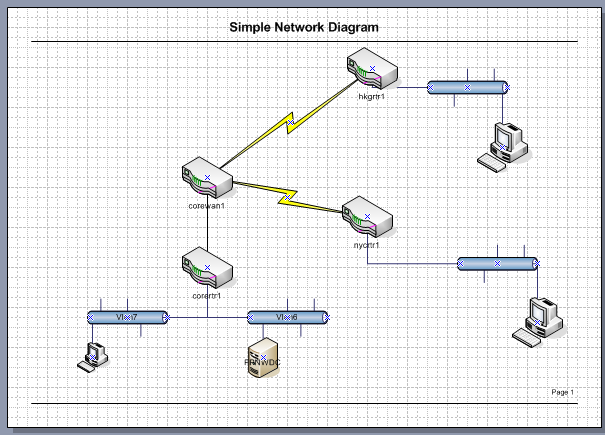
Or something like this
Ok, now this may look complicated, but in all reality it really isn’t. Â It is always a good thing to keep track of what network addresses you are going to use, so here is my chart:
| Description | IPX | IP | Mask | |
| CORE | ||||
| FA0/0 | Wan Interconnect | C0000001 | 138.1.0.5 | 255.255.255.0 |
| Eth1/0 | Server | C0010001 | 138.1.1.1 | 255.255.255.0 |
| Eth1/1 | User | C0010002 | 138.1.10.1 | 255.255.255.0 |
| WAN | ||||
| Fa0/0 | Wan Interconnect | C0000001 | 138.1.0.6 | 255.255.255.0 |
| S1/0.102 | New York PVC | A0000001 | 135.0.0.5 | 255.255.255.252 |
| S1/0.103 | Hong Kong PVC | A0000002 | 135.0.0.1 | 255.255.255.252 |
| New York | ||||
| Fa0/0 | User | C10000001 | 136.2.0.1 | 255.255.255.0 |
| S1/0.201 | Core PVC 201 | A0000001 | 135.0.0.6 | 255.255.255.252 |
| Hong Kong | ||||
| Fa0/0 | User | C20000001 | 136.1.0.1 | 255.255.255.0 |
| S1/0.301 | Core PVC 301 | A0000002 | 135.0.0.2 | 255.255.255.252 |
For simplicities sake for the routers & IOS I’m using 7200’s everywhere. Â The 7200 is a good router with plenty of slots, so it fits my needs just fine. Â I suppose I could track down a 2600 or 1700 IOS image, and use them for the access sites, but for now it doesn’t matter. Â Mostly because of the ghostios image option where the same memory map can be shared between routers, and of course my Mac Pro has 16GB of RAM.
Now the exciting part of this configuration is that I can easily connect in Qemu 1.6.0 processes to this configuration, allowing me to test the network out in its entirety. Â Even better thanks to it being UDP, I can reboot and restart the Qemu or router processes at will.
Naturally like any test scenario, I should spell out some goals, along with some applications that I hope to be able to run. Â So to start, a simple setup with an NT 4.0 server with the FPNW services setup. Â To run Qemu to attach to the first port on the server VLAN in the core switch I start Qemu like this:
./qemu/qemu-system-i386 -cpu pentium -L ./qemu/pc-bios/ -m 64 -hda FPNW-DC.vmdk -net nic,model=pcnet -net nic,model=ne2k_isa -net socket,udp=localhost:41300,localaddr=0.0.0.0:51300
And from there by changing the UDP numbers I can easily jump VLANs. Â Fun. Â The major thing is that each additional instance of Qemu will need a unique MAC address, so additional instances should be run like this…
./qemu/qemu-system-i386 -L ./qemu/pc-bios/ -m 16 -net nic,model=pcnet,macaddr=00:11:22:33:44:55 -net socket,udp=localhost:41304,localaddr=0.0.0.0:51304 Â -fda nwclient-pcnet.vfd
So maybe I should launch into some big diatribe on cisco routers, networking and the rest of the fun stuff. Â And maybe I will.
I think the next article will be an anchor page for various topics of what I’m going to get into, and from there evolve my network from the mid 90’s before the internet craze into something far more modern. Â And of course a page going over the scope of what I hope to create.
As many of you Windows NT MIPS fans may know (apparently there are more than 3 of us now!) the MIPS Magnum target is broken in the current build of Qemu.  The problem lies in the firmware as it accesses unassigned memory.  Luckily I just received an email from Hervé that details how to fix this!
The good news is that the fix is VERY easy, all you need to do is comment out a single line in target-mips/op_helper.c
In the function mips_cpu_unassigned_access:
void mips_cpu_unassigned_access(CPUState *cs, hwaddr addr,
bool is_write, bool is_exec, int unused,
unsigned size)
{
MIPSCPU *cpu = MIPS_CPU(cs);
CPUMIPSState *env = &cpu->env;if (is_exec) {
helper_raise_exception(env, EXCP_IBE);
} else {
helper_raise_exception(env, EXCP_DBE);
}
}
Simply comment out the line
helper_raise_exception(env, EXCP_DBE);
And you’ll be able to boot up the NT PROM.
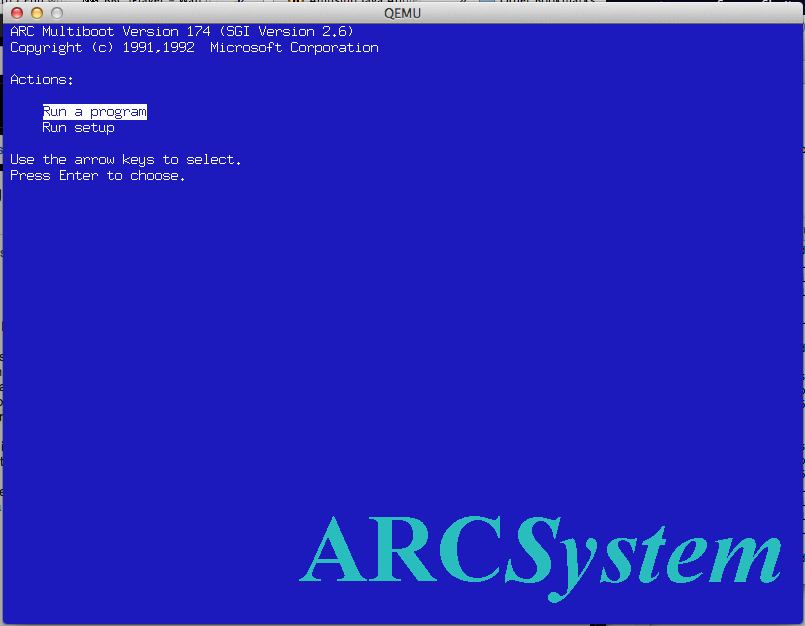
MIPS Firmware
Remember you’ll want to run it something like this:
qemu-system-mips64el -L /tmp -M magnum -m 64 -cdrom WindowsNT4.0-MIPS.iso -hda MIPS.disk -net nic -net user -global ds1225y.filename=nvram  -global ds1225y.size=8200
Where I’m keeping my NT PROM is /tmp (although that is probably a bad idea…) Â But you’ll need the NVRam stuff to add extra space for the ethernet MAC address. Â The clock is always trashed but at least it is doing something this time!
For the uninitiated, some installation notes can be found here.
I updated my glib2 to the same version that works great on OS X, and it feels like the Win32 binaries are just slower than ever. Â Now I am running this under VMWare, so maybe that is why it is so slow.
Can someone give this a shot?
Any and all feedback would be nice.
Oh I included the Doom 1.1 in there run it like this:
qemu-system-i386 -L pc-bios -m 16 -hda doom11.img -soundhw sb16,adlib
And you should be able to run doom with sound.