User Mode Linux revisited (UML) aka SLiRP networking

So my uh ‘friend’ that got into trouble when he found out that his ‘dedicated’ machine turned out to be a VM which he couldn’t launch nested KVM VM’s, and instead found that User Mode Linux (UML), would allow them to run their touchy ancient Linux application in a psudo VM/Container.  Well they finally bit the bullet and decided to move to something better.

And by better, it was cheaper.  And why was it cheaper?  Because it is even a more restricted VM.

Great.

So naturally the panic call was made, because TUN/TAP networking was not permitted in this new VM.  So what to do.

Well, keeping in mind how Qemu gets around this problem, it binds in a copy of SLiRP.  And it turns out that UML can actually call SLiRP directly!  So cool we have an ‘out’.  First things first, we need SLiRP on the host machine.  I’m old, so that means I build it from source.That means I’m downloading slirp-1.0.16.tar.gz, along with the 1.0.17 patch.  I’m not sure if I need to go into how to extract source, patch, running configure and compiling.

One thing of note is that you really really really want to set the “FULL_BOLT” option either in the Makefile, or in config.h

With SLiRP built, I just copy it into /usr/local/bin .. I’m sure there is packages and stuff out there, but heh I’m old.

OK next up I make a small script to call SLiRP, in this case, I’m going to redirect port 80 directly into the VM.  And for a test port 2323 which then goes into port 23 (why not ssh? .. sigh don’t go there).

So my script looks like this:

#!/bin/sh
/usr/local/bin/slirp “redir 80 80” “redir 23 2323”

Pretty simple right?  I’m using a script as there will be more than one VM, so relying on .slirprc isn’t a solution for me.

./linux-2.6.24-rc7 ubd0=junk.ubda eth0=slirp,,/virtual/sl.sh

And away we go!

Inside the VM we can configure it with the usual SLiRP config:

ifconfig eth0 10.0.2.15 255.255.255.0
route add default gw 10.0.2.2

And now we can access the internal http server!

Add in some magic to /etc/resolv.conf such as:

nameserver 10.0.2.3

and it’ll automatically use whatever the host is configured to do.
Torbjörn Granlund’s Excellent resource on running free OS’s on Qemu

Ever get tired of x86 on x86?  yeah me too.

How to solve that problem?

Simple, grab QEMU, and jump off into all those cool RISC processors of the 1990’s that were going to save us all from the WINTEL hegemony!

Lots of instructions, samples, images, and hints here:

https://gmplib.org/~tege/qemu.html

It’s really more comprehensive than I’ve sat down to do, so yeah it’s awesome!

Supported platforms include:

mips32,mips64,sparc32,sparc64,ppc32,ppc64,arm32,arm64,s390x,alpha

MIDI Mayhem on Windows 10

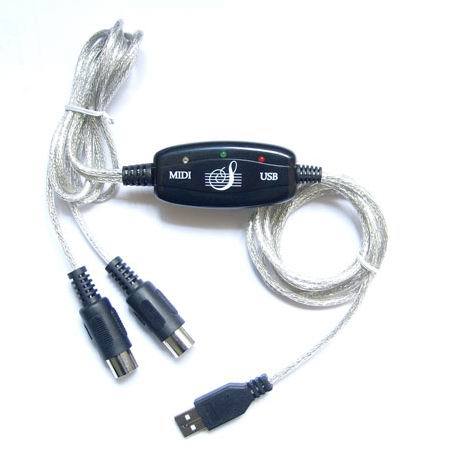
So I know it’s ‘probably’ the super cheap generic USB to MIDI dongal I got on the cheap, but it just doesn’t work on Windows 10.

Using DOSBox, I get the following output when cycling between devices on the console:

MIDI:Opened device:win32
MIDI:win32 selected Microsoft GS Wavetable Synth
MIDI:Opened device:win32
MIDI:win32 selected USB2.0-MIDI
MIDI:Opened device:none
MIDI:win32 selected MIDIOUT2 (USB2.0-MIDI)
MIDI:Opened device:none

As you can see it clearly can see the USB device, but when it opens the device it fails. And yes I’ve tried Administrator.  And for the hell of it, I fire up Windows XP on VMWare, connect the USB dongal, and amazingly:

MIDI:Opened device:win32
MIDI:win32 selected USB Audio Device
MIDI:Opened device:win32
MIDI:win32 selected USB Audio Device [2]
MIDI:Opened device:win32
MIDI:win32 selected Microsoft GS Wavetable SW Synth
MIDI:Opened device:win32

Yes, I can open the out port just fine.  So now I run a virtualizer to run my emulator to drive a physical peripheral… Ugh.  Has MIDI been this messed up all along and I never noticed?

Oh yeah, the GS Wavetable Synth works fine, as did MUNT before I uninstalled it, thinking it was somehow interfering with anything.

I know I’m using this fine device, the QinHeng USB MIDI adapter, which apparently is notorious crap, but my recently acquired Yamaha MU 80, works fine with it on Windows XP.

QinHeng USB MIDI adapter

QinHeng USB MIDI adapter

Ugh.

Cross compiling Linux 0.95c+ & 0.96c from Windows

The first thing is to build GCC 2…  I couldn’t find any of the Linux patches for 2.0, 2.1 or 2.2.. I only tried to build 2.0 from source as targeting a.out i386 but it looks like the 2.0 files on the FSF’s site are missing files?

Anyways GCC 2.3.3 actually includes builtin support of Linux!  I was able to build most of it, but just like GCC 2.5.8 for OS/2 EMX, But this time I used the gcc driver from GCC 2.6.3, which added support for Windows NT 3.5 native builds, and I now had my GCC cross compiler!

D:\aoutgcc\src>gcc2 -v -c hi.c -o hi
gcc version 2.6.3 -Linux 2.3.3
cpp2 -lang-c -v -undef -D__GNUC__=2 -Dunix -Di386 -Dlinux -D__unix__ -D__i386__ -D__linux__ -D__unix -D__i386 -D__linux hi.c C:\Temp\cca09324.i
GNU CPP version 2.3.3 (80386, BSD syntax)
cc12 C:\Temp\cca09324.i -quiet -dumpbase hi.c -version -o C:\Temp\cca09324.s
GNU C version 2.3.3 (80386, BSD syntax) compiled by GNU C version 5.1.0.
a386 -o hi C:\Temp\cca09324.s

Thankfully the prior binutils and assembler I was using in my GCC 1.40 cross compiler, still cooperated just fine, and I could happily build and link just fine.

From there it was a matter of fighting the makefiles as for some reason as make calls other makefiles they are not passing variables, so I just cheated, and changed the paths, along with editing the dependencies to finding stuff in a more sane manner.  Plus all the Makefiles have include paths hard coded into the build process as expected.  After fighting for a while, it linked and even better, it runs!

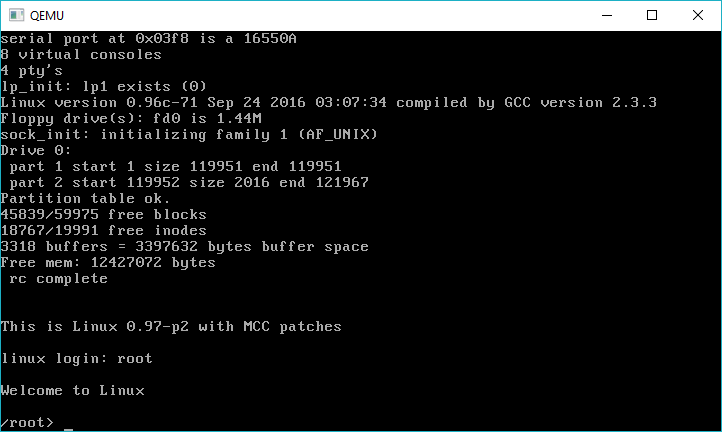
linux-0-96c-71-cross-compiled-from-windows

Linux 0.96c-71 cross compiled from windows

So yeah, using the MCC hard disk image from oldlinux.org and it boots!

Cool stuff, indeed!

As an added bonus I was also able to get 0.97 & 0.98 to compile as well!

Download your copy @ MinGW-aout-linux–001_010_011_012_095_096_097_098.7z.

NetBSD 1.0 i386

It had just hit me that I’d never actually installed NetBSD 1.0

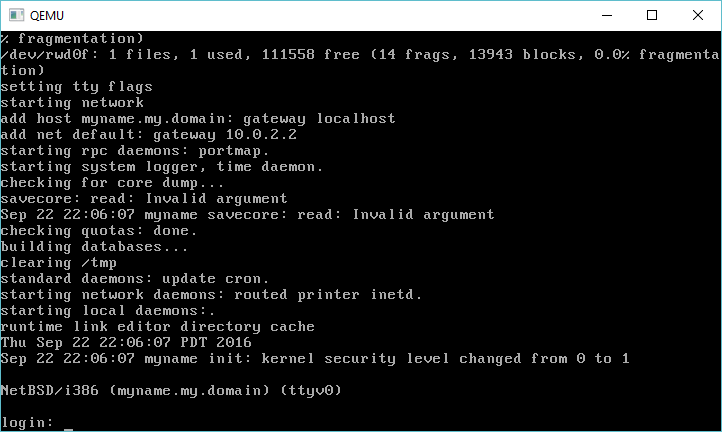
So here we go!  For whatever reason Qemu and NetBSD 1.0 see the floppy as a 1.2 MB, so I had to make 1.2 MB images.  For anyone feeling like shuffling a whole lot of floppies here you go!

For everyone else, here is a pre-installed VMDK + Qemu all set to run (for Windows).

I’ve setup the networking, so you can telnet into the VM, and of course access outside, but remember with SLiRP, things like FTP & NFS aren’t going to work.

NetBSD 1.0 on Qemu

NetBSD 1.0 on Qemu

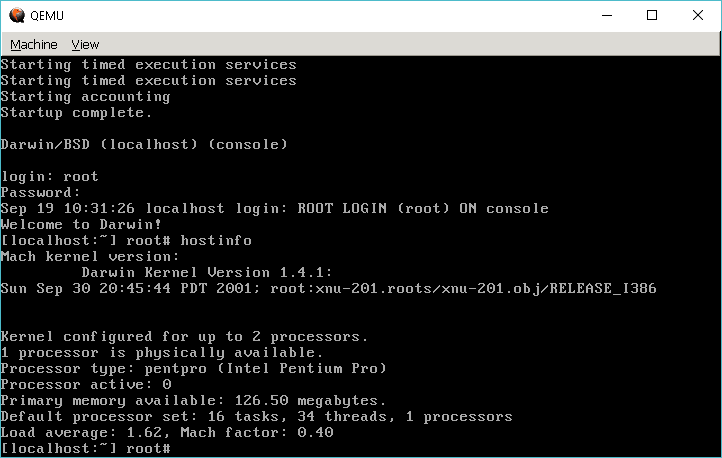
Darwin 1.4.1 installs on Qemu 2.7!

Darwin 1.4.1 on Qemu

Darwin 1.4.1 on Qemu

I tried the x86 version from Apple’s Darwin web site.  For those who don’t know Darwin was (is?) an open source version of the OS X kernel and userland.  This was on parity with the OS X 10.1 release.  It was notoriously picky about hardware back in 2001, let alone anything today, and much to my amazement it installed fine on Qemu 2.7.

Source code to the packages should be about here. and the ISO is still on Apple’s site here.

Visual C++ Toolkit 2003

For those 2-3 people still searching for this thing, it’s the old ‘free’ CLI C++ compiler from Visual Studio .NET 2003.

Microsoft (R) 32-bit C/C++ Optimizing Compiler Version 13.10.3052 for 80×86
Copyright (C) Microsoft Corporation 1984-2002. All rights reserved.

Although Visual C++ .NET 2003 SP1 gives you a later version of the compiler…

Microsoft (R) 32-bit C/C++ Optimizing Compiler Version 13.10.6030 for 80×86
Copyright (C) Microsoft Corporation 1984-2002. All rights reserved.

I’m not sure if you can service pack this toolkit.

You can download it from my site as VCToolkitSetup.exe

For anyone who wants to run this under newer versions of Windows as I know I can’t install it on Windows 8 or 10, I installed it on my Windows XP x64 machine, and uploaded it here as vc2003toolkit.7z

By the time this came out, Microsoft had started to admit that they had lost serious ground to GCC, as for years they had neglected the low end $99 market that they had dominated during their fights with Borland in the QuickC vs TurboC days.  Once Borland had withdrawn from the market, Microsoft felt no need to compete and this left plenty of time for GNU tools to take hold in the marketplace.  This was a stopgap reaction as a prelude to the Visual Studio Express that would happen in 2005 onward.

Elsewhere I’ve been able to find an old Windows 2003 SP1 Platform SDK image, it should certainly let this compiler build far more interesting things.  Although unless you really need 2003, you really ought to look at newer stuff.  Unless you like really old stuff, then as a reminder the Win32s 1.1 SDK includes the version 8.00 compiler from 1993 as well.  You can download it from here: win32s-1.1-build-88-msvc32sdev.7zÂ