(this is a guest post by Tenox)
Finally someone made a distribution with CDE as default eyecandy. I’m happy.
Enter CDEbian!

(this is a guest post by Tenox)
Finally someone made a distribution with CDE as default eyecandy. I’m happy.
Enter CDEbian!
So a while back, I built some stuff for Solaris on QEMU, and stuck it in a virtual disk. Â Great. Â Now the fun is years later trying to use it for yet another project.
By default Solaris doesn’t magically build out the dev tree so adding a disk won’t make it magically appear in the dev tree. Â Add the ‘-r’ flag when booting, and it’ll do that. Â I still like the verbose boot, so from the prom it’s ‘boot disk0 -rv’
Type help for more information
ok boot disk0 -rv
Boot device: /iommu/sbus/espdma@5,8400000/esp@5,8800000/sd@0,0 File and args: -rv
And away we go!
while the kernel boots I can see it see’s my second disk
sd0 at esp0: target 0 lun 0
sd0 is /iommu@0,10000000/sbus@0,10001000/espdma@5,8400000/esp@5,8800000/sd@0,0
<Qemu2GB cyl 4090 alt 2 hd 16 sec 63>
sd1 at esp0: target 1 lun 0
sd1 is /iommu@0,10000000/sbus@0,10001000/espdma@5,8400000/esp@5,8800000/sd@1,0
<Qemu2GB cyl 4090 alt 2 hd 16 sec 63>
sd2 at esp0: target 2 lun 0
sd2 is /iommu@0,10000000/sbus@0,10001000/espdma@5,8400000/esp@5,8800000/sd@2,0
<Qemu2GB cyl 4090 alt 2 hd 16 sec 63>
And once it starts user processes it’ll add in the device files
Configuring the /dev directory
Configuring the /dev directory (compatibility devices)
Which is great. Â But how to view the disklabel?
prtvtoc can tell us, remember that s2 is the ‘whole disk’ on SYSV.
# prtvtoc /dev/rdsk/c0t2d0s2
* /dev/rdsk/c0t2d0s2 partition map
*
* Dimensions:
* 512 bytes/sector
* 63 sectors/track
* 16 tracks/cylinder
* 1008 sectors/cylinder
* 4092 cylinders
* 4090 accessible cylinders
*
* Flags:
* 1: unmountable
* 10: read-only
*
* First Sector Last
* Partition Tag Flags Sector Count Sector Mount Directory
0 2 00 0 132048 132047
1 3 01 132048 263088 395135
2 5 01 0 4122720 4122719
6 4 00 395136 3727584 4122719
So we have a 0, the 1 is ‘swap’, 2 is he whole disk, and a 6.
Running fsck can reveal that 0 is a real filesystem:
# fsck /dev/rdsk/c0t2d0s0
** /dev/rdsk/c0t2d0s0
** Last Mounted on /mnt
** Phase 1 – Check Blocks and Sizes
** Phase 2 – Check Pathnames
** Phase 3 – Check Connectivity
** Phase 4 – Check Reference Counts
** Phase 5 – Check Cyl groups
4 files, 32504 used, 29111 free (15 frags, 3637 blocks, 0.0% fragmentation)
while 6 is not.
# fsck /dev/rdsk/c0t2d0s6
** /dev/rdsk/c0t2d0s6
BAD SUPER BLOCK: MAGIC NUMBER WRONG
USE AN ALTERNATE SUPER-BLOCK TO SUPPLY NEEDED INFORMATION;
eg. fsck [-F ufs] -o b=# [special …]
where # is the alternate super block. SEE fsck_ufs(1M).
Sadly none of the stuff in there is ‘ready to run’ but rather built in it’s source directory.
And I wanted to make a 2GB /usr/local on another disk, so I copied my disk template file, (can use the OS, or the gnu-utils) and run format on the disk.
It was a matter of clearing out partitions, and making ONE BIG partition 0.
# format /dev/rdsk/c0t1d0s2
selecting /dev/rdsk/c0t1d0s2: data
[disk formatted]
Warning: Current Disk has mounted partitions.
FORMAT MENU:
disk – select a disk
type – select (define) a disk type
partition – select (define) a partition table
current – describe the current disk
format – format and analyze the disk
repair – repair a defective sector
label – write label to the disk
analyze – surface analysis
defect – defect list management
backup – search for backup labels
verify – read and display labels
save – save new disk/partition definitions
inquiry – show vendor, product and revision
volname – set 8-character volume name
quit
format> partition
PARTITION MENU:
0 – change `0′ partition
1 – change `1′ partition
2 – change `2′ partition
3 – change `3′ partition
4 – change `4′ partition
5 – change `5′ partition
6 – change `6′ partition
7 – change `7′ partition
select – select a predefined table
modify – modify a predefined partition table
name – name the current table
print – display the current table
label – write partition map and label to the disk
quit
partition> print
Volume: data
Current partition table (original):
Total disk cylinders available: 4090 + 2 (reserved cylinders)
Part Tag Flag Cylinders Size Blocks
0 alternates wm 0 – 4069 1.96GB (4070/0/0)
1 unassigned wu 0 0 (0/0/0)
2 backup wu 0 – 4089 1.97GB (4090/0/0)
3 unassigned wm 0 0 (0/0/0)
4 unassigned wm 0 0 (0/0/0)
5 unassigned wm 0 0 (0/0/0)
6 unassigned wm 0 0 (0/0/0)
7 unassigned wm 0 0 (0/0/0)
Good fun. Â As always don’t forget how to mount the CD-ROM under Qemu, and add packages as needed.
I still think the quickest, and easiest way to power ‘off’ the VM is the poweroff command.
# poweroff
Apr 18 20:26:33 qemu24 poweroff: poweroffed by root
Apr 18 20:26:35 qemu24 syslogd: going down on signal 15
syncing file systems… done
Brutal, quick, and efficient.
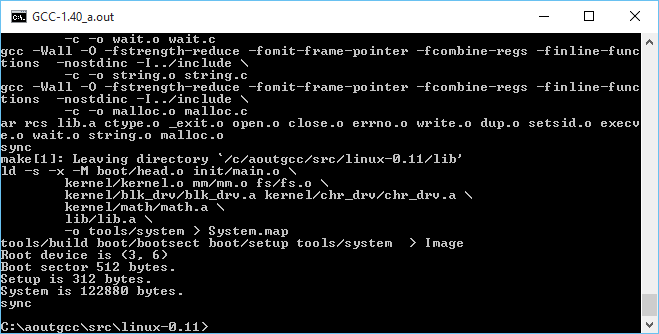
No really, it compiles! on Windows!
So continuing with the fun from yesterday, where I had managed to get gcc 1.40 running on Windows with MinGW, it was time to try to take the final leap and build Linux.
There wasn’t too much to massage on Linux, mostly Makefiles for the various tool name differences, and how to handle keyboard.S as the default setup for NTFS is case insensitivity. While I did get some old version of as16 and ld16 to build, I’m not sure if they are working correctly. Or it could be the ‘build’ tool. The downside is that the final ‘Image’ file produced doesn’t work (I should add that all issues have since been fixed, and it is now possible to cross compile a running kernel from Windows, and boot it with Qemu).
But copying the ‘system’ file that is compiled on Windows, to a Linux VM, and having it do the boot setup does work!
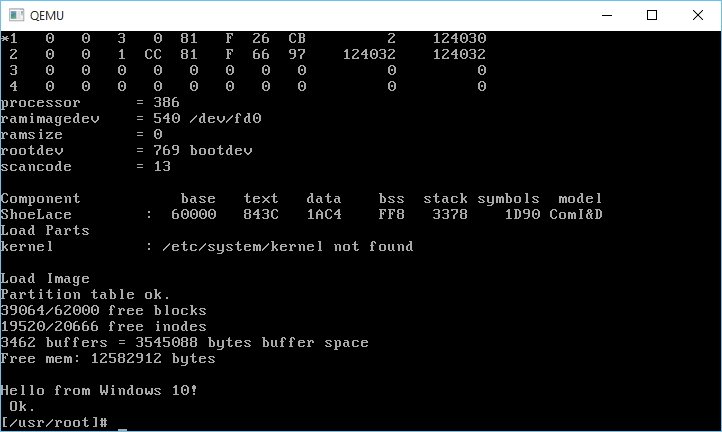
And it boots!
Very cool to say the least!
I almost wonder if MSVC 1.0 could build any of this. Then it could be possible to bootstrap Linux from Windows NT 3.1 … Although Windows 10 is good enough for me, right now.
And I got the DJGPP 1.0 gcc driver to work (soft of)!
C:\aoutgcc\test>gcc -v hello.c -o hello -I ../include-0.12 -L../lib
gcc version 1.40
cpp -v -I ../include-0.12 -undef -D__GNUC__ -Dunix -Di386 -D__unix__ -D__i386__ hello.c C:/Users/neozeed/AppData/Local/Temp/cca0_388.cpp
GNU CPP version 1.40
cc1 C:/Users/neozeed/AppData/Local/Temp/cca0_388.cpp -quiet -dumpbase hello.c -version -o C:/Users/neozeed/AppData/Local/Temp/cca0_388.s
GNU C version 1.40 (80386, BSD syntax) compiled by GNU C version 5.1.0.
default target switches: -m80387
a386 -o hello.o C:/Users/neozeed/AppData/Local/Temp/cca0_388.s
ld -o hello c:/aoutgcc/lib/crt0.o -L../lib hello.o c:/aoutgcc/lib/gnulib -lc c:/aoutgcc/lib/gnulib
Sorry that doesn’t format so well on a blog. But now I only have to force the include path, and the lib directory. At this point I’d call it ‘good enough’
I uploaded the archive MinGW-aout-linux-011.7z. If you want to compile Linux, you’ll need a MSYS from MinGW. Otherwise, this is only interesting to people who run Windows and want to play with Linux 0.11. Â I also included the Linux VM, and binaries for the tools. It’s not even 7MB. How is that for crazy small?
** EDIT
I got it all working now that I found all the portions to set to output as O_BINARY/wb that are needed on a Win32 host, so using MinGW I can build the as86/ld86/binutils/gcc and Linux 0.11!
Also I put all the source onto git, along with binaries up on sourceforge. It’s worth mentioning that since I wrote this article, I have gotten quite a number of older versions of Linux to build, along with simple kernel debugging with GDB. Kernels include:

Windows 10 to target Linux 0.11!
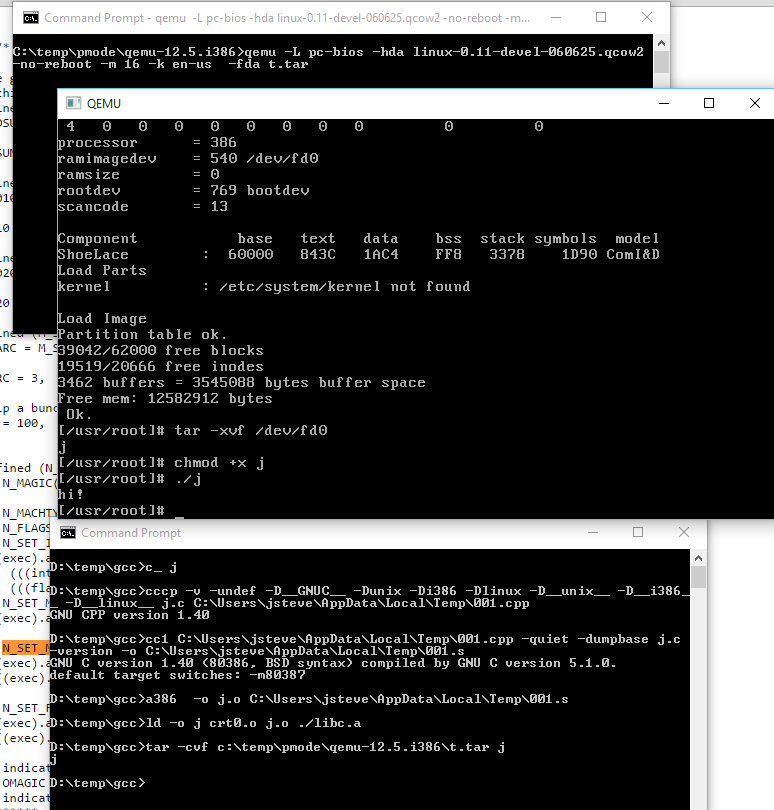
It works!
Sadly that ancient line program only runs ELF binaries, so that won’t work to test.
As I mentioned gcc doesn’t work. I need to tear more into DJGPP
to see how they did it or just use it’s gcc driver to run this.
In the test directory I’ve mimic’d what a Linux 0.11 install does when compiling
a single file into an exe.
simply run:
c_ hello
and it’ll compile hello.c into hello.
C:\aoutgcc>..\bin\cpp -v -I../include-0.12 -undef -D__GNUC__ -Dunix -Di386 -Dlinux -D__unix__ -D__i386__ -D__linux__ hello.c C:\Users\neozeed\AppData\Local\Temp\001.cpp
GNU CPP version 1.40
C:\aoutgcc>..\bin\cc1 C:\Users\neozeed\AppData\Local\Temp\001.cpp -quiet -dumpbase hello.c -version -o C:\Users\neozeed\AppData\Local\Temp\001.s
GNU C version 1.40 (80386, BSD syntax) compiled by GNU C version 5.1.0.
default target switches: -m80387
C:\aoutgcc>..\bin\a386 -o hello.o C:\Users\neozeed\AppData\Local\Temp\001.s
C:\aoutgcc>..\bin\ld -o hello ../lib/crt0.o hello.o ../lib/libc.a
Wasn’t that fun?
The ‘best’ way I can think of to test is to tar the exe like this:
C:\aoutgcc>..\bin\tar.exe hello.tar hello
And then run it with the Linux 0.11 on Qemu which can be found here:
qemu -L pc-bios -hda linux-0.11-devel-060625.qcow2 -no-reboot -m 16 -k en-us -fda hello.tar
Then once Linux boots, do this:
tar -xvf /dev/fd0
chmod +x hello
./hello
Fun?!
For anyone who wants to play at home, here is the complete sources, and binaries.
So here is my cross compiled Qemu binaries for Windows.
I added in my Control+Alt+d ‘fix’ to be a Control+Alt+Delete that anyone who runs Windows NT or MS-DOS will no doubt love. The kbd_put_keycode function had been removed, so I also put that back in.
I also undid the weird scaling thing that has been around since version 1.1. And I tried my best to merge in some NE2000 fixes.
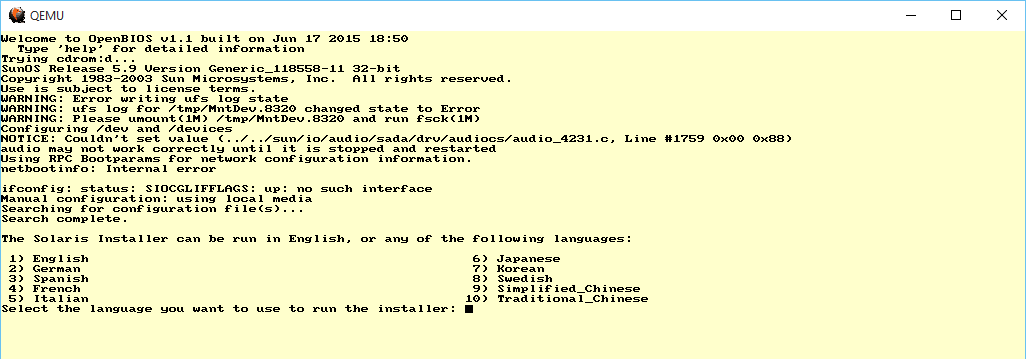
Solaris 9
I threw a Solaris 9 ISO at it, and it booted up to the text installer!
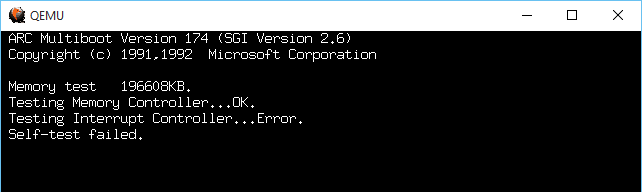
MIPS ARC
The MIPS ARC firmware however always bombs out on reset with an Interrupt Controller Error.
I tried the ‘doom’ test, and installing DooM 1.1 took FOREVER. Writing to the disk is slow. Incredibly slow. I guess forcing the write thru cache is mandatory?
-drive file=bla.disk,if=ide,index=0,media=disk,cache=writethrough
I haven’t tested.
I nearly went deaf. It doesn’t work properly, but rather loops so that one beep turns into a hurricane of beeps.
I’ve included the needed DLL’s, and compiled everything I could statically. I guess I could have fought more but I have other things to do.
So the ‘cut down’ version which is i386/x86_64 only is HERE.
Those who want to try out the various RISC processors download the ‘full’ package HERE.
So as always it’s the glibc2 wars. Â And as part of the fun you need pkg-config. Â And since it has to run, you’ll end up with the native version.
Luckily I found this site, mega-nerd.com
So you can create a i586-mingw32msvc-pkg-config file.  Just in case it get's lost here it is:
#!/bin/bash
# This file has no copyright assigned and is placed in the Public Domain.
# No warranty is given.
# When using the mingw32msvc cross compiler tools, the native Linux
# pkg-config executable works fine as long as the default PKG_CONFIG_LIBDIR
# is overridden.
export PKG_CONFIG_LIBDIR=/usr/i586-mingw32msvc/lib/pkgconfig
# Also want to override the standard user defined PKG_CONFIG_PATH with
# a mingw32msvc specific one.
export PKG_CONFIG_PATH=$PKG_CONFIG_PATH_MINGW32MSVC
# Now just execute pkg-config with the given command line args.
pkg-config $@
Fun as always, right?
And as always Qemu can be configured with:
configure --cross-prefix=i586-mingw32msvc-
When cross compiling.
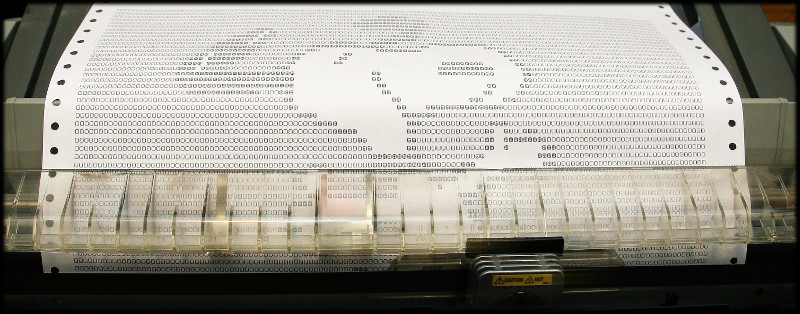
Hey Snoopy!
Following up on Adventures with Snoopy, Mihai has delivered!  Snoopy printed out from a VAX onto a real 9 pin printer, onto paper!
Just the way we used to do things a million years ago!
Be sure to check out the whole thing on hawk.ro, Â complete with pictures, and source material! Â Totally check it out, for that real programmer’s vibe!
And for those who have no idea, here is where it all started.
So I’m trying to force a break in a program to look at the call stack. Â Normally pretty easy stuff as far as adding breakpoints or the random i=j/0 type thing to force a div0 exception etc.
But I’ve been going crazy with this fun error:
gdb: unknown target exception 0x4000001f at 0x453b1c
And I should have checked my path earlier, as even though I’m using the 32bit version of GCC, the TDM-GCC project bundles their 32bit GDB as gdb32.exe . Â Ouch. Â The other hint of course was in the banner:
GNU gdb (GDB) 7.9.1
Copyright (C) 2015 Free Software Foundation, Inc.
License GPLv3+: GNU GPL version 3 or later <http://gnu.org/licenses/gpl.html>
This is free software: you are free to change and redistribute it.
There is NO WARRANTY, to the extent permitted by law. Type “show copying”
and “show warranty” for details.
This GDB was configured as “x86_64-w64-mingw32”.
Yeah, further oops, in actually paying attention to how it executes:
(gdb) r
Starting program: C:\temp\dynamips\dynamips.exe -P 1700 -s 0:0:gen_eth:”\Device\NPF_{2F7A0E3F-0908-4489-8117-475A6AD299A6}” C1700-Y-.BIN -j
[New Thread 2696.0x22b0]
warning: `C:\WINDOWS\SYSTEM32\ntdll.dll’: Shared library architecture i386:x86-64 is not compatible with target architecture i386.
warning: `C:\WINDOWS\system32\wow64.dll’: Shared library architecture i386:x86-64 is not compatible with target architecture i386.
warning: `C:\WINDOWS\system32\wow64win.dll’: Shared library architecture i386:x86-64 is not compatible with target architecture i386.
warning: Could not load shared library symbols for WOW64_IMAGE_SECTION.
Do you need “set solib-search-path” or “set sysroot”?
warning: Could not load shared library symbols for WOW64_IMAGE_SECTION.
Do you need “set solib-search-path” or “set sysroot”?
warning: Could not load shared library symbols for NOT_AN_IMAGE.
Do you need “set solib-search-path” or “set sysroot”?
warning: Could not load shared library symbols for NOT_AN_IMAGE.
Do you need “set solib-search-path” or “set sysroot”?
warning: `C:\WINDOWS\system32\wow64cpu.dll’: Shared library architecture i386:x86-64 is not compatible with target architecture i386.
[New Thread 2696.0xabc]
Great.
So it’s not some exciting bug, but rather the 64bit version of gdb can kick off a 32bit exe, but it’ll get lost inside. Â The proper 32bit GDB looks like this:
C:\temp\dynamips>gdb32.exe dynamips.exe
GNU gdb (GDB) 7.9.1
Copyright (C) 2015 Free Software Foundation, Inc.
License GPLv3+: GNU GPL version 3 or later <http://gnu.org/licenses/gpl.html>
This is free software: you are free to change and redistribute it.
There is NO WARRANTY, to the extent permitted by law. Type “show copying”
and “show warranty” for details.
This GDB was configured as “mingw32”.
And sure enough the call stack works fine.
Breakpoint 1, 0x00453b1c in mpc860_fec_set_nio ()
(gdb) bt
#0 0x00453b1c in mpc860_fec_set_nio ()
#1 0x004827e2 in dev_c1700_mb_eth_set_nio ()
#2 0x0044abdf in cisco_card_enable_all_nio ()
#3 0x0044b9df in vm_slot_enable_all_nio ()
#4 0x0044bb0e in vm_slot_init ()
#5 0x0044bb36 in vm_slot_init_all ()
#6 0x00481b5d in c1700_init_platform ()
#7 0x00481dc3 in c1700_init_instance ()
#8 0x004155b3 in vm_init_instance ()
#9 0x004125dc in main ()
(gdb)
Wasn’t that fun?!
Speaking of retro!

totally!
It’s the best thing since GTA Vice City!
It’s kind of amazing there is that much uploaded to youtube these days. Â I guess with enough archivists out there, you never have to leave those oh so innocent and simple decades. Â Or at least the ‘music channels’ are the perfect thing to listen to, while reading olduse.net.
will want to incorporate these patches on the Windows platform:
https://github.com/veracrypt/VeraCrypt/commit/9b24da3398581da1fa66c6b8f682bbcfa7ded4fd
https://github.com/veracrypt/VeraCrypt/commit/b7f9df6e4f09ba342fdbbadc63af5062cc57eaf2
So yeah, apparently you can get full admin rights through the driver. oops.