I was thinking….

Just as there is HECNet for DECNET, there isn’t anything comperable for NetBIOS… would anyone even be interested in such a thing?

I would be trivial to modify the hecnet bridge program to transport netbios… And I’ve done SIMH, I suppose other emulators (qemu) could be modified to talk to a hecnet style bridge with netbios….

Anyone interested?

flashterm_

I came across this the other day.

And I must say, it’s an excellent way to make older machines more ‘accessible’ to everyone.  I know it’s only going to encourage ‘kids’ to get into VAX’s etc, and of course as many are aware, Vista and beyond have removed the telnet client.. (and hyperterm for that matter!!!).

We are now living in a world devoid of telnet & rs232.

Enter flashterm_

Flashterm, is one of those fancy GCC for flash projects that uses the flash socket API to create a telnet client!  Right now they are focused on ANSI emulation geared towards BBS’s.  But if you’ve got a firewall to redirect ports, or if you are running the ‘policy’ server directly you can let people into your machine, and all they need is a modern browser/flash combination which you can safely say all ‘kids’ machines will have (and yes even my parents, as they LOVE those silly flash games, and dancing cats).

Anyways, the control key is NOT captured, so there is no control+d to kill your session, but a ‘reload’ of the browser, or closing the tab will do it just as well.  Robots doesn’t work correctly, but all & all it’s a super simple way to get back to your machines!

I’ve set one up in the meantime as a test…

http://vpsland.superglobalmegacorp.com/telnet

Although I don’t know how long I’ll keep it online.  But it does create the possibility now of having not only information on various ancient UNIX but to allow others to use them!.. And for most internet users, with no real downloads as that flash thing is EVERYWHERE…
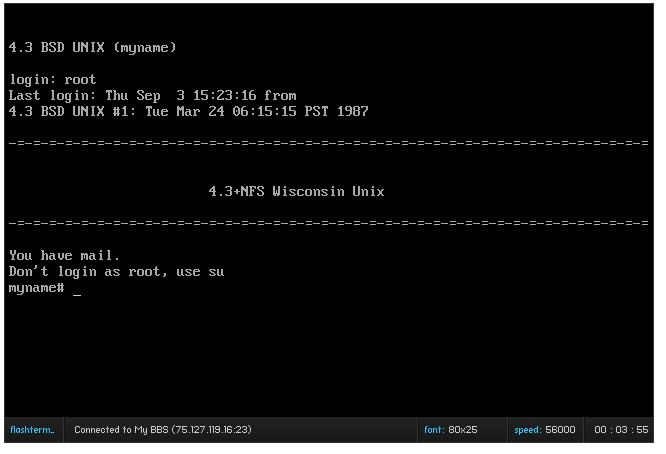
_flashtelnet in action

_flashtelnet in action

OpenBSD / amd64 fun


Don't you love days like this?

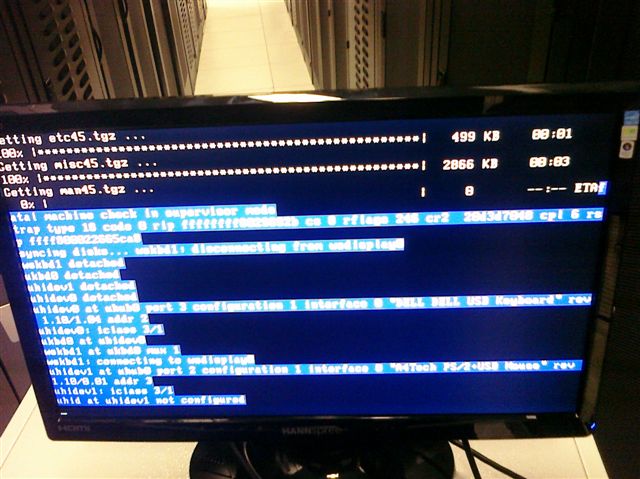
So here I was installing OpenBSD 4.5 amd64 on some HP DL386’s with.. AMD Opterons, and during the install it crashed out with the error message:

fatal machine check in supervisor mode
trap type 18 code 0 rip……….

And odds are if you may be here for the same thing, as google came up with 0 hits on fatal machine check in supervisor mode.

Nothing.

Nill.

But I’ve got a crash screen to prove it.

Now here is a kicker, I found in the bios if you turn off the “Page directory cache”, for “older Linux kernels”, you can complete your install!!

The downside, is that a dmesg causes a kernel fault.

Sigh.

So annoying.

Quake 1 fun

Well I started playing some more with the Quake source, looking to get a dedicated server at least running on Windows NT 3.1 . The problem is that every time someone connected I got this error:

SV_ReadClientMessage: NET_GetMessage failed

And they were disconnected. Some digging thru the source code revelaed that they were being dropped because they had ‘timed out’. But they did not timeout, the real cause is that the null_sys driver is TOO FAST!!! So this gave me a good excuse to re-use my failed SDL build for NT 3.1 (it has no video) but the timer works great! So with a little fun with the linker & Visual C++ 1.0 I managed to get it running!

I’ve put the source and build script for building the dedicated quake server here

The SDL.lib will probably link with every version of Visual C++, but I’m no promising. Also it wont work video wise on NT 3.1 so don’t get all excited.

Anyways no I havent put one on the internet… I dont know if there are enough people even slightly excited about quake… but it’s FYI….

Qemu test…

*Edit, this is completely out of date, and replaced by the much more improved Apache 1.3 for Windows NT 3.1.  Not that it’s visible to a visitor, but it’s live @ http://winnt31.superglobalmegacorp.com/

Well I figured I’d try Qemu on the PowerPC 64 platform… (AKA Playstation 3), and I loaded up NT 3.1 & Serweb… Not exactly a ‘high performance’ solution but I wanted to see it work..

And you can too!

http://216.75.197.51

I just put some minor things on NT 3.1 on there, although I’ll have to get something… better on there.

In the meantime, enjoy some old cat stuff.

Quake for the MIPS (NT4)

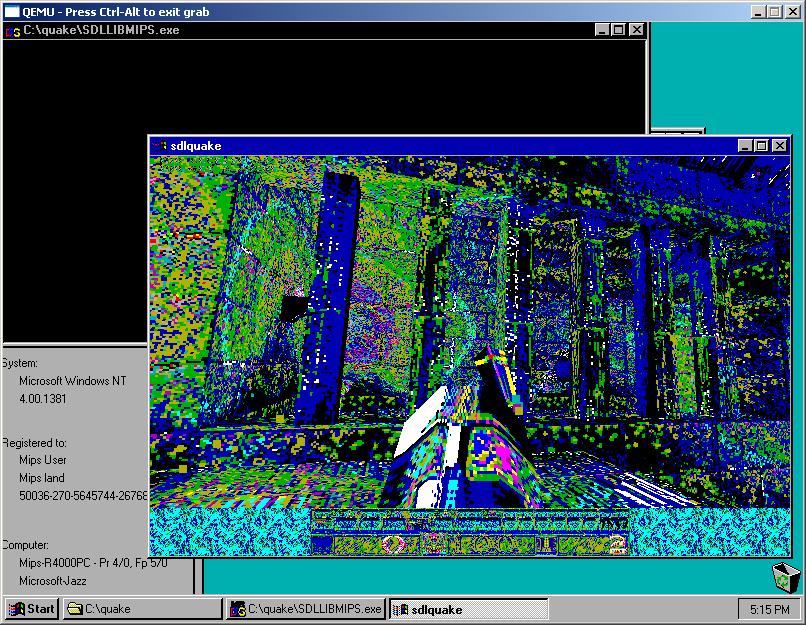
Well I started this off hoping I could get Quake running on Windows NT 3.1 … I’m almost there I have the null version running just fine. However I’m not all that great with DIB programming so I was looking thru SDL and saw that it has a WINDIB driver!

So with a LOT of tweaking through SDL 1.2.13 I got it to compile with Visual C++ 1.0!! However it is lacking one critical call, the CreateDIBSection api call in GDI is not present in NT 3.1. So remembering all the MIPS stuff as of late, and that I have Visual C++ 4.0 which should easily support this call, I first got it running with Visual C++ 2.0 on the i386 (Under XP of all things). So it was just a matter of building the source, and making sure there is no errors, uploading it to the emulator, and rebuilding for the MIPS.

And after 30 minutes, I got my exe, and it ran!

Quake 1.06 on the MIPS/NT

Quake 1.06 on the MIPS/NT

I’ve included a link for any other MIPS people out there that want to play quake. I haven’t built the networking as I was having issues with my network earlier and couldn’t get it working…

The exe is available here.

And the source code with all the bits is right here.

In this build I’m not building SDL as a DLL or static library, but rather compiling Quake right into the source. Now that SDL is running on the MIPS, and possibly other Win32 OS’s (I have yet to test Win32s… I suspect the inherent threading in SDL will prevent it, but could the DBI calls be made directly stripping out SDL…?) but who knows, I think anything past 3.51 would work.

Tip on memory for Windows NT 3.1 users

I just found out that if you replace the ntldr & ntdetect.com from Windows NT 3.51 service pack 5, you can access as much memory as the 32bit platform will let you!!! This is of course, 2GB per process, 1GB for Windows NT, the other 1GB is reserved for PCI hardware (remember the upper 384k in MS-DOS??). I have to say it’s GREAT to shatter the 64MB barrier of the earlier PC’s.

Anyways it’s quite simple to do, just download and extract service pack 5, then just copy the ntldr & ntdetect.com in the c:\ directory.

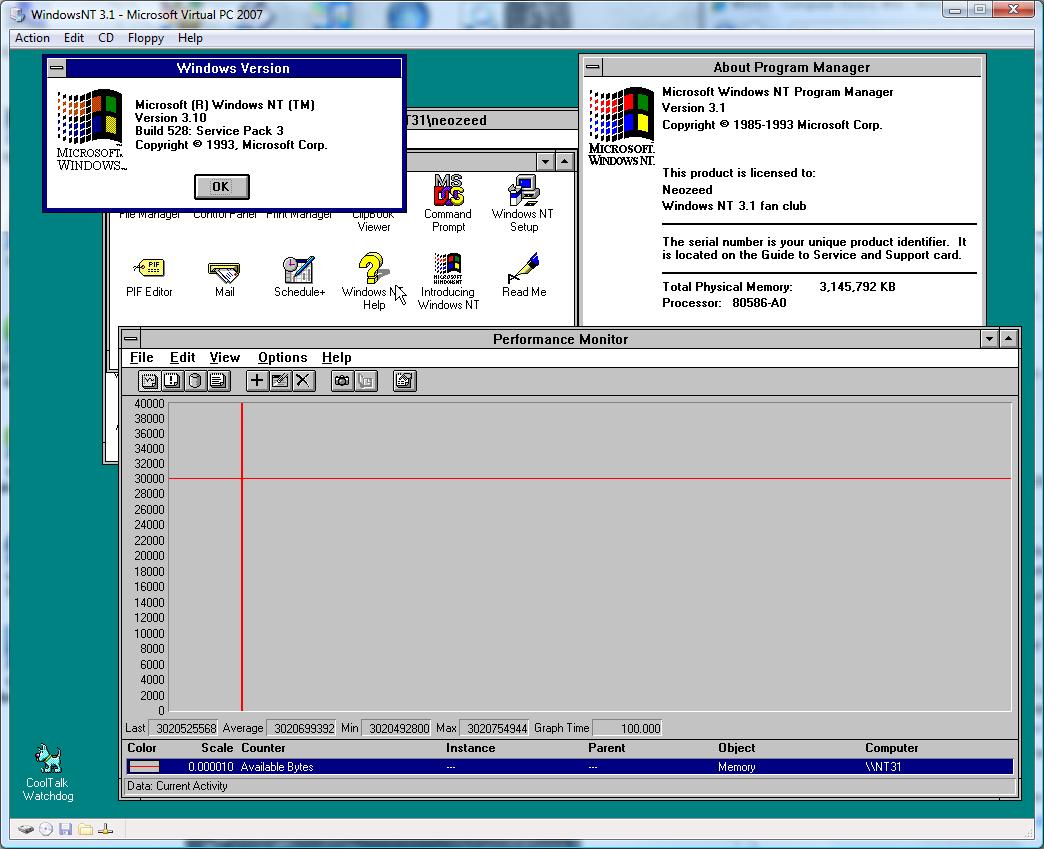
And here is a screen shot for the heck of it, of my Windows NT 3.1 with NT 3.51’s loader running with 3GB of ram! This makes compiling bigger things way easier, and I don’t have to page like crazy with Netscape…

Windows NT 3.1 with 3GB of RAM!

Windows NT 3.1 with 3GB of RAM!

For what it’s worth, I wouldn’t go beyond 3GB, as you’ll never get to use any more then that much, just as it is with Windows 2000,XP,2003,Vista on the i386 32bit platform. That is just the way it is, and yes XP & Vista that tell you about your 4GB of ram are simply reporting installed ram, not available memory.

Minor tip for Virtual PC 2007 users

On vista with some fancy multi core machines I’ve found that some OS’s will just DOG big time, inducing major latency, disk errors, and of course it’ll eventually corrupt the guest OS into not working.

As an instance, NT 3.1 takes about 30 minutes to install (compare to Qemu in about 2 minutes tops) and every time I’d try to convert the disk to NTFS it would either corrupt the disk so it couldn’t boot or it would fail saying the disk was unable to convert

Anyways back when Virtual PC was a connectix product it was meant to run on a SINGLE CPU/CORE.  Back then multiproc machines were servers  And who would be running Windows NT 4.0 server on a Windows NT 4.0 server??

Anyways the ‘fix’ here is to set Virtual PC’s affinity to a single core BEFORE you start any VM’s.  I’ve been setting mine to 0, but i suspect it doesn’t matter as long as no other VM’s have started before hand.  Anyways start up Virtual PC, then launch task manager, and set it’s affinity to a single core, then you’ll be good to go!

So far it would seem that Virtual Server is not hit by this, and I have to wonder if you install Virtual server onto a machine running Virtual PC with the new ‘core’ would it work correctly..?

Anyways this fix is good enough for me.  It’s nice to boot up in a few seconds.

Networking with Windows NT 3.1 under emulation


Windows NT 3.1 does NOT support the PCI bus, making most emulation difficult to impossible.

However some vendors wrote their own PCI routines allowing their PCI devices to work under Windows NT 3.1!

And as luck would have it, the two that I found should work for both VMWare & Virtual PC users!

First the Virtual PC users, you’ll want this file GF10011.EXE , and just extract it, and put it on a floppy.  x64 users will either need to do this under dosbox / MS-DOS in a VM… Also another note about Virtual PC & NT 3.1 is that it has massive pauses, to where it seems to be unusable.  I’ve found that altering the Virtual PC process, and binding it to only a single CPU, and boosting it’s priority helps a great deal, although it’s nothing compared to the speed of Qemu…

VMWare users can download an AMD Pcnet driver here that will happily bind on PCI.  Once you install the driver, you can have it scan the appropriate busses and it should pull up and work.

Another fun thing I found for Virtual PC users, is that the HP Pavilion 5000 desktop shipped ready for Windows NT 3.1, and it was equiped with a S3 video card! And it’s video driver will work with Virtual PC! You can download it from HP’s site here.

This brings Windows NT 3.1 into a far more usable state. Another fun thing I found is that Netscape 2 & 3 for Windows 3.1 WILL RUN! One of these days I’ll have to sort out the exchange client situation…

And if anyone wants to see it in action, be sure to check out Apache running on Windows NT 3.1!

Or you can hit it directly:

http://winnt31.superglobalmegacorp.com/

Visual C++ 4.0 arrived today!

For the RISC cpu!… That being Alpha & MIPS. Although the back of the box does mention PowerPC there is no PowerPC anything here…

Visual C++ 4.0 RISC box

Visual C++ 4.0 RISC box

I always did like the old Microsoft boxes during this time period… They always looked somewhat professional, not like today’s weird boxes that look like some kind of toy should be inside.

Also speaking of RISC cpu’s check the back of the Visual C++ 2.0 for mips box:

Visual C++ 2.0 MIPS box back

Visual C++ 2.0 MIPS box back

You have to remember it was “time” the golden age of the promised RISC cpu… Intel was hitting that wall with the 486, but lo the pentium changed all of that. And the Pentium PRO cemented all the little RISC cpu’s death. It’s funny how at the same time the “itanic/itanium” is just as dead as well.. MIPS. At least MIPS has their embedded space.. Which is funny looking back at the R4000 as a workstation CPU, and now it’s available in handhelds & set tops.. Although the Acorn derived strongarm is well… Strong-arming MIPS & Power for embedded dominance.

I’m pretty sure that Visual C++ 4.0 brought a lot of Windows 95 like functionality to NT, so I’ll have to see just how much(or little) of modern stuff will build. According to this link, 4.0a was the LAST version to support the MIPS, so Unless I can find 4.0a this is as good as it’s going to get.

If anyone has either insight on where to get Visual C++ 4.0a for the MIPS, or even where to get NT 3.1 for the Alpha give me a line…. Not to mention service pack 3 for the MIPS running NT 3.1… I have a feeling the shiped kernel is at fault in the emulator…