Qemu Sparc snapshot getting better!

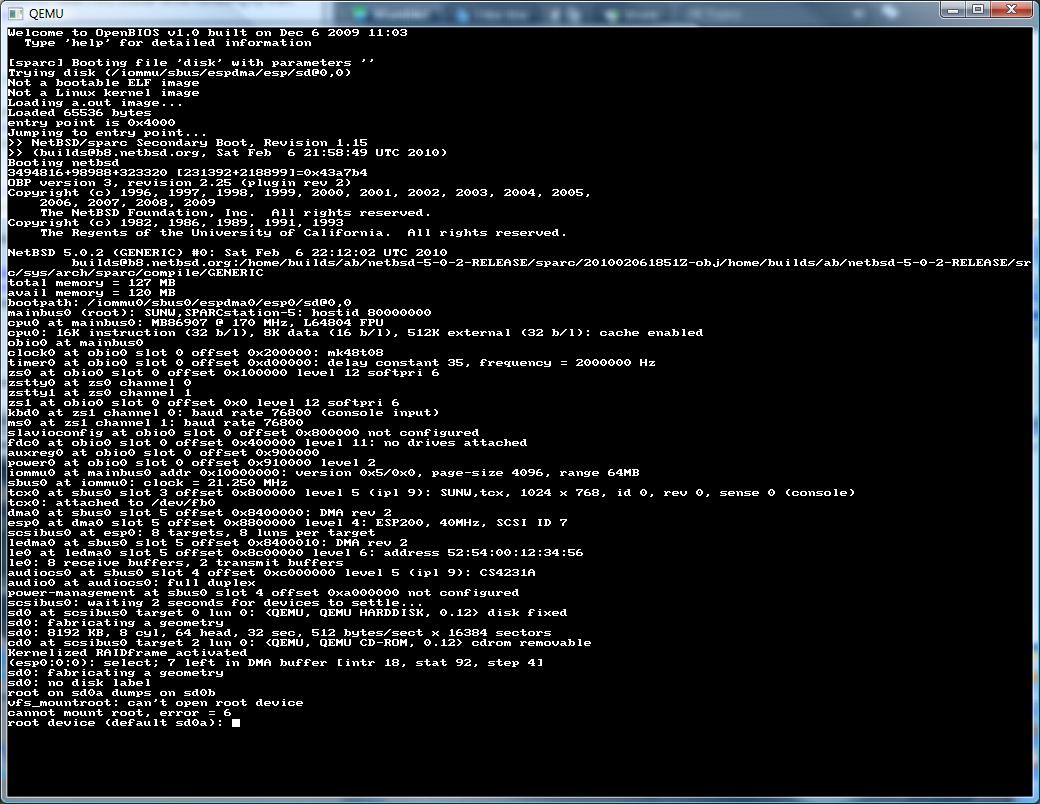
Thanks to Artyom Tarasenko‘s tireless work on the Sparc MMU, DMA, SCSI It’s not possible to install some versions of Solaris, and boot others to single user mode!
Heck, even the NeXTSTEP 3.3 boot program goes ahead and loads up..

However this is all done without a graphical console, as the sparc rom’s dont understand the framebuffer that Qemu emulates…

qemu-system-sparc.exe -nographic -monitor null -serial mon:telnet:127.0.0.1:23,server -bios ..\ss5-170.bin -M SS-5 -m 256 -hda ..\solaris.disk -startdate “2009-12-13” -cdrom \temp\cd46.iso

Running it is something like this. The key here is the lines:

-nographic -monitor null -serial mon:telnet:127.0.0.1:23,server

Which setup a serial port console you can just telnet into (for us Windows users).

This gets around all the errors like this:

chardev: backend “stdio” not found
qemu: could not open serial device ‘mon:stdio’: Result too large

Sadly my SunOS cd doesn’t seem to want to boot, and I somehow saved a copy of Solaris 8, but not 6..? Sigh.

ok
ok boot cdrom -vb
Boot device: /iommu/sbus/espdma@5,8400000/esp@5,8800000/sd@6,0:d File and args:
-vb
Size: 259712+54162+47510 Bytes
SunOS Release 5.8 Version Generic_108528-13 32-bit
Copyright 1983-2001 Sun Microsystems, Inc. All rights reserved.
Ethernet address = 52:54:0:12:34:56
Using default device instance data
vac: enabled in write through mode
mem = 262144K (0x10000000)
avail mem = 258322432
root nexus = SUNW,SPARCstation-5
iommu0 at root: obio 0x10000000
sbus0 at iommu0: obio 0x10001000
dma0 at sbus0: SBus slot 5 0x8400000
dma0 is /iommu@0,10000000/sbus@0,10001000/espdma@5,8400000
/iommu@0,10000000/sbus@0,10001000/espdma@5,8400000/esp@5,8800000 (esp0):
esp-options=0x46
esp0 at dma0: SBus slot 5 0x8800000 sparc ipl 4
esp0 is /iommu@0,10000000/sbus@0,10001000/espdma@5,8400000/esp@5,8800000
sd6 at esp0: target 6 lun 0
sd6 is /iommu@0,10000000/sbus@0,10001000/espdma@5,8400000/esp@5,8800000/sd@6,0
root on /iommu@0,10000000/sbus@0,10001000/espdma@5,8400000/esp@5,8800000/sd@6,0:
b fstype ufs
obio0 at root
obio0 at obio0: obio 0x100000, sparc ipl 12
zs0 is /obio/zs@0,100000
obio1 at obio0: obio 0x0, sparc ipl 12
zs1 is /obio/zs@0,0
cpu0: FMI,MB86907 (mid 0 impl 0x0 ver 0x4 clock 1070 MHz)
# uname -a

SunOS 5.8 Generic_108528-13 sun4m sparc SUNW,SPARCstation-5
#

Which is all cool. And check the CPU, 1070Mhz! Don’t we all wish we had SPARC’s that fast!

I’ve even managed to install OpenBSD/Sparc! … But it crashed on booting.

Anyways it’s late, and thats it for now.

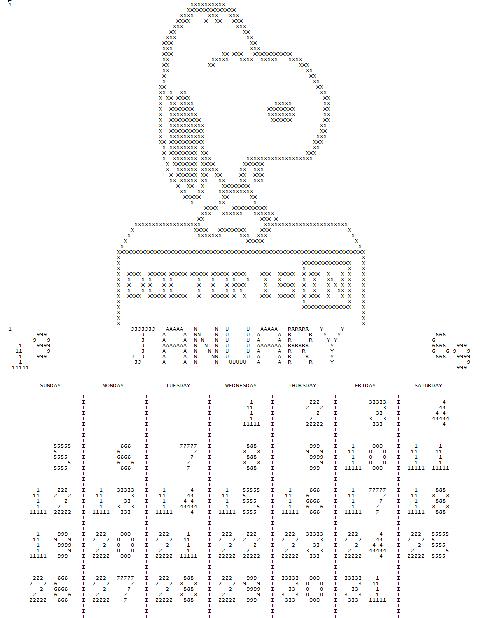
The real programmer’s Snoopy Calendar.

I was googling around last night waiting for this huge dataset to copy (lol more on that disaster later) when I came across this cute posting about real programmers.

And of course in there, every ‘real programmer’ has a Snoopy Calendar dated from 1969.

With a bit of googling, I come across this site that has the needed snpcal.for, snppic.for and snpcal.dat. Now granted this is from 1987, but hey, it’s as distant as even the original program from the 1960’s.

Now there is a lot of folklore about this program from the 1960’s along with an older version which can be found here, but sadly it wasn’t enough to keep the wikipedia page alive as they had no real sources backing it up prior to the 1980’s.

Anyways with a few minor tweaks, the code from the 1980’s will compiler on MS Powerstation Fortran, and that code will in turn compile via f2c!

So, for the few people that care about this kind of thing, or stumbled upon it, here it is:

Just take note that it’s made for a 132-column printer, which was a popular thing back in the day. Although I’m sure laser & various ‘jet’ printers can print this thing in portrait mode.

I’ve included the source that I changed, along with a win32 exe and the output (in MS-DOS text format) here.

If you want a more ‘modern’ version of the calendar, just edit the data file, you can easily find the star/stop portion in there (search for 1969!).

Next time I’m near a printer and nobody’s looking I’ll have to print one!

NetBSD 1.5.1 follow up

I figured I’d share what I had, and allow people to download my disk image, and for win32 users, it has all the bits to go…

Just extract THIS zip file, and then run the mips.cmd file, and you’ll be in NetBSD ARC/MIPS land in no time!

Other platforms will need to build Qemu 0.12.3 and use the mips 64bit little endian emulator to run the disk image…

NetBSD 1.5.1 – arc

Well… I was looking around for another OS that’d run on a MAGNUM (ie ARC MIPS in little endian mode), and I found that NetBSD supports the ARC Magnum, unlike OpenBSD.

Sadly it’s *VERY* touchy…. The current version 5.0.2 crashes when unpacking the distribution… However 1.5.1 runs! … kind of.

NetBSD 1.5.1 for the ARC has no install program… So I had to prepare a system partition with Windows NT, then boot that disk under the i386 qemu emulator with NetBSD 1.5.1, setup the disk, and unpack the distro.

From there it was a matter of rigging the ARC loader to boot up an ecoff kernel.

There were a few files in the /etc directory to ‘fix’ to allow normal booting (fstab/rc.conf) and to make sure there is no /netbsd in the root.. For some reason while extracting symbols for the ps tables and whatnot it CRASHES.

So far I’m having issues with the networking, but it is running!

I may have to do some more experimenting with this to see if later versions of NetBSD can get their networking going… The ‘big’ issue at the moment is the ethernet reports a MAC address of all zeros… While the same nvram file in Windows NT works just happily……..

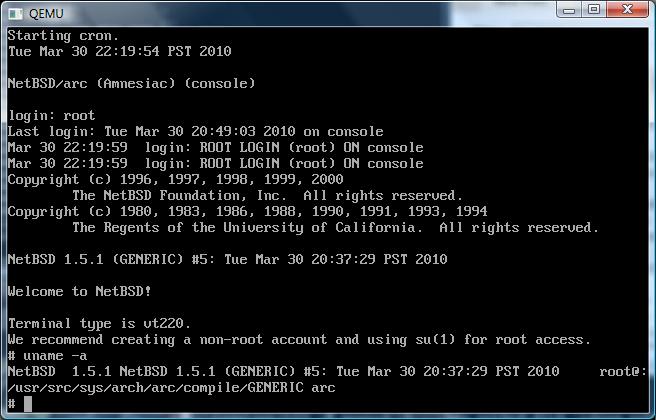
Oh well, here is a screen shot!

NetBSD 1.5.1 ARC on Qemu 0.12.3

NetBSD 1.5.1 ARC on Qemu 0.12.3

I guess it’s worth mentioning that once it boots up, it’s been stable enough for me to rebuild a kernel.. And the kernel even booted! (but transferring it out was such a major ordeal…)

Dungeon for NetBSD little endian MIPS

Dungeon for NetBSD little endian MIPS

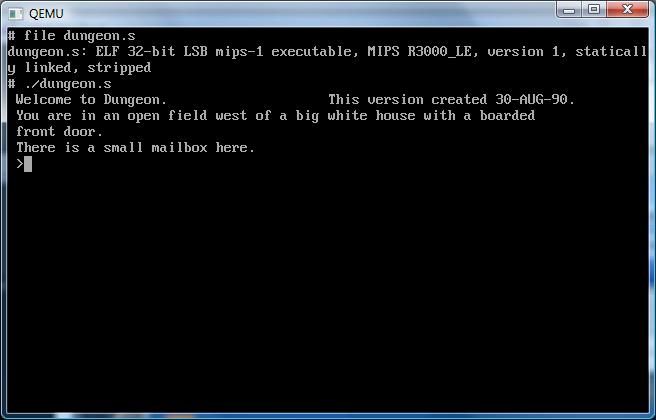
Oh, and of course it runs dungeon!

Neko x64!

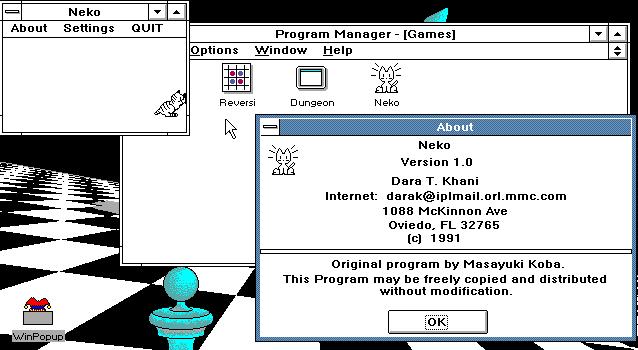
For no real reason today I remmeber that there used to be this cool program back in the Windows 3.0 days called Neko. I was trying to explain it to my girlfriend about this cat that would chase your mouse!  Click the picture above to play with neko in jdosbox.

I recall that Neko even made it to OS/2 as it was more interesting than the mouse trails alternative from Microsoft.

At any rate, I was wondering if there ever was a 32bit version of Neko… And much to my amazement I found there was a Neko95, and a Neko98! And they even ran on my x64 version of Windows… So after googling around, I found the source code to Neko 98!

So, I did the next best thing, which is download the source, fix a single casting ‘error’ in some square root function and I got it building under Visual C++ 2008. Then I figured, what the hell, added a target for the x64, and built… a 64 bit version of neko!

You can download the x64 binaries, and the source directory that I used here.

You may need some VC runtimes if your system is an old x64… At this moment it can be found here:

Or by searching for Microsoft Visual C++ 2008 SP1 Redistributable Package (x64)

Oh well at any rate, it’s cool to see Neko still kicking!

PS When I get back, I’ll have to see about an i386, MIPS, Dec Alpha and Itanium build… wink wink!

—edit

Neko98’s source code has been rescued, all saved here. and on github.

—years later

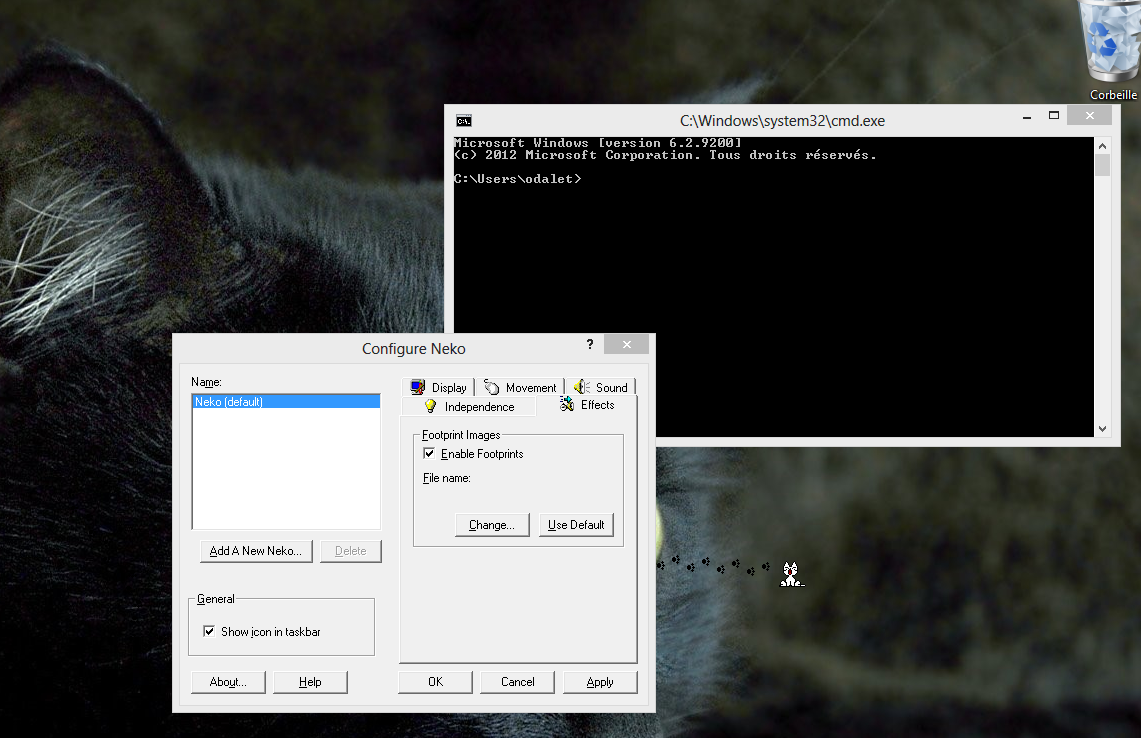
I just received this screen shot of Neko x64 rocking it on Windows 8 (Desktop mode)

Neko on Windows 8

Fun with SLIP

Back before the advent of PPP there was SLIP. And the main difference between the two is that SLIP was configured statically. For people with static devices (routers) etc this worked fine. After all SLIP was point to point by nature. And of course it sat behind leased lines, and dialups that were maintained in a 1:1 fashion so you knew you were dialing, and where they were….

Then the internet went all consumer based, and that was out.. the world needed a ‘dynamic’ protocol, and they took SLIP and taught it to auto configure… the results were PPP.

Anyways if you ever find yourself with some kind of legacy device…. SLIP is as good as it gets.

And that is where the fun begins…..

A friend of mine scored the tcp/ip kit for a certain venerable UNIX, and of course it being from the late 1980’s it only supports SLIP. Well thankfully it runs in Virtual PC 2007. So we can have some fun with it.

Windows 7, Vista, 2003 and XP have *NO* SLIP support… That means you’ll need a Windows NT 4.0 machine to make the magic work…

So first up install a copy of NT 4.0 . It wont matter if it’s workstation,server,enterprise or terminal server. While you are installing it, setup a single NIC, and then setup RAS on COM2 with any bogus modem you want… The next thing to do is make sure you have service pack 6… You may as well update it.

Once that is done, you’ll need to make a few registry changes. The first will enable unimodem support..

[HKEY_LOCAL_MACHINE\SOFTWARE\Microsoft\RAS\PROTOCOLS]
Make a DWORD key named “EnableUnimodem”, and set it to 1.

The next key to modify is
[HKEY_LOCAL_MACHINE\SYSTEM\CurrentControlSet\Services\RasArp\Parameters]
Make a DWORD key named “DisableOtherSrcPackets” and set it to 0.

Now with all that in place, reboot the NT 4.0 VM.

Next you’ll need the ‘new’ and improved driver for a nullmodem available here. thanks to Kevin Wells.

Now you can add the “RAS Serial Cable between 2PCs” on COM1, and set it up for dial out operations. While you are configuring it, be sure to uncheck all the flow control options, and all the header compression… Odds are your SLIP machine will be too old to support such stuff. While you are going thru your options, be sure to pick an ip address for your target & the NT machine…

Ok now with all that out of the way, then configure Virtual PC (or server) to use COM1 for some named pipes… \\.\pipe\slip1 works great.

Now what I do is I launch hyper terminal on the NT side, have it on COM1 running at 9600 baud (most old OS’s cannot safely do more then that because of issues with the originally 16550 UARTS). Then from the UNIX side, configure it’s COM1 on the same pipe, then try this from the UNIX side:

echo ‘a’ > /dev/tty1a

If you are lucky you’ll see an ‘a’ pop up on the serial program. If so GREAT!.. If not.. try turning off all the VM’s, and try it again…. Sometimes the pipe code for VPC/Vserver gets out of sync.

Assuming it worked, you can then initiate the ‘dialing’ part from the NT side, give it a phone number of 1 to satisfy the script and it’ll sit there waiting for *ANYTHING* on the serial port…

On the UNIX side I run this in a script…

echo ‘a’ > /dev/tty1a
slattach /dev/tty1A 10.0.1.1 10.0.1.2 255.255.255.0 9600
route add default 10.0.1.2 1

Then run the script, and NT 4.0 should beep and you should be in business!

Go ahead and ping and whatnot…

If that is working, then you can take the next step on your LAN and add some routing statements pointing the 10.0.1.1 towards the LAN ip of your NT machine, and it should route!

I’ve managed to get the box on the internet so it does work!!!!!

The Commodore Amiga

I was enjoying that great site, stumbleupon when I came across a commented listing of the Amiga 1.2 ROM. Then it hat hit me, I’ve never really written about some of the great emulators for the Commodore Amiga.

Back when I was in highschool I wanted a Commodore Amiga, as at the time I was stuck with a Commodore 64. However the world was starting to accept the IBM PC swing of things. Windows 3.0 was out, suddenly the protected mode of the 80286 could be exploited for only a few hundred dollars, vs the thousands for a UNIX port, or what OS/2 cost. And of course the big appeal at the time was that you could build your own PC in a kit fashion (well it still is!). So I was toying with the idea of buying this 286 8Mhz board for $30 CDN when I saw this program that a kid had brought in… It needed VGA, but it could apparently emulate a Commodore Amiga!

You can still download it here.

Running it just simply threw up a picture of the Amiga’s insert a workbench diskette, and clicked the drive madly.. Passing it through a hex editor showed a copy of an Amiga ROM tacked on the end, but it didn’t actually emulate anything.

But I didn’t realize it at the time, and it cemented my decision to buy the 286.

Years later and the topic of m68k emulation came up, as there were simple cross assemblers and simulators, and I can remember in college searching to see if anyone had started an Amiga emulator… And there was one project!

UAE

Originally it stood for “Unusable Amiga Emulator” and well it was unusable. But then with enough people starting to flock to the project it suddenly could boot AmigaDOS. I used to use this on MS-DOS back in the day for ‘maximum’ speed. I was able to find one ancient version of this 0.65 that still has an MS-DOS exe. And it runs great under DOSBOX. You can find it here.

And for the heck of it, here is a screen shot with a 1.3 ROM.

UAE 0.65 under DOSBOX

UAE 0.65 under DOSBOX

Naturally transferring disks was a major pain in the butt… I luckily had a friend with a working Amiga and cross dos for AmigaDOS all configured so I could transfer some terminal emulator to my poor Amiga 500 I had picked up at a used hardware store in college. Then I used what I could of ramdisks, compression programs and whatnot to upload via some 50 foot nullmodem cable I had to transfer ADF’s of my workbench disks and an old favorite game of mine, Captain Blood. Even back at the time, Commodore was bankrupt their future was bleak. Getting spare parts then was becoming hard for my Amiga 500. And my 486SX-20 could almost run at an acceptable speed in emulation..

But time marches on.

UAE was then ported to Linux & X11, and the SVGA lib. I had some old RS232 terminal so I could keep on using my machine to ‘work’ and still play console vga stuff like doom for SVGAlib and of course UAE. Now with CPUs in the GHz++ speed range, emulation of a 8Mhz machine with 3 custom chips is more in software then raw cpu speed. The UAE project kind of died off, there hasn’t been any big updates in years, but the CPU core work lives on in all kinds of m68k derived work.

There is no doubt that there is still a few closeted Amiga users out there, but I suspect that we don’t kick up UAE all that much these days.. But it’s still cool to watch it in action.

And of course the demos! One of my favorites was the fairlight 242 demo. Which UAE with a Kickstart 1.3 ROM will run. Even the MS-DOS version!

fairlight 242 UAE for DOS on DOSBOX

fairlight 242 UAE for DOS on DOSBOX

I should add you can find more demos here, and a Win32 version of UAE here.

Qemu 0.12.3 win32 build available

Hot off the compiler….

http://vpsland.superglobalmegacorp.com/install/qemu-0.12.3.zip

I even remembered to strip the exe’s so it’s WAY smaller then the other versions….

Also for those *ONLY* interested in x86 emulation (ie regular PC) I’ve created a far smaller archive here, that only contains the pc emulator.

I figure the amount of people that run the non x86 stuff is few & far between.

Qemu 12.3 is out!

didn’t the time fly by?

Anyways scanning through the list I see that the SDL full screen/windowing has been fixed!

I’ll have to crank out some binaries later, but I had to write something here, otherwise I’d forget it.

Also on the topic of Qemu, I see this site qemu-buch.de has me listed as the latest win32 build site for Qemu on Win32…

Cool!