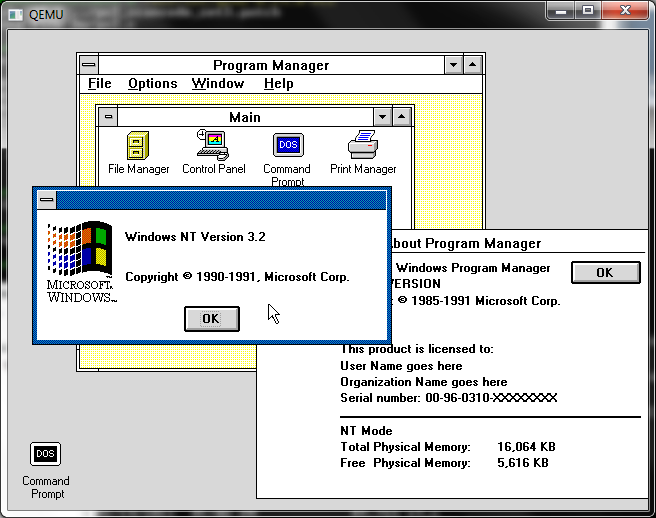
After a very short release cycle, Qemu 0.14.0 is done!
I’ve merged in the PS/2 keyboard fix, and set the NE2000 to 0x300 IRQ 3. These are untested, but meanwhile, Enjoy!

After a very short release cycle, Qemu 0.14.0 is done!
I’ve merged in the PS/2 keyboard fix, and set the NE2000 to 0x300 IRQ 3. These are untested, but meanwhile, Enjoy!
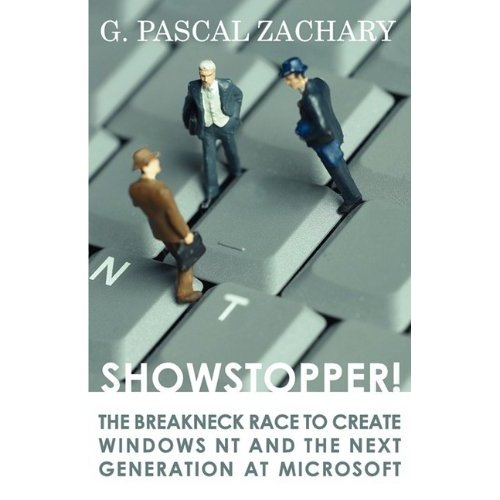
So I re-read that great book, showstopper! which recounts the race to bring Windows NT to market.
So after a lot of digging around I managed to find an old CD, the second public showing of Windows NT, the December 1991 pre-release.
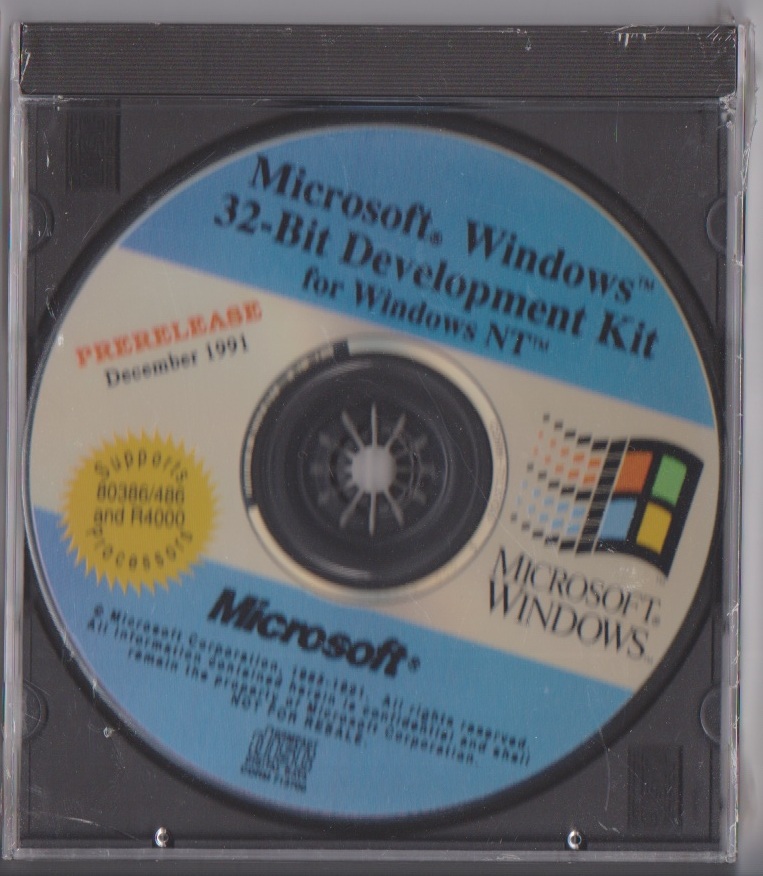
This is the first version that contained both MIPS and i386 binaries. At the time there were lots of issues with the MIPS processors, and the MIPS port of NT was slipping behind the i386 in major ways. So between the first public display of Windows NT at the 1991 COMDEX in October, there was a major push to bring the MIPS release up to some level of parity.
On the way to making Windows NT the team started by cross compiling from OS/2 1.3 machines. And in this release they left the cross compilers in there, which is kind of cool. So I just compiled a simple console application, like this:
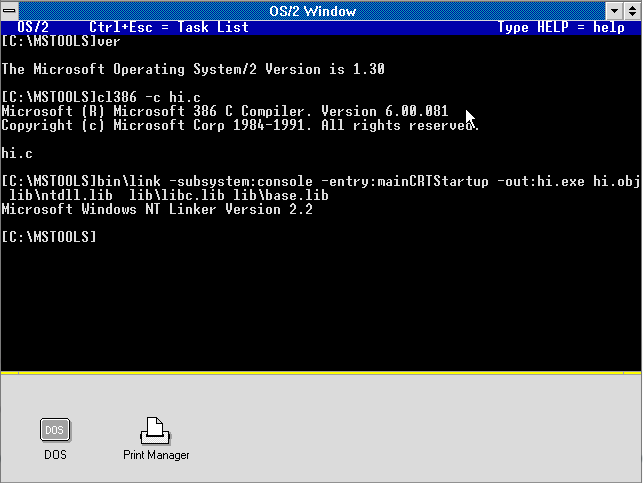
And then running it under the pre-release..
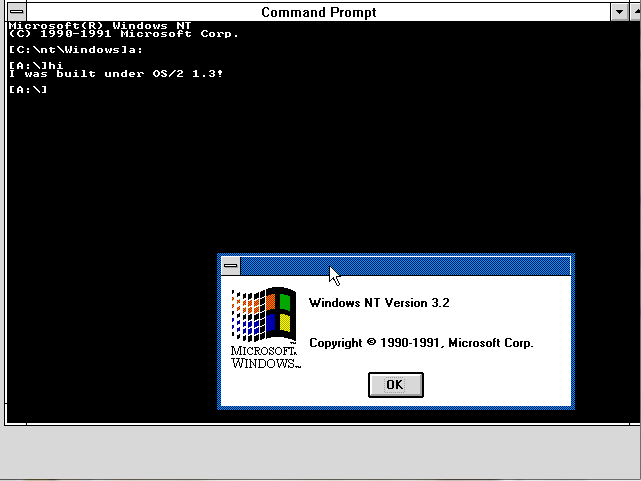
Which is pretty neat when you consider it.. And of course in the book there is the coming break with IBM as they pushed not only for the dominant Win32 personality, but also to make NT self hosting. According to the book, NT was self hosting some time in March of 1991, with NT being text only. The first graphics started to show up around May, and Networking as late as August.
Installing the beta is a little interesting as there is no ‘setup’ program at this point. The easiest way to install it is from within MS-DOS. There is a batch file that will xcopy in the needed parts, and then uses debug to write in a new bootsector. After a lot of trial and error I found that the disk works best when it’s under 500MB.
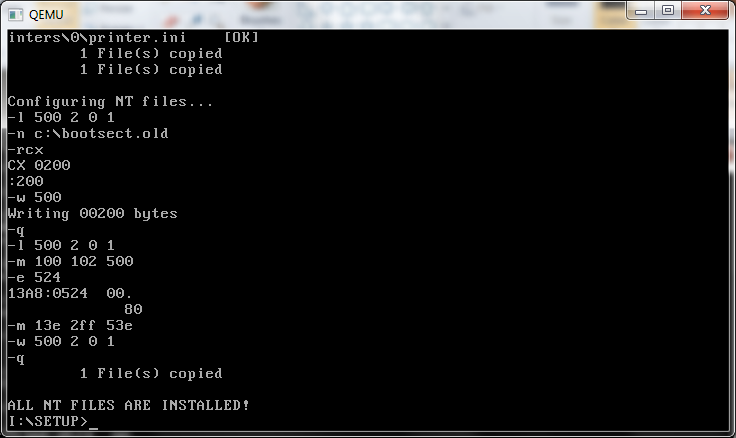
And away we go!
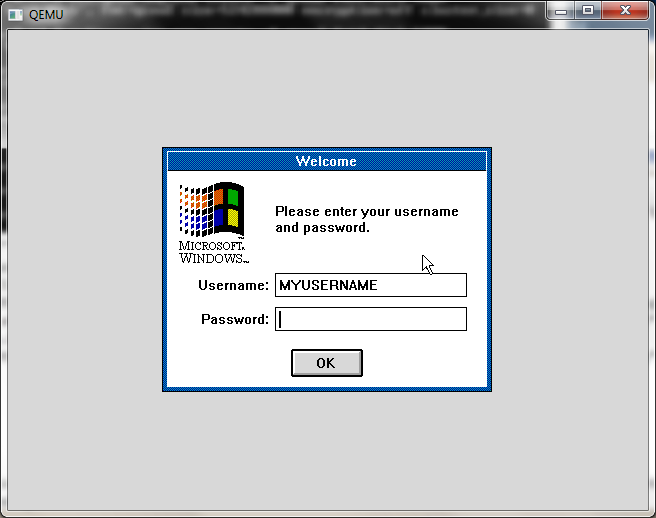
What is interesting about these 1991 releases is that they didn’t include any of the subsystems other then the Win32 subsystem. And the user login screen here actually doesn’t even take the password it’s just a dummy screen. Windows NT is configured from a plain text file nt.cfg . The registry has only begun it’s work at this stage, but it’s just not there.
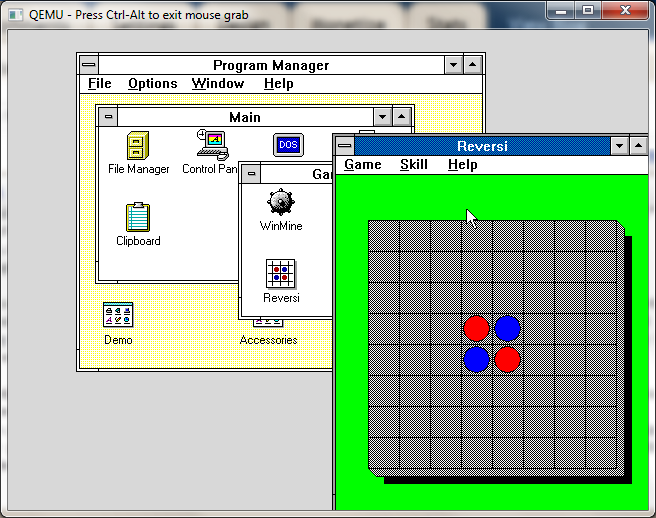
reversi!
From a user standpoint it looks and feels more like Windows 3.0 or an early Windows 3.1 beta. Which should be expected from the timeline. Even the games, it’s solitare, winmine, and reversi! All in 32bit glory! Even the help about screen for program manger lists that it’s running in “NT MODE”, as opposed to REAL, STANDARD or 386 Enhanced modes, which were available at the time for Windows 3.0 .
Another thing, is that the ‘administrative’ tools didn’t exist yet. I do know the net command had the start/stop so services are there, if only hidden. NT really didn’t start to feel more like NT until late 1992 when it was getting really close to being feature complete, as they shook the bugs out.
Now the install media has this ‘special’ boot floppy to do a GUI install, which Qemu won’t support because of the lack of the ancient scsi controllers of the time. But with a little pathing I managed to get it to run under NT. I’ll spare you the middle bits, but if you can you can get them here.
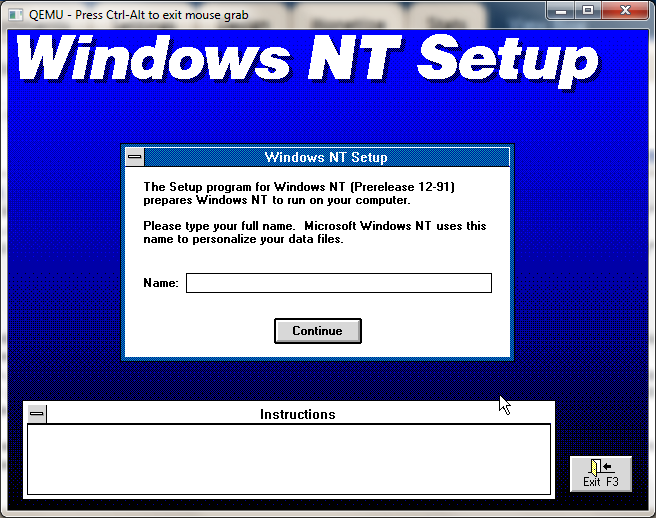
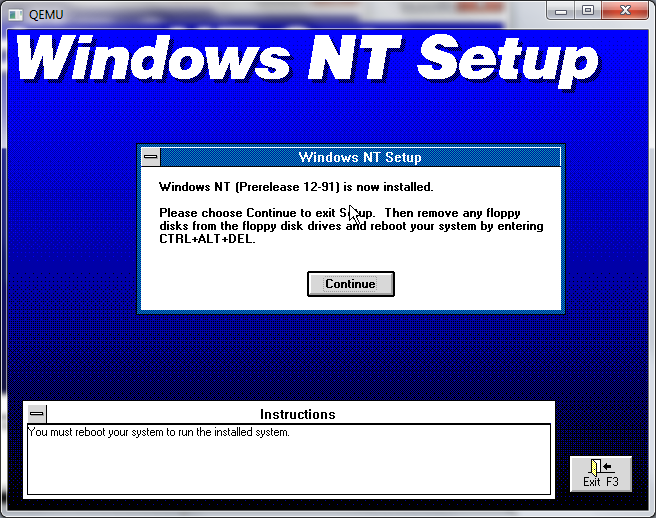
And there we go!
Another interesting thing I stumbled across from this time was this: InfoWorld article, which is an interview with Steve Balmer just after the October COMDEX show.
It’s really neat to see something as prolific like Windows NT, which has installed seats in the hundreds of millions what it was like when it was so young and vulnerable.. It certainly was ‘forward thinking’ in that it didn’t run all that well on 386’s with 8MB of ram, a ‘power house’ of a computer back then. But it scales up to machines like my laptop with 8 cores and 6GB of ram just fine. By forcing the portability NT like any other *NIX just ports over and keeps on going.
As a silly story when NT 4.0 was in it’s heyday (sp2!) I ran a Compaq Desqpro 386 with 16MB of ram with NT 3.1 Advanced Server as a MSMail hub. And It’s kind of funny in retrospect but I had all the SQL servers using it for alerts and whatnot, and when it came to uptime NT 3.1 had all the 4.0 stuff beat. Then again NT 3.1 was the ‘pure’ architecture version, before they started the crazed speed hacks of the video/printer stuff moving to kernel space… Oh well that’s my $0.02.
So looking around for other IBM PC emulators, I came across this one, PCEm. Now what’s really cool about this one is the old models it can emulate, including the IBM XT, the IBM AT, and it can even run the AMI BIOS for a 286, 386 and 486!
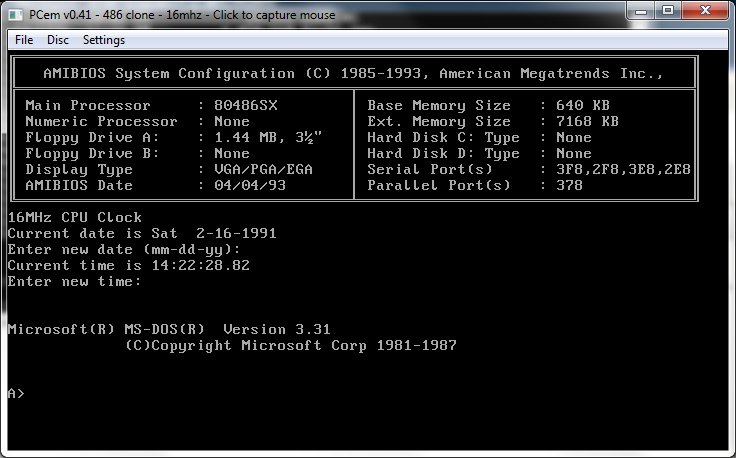
PCem 486
So not only can it run the BIOS but some ‘fun’ stuff like Windows 3.0 & 3.1 in standard mode, (386 enhanced is busted.. )
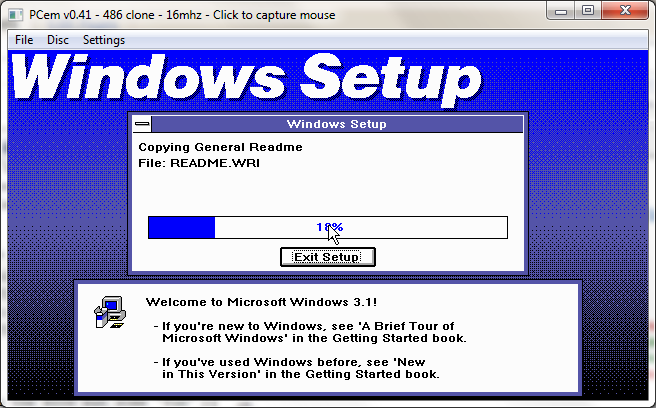
Setting up Windows 3.1 on EGA
I find the 486SX mode works the best… And naturally fastest as it’s cycle accurate emulation. An interesting mode is the IBM 386, which appears to be the IBM AT’s BIOS patched to run on a 386 CPU.
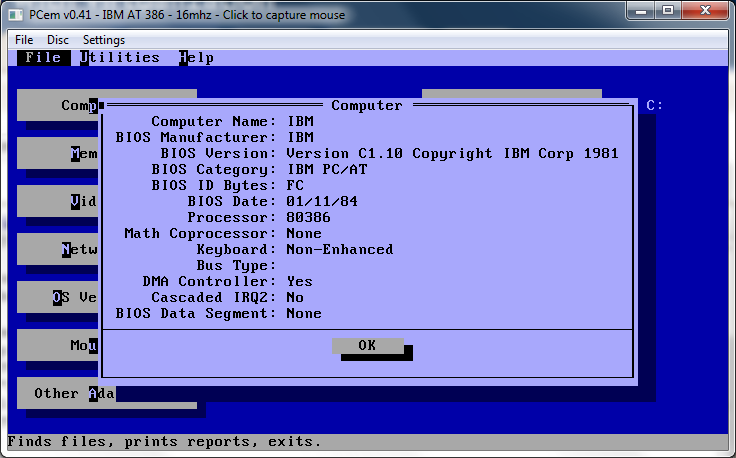
PCem MSD report
What is cool though, is the 386 protected mode is complete enough for DOS4G/W executables to run…
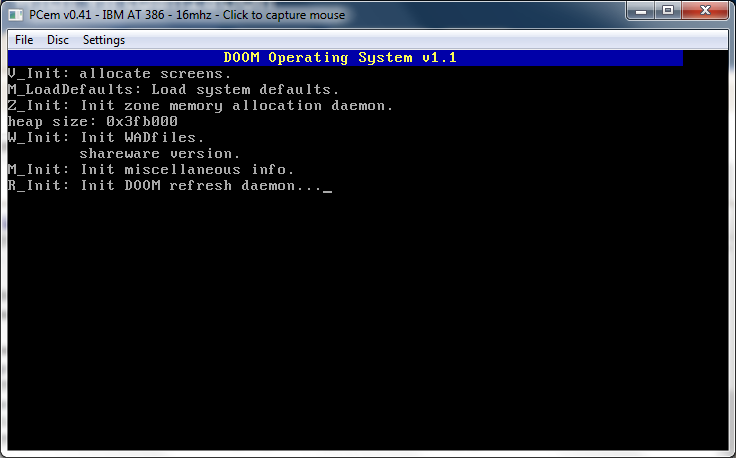
Loading DooM!
And yes if your CPU is set to low enough Mhz it will take a minute or two to load as it did back in the day…
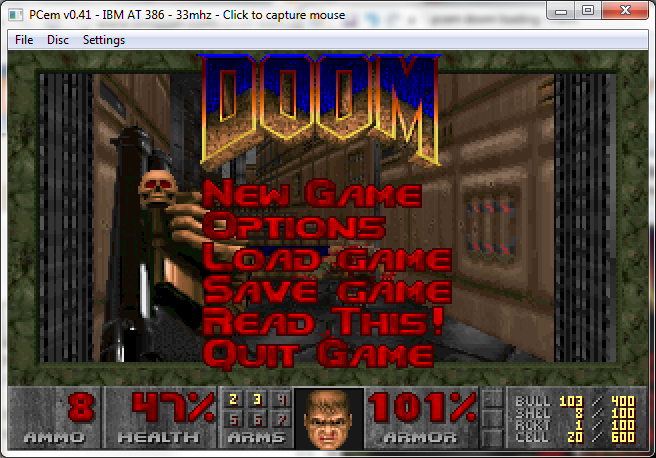
PCem running DooM
And away we go! I should add this is Doom 1.1 shareware, which I did manage to get the sound working on OS/2 2.1, and it’s great to hear that PCEm’s soundblaster emulation works great!
For DOS games, this emulator really has a wide range of machines, and with the actual BIOS it sure gives the original ‘experience’.
*NOTE you’ll need disk images, and lots of them… or some scheme to mount the raw disk image. Also the UI is touchy I’ve already lost one disk to it….
Qemu 0.14.0 rc2 and Windows NT December 1991
Well this one compiles clean under MinGW so that’s a nice touch. the ISAPC machine type is still broken. 😐
I’ve built the usual set with soundblaster & adlib enabled, and the NE2000 set to 0x300 irq 3 so old crusty things ought to have some hope of working. I’ve also included the PS/2 mode 3 keyboard patch for some really old stuff.
So here we go the x86 / x86_x64 builds that 99% of you want/need.
And here for the rest of the stuff for the 1% that need/want sparc/arm/powerpc/mips etc…
I really have no idea why anyone would want it, but here it is.
“sail – multi-user wooden ships and iron men”
It is described more as a “computer version of Avalon Hill’s game of fighting sail originally developed by S. Craig Taylor.”
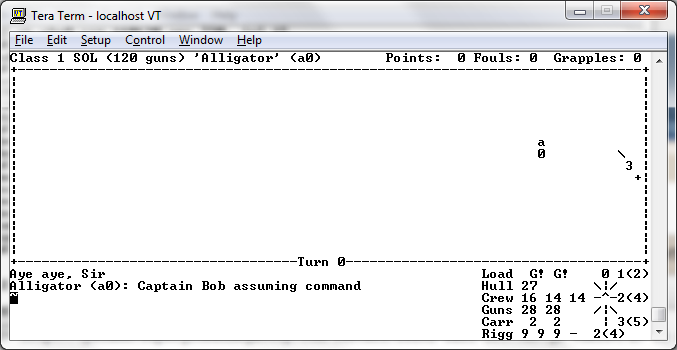
Sailing away…
For anyone wanting to check it out, the easiest way is to just run 4.2 BSD.
There is plenty more afoot regarding various emulators, and I just have to write them down… but not tonite.
OK they aren’t virtual, but it’s still fun to see the old hardware.
And finally.
Since the last time I reviewed it, the MS-DOS Player, by Takeda Toshiya has come a long way!. He’s fleshed out more of the MS-DOS emulation, and updated the CPU core.
I’ve now been able to run the Microsoft C 5.1 compiler under Windows 7:
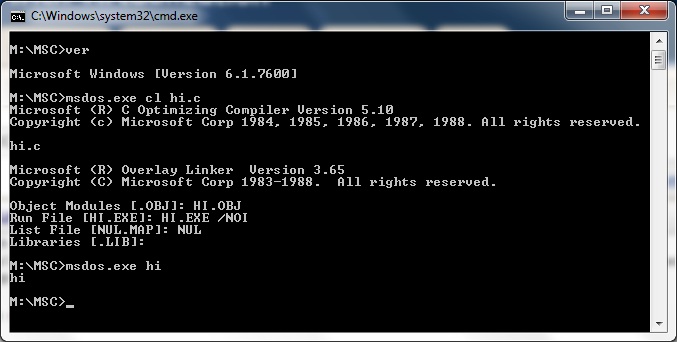
MS-DOS Player running Microsoft C 5.1
Check it out!
The MS-DOS Player is similar in nature to DOSBox, except that it’s not interactive, but rather built for CLI batch based operation. The MS-DOS Player seems to have some 80286 capabilities, but it’s BIOS/DOS emulation doesn’t seem to have the protected mode interface to allow dos extenders to work.
It’s certainly great for people that still have ANCIENT cli based programs that you’d want to call & capture their output. This is a life saver for some of us that still rely on dbaseIII & some ancient i8085 micro controller.
*EDIT updates from the future
Well Looking back at this post, it really is a snapshot of life back in 2011. Since those many years later DPMI support was added, along with the ability to ‘bind’ old programs allowing you to have a ‘Win32/Win64’ native exe that’ll run the old program inside. This is incredibly valuable for ancient toolchains where the source was either lost, or never provided, but now you can run them! This saves things like the Nintendo toolchain, although you can cross build the compiler, and assembler as they are GNU standard, the linker is a special one that will output cartridge images. And now you can run the MS-DOS DPMI version under Win64. Awesome!
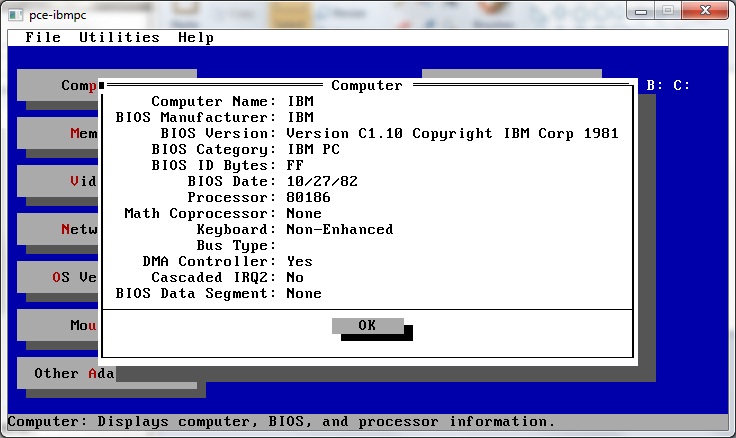
I came across this PC emulator, PCE, which is unique in that it can run IBM ROM’s. While it is limited to the original IBM PC, and XT, it’s still a good little emulator.
And perfect for super ancient touchy stuff…
Back on the heels of the 0.14.0 rc0 release, it’s rc1!
Still nothing on the official changelog…
Also I ran into this snag while building under windows..
LINK i386-softmmu/qemu.exe
../qemu-timer.o: In function `host_alarm_handler’:
C:/msys/1.0/src/qemu-0.14.0-rc1/qemu-timer.c:188: undefined reference to `qemu_next_alarm_deadline’
I moved the “#ifndef _WIN32” below the definition of `qemu_next_alarm_deadline’, and all was well.
So here is the x86, x86_x64 build, what 99% of you want. And here is the RISC version for the 0.01%.
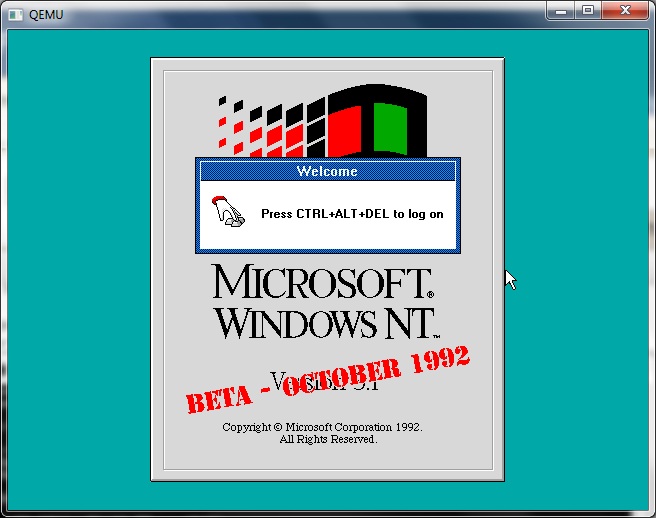
Qemu 0.14.0 rc1 and Windows NT October 1992
I know this may not look like much, or seem different from much of any version of Qemu but it’s 0.14.0 rc!!!!
Whoa I didn’t see that coming along so quick…
I was anxiously awaiting some VM/386 diskettes I ordered from Amazon to show up.
The main changelog hasn’t been updated since 0.12.5 so I really don’t know what to expect in this release.
One thing that is new, is QMP, the The QEMU Monitor Protocol.
Another interesting thing at a glance, is that 0.14 seems to have far more modes for the i386-softmmu..
pc Standard PC (alias of pc-0.14)
pc-0.14 Standard PC (default)
pc-0.13 Standard PC
pc-0.12 Standard PC
pc-0.11 Standard PC, qemu 0.11
pc-0.10 Standard PC, qemu 0.10
isapc ISA-only PC
The NE2000 still has a conflict on 0x300 IRQ 9, so removing it from hw/pc.c will allow the ISA NE2000 to function…
I also see the addition of the Intel HD Audio Controller, or hda, not to be confused with the first hard disk.
So for those of you who wish to give it a shot, here is the x86/x86_64 only version (what 99% of you want), and for the 1% crowd, the ‘other’ version which has all the OTHER cpu’s (mips,m68k,sh4,ppc).
And for some shameless google juice, here is the options for the new version of qemu-i386softmmu:
QEMU emulator version 0.13.90, Copyright (c) 2003-2008 Fabrice Bellard
usage: qemu [options] [disk_image]‘disk_image’ is a raw hard disk image for IDE hard disk 0
Standard options:
-h or -help display this help and exit
-version display version information and exit
-M machine select emulated machine (-M ? for list)
-cpu cpu select CPU (-cpu ? for list)
-smp n[,maxcpus=cpus][,cores=cores][,threads=threads][,sockets=sockets]
set the number of CPUs to ‘n’ [default=1]
maxcpus= maximum number of total cpus, including
offline CPUs for hotplug, etc
cores= number of CPU cores on one socket
threads= number of threads on one CPU core
sockets= number of discrete sockets in the system
-numa node[,mem=size][,cpus=cpu[-cpu]][,nodeid=node]
-fda/-fdb file use ‘file’ as floppy disk 0/1 image
-hda/-hdb file use ‘file’ as IDE hard disk 0/1 image
-hdc/-hdd file use ‘file’ as IDE hard disk 2/3 image
-cdrom file use ‘file’ as IDE cdrom image (cdrom is ide1 master)
-drive [file=file][,if=type][,bus=n][,unit=m][,media=d][,index=i]
[,cyls=c,heads=h,secs=s[,trans=t]][,snapshot=on|off]
[,cache=writethrough|writeback|none|unsafe][,format=f]
[,serial=s][,addr=A][,id=name][,aio=threads|native]
[,readonly=on|off]
use ‘file’ as a drive image
-set group.id.arg=value
setparameter for item of type
i.e. -set drive.$id.file=/path/to/image
-global driver.property=value
set a global default for a driver property
-mtdblock file use ‘file’ as on-board Flash memory image
-sd file use ‘file’ as SecureDigital card image
-pflash file use ‘file’ as a parallel flash image
-boot [order=drives][,once=drives][,menu=on|off]
‘drives’: floppy (a), hard disk (c), CD-ROM (d), network (n)
-snapshot write to temporary files instead of disk image files
-m megs set virtual RAM size to megs MB [default=128]
-mem-path FILE provide backing storage for guest RAM
-k language use keyboard layout (for example ‘fr’ for French)
-audio-help print list of audio drivers and their options
-soundhw c1,… enable audio support
and only specified sound cards (comma separated list)
use -soundhw ? to get the list of supported cards
use -soundhw all to enable all of them
-usb enable the USB driver (will be the default soon)
-usbdevice name add the host or guest USB device ‘name’
-device driver[,prop[=value][,…]]
add device (based on driver)
prop=value,… sets driver properties
use -device ? to print all possible drivers
use -device driver,? to print all possible properties
File system options:
-fsdev local,id=id,path=path,security_model=[mapped|passthrough|none]
Virtual File system pass-through options:
-virtfs local,path=path,mount_tag=tag,security_model=[mapped|passthrough|none]-name string1[,process=string2]
set the name of the guest
string1 sets the window title and string2 the process name (on Linux)
-uuid %08x-%04x-%04x-%04x-%012x
specify machine UUIDDisplay options:
-nographic disable graphical output and redirect serial I/Os to console
-no-frame open SDL window without a frame and window decorations
-alt-grab use Ctrl-Alt-Shift to grab mouse (instead of Ctrl-Alt)
-ctrl-grab use Right-Ctrl to grab mouse (instead of Ctrl-Alt)
-no-quit disable SDL window close capability
-sdl enable SDL
-spiceenable spice
-portrait rotate graphical output 90 deg left (only PXA LCD)
-vga [std|cirrus|vmware|qxl|xenfb|none]
select video card type
-full-screen start in full screen
-g WxH[xDEPTH] Set the initial graphical resolution and depth
-vnc display start a VNC server on display1 target only:
-win2k-hack use it when installing Windows 2000 to avoid a disk full bug
-no-fd-bootchk disable boot signature checking for floppy disks
-no-acpi disable ACPI
-no-hpet disable HPET
-balloon none disable balloon device
-balloon virtio[,addr=str]
enable virtio balloon device (default)
-acpitable [sig=str][,rev=n][,oem_id=str][,oem_table_id=str][,oem_rev=n][,asl_co
mpiler_id=str][,asl_compiler_rev=n][,data=file1[:file2]…]
ACPI table description
-smbios file=binary
load SMBIOS entry from binary file
-smbios type=0[,vendor=str][,version=str][,date=str][,release=%d.%d]
specify SMBIOS type 0 fields
-smbios type=1[,manufacturer=str][,product=str][,version=str][,serial=str]
[,uuid=uuid][,sku=str][,family=str]
specify SMBIOS type 1 fieldsNetwork options:
-net nic[,vlan=n][,macaddr=mac][,model=type][,name=str][,addr=str][,vectors=v]
create a new Network Interface Card and connect it to VLAN ‘n’
-net user[,vlan=n][,name=str][,net=addr[/mask]][,host=addr][,restrict=y|n]
[,hostname=host][,dhcpstart=addr][,dns=addr][,tftp=dir][,bootfile=f]
[,hostfwd=rule][,guestfwd=rule] connect the user mode ne
twork stack to VLAN ‘n’, configure its
DHCP server and enabled optional services
-net tap[,vlan=n][,name=str],ifname=name
connect the host TAP network interface to VLAN ‘n’
-net socket[,vlan=n][,name=str][,fd=h][,listen=[host]:port][,connect=host:port]
connect the vlan ‘n’ to another VLAN using a socket connection
-net socket[,vlan=n][,name=str][,fd=h][,mcast=maddr:port[,localaddr=addr]]
connect the vlan ‘n’ to multicast maddr and port
use ‘localaddr=addr’ to specify the host address to send packets
from
-net dump[,vlan=n][,file=f][,len=n]
dump traffic on vlan ‘n’ to file ‘f’ (max n bytes per packet)
-net none use it alone to have zero network devices. If no -net option
is provided, the default is ‘-net nic -net user’
-netdev [user|tap|socket],id=str[,option][,option][,…]Character device options:
-chardev null,id=id[,mux=on|off]
-chardev socket,id=id[,host=host],port=host[,to=to][,ipv4][,ipv6][,nodelay]
[,server][,nowait][,telnet][,mux=on|off] (tcp)
-chardev socket,id=id,path=path[,server][,nowait][,telnet],[mux=on|off] (unix)
-chardev udp,id=id[,host=host],port=port[,localaddr=localaddr]
[,localport=localport][,ipv4][,ipv6][,mux=on|off]
-chardev msmouse,id=id[,mux=on|off]
-chardev vc,id=id[[,width=width][,height=height]][[,cols=cols][,rows=rows]]
[,mux=on|off]
-chardev file,id=id,path=path[,mux=on|off]
-chardev pipe,id=id,path=path[,mux=on|off]
-chardev console,id=id[,mux=on|off]
-chardev serial,id=id,path=path[,mux=on|off]Bluetooth(R) options:
-bt hci,null dumb bluetooth HCI – doesn’t respond to commands
-bt hci,host[:id]
use host’s HCI with the given name
-bt hci[,vlan=n]
emulate a standard HCI in virtual scatternet ‘n’
-bt vhci[,vlan=n]
add host computer to virtual scatternet ‘n’ using VHCI
-bt device:dev[,vlan=n]
emulate a bluetooth device ‘dev’ in scatternet ‘n’Linux/Multiboot boot specific:
-kernel bzImage use ‘bzImage’ as kernel image
-append cmdline use ‘cmdline’ as kernel command line
-initrd file use ‘file’ as initial ram diskDebug/Expert options:
-serial dev redirect the serial port to char device ‘dev’
-parallel dev redirect the parallel port to char device ‘dev’
-monitor dev redirect the monitor to char device ‘dev’
-qmp dev like -monitor but opens in ‘control’ mode
-mon chardev=[name][,mode=readline|control][,default]
-debugcon dev redirect the debug console to char device ‘dev’
-pidfile file write PID to ‘file’
-singlestep always run in singlestep mode
-S freeze CPU at startup (use ‘c’ to start execution)
-gdb dev wait for gdb connection on ‘dev’
-s shorthand for -gdb tcp::1234
-d item1,… output log to /tmp/qemu.log (use -d ? for a list of log items)
-hdachs c,h,s[,t]
force hard disk 0 physical geometry and the optional BIOS
translation (t=none or lba) (usually qemu can guess them)
-L path set the directory for the BIOS, VGA BIOS and keymaps
-bios file set the filename for the BIOS
-enable-kvm enable KVM full virtualization support
-xen-domid id specify xen guest domain id
-xen-create create domain using xen hypercalls, bypassing xend
warning: should not be used when xend is in use
-xen-attach attach to existing xen domain
xend will use this when starting qemu
-no-reboot exit instead of rebooting
-no-shutdown stop before shutdown
-loadvm [tag|id]
start right away with a saved state (loadvm in monitor)
-option-rom rom load a file, rom, into the option ROM space
-clock force the use of the given methods for timer alarm.
To see what timers are available use -clock ?
-rtc [base=utc|localtime|date][,clock=host|vm][,driftfix=none|slew]
set the RTC base and clock, enable drift fix for clock ticks (x86 only)
-icount [N|auto]
enable virtual instruction counter with 2^N clock ticks per
instruction
-watchdog i6300esb|ib700
enable virtual hardware watchdog [default=none]
-watchdog-action reset|shutdown|poweroff|pause|debug|none
action when watchdog fires [default=reset]
-echr chr set terminal escape character instead of ctrl-a
-virtioconsole c
set virtio console
-show-cursor show cursor
-tb-size n set TB size
-incoming p prepare for incoming migration, listen on port p
-nodefaults don’t create default devices
-prom-env variable=value
set OpenBIOS nvram variables
-semihosting semihosting mode
-old-param old param mode
-readconfig
-writeconfig
read/write config file
-nodefconfig
do not load default config files at startupDuring emulation, the following keys are useful:
ctrl-alt-f toggle full screen
ctrl-alt-n switch to virtual console ‘n’
ctrl-alt toggle mouse and keyboard grabWhen using -nographic, press ‘ctrl-a h’ to get some help.
And because some people wanted it, here is *every* version of qemu I’ve found… in source!