Building Linux 0.11 on Windows 10

No really, it compiles! on Windows!

No really, it compiles! on Windows!

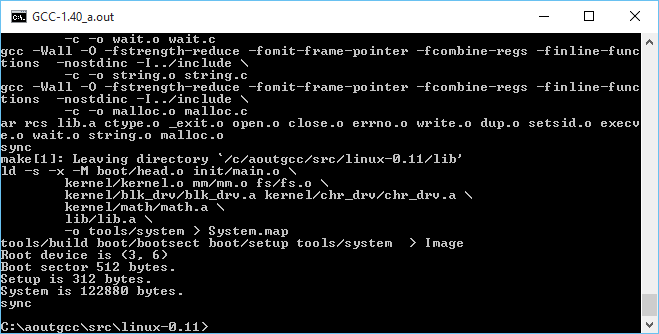
So continuing with the fun from yesterday, where I had managed to get gcc 1.40 running on Windows with MinGW, it was time to try to take the final leap and build Linux.

There wasn’t too much to massage on Linux, mostly Makefiles for the various tool name differences, and how to handle keyboard.S as the default setup for NTFS is case insensitivity. While I did get some old version of as16 and ld16 to build, I’m not sure if they are working correctly. Or it could be the ‘build’ tool. The downside is that the final ‘Image’ file produced doesn’t work (I should add that all issues have since been fixed, and it is now possible to cross compile a running kernel from Windows, and boot it with Qemu).

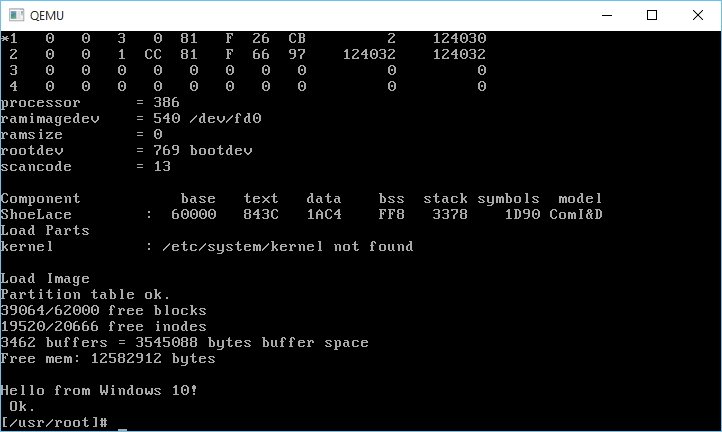
But copying the ‘system’ file that is compiled on Windows, to a Linux VM, and having it do the boot setup does work!

And it boots!

And it boots!

Very cool to say the least!

I almost wonder if MSVC 1.0 could build any of this. Then it could be possible to bootstrap Linux from Windows NT 3.1 … Although Windows 10 is good enough for me, right now.

And I got the DJGPP 1.0 gcc driver to work (soft of)!

C:\aoutgcc\test>gcc -v hello.c -o hello -I ../include-0.12 -L../lib
gcc version 1.40
cpp -v -I ../include-0.12 -undef -D__GNUC__ -Dunix -Di386 -D__unix__ -D__i386__ hello.c C:/Users/neozeed/AppData/Local/Temp/cca0_388.cpp
GNU CPP version 1.40
cc1 C:/Users/neozeed/AppData/Local/Temp/cca0_388.cpp -quiet -dumpbase hello.c -version -o C:/Users/neozeed/AppData/Local/Temp/cca0_388.s
GNU C version 1.40 (80386, BSD syntax) compiled by GNU C version 5.1.0.
default target switches: -m80387
a386 -o hello.o C:/Users/neozeed/AppData/Local/Temp/cca0_388.s
ld -o hello c:/aoutgcc/lib/crt0.o -L../lib hello.o c:/aoutgcc/lib/gnulib -lc c:/aoutgcc/lib/gnulib

Sorry that doesn’t format so well on a blog. But now I only have to force the include path, and the lib directory. At this point I’d call it ‘good enough’

I uploaded the archive MinGW-aout-linux-011.7z. If you want to compile Linux, you’ll need a MSYS from MinGW. Otherwise, this is only interesting to people who run Windows and want to play with Linux 0.11. Â I also included the Linux VM, and binaries for the tools. It’s not even 7MB. How is that for crazy small?

** EDIT

I got it all working now that I found all the portions to set to output as O_BINARY/wb that are needed on a Win32 host, so using MinGW I can build the as86/ld86/binutils/gcc and Linux 0.11!

My updated post is here.

Also I put all the source onto git, along with binaries up on sourceforge. It’s worth mentioning that since I wrote this article, I have gotten quite a number of older versions of Linux to build, along with simple kernel debugging with GDB. Kernels include:

Download Ancient Linux on Windows

Download Ancient Linux on Windows

Qemu 2.4.0.1 binaries for Windows

So here is my cross compiled Qemu binaries for Windows.

I added in my Control+Alt+d ‘fix’ to be a Control+Alt+Delete that anyone who runs Windows NT or MS-DOS will no doubt love.  The kbd_put_keycode function had been removed, so I also put that back in.

I also undid the weird scaling thing that has been around since version 1.1.  And I tried my best to merge in some NE2000 fixes.

Solaris 9

Solaris 9

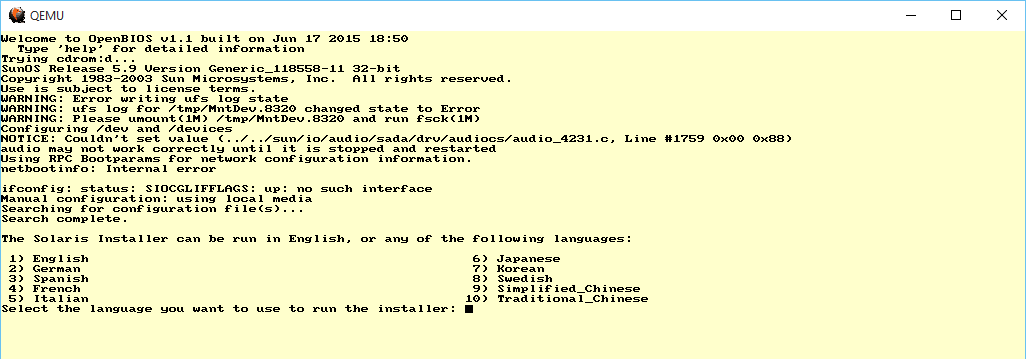
I threw a Solaris 9 ISO at it, and it booted up to the text installer!

asd

MIPS ARC

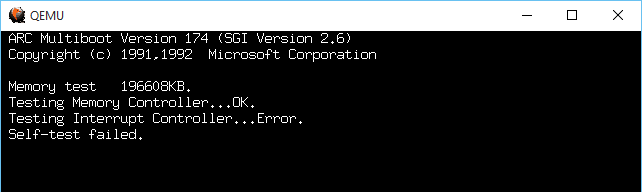
The MIPS ARC firmware however always bombs out on reset with an Interrupt Controller Error.

I tried the ‘doom’ test, and installing DooM 1.1 took FOREVER.  Writing to the disk is slow. Incredibly slow. I guess forcing the write thru cache is mandatory?

-drive file=bla.disk,if=ide,index=0,media=disk,cache=writethrough

I haven’t tested.

Also DO NOT USE THE PCSPEAKER DEVICE.

I nearly went deaf.  It doesn’t work properly, but rather loops so that one beep turns into a hurricane of beeps.

I’ve included the needed DLL’s, and compiled everything I could statically.  I guess I could have fought more but I have other things to do.

So the ‘cut down’ version which is i386/x86_64 only is HERE.

Those who want to try out the various RISC processors download the ‘full’ package HERE.

Building MinGW32 Qemu on Linux (or anything else I guess)

So as always it’s the glibc2 wars.  And as part of the fun you need pkg-config.  And since it has to run, you’ll end up with the native version.

Luckily I found this site, mega-nerd.com

So you can create a i586-mingw32msvc-pkg-config file.  Just in case it get's lost here it is:

#!/bin/bash

# This file has no copyright assigned and is placed in the Public Domain.
# No warranty is given.

# When using the mingw32msvc cross compiler tools, the native Linux
# pkg-config executable works fine as long as the default PKG_CONFIG_LIBDIR
# is overridden.
export PKG_CONFIG_LIBDIR=/usr/i586-mingw32msvc/lib/pkgconfig

# Also want to override the standard user defined PKG_CONFIG_PATH with
# a mingw32msvc specific one.
export PKG_CONFIG_PATH=$PKG_CONFIG_PATH_MINGW32MSVC

# Now just execute pkg-config with the given command line args.
pkg-config $@

Fun as always, right?

And as always Qemu can be configured with:

configure --cross-prefix=i586-mingw32msvc-

When cross compiling.

GSOC bringing MacOS 9 to Qemu

It's some progress!

It’s some progress!

I know it may not look like much right now, but Cormac O’Brien is working on bringing MacOS 9 support to Qemu!  This is really great news as Sheepshaver has painted itself in a corner with it’s CPU code that requires memory access to 0x00000000 which more and more operating systems deny.

So you can download the snap and follow the instructions here. And you too can watch it fail.

Screen Shot 2015-07-20 at 9.57.16 AM

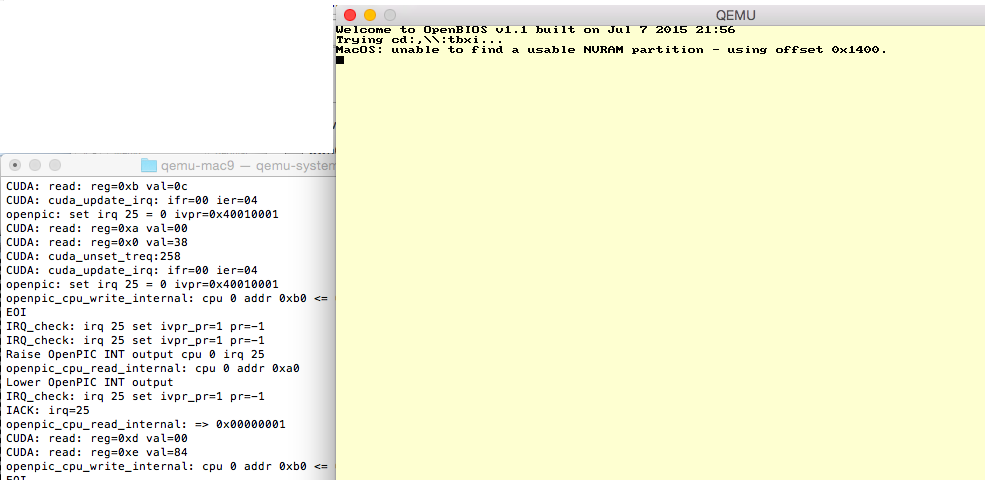
Starting to boot

During the boot you’ll see a message from MacOS on the CLI that it is unable to find a NVRAM partition.  During this time you will either see a bunch of CUDA and IRQ messages, and there is a good chance from here it’ll progress to loading the New World ROM.  If it gets stuck you’ll see tonnes of the following messages:

CUDA: read: reg=0xd val=00
CUDA: read: reg=0x0 val=30
CUDA: read: reg=0xd val=00
CUDA: read: reg=0x0 val=30

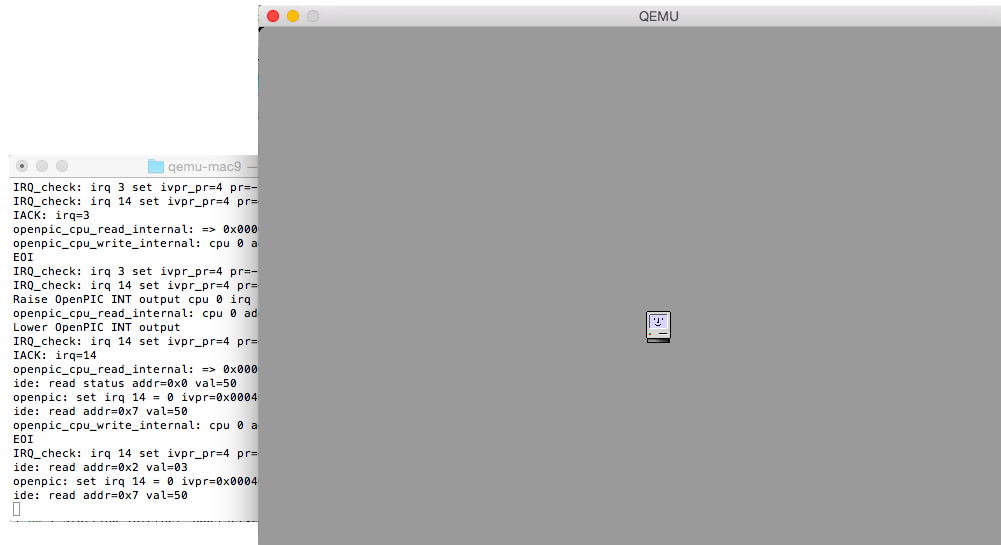
From here the screen should turn grey, and again it may or may not go to a happy mac, or again get stuck on the CUDA read 30/00 thing above.

New World ROM loaded

New World ROM loaded

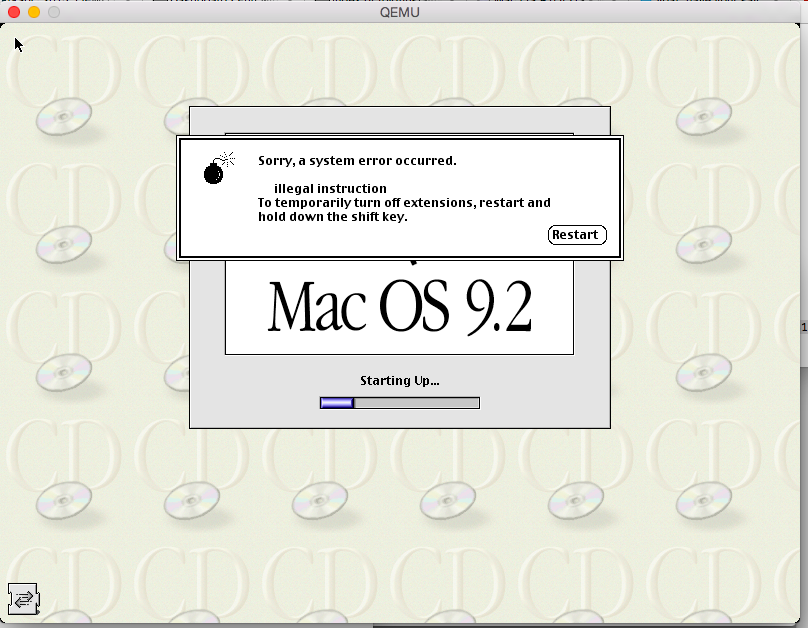
Once it goes New World happy mac, it’ll load MacOS then bomb over one of the extensions.

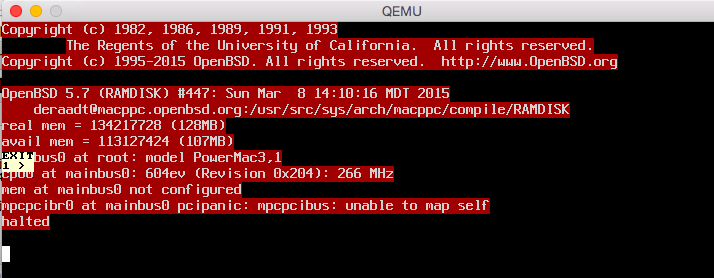
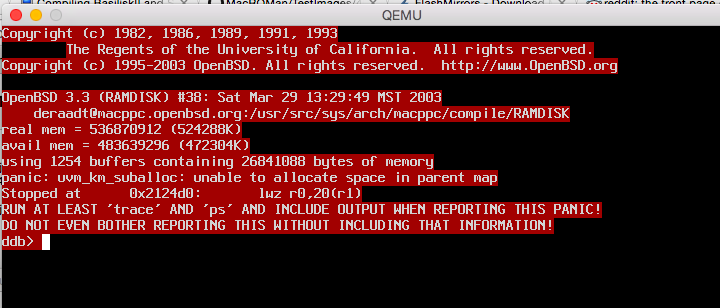
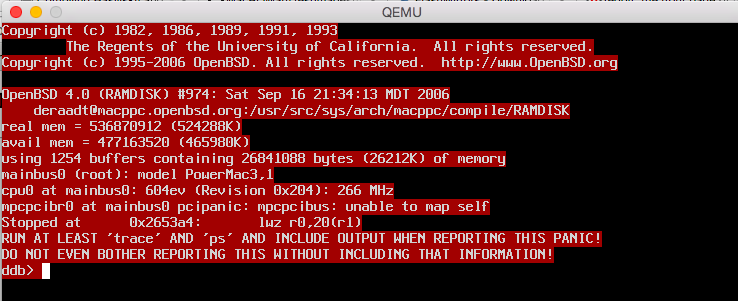
I tried some OpenBSD for the heck of it, the good news is the kernel loads and starts the boot, but it has some issues with either memory or mapping the PCI bus.

Screen Shot 2015-07-19 at 6.03.43 PM

OpenBSD 5.7

Screen Shot 2015-07-19 at 6.08.31 PM

OpenBSD 3.3

Screen Shot 2015-07-19 at 6.16.02 PM

OpenBSD 4.0

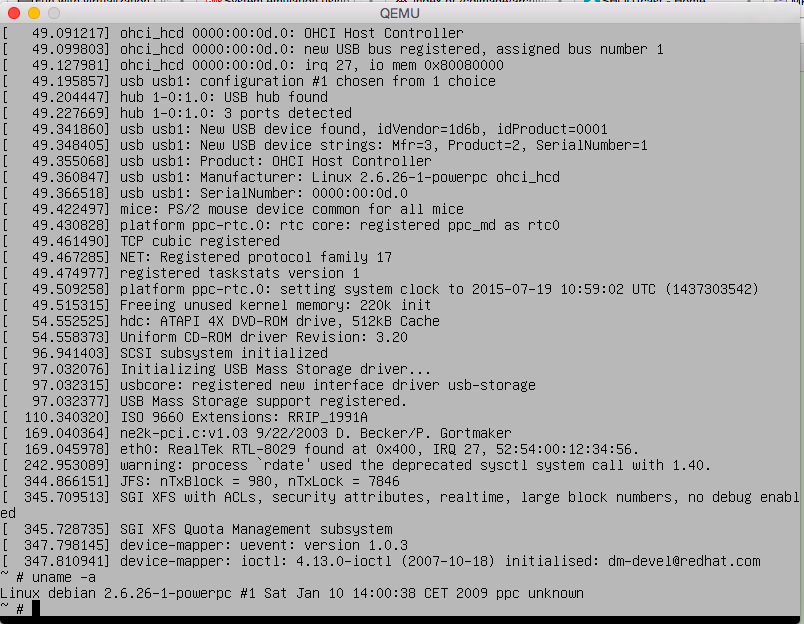
And for the heck of it, Debian 5.0.0

Debian 5.0.0 installer

Debian 5.0.0 installer

I didn’t bother installing but nice to see the installer CD runs fine.

All aboard the VENOM hype train!

So here we go, another time for another major security threat, and this time it’s the “VIRTUALIZED ENVIRONMENT NEGLECTED OPERATIONS MANIPULATION” aka VENOM attack.  Yes it has a website, and even a logo! (Creative Commons Attribution-ShareAlike 4.0 International License)

Look at me!

Look at me!

So what is all the fuss about?  Well if you can compromise a Xen, or KVM (and QEMU) VM to run code that bangs against the floppy controller it can have a buffer overflow exploit.

fantastic.

But, I know what you are thinking, most people who KVM use guest OSs that either don’t have floppy drivers, or even explicitly disable the floppy controller.  And from the site:

an unrelated bug causes the vulnerable FDC code to remain active and exploitable by attackers.

Oops.

But let’s calm down, first the attacker has to get root level on the VM before they can think about doing anything.  Of course this is a BIG problem for VM resellers.  Hopefully the patches will be available quickly, and they will be moderately disruptive, especially for those of us who still use virtual floppies.

The source patch has been released on the Qemu mailing list right here.

Qemu 2.3.0 released!

While trying to build on OS X there is some errors with building pixman
Undefined symbols for architecture x86_64:

“_prng_state”, referenced from:
_main in region-test.o
“_prng_state_data”, referenced from:
_main in region-test.o

But these are some ‘test’ programs that we really don’t need or care about.  A quick way to get it to bypass these is to run

touch /pixman/test/region-test
touch /pixman/test/scaling-helpers-test

And now it’ll compile, link and everything!

DOOM!

DOOM!

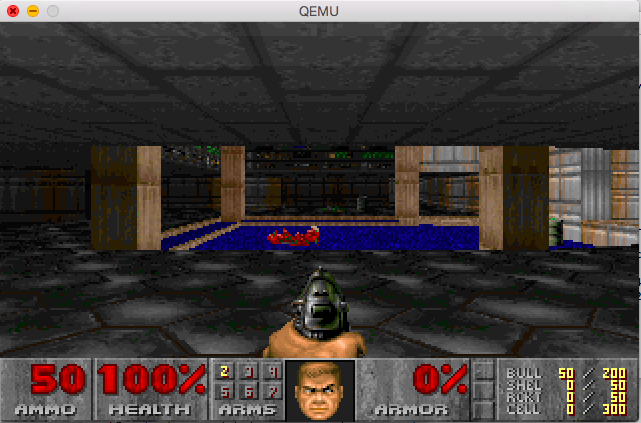
And yes, it’ll run DOOM.  Although on my 2012 MacBook Air, it’s VERY slow.  But at least the audio works.

From the source code…

DEFINE_PROP_UINT32 (“iobase”, SB16State, port, 0x220),
DEFINE_PROP_UINT32 (“irq”, SB16State, irq, 5),
DEFINE_PROP_UINT32 (“dma”, SB16State, dma, 1),
DEFINE_PROP_UINT32 (“dma16”, SB16State, hdma, 5),

So for MS-DOS be sure to set the BLASTER environment variable to:

SET BLASTER=A220 I5 D1 H5 P330 T6

From the source, in case anyone cares anymore about how to run MS-DOS soundblaster stuff in Qemu.  For any OS X users, you can find my binaries here.

And to run DOOM it’s something like this (once you’ve installed MS-DOS and DOOM itself!)

./qemu-system-i386 -L pc-bios -m 16 -soundhw sb16,adlib,pcspk -hda i/doom.vmdk

Getting Qemu’s NetWare 3.12 onto the LAN with Tun/Tap

I could also call this ‘going with the flow’… So instead of fighting the system, like I usually do today we are going to do things the way everyone else enjoys doing things, and that is building stuff with tun/tap and bridges.

YUCK.

Ok, so I’m using Windows, and that is what I’m assuming you are as well for this ‘guide’.

The first thing you’ll need is the tun/tap driver for Windows, and the easiest way to get that is via OpenVPN.  The next thing you’ll need is Qemu, again I’m just using the pre-compiled stuff right here.

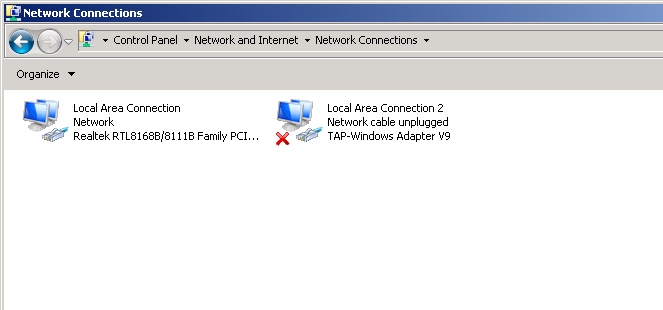
Go ahead, and install them both.  With OpenVPN installed, when you open your control panel, and check out your network interfaces you’ll see something like this:

One NIC, One Tap

One NIC, One Tap

Good.

Now for my example, I’m going to add another TAP interface.  TAP’s are only good for a 1:1 relationship with the VMs.  Yes, that is why I prefer something else, but again we are going to do things today the way everyone else does them.

Now for me, I run the ‘addtap’ batch file located in the C:\Program Files\TAP-Windows\bin folder as Administrator, and this now gives me two TAP adapters.  I highly recommend disabling TCP/IP v4 and v6 on the TAP adapters, along with the MS client/server stuff.  We are only using these for bridging the VMs so we dont’ need the host computer to participate in this network.

Now for the fun part.  I’m assuming you have your NetWare server and client images all ready to go (I guess I can go over installation again some other day), and now we get to bind each one to a SINGLE TAP instance.  Also don’t forget that each machine needs a UNIQUE MAC address.  One of them can use the default settings, but the other one cannot.

I’m going to start my server like this:

\Progra~1\qemu\qemu-system-i386.exe -m 16 -hda netware312.disk -device ne2k_isa,netdev=usernet,mac=52:43:aa:00:00:11,irq=10,iobase=0x300 -netdev “tap,ifname=Local Area Connection 2,id=usernet”

As you can see, this gives me a NE2000 on port 0x300, IRQ 10 and sets the MAC address to 52:43:aa:00:00:11 .  And this sets it on the first TAP adapter, lovingly called “Local Area Connection 2″ because the primary adapter is called “Local Area Connection“.  Also take note of the quotes in this command line, as it’ll encapsulate the full default name of the TAP adapter.  The other alternative is to just rename the adapters, but where is the fun in that?

Now for my client:

\Program Files\qemu\qemu-system-i386.exe” -m 16 -hda client.disk -soundhw sb16,adlib,pcspk -device ne2k_isa,irq=10,iobase=0x300,netdev=usernet -netdev “tap,ifname=Local Area Connection 3,id=usernet”

As you can see the primary difference here is that it’s connected to “Local Area Connection 3” which is my second TAP interface.

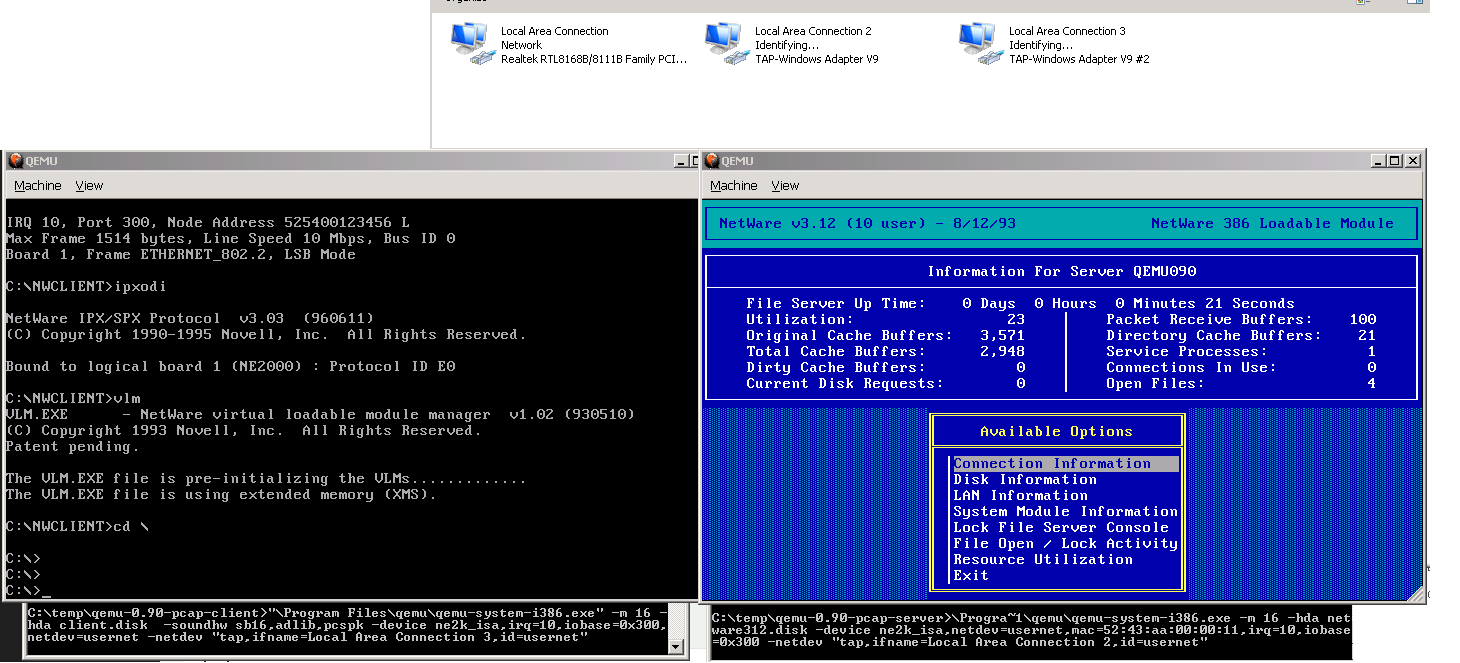
Now with both virtual machines running the interfaces will turn on!

But as you’ll quickly discover, neither machine can talk to each-other, as they are islands so to speak.

Two virtual machines on islands.

Two virtual machines on islands.

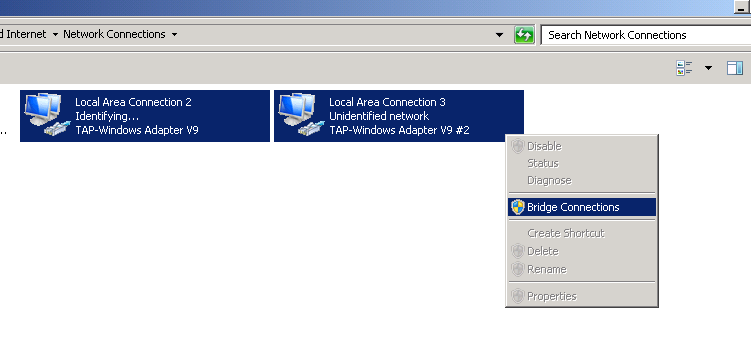
Now for the fun part, we highlight the two TAP interfaces, right click, and turn on the built in bridge function of Windows!

highlight and select

highlight and select

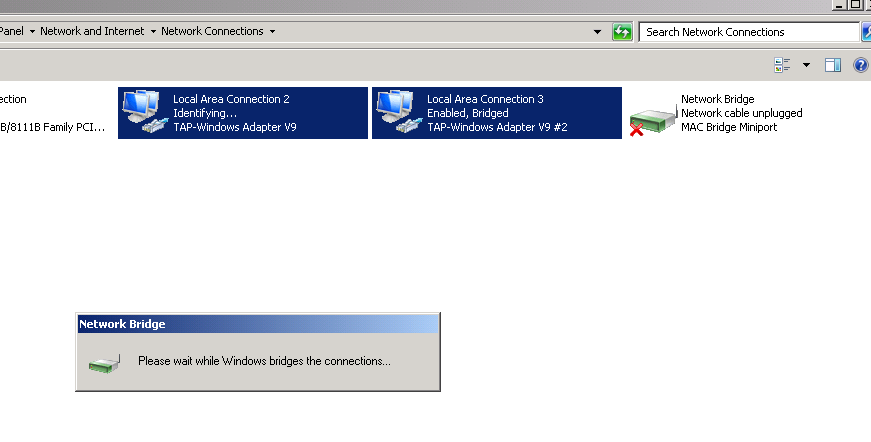
And once that is done, a new Network Bridge interface will show up, transfer what layer 3 settings there are, and then setup the layer 2 bridge between the TAP interfaces.

Bridge activating...

Bridge activating…

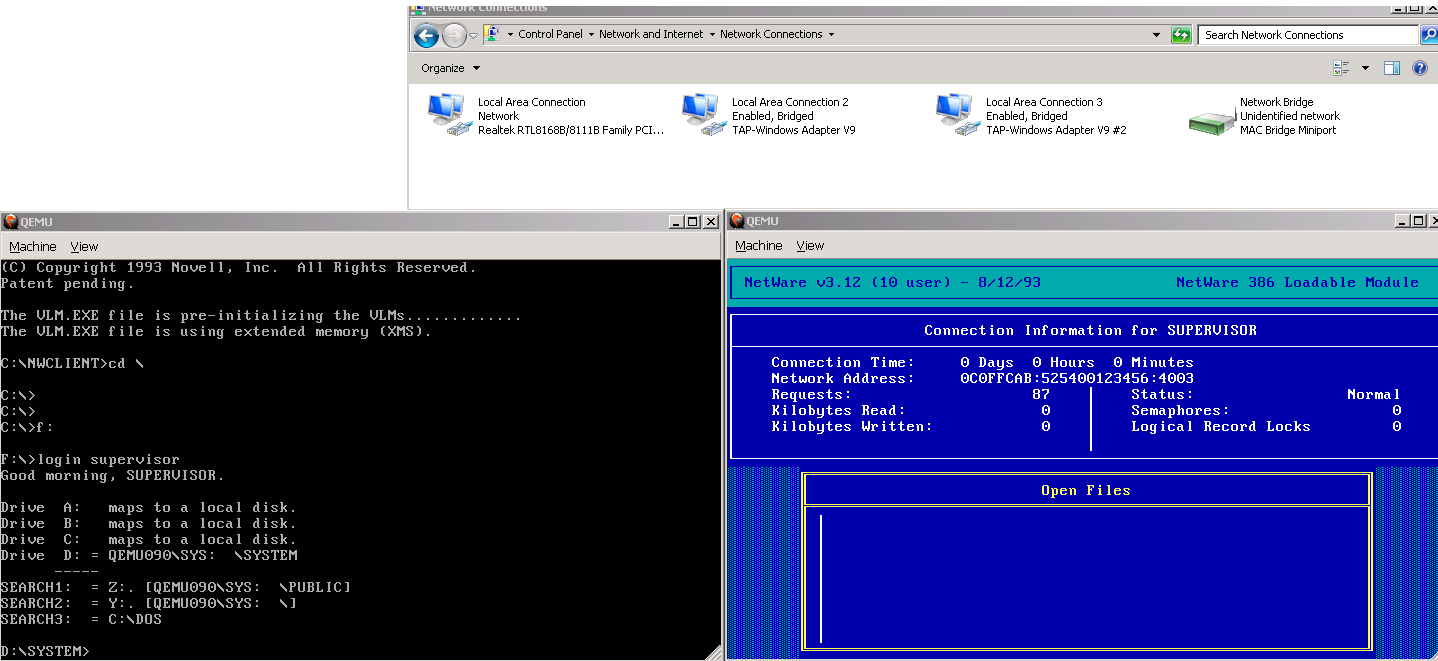
And once the bridge interface has gone live, give spanning tree 15 seconds to do it’s thing, and YES you can now login to the NetWare server!

Logging in from the MS-DOS VM to the NetWare 3.12 VM

Logging in from the MS-DOS VM to the NetWare 3.12 VM

And there you go!  This is the ‘approved’ way to do virtual networking with Qemu.

Now I know what you are thinking, this is great for VM’s and all that jazz, but what if I say have an office FULL of old PC’s and I want them onto my new fangled ancient server?

No problem, right click on the bridge, and select delete.  This will put everything back the way it was, sending the VMs back to their own TAP interfaces.  Now select all the interfaces, and then setup a bridge (I suppose you could edit the existing one to include the physical interface…) and now once the bridge has been setup, it’ll now be talking out the local Ethernet interface.

One quick note, bridging and WiFi tend to not go hand in hand.  Some interfaces will work, but the rule seems to be the vast majority of setups will not.  So don’t complain if yours didn’t work, you are just part of the 99.99999%.  And if you did get yours to work, well good for you.

Novell Netware 3.12 once more runs on Qemu!

This version of Qemu seems to be one of the better ones in a LONG LONG time.

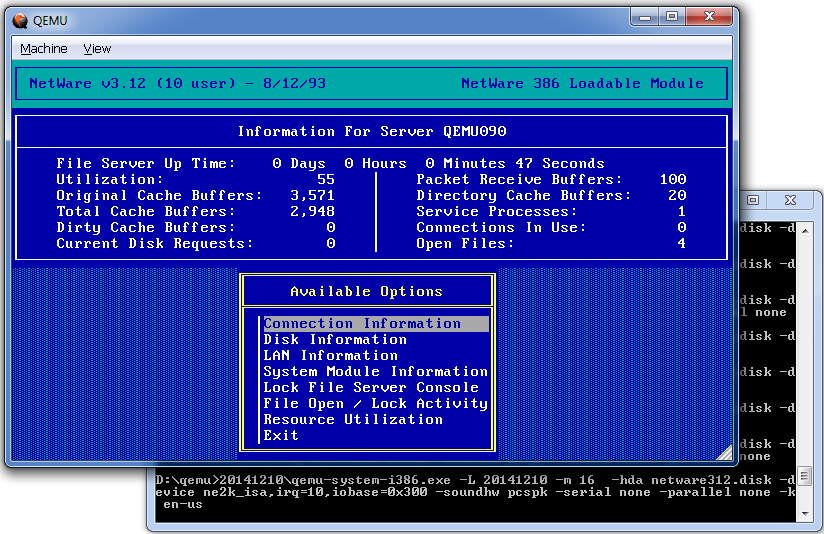
Netware 3.12

Netware 3.12

Much to my amazement, as I fully expected this to crash much like all the other versions, it actually runs.

qemu-system-i386.exe -m 16 -hda netware312.disk -device ne2k_isa,irq=10,iobase=0x300 -soundhw pcspk -serial none -parallel none -k en-us

I’m just more amazed it works.  Now I did try it on my old setup of a NE2000 on 0x300 Interrup 2/9 but I was getting some IRQ issues.  So I went ahead and reconfigured Netware for IRQ ‘A’, and set the CLI for 10. Of course I haven’t actually tested networking, this is really a ‘wow it did something’ statement.  No doubt I’ll have to build a new GNS3 test bed with this Qemu, and see how Netware performs.

OpenBSD 5.6 Sparc64 on Qemu

Well the good news is that like NetBSD the kernel boots.  The downside is that none of the network adapters I could think of work.  They are either ignored, or crash out the kernel.

OpenBIOS for Sparc64
Configuration device id QEMU version 1 machine id 0
kernel cmdline
CPUs: 1 x SUNW,UltraSPARC-IIi
UUID: 00000000-0000-0000-0000-000000000000
Welcome to OpenBIOS v1.1 built on Nov 15 2014 12:59
Type ‘help’ for detailed information
Trying cdrom:f…
Not a bootable ELF image
Not a bootable a.out image

Loading FCode image…
Loaded 4829 bytes
entry point is 0x4000
OpenBSD IEEE 1275 Bootblock 1.3
..
Jumping to entry point 0000000000100000 for type 0000000000000001…
switching to new context: entry point 0x100000 stack 0x00000000ffe8aa09
>> OpenBSD BOOT 1.6
Trying bsd…
open /pci@1fe,0/pci-ata@5/ide1@2200/cdrom@0:f/etc/random.seed: No such file or d
irectory
Booting /pci@1fe,0/pci-ata@5/ide1@2200/cdrom@0:f/bsd
3864176@0x1000000+2448@0x13af670+3261928@0x1800000+932376@0x1b1c5e8
symbols @ 0xffc5a300 119 start=0x1000000

Unexpected client interface exception: -1
console is /pci@1fe,0/ebus@3/su
Copyright (c) 1982, 1986, 1989, 1991, 1993
The Regents of the University of California. All rights reserved.
Copyright (c) 1995-2014 OpenBSD. All rights reserved. http://www.OpenBSD.org

OpenBSD 5.6 (RAMDISK) #178: Fri Aug 8 05:00:27 MDT 2014
[email protected]:/usr/src/sys/arch/sparc64/compile/RAMDISK
real mem = 2147483648 (2048MB)
avail mem = 2103877632 (2006MB)
mainbus0 at root: OpenBiosTeam,OpenBIOS
cpu0 at mainbus0: SUNW,UltraSPARC-IIi (rev 9.1) @ 100 MHz
cpu0: physical 256K instruction (64 b/l), 16K data (32 b/l), 256K external (64 b
/l)
psycho0 at mainbus0: SUNW,sabre, impl 0, version 0, ign 7c0
psycho0: bus range 0-2, PCI bus 0
psycho0: dvma map c0000000-dfffffff
pci0 at psycho0
ppb0 at pci0 dev 1 function 0 “Sun Simba” rev 0x11
pci1 at ppb0 bus 1
ppb1 at pci0 dev 1 function 1 “Sun Simba” rev 0x11
pci2 at ppb1 bus 2
unknown vendor 0x1234 product 0x1111 (class display subclass VGA, rev 0x02) at p
ci0 dev 2 function 0 not configured
ebus0 at pci0 dev 3 function 0 “Sun PCIO EBus2” rev 0x01
“fdthree” at ebus0 addr 0-ffffffff not configured
com0 at ebus0 addr 3f8-3ff ivec 0x2b: ns16550a, 16 byte fifo
com0: console
“kb_ps2” at ebus0 addr 60-67 not configured
“Realtek 8029” rev 0x00 at pci0 dev 4 function 0 not configured
pciide0 at pci0 dev 5 function 0 “CMD Technology PCI0646” rev 0x07: DMA, channel
0 configured to native-PCI, channel 1 configured to native-PCI
pciide0: using ivec 0x7d4 for native-PCI interrupt
pciide0: channel 0 disabled (no drives)
atapiscsi0 at pciide0 channel 1 drive 0
scsibus0 at atapiscsi0: 2 targets
cd0 at scsibus0 targ 0 lun 0: <QEMU, QEMU DVD-ROM, 2.2.> ATAPI 5/cdrom removable
cd0(pciide0:1:0): using PIO mode 4, Ultra-DMA mode 2
prtc0 at mainbus0
softraid0 at root
scsibus1 at softraid0: 256 targets
bootpath: /pci@1fe,0/pci-ata@5,0/ide1@2200,0/cdrom@0,0:f
root on rd0a swap on rd0b dump on rd0b
unix-gettod:interpret: exception -13 caught
interpret h# 01c099ec unix-gettod failed with error ffffffffffffffed
WARNING: bad date in battery clock — CHECK AND RESET THE DATE!
erase ^?, werase ^W, kill ^U, intr ^C, status ^T

Welcome to the OpenBSD/sparc64 5.6 installation program.
(I)nstall, (U)pgrade, (A)utoinstall or (S)hell?

(I)nstall, (U)pgrade, (A)utoinstall or (S)hell? (I)nstall, (U)pgrade, (A)utoinst
all or (S)hell? s

#

But it’s great it’s this close!

NetBSD 6.1.5 Sparc64 on Qemu

Yes, really!

I thought I’d try it for the heck of it, and it’s working enough to go multiuser, but it has some issues with hitting the disk & network pretty hard.  But it does let you install!

I just started it up like this:

qemu-system-sparc64.exe -cdrom NetBSD-6.1.5-sparc64.iso -net nic,model=ne2k_pci -net user -boot c -hda netbsd-615-sparc64.raw -nographic -serial mon:telnet:127.0.0.1:23,server,wait -m 2048 -boot d

And in no time I was booting up!

OpenBIOS for Sparc64
Configuration device id QEMU version 1 machine id 0
kernel cmdline
CPUs: 1 x SUNW,UltraSPARC-IIi
UUID: 00000000-0000-0000-0000-000000000000
Welcome to OpenBIOS v1.1 built on Nov 15 2014 12:59
Type ‘help’ for detailed information
Trying cdrom:f…
Not a bootable ELF image
Not a bootable a.out image

Loading FCode image…
Loaded 7478 bytes
entry point is 0x4000
NetBSD IEEE 1275 Multi-FS Bootblock
Version $NetBSD: bootblk.fth,v 1.13 2010/06/24 00:54:12 eeh Exp $
..
Jumping to entry point 0000000000100000 for type 0000000000000001…
switching to new context: entry point 0x100000 stack 0x00000000ffe8aa09
>> NetBSD/sparc64 OpenFirmware Boot, Revision 1.16
=0x8870a0
Loading netbsd: 8072208+553056+339856 [601032+393301]=0x9cd528
Unimplemented service set-symbol-lookup ([2] — [0])

Unexpected client interface exception: -1
Copyright (c) 1996, 1997, 1998, 1999, 2000, 2001, 2002, 2003, 2004, 2005,
2006, 2007, 2008, 2009, 2010, 2011, 2012
The NetBSD Foundation, Inc. All rights reserved.
Copyright (c) 1982, 1986, 1989, 1991, 1993
The Regents of the University of California. All rights reserved.

NetBSD 6.1.5 (GENERIC)
total memory = 2048 MB
avail memory = 1997 MB
mainbus0 (root): OpenBiosTeam,OpenBIOS: hostid 80123456
cpu0 at mainbus0: SUNW,UltraSPARC-IIi @ 100 MHz, UPA id 0
cpu0: 256K instruction (64 b/l), 16K data (32 b/l), 256K external (64 b/l)
psycho0 at mainbus0
psycho0: SUNW,sabre: impl 0, version 0: ign 7c0 bus range 0 to 2; PCI bus 0
pci0 at psycho0
ppb0 at pci0 dev 1 function 0: Sun Microsystems Simba PCI Bridge (rev. 0x11)
pci1 at ppb0 bus 1
ppb1 at pci0 dev 1 function 1: Sun Microsystems Simba PCI Bridge (rev. 0x11)
pci2 at ppb1 bus 2
genfb0 at pci0 dev 2 function 0: unmatched vendor 0x1234 product 0x1111 (rev. 0x02)
ebus0 at pci0 dev 3 function 0
ebus0: Sun Microsystems PCIO Ebus2, revision 0x01
fdthree at ebus0 addr 0-ffffffff not configured
com0 at ebus0 addr 3f8-3ff ipl 2b: ns16550a, working fifo
com0: console
kb_ps2 at ebus0 addr 60-67 not configured
ne0 at pci0 dev 4 function 0: Realtek 8029 Ethernet
ne0: Ethernet address 52:54:00:12:34:56
ne0: 10base2, 10baseT, 10baseT-FDX, auto, default [0x40 0x40] 10baseT-FDX
ne0: interrupting at ivec 3010
cmdide0 at pci0 dev 5 function 0: CMD Technology PCI0646 (rev. 0x07)
cmdide0: primary channel configured to native-PCI mode
cmdide0: using ivec 14 for native-PCI interrupt
atabus0 at cmdide0 channel 0
cmdide0: secondary channel configured to native-PCI mode
atabus1 at cmdide0 channel 1
NULL phandle
Unexpected client interface exception: -1
pcons at mainbus0 not configured
No counter-timer — using %tick at 100MHz as system clock.
wd0 at atabus0 drive 0
wd0: <QEMU HARDDISK>
wd0: 2048 MB, 4161 cyl, 16 head, 63 sec, 512 bytes/sect x 4194304 sectors
atapibus0 at atabus1: 2 targets
cd0 at atapibus0 drive 0: <QEMU DVD-ROM, QM00003, 2.2.50> cdrom removable
wd0: no disk label
wd0: no disk label
FATAL: boot device not found, check your firmware settings!
root device: cd0c
dump device (default cd0b):
file system (default generic):
root on cd0c dumps on cd0b
root file system type: cd9660
WARNING: no TOD clock present
WARNING: using default initial time
warning: no /dev/console
init path (default /sbin/init):
init: trying /sbin/init
Created tmpfs /dev (622592 byte, 1184 inodes)
init: kernel security level changed from 0 to 1

You are using a serial console, we do not know your terminal emulation.
Please select one, typical values are:

vt100
ansi
xterm

Terminal type (just hit ENTER for ‘vt220’): xterm

NetBSD/sparc64 6.1.5

This menu-driven tool is designed to help you install NetBSD to a hard disk,
or upgrade an existing NetBSD system, with a minimum of work.
In the following menus type the reference letter (a, b, c, …) to select an
item, or type CTRL+N/CTRL+P to select the next/previous item.
The arrow keys and Page-up/Page-down may also work.
Activate the current selection from the menu by typing the enter key.

┌─────────────────────────────────────────────┐
│>a: Installation messages in English │
│ b: Installation auf Deutsch │
│ c: Mensajes de instalacion en castellano │
│ d: Messages d’installation en français │
│ e: Komunikaty instalacyjne w jezyku polskim │
└─────────────────────────────────────────────┘

Wow, how’s that for cool?

A few notes though, if you use a VMDK disk access is dreadfully slow during the install, raw disk images are MUCH MUCH faster (36Kb/sec vs 3+MB/sec).  The kernel cannot figure out the root disk, so you have to tell it on every boot.  When installing it’s cd0c, when booting off the harddisk it’s wd0a. The e1000 adapter causes the kernel to go crazy, and on bootup the system indexes the man pages, which seems to kill the machine.

makemandb

makemandb indexing like crazy

As you can see this is what happens when you hit the disk too hard..

# dd if=/dev/wd0c of=/dev/null bs=1m
^Ccmdide0:0:0: lost interrupt
type: ata tc_bcount: 2048 tc_skip: 0
463+0 records in
463+0 records out
485490688 bytes transferred in 59.701 secs (8132036 bytes/sec)

and if you don’t incur the rage of the disk controller it’s the same speed:

# dd if=/dev/wd0c of=/dev/null bs=1m count=10
10+0 records in
10+0 records out
10485760 bytes transferred in 1.217 secs (8616072 bytes/sec)

But yeah, I can’t complain!