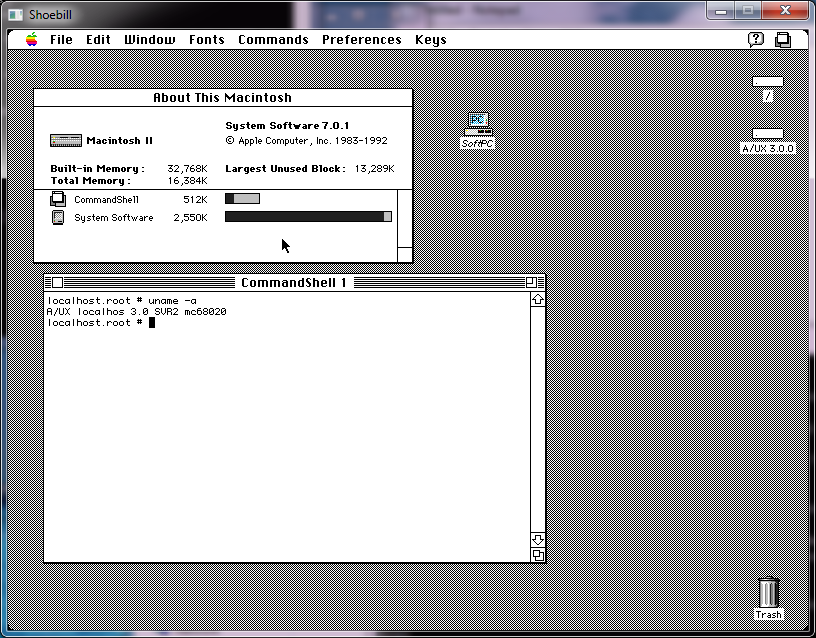
Announcing HECnetNT!

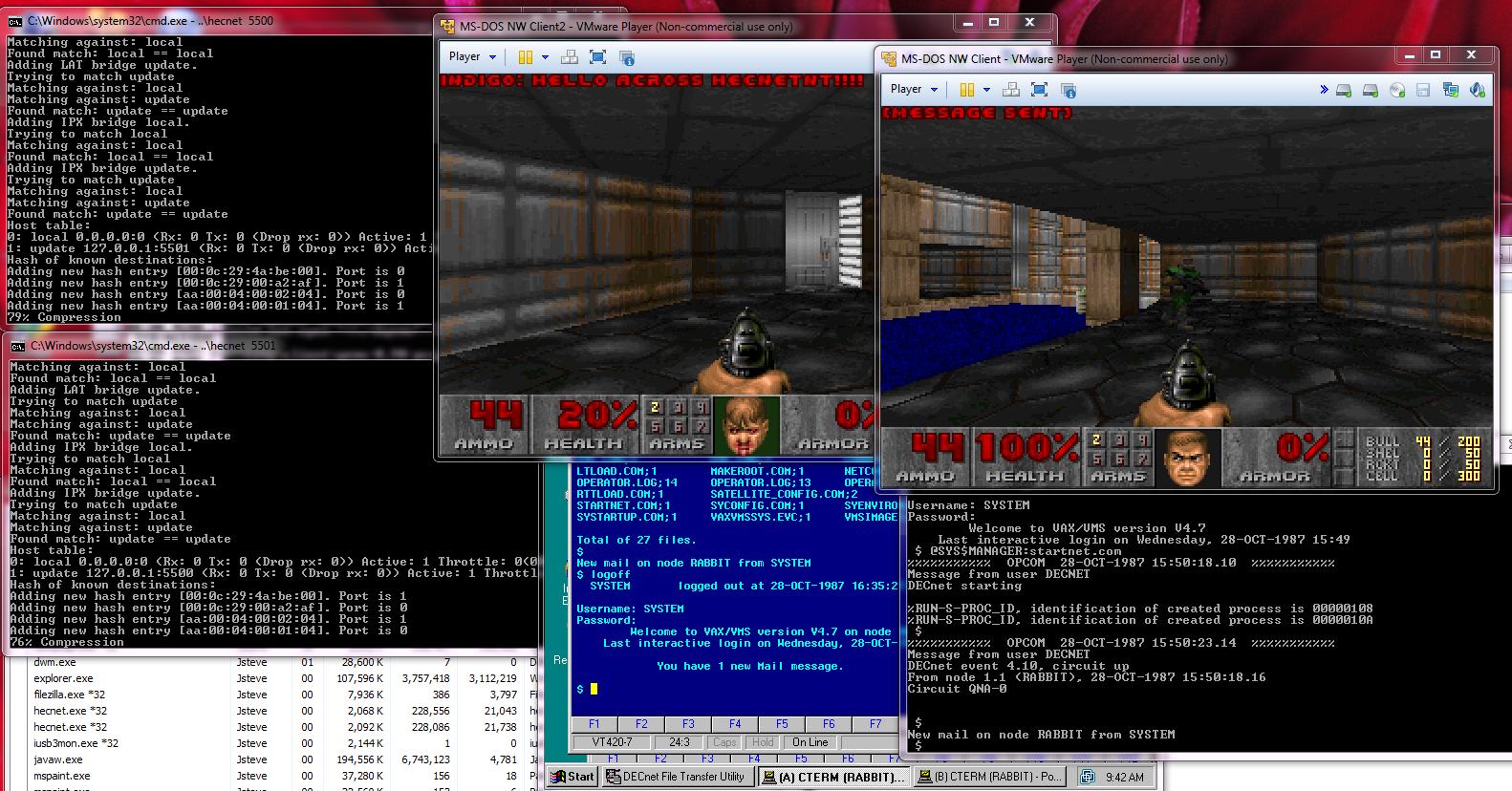
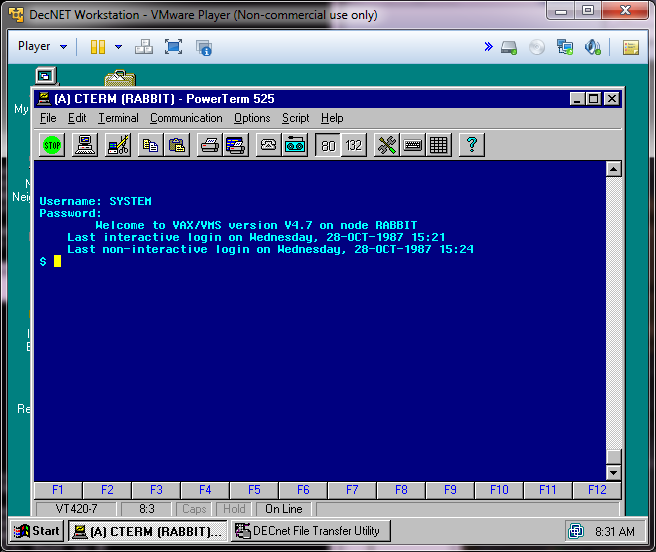
HECnetNT in action!

HECnetNT in action!

So I have my little project working well enough to let it out into the world.  I call it HECnetNT, and it’s available out on sourceforge.

It’s a port of  Johnny Billquist‘s bridge program to Windows.  This isn’t a MinGW or Cygwin build, but rather, a native build, compiled in Visual Studio 2003.  I’ve been able to run this build on NT 4.0, 2000 and Windows 7.

I also made some additions to the bridge program, by allowing it to bridge IPX/SPX Ethernet_II frames, so you can now build legacy networks that let you logon to NetWare servers, or even play those old IPX/SPX games.

Back when I first got DOOM v1.1 working on IPX/SPX I noticed that it sent an incredible amount of packets that were mostly empty.  To work around this, I incorporated LZSS to compress data between HECnetNT bridges.  Even better, I don’t see any significant CPU utilization, even with DOOM blasting packets like crazy!

The best part is that you can mix compressed & uncompressed bridges.  So you can have an uncompressed connection to one host, and a compressed connection to another.

I’ve been able to bridge CTERM with SIMH to hosts using compressed, and uncompressed links, and this also includes a LINUX box with the original bridge software!

To take it one more step, I also setup a Windows NT box with an ethernet adapter, and the MS LOOPBack adapter, setup TCP/IP on both interfaces (a dummy address on the loopback is enough, but there needs to be something there), and then installed DEC Pathworks 7, on NT, bound it to the loopback adapter, ran the HECnetNT software, and I’ve been able to connect my NT instance.  Logically I could go one more step, and install PPTP support, so I the NT server could then use PPTP to VPN to a HECnet bridge, and then join it.

So the larger question is, the DECnet enthusiasts have their hecnet, is anyone interested in making a Novell like equivalent?  With older Linux that supports IPX/SPX or even NT we could even do routers, and build a large-ish sized network.

Setting up DECNet on VMS 4.7

Years ago, I was given an image of VMS 4.7.  I only tested it for idle capabilities, and that is as far as I got with it.  I never used it for anything else.

But today I needed to verify my Win32 Hecnet project works, so I needed to generate some legit DECNet traffic.  Luckily I still have the VMS image, and in the prevailing years I managed to get a copy of PathWorks for Windows NT (And one for MS-DOS as well!).

So googling around, I found blinkenbone who mentions the command needed to setup some DECNet love.  Now the one thing that is strange about DECNet is that the MAC address needs to be changed to the DECNet area & node id.  Thankfully there is an online calculator, powerdog.  Since I’m just testing, I’ll put my VAX in area 1, node 1, that means the VAX MAC needs to be set to:

AA-00-04-00-01-04

So in SIMH, I just use the line:

set xq mac=AA-00-04-00-01-04

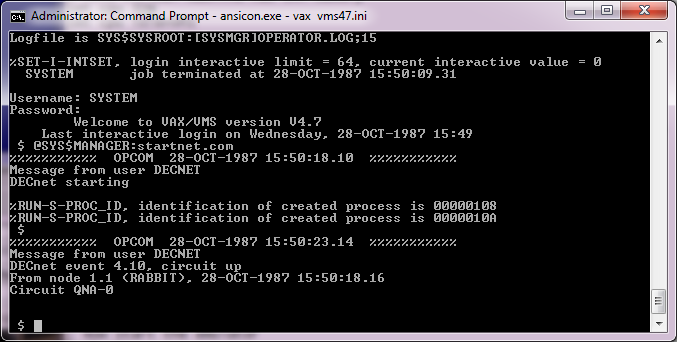
Cool.  Now I use ansicon, in the hopes it’ll make the console better, and fire up VMS.

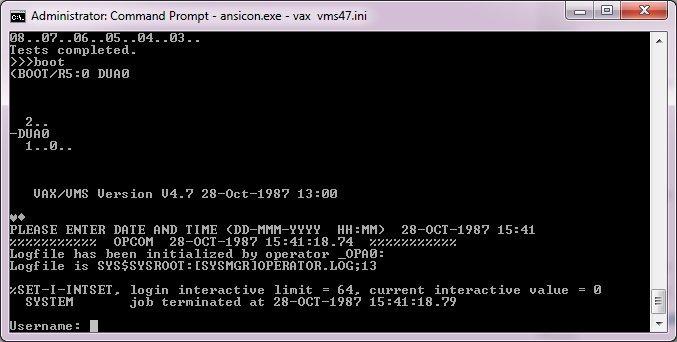
VMS 4.7 booted

VMS 4.7 booted

And then login as system/manager

Now I can setup decnet very simply like this:

Username: SYSTEM
Password:
Welcome to VAX/VMS version V4.7
Last interactive login on Saturday, 20-SEP-2008 17:32
$ @sys$manager:netconfig

DECnet-VAX network configuration procedure

This procedure will help you define the parameters needed to get DECnet
running on this machine. You will be shown the changes before they are
executed, in case you wish to perform them manually.

What do you want your DECnet node name to be? : rabbit
What do you want your DECnet address to be? : 1.1
Do you want to operate as a router? [NO (nonrouting)]:
Do you want a default DECnet account? [YES]:

Here are the commands necessary to setup your system.

————————————————————————–
$ RUN SYS$SYSTEM:NCP
PURGE KNOWN OBJECTS ALL
PURGE MODULE CONFIGURATOR KNOWN CIRCUITS ALL
$ DEFINE/USER SYS$OUTPUT NL:
$ DEFINE/USER SYS$ERROR NL:
$ RUN SYS$SYSTEM:NCP ! Remove existing entry, if any
PURGE NODE 1.1 ALL
PURGE NODE RABBIT ALL
$ RUN SYS$SYSTEM:NCP
DEFINE EXECUTOR ADDRESS 1.1 STATE ON
DEFINE EXECUTOR NAME RABBIT
DEFINE EXECUTOR MAXIMUM ADDRESS 1023
DEFINE EXECUTOR TYPE NONROUTING IV
DEFINE EXECUTOR NONPRIVILEGED USER DECNET
DEFINE EXECUTOR NONPRIVILEGED PASSWORD DECNET
$ DEFINE/USER_MODE SYSUAF SYS$SYSTEM:SYSUAF.DAT
$ RUN SYS$SYSTEM:AUTHORIZE
ADD DECNET /OWNER=”DECNET DEFAULT” –
/PASSWORD=DECNET –
/UIC=[376,376] /ACCOUNT=DECNET –
/DEVICE=SYS$SPECIFIC: /DIRECTORY=[DECNET] –
/PRIVILEGE=(TMPMBX,NETMBX) –
/DEFPRIVILEGE=(TMPMBX,NETMBX) –
Press RETURN to continue

/FLAGS=(CAPTIVE) /LGICMD=NL: –
/NOBATCH /NOINTERACTIVE
$ CREATE/DIRECTORY SYS$SPECIFIC:[DECNET] /OWNER=[376,376]
$ RUN SYS$SYSTEM:NCP
DEFINE LINE QNA-0 STATE ON
DEFINE CIRCUIT QNA-0 STATE ON COST 4
DEFINE LOGGING MONITOR STATE ON
DEFINE LOGGING MONITOR EVENTS 0.0-9
DEFINE LOGGING MONITOR EVENTS 2.0-1
DEFINE LOGGING MONITOR EVENTS 4.2-13,15-16,18-19
DEFINE LOGGING MONITOR EVENTS 5.0-18
DEFINE LOGGING MONITOR EVENTS 128.0-4
————————————————————————–

Do you want to go ahead and do it? [YES]:
%UAF-I-ADDMSG, user record successfully added
%UAF-I-RDBADDMSGU, identifier DECNET value: [000376,000376] added to RIGHTSLIST.
DAT
%UAF-I-DONEMSG, system authorization file modified
%UAF-I-RDBDONEMSG, rights database modified
%NCP-I-NMLRSP, listener response – Success
Logging sink type = monitor
%NML-I-RECADDED, Database entry added

The changes have been made.

If you have not already installed the DECnet-VAX license, then do so now.

After the license has been installed, you should invoke the procedure
SYS$MANAGER:STARTNET.COM to startup DECnet-VAX with these changes.

(If the license is already installed) Do you want DECnet started? [YES]:
%%%%%%%%%%% OPCOM 28-OCT-1987 15:42:37.64 %%%%%%%%%%%
Message from user DECNET
DECnet starting

%RUN-S-PROC_ID, identification of created process is 00000109
%RUN-S-PROC_ID, identification of created process is 0000010B
$
%%%%%%%%%%% OPCOM 28-OCT-1987 15:42:42.67 %%%%%%%%%%%
Message from user DECNET
DECnet event 4.10, circuit up
From node 1.1 (RABBIT), 28-OCT-1987 15:42:37.69
Circuit QNA-0

It basically set itself up.

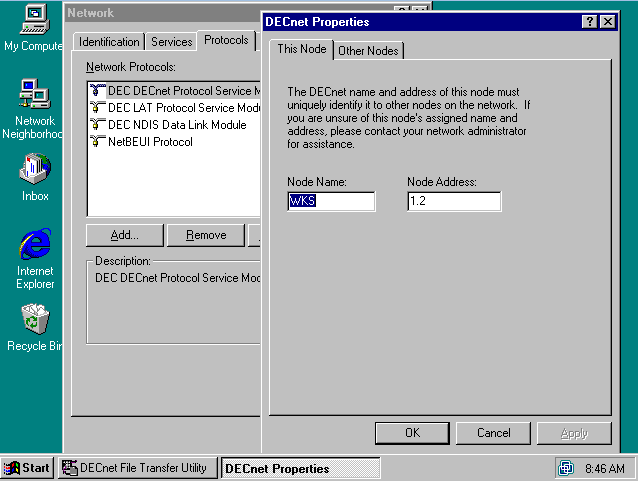
And on the Windows NT side, I simply set itself up as node 2 in area 1.

Windows NT + Pathworks

Windows NT + Pathworks

And now I can use CTERM to connect to the VAX.

CTERM

CTERM

Nice!.  And it even works through my port of HECNet.

On reboots you have to manually start the network.  I don’t have EDT, or I don’t know where to find it (remember the gold key? ugh).

Manually starting the network

Manually starting the network

But it’s a simple command:

@SYS$MANAGER:startnet.com

And you are good to go!

Likewise shutting down is accomplished with this:

@SYS$SYSTEM:SHUTDOWN.COM

And that’s about all I know about VMS.  But it’s good to see that configuring this was pain free!

I forget what I was looking for

when I stumbled onto Haruhiko Okumura’s lzss.c, but I was really intrigued.  Every time I’ve seen anything to do with compression, it’s insanely massive.

Except for this.

Including the ‘main’ portion of the source, it’s 180 lines long.  4.3Kb.  That’s microscopic by today’s standards.  On OS X I get a 13kb executable, compared to 76kb for gzip, or 1.6MB for 7za.

And googling around I found a few other variations.  So I figured it would be slightly fun to have a ‘bakeoff’ with the ‘tradtional’ Calgary Corpus, which includes some variable types of data.

Unsurprisingly, 7zip is the best of the bunch.

$ ./testcomp.sh
compiling……..
cleaning up
unzipping
running…….The winner (smallest) is :
261057 6 Jun 20:18 book1.7z
53167 6 Jun 20:18 geo.7z
9472 6 Jun 20:18 obj1.7z
17322 6 Jun 20:18 paper1.7z
43596 6 Jun 20:18 pic.7z
15060 6 Jun 20:18 progl.7z
16748 6 Jun 20:18 trans.7z
30716 6 Jun 20:18 bib.7z
169894 6 Jun 20:18 book2.7z
119399 6 Jun 20:18 news.7z
61758 6 Jun 20:18 obj2.7z
27310 6 Jun 20:18 paper2.7z
12605 6 Jun 20:18 progc.7z
10428 6 Jun 20:18 progp.7z

But the source to 7zip is unwieldy at best.  So how did the small lzss and variants stuff do?

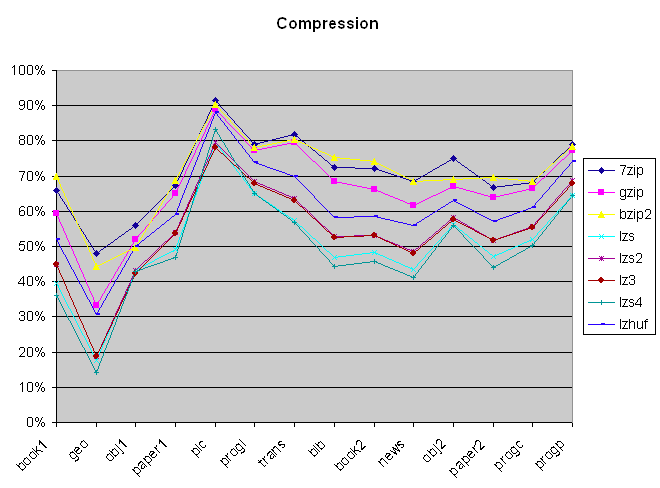
Compression percentage

Compression percentage

Honestly I’m surprised gzip put up a good fight.  Bzip2 & 7zip really fought for the top, The surprise to me was lzhuf leading the old stuff, which has it’s roots back in 1988/1989.  So let’s look at the data without anything modern in the way.

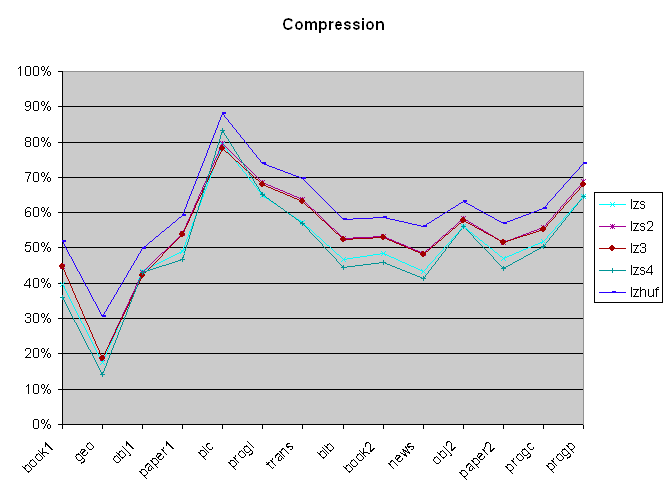
Old Compression only

Old Compression only

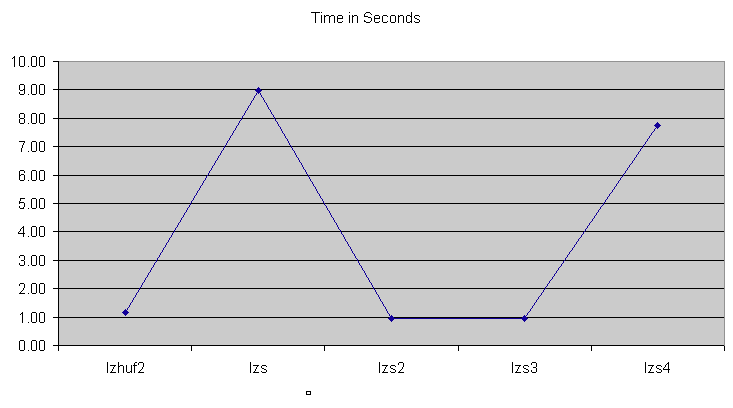
So from the numbers, we can see that lzs2 and lz3 run almost identical, with lzs & lzs4 at the bottom.  Now when we look at time, we get something different.

Compression duration

Compression duration

Both lzs & lzs4 take eight or more seconds!  So they are both out, as I’m shopping for something good/fast, and taking this long is out of the question!  So it comes down to how complicated lzhuf2, lzs2 and lzs3 are.

SourceLines
lzs.c4360
lzs4.c4632
lzs2.c8308
lzs3.c12844
lzhuf.c18323
lzhuf2.c22556

While lzs.c is still pretty impressive for the size, for what I’m going to try thought, I’m going to use lzs2.c as it’s 8kb, and seems to fit the bill.

For anyone who’s interested in running this on their own, here is the package.  I only tested on OS X, it may run on other UNIX stuff, it may not.  Extract it and run ‘testcomp.sh’.  And it may even work!  The only thing on OS X I had to add was ‘-Wno-return-type’ for compiling, as clang doesn’t like ancient source like this…

SoundBlaster support on VMWare Player

Well it’s kind of skinny to be honest.  It works, Kinda though.

You can either have AdLib/OPL3 emulation, OR the PCM/Wave.

You can’t do both at the same time.

Really.

Edit the .vmx file, and look for the sound section..

sound.present = “TRUE”
sound.virtualDev = “sb16”
sound.opl3.enabled = “TRUE”
sound.autodetect = “TRUE”
sound.baseAddr = “0x220”
sound.dma16 = “7”
sound.dma8 =”1″
sound.irq = “5”
sound.mpu401baseAddr = “0x330”
sound.Opl3BaseAddr = “0x388”

And add in something like this.  To get the opl3 emulation set it to TRUE, but the PCM won’t work.  Set it to false and you’ll get sound.

And of course set your environment variable for MS-DOS

SET BLASTER=A220 I5 D1 H7 P330 T6

yay.

I’ve tested it with Doom v1.1, and it works.  Of course you can ‘cheat’ and setup a network game, with one player with Adlib, and the other with the Sound Blaster.  But I know that’s crazy!

Stacker compression for Cisco routers

Looking at my Netware configuration, and the MTU issues I was having, I was right to think that it used to work with serial links with an MTU of 1500 along with stacker compression.  No doubt with the world moving away from traditional HDLC links, and Novell Netware, the code is in 12.4, but it doesn’t work.

Luckily someone sent me 11.3 for the 2600.

Cisco Internetwork Operating System Software
IOS ™ C2600 Software (C2600-D-M), Version 11.3(6)T, RELEASE SOFTWARE (fc1)
Copyright (c) 1986-1998 by cisco Systems, Inc.
Compiled Tue 06-Oct-98 18:07 by ccai

It’s still strange to think of 1998 being old.  Or legacy.  But back then I had an IOS 9 device running as a terminal server, and whole lot of 2500’s & 4000’s running 10.3, and some 7000’s with 11.0.  Good times for sure!

Since I setup a simple IPX network the router config’s are pretty simple.  I didn’t even bother with TCP/IP.

R12

ipx routing c809.1dfc.0000
!
interface Ethernet0/0
no ip address
ipx encapsulation SAP
ipx network CAB2
!
interface Serial0/0
no ip address
bandwidth 1966080
ipx network BEEF
clockrate 2000000
compress stac

R13

ipx routing c808.1dfc.0000
!
interface Ethernet0/0
no ip address
ipx encapsulation SAP
ipx network CAB3
!
interface Serial0/0
no ip address
bandwidth 1966080
ipx network BEEF
clockrate 2000000
compress stac

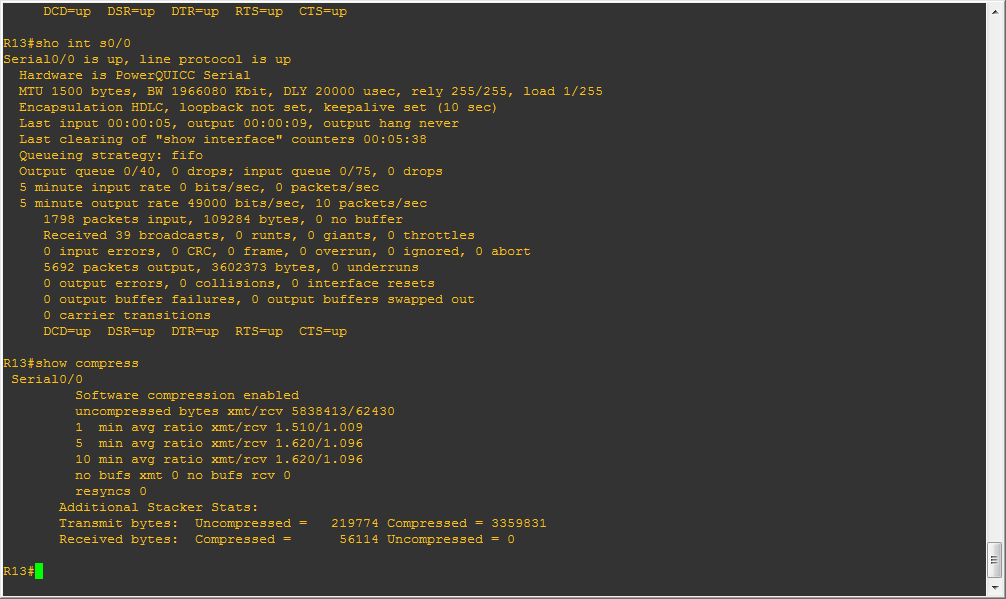
As you can see the configuration is pretty bare bones.  But the only thing I’m interested in is compressing that serial link.  I didn’t have to do any MTU sizing games, instead logging into the server ‘just worked’.  Then I turned on the compression, and copied the server’s system folder to the local disk.

Stacker Compression!

Stacker Compression!

And you can see I’m getting about 1.5:1 .  Not bad for a simple setting change.

Serial0/0
Software compression enabled
uncompressed bytes xmt/rcv 8733770/81026
1 min avg ratio xmt/rcv 1.577/1.121
5 min avg ratio xmt/rcv 1.578/1.070
10 min avg ratio xmt/rcv 1.606/1.083
no bufs xmt 0 no bufs rcv 0
resyncs 0
Additional Stacker Stats:
Transmit bytes: Uncompressed = 279855 Compressed = 5124744
Received bytes: Compressed = 72387 Uncompressed = 0

But naturally dynamips is slow for doing what it does.  And to know that I’m not totally crazy, as this stuff did work before.  This should also serve as a warning to people new at the fun world of cisco, just because you have a ‘newer’ version of IOS doesn’t mean that feature XYZ is going to work correctly.  Oh sure the statements may work, but when it comes down to it, it may not work at all, or poorly.  In case you ever wondered why people hoarde IOS versions this would be why.


GNS3 + VMWare +Netware 3.12

So continuing from where I left off, I thought I’d setup a small Netware network onto my GNS3 testbed.

Netware was once the big dog in the networking world, but now it’s just a footnote in obscurity.  Long gone are the days of syscon, rconsole, and all the frametypes that Netwaer supported in equally incompatible ways.  So maybe it’s a good thing.

But I digress, years ago I paid good money for a 50 user version of Netware 3.12.  I don’t know why either, but I occasionally like to get it running so I don’t feel like I completely wasted the thing.

With the right lan drivers, installation is a snap.  Or if you don’t have the right lan drivers, create a MS-DOS VM, so it’ll have an IDE hard disk.  You can install netware without lan drivers just fine.  I just installed netware by itself, then added in some patches for the network card & the idle program so it wouldn’t eat 100% of my CPU.  For the network though the command line was a little weird but I worked it out

file server name vmware
ipx internal net 538787d
mount all
load c:\server.312\nw4-idle.nlm
load c:\server.312\pcntnw slot=10001 FRAME=Ethernet_802.2
BIND IPX to pcntnw NET=cab2
load remote password
load rspx

Which gets me networking, and rconsole support.  With the server running, I just then had to enable IPX routing on my cisco routers.
R1

ipx routing ca00.1b00.0008
interface FastEthernet0/1
ipx encapsulation SAP
ipx network CAB1
interface Serial1/0
mtu 2000
ipx network CAB0

R2

ipx routing ca08.140c.0008
interface FastEthernet0/1
ipx encapsulation SAP
ipx network CAB2
interface Serial1/0
mtu 2000
ipx network CAB0

 Now with this all in place I can see the IPX routes from R1, including the one that goes directly into the server:

R1#show ipx route
Codes: C – Connected primary network, c – Connected secondary network
S – Static, F – Floating static, L – Local (internal), W – IPXWAN
R – RIP, E – EIGRP, X – External, A – Aggregate
s – seconds, u – uses, U – Per-user static/Unknown, H – Hold-down

4 Total IPX routes. Up to 1 parallel paths and 16 hops allowed.

No default route known.

C CAB0 (HDLC), Se1/0
C CAB1 (SAP), Fa0/1
R CAB2 [07/01] via CAB0.ca08.140c.0008, 56s, Se1/0
R 5383787D [08/02] via CAB0.ca08.140c.0008, 56s, Se1/0

And of course I can see the server!

R1#show ipx servers
Codes: S – Static, P – Periodic, E – EIGRP, H – Holddown, + = detail
U – Per-user static
2 Total IPX Servers

Table ordering is based on routing and server info

Type Name Net Address Port Route Hops Itf
P 4 VMWARE 5383787D.0000.0000.0001:0451 8/02 2 Se1/0
P 107 VMWARE 5383787D.0000.0000.0001:8104 8/02 3 Se1/0

Now if you remember from the bad old days of Netware, each service running on a server is advertised.  So in this case, type 4 is a file/print server, and 107 is a server running the ‘remote’ facility so you can rconsole into it.

Another thing to take note, is that because I configured IPX on serial interfaces is that their encapsulation is always HDLC.  Also because IPX cannot fragment like TCP/IP the MTU on the serial interface *MUST* be larger than ethernet’s 1500.  I like 2000 as I avoid all frame overhead this way.

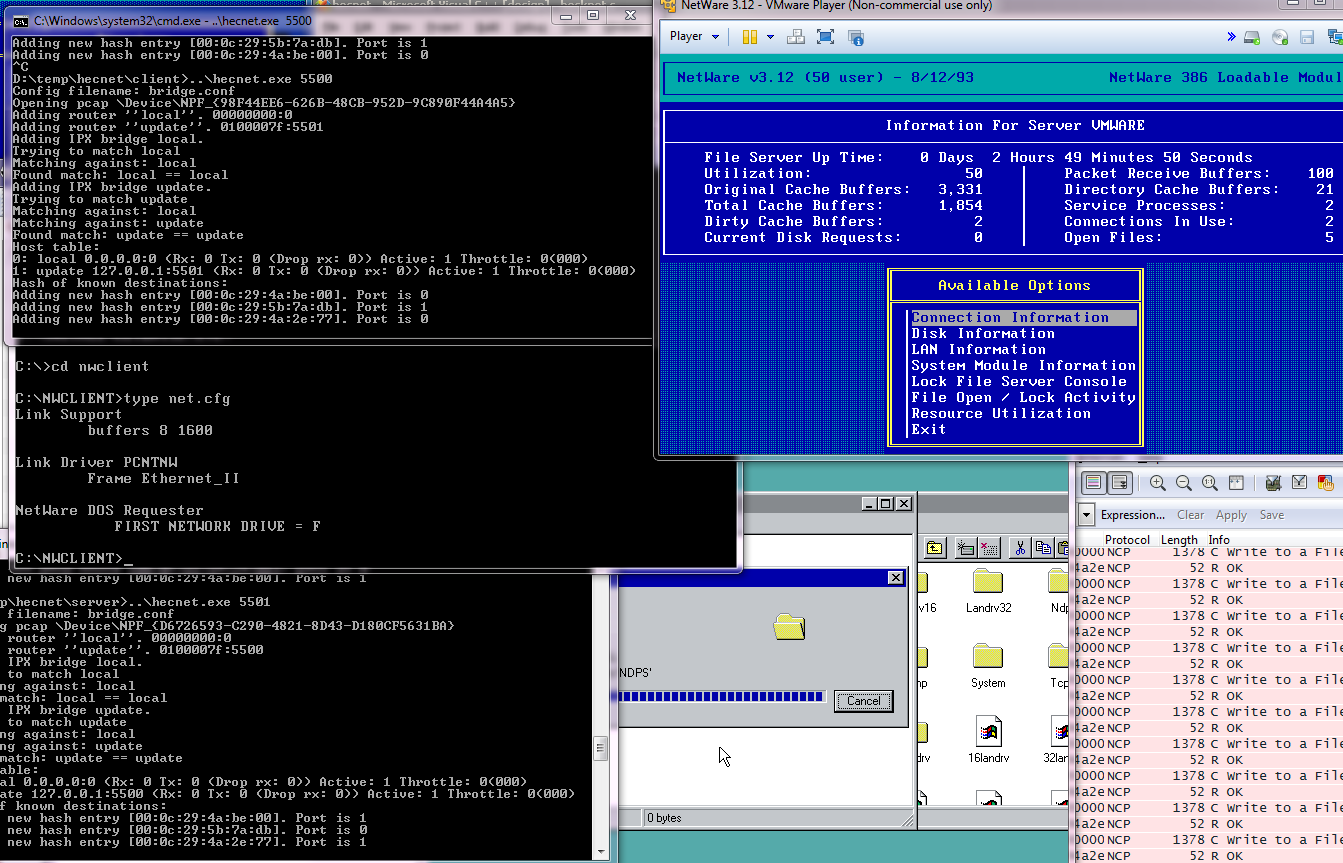
Now I’m using the old netware client with the drivers I found here, and it works fine, as long as I had the MTU bumped up on the serial interface.  Now I could have used ethernet, and it’d achieve the same thing, except I’m not in some weird MTU war.

IPX network

IPX network

SA-COMP/1

SA-COMP/1

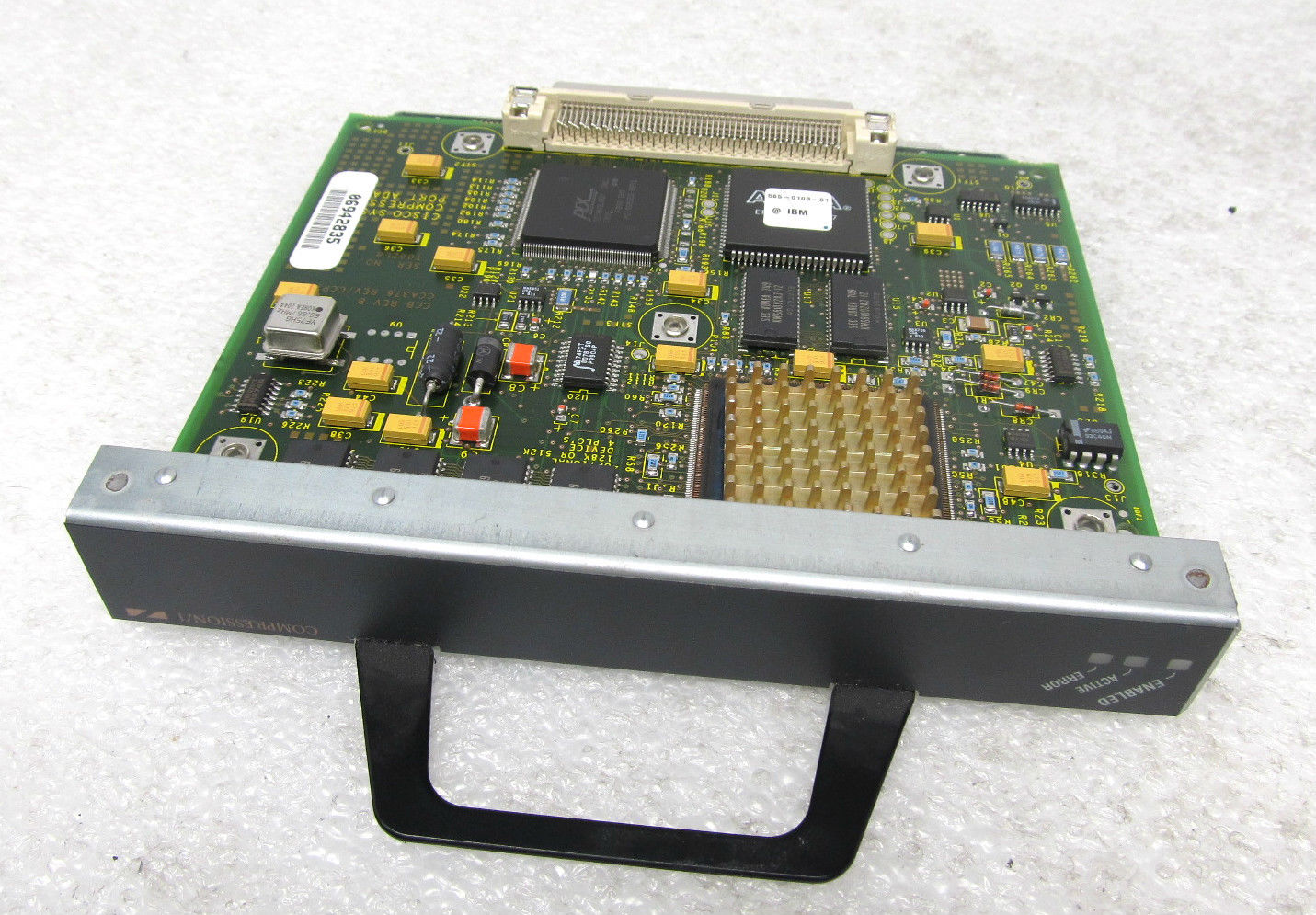
At the same time, it is very slow.  If you want to do anything reasonably fast, you really need to move your client to the same VNet as the server.  But if you want to feel like the old days when connections were slow, well you’ll enjoy a max 400k connection.  I tried enabling stacker compression on the interface, but it resulted in packet corruption.  I think it’s an IOS thing though, so if you play with this, you may have better luck.  Back before MPLS was everyone’s latest wan joy, I ran stacker compression, and the speed boost was really noticeable, with a 1.5:1 or 2:1 compression not being uncommon.  Although on lower routers it could be a killer (the 2500…) or a 7000 with multiple interfaces doing compression it could also bring a router to it’s knees.  Also looking at the support table for the  SA-COMP/1  SA-COMP/4 I doubt 12.4 would support stacker compression properly.

[table id=2 /]

Otherwise, yeah it works fine.  I also loaded up a Windows NT client, and it works too!

With all the truecrypt hysteria running around

truecrypt-logoI thought I’d go mining for old versions, and put them up on CVS web.  Turns out some old versions are missing, but oddly enough not the 1.0 stuff.

So here is the src2html version, and the raw tree view.

And for the really crazy, I dumped all versions into CVS.

I only briefly looked at it, and noticed the block driver has the ability to look at memory.. I don’t know why, but I don’t think I would want my block drivers being able to do that.  maybe it’s a good thing, I don’t know.  I haven’t tried to build it, and I’ve never used TrueCrypt so I really can’t comment on it.

Also pulling through archvie.org I found some old versions of scramdisk. But I never used that either.

BBS down. again.

LOL Maybe I’m just cursed at this point.

This is an email to follow up on the update on our social network accounts (twitter and facebook: @hosthatch) that we are investigating an issue on SSDNode15. Instead of fixing this server, we have chose to restore from 1 hour old backups to some of our other stable servers running for 3+ months with no downtimes. SSDNode15 has unfortunately had very bad luck and has failed 3 times in the past month, which is why we are going to take it out of production, replace most of the parts, burn test it and then put it back into production.

Although I had time to check the log, it turns out I had over 250 users, but a good 150 of them couldn’t figure out the synchronet mandatory send a letter to sysop thing so they abandoned the process.

I don’t know why, but I still liked the idea of being the last OS/2 sysop on the planet, but this year has been ridiculous.  Now that I have it running on VMWare, maybe it’s time I just buy a UPS, and run it on ESX from now on.  But at the same time, I did like the idea of it running in a datacentre.