Visual C++ 2005 project & exe’s for SIMH 3.7-3

I’ve uploaded onto the sourceforge site, my project source & the resulting exe’s

I need to see which compiler generates the faster exe, and ship with that going forward for the win32 platform. I suspect its VC2005, but the race is going to be between VC2005, gcc/mingw, Watcom 11.

Of course if anyone want’s to suggest another C compiler for win32, I could always try it out, and see how it performs.

Of course today is 9/11… It’s hard to believe that it’s been 6 years. One can only hope the madness will end.

4.2BSD on Windows!

Recently I’ve taken it upon myself to update the sourceforge pages for SIMH. In the process of building platform EXE’s for people and whatnot, I’ve decided to try to make some of the more popular Operating Systems easier to use for the Windows users.

From what I’ve seen of the downloads the Windows users are the largest group, then followed by OSX. I’ve actually seen 2x more downloads for NeXTSTEP than Linux/i386… But I suspect it’s an advertising thing if anything else.

So inorder to make 4.2BSD more accessable to the end user I have spent a day with NSIS, and created an install package.

You can now download 4.2BSD in an easy to use EXE here:
http://sourceforge.net/project/showfiles.php?group_id=204974&package_id=245145&release_id=538195

As I write this the current version is listed as v0.1a . I fixed a few annoying bugs, however I wanted to push out a release before I went to sleep.

What I have tried to do here, is seperate the user data, from the Operating System. By doing this a novice can quickly repair the OS, but re-installing the os component from a windows installer. Currently this NSIS script doesn’t support repairs, so to do it cleanly you must uninstall 4.2BSD, doing so will give you the options of preserving your OS & Home disks. If the OS is trashed, simply allow it to remove the OS, but retain the home disk. Then re-install the application, and uncheck the home disk. This will preserve the one in place.

I’ve also included a copy of putty to give a better tty experence to the end user. I’m thinking about changing this so that the console is brought up with putty.

At any rate, if anyone thinks something along these lines is a good tool, let me know!

Simh 3.7-3 released!

Hope you had a good holiday, Bob has published a new update to SIMH!

http://simh.trailing-edge.com/

On a related note, I’ve been able to get a few to compile for the iPhone, but they have fread errors… I’m not sure what’s going on so I’m going to try to adapt the disk access to sqllite (it’s part of the base os on the iPhones!) kind of like my .net ‘updates’ to simh.

I really need to put all these things somewhere…

Well at anyrate I think I’ll try to build a NLM for the 1 remaning Netware user out there.. And to check portability.

libpcap updates for Qemu 0.9.0

I decided to update my pcap patches for Qemu 0.9.0 . Now I know that for the majority of people the user mode NAT works fine for them, or they are on a platform where they enjoy playing tun/tap games. However tun/tap aren’t available on every platform. That and some of us run things like Novell Netware.

The patches are as follows:

The patch for plain QEMU
http://qemu-forum.ipi.fi/download.php?id=389

And adding support for NeXTSTEP
http://qemu-forum.ipi.fi/download.php?id=390

Now how robust is this? Well I have transfered about a gigabyte on a VM on the internet with this thing. The machine in question is a windows 2003 server running this Qemu as a service. http://tiger.vaxenrule.com/ . It’s hosting it’s own Apache, and it seems somewhat responsive to me.

I can provide exe’s if anyone is interested just contact me via here…

Qemu 0.90 patched for NeXTSTEP 3.3 i386

Patches for Qemu 0.90 are available here:
Files needed to Build and patch Qemu 0.90 for NeXTSTEP on Windows : Free Download, Borrow, and Streaming : Internet Archive

The busmouse patch still survives here.
The win32 exe is here.

A PowerPC macosx 10.4 binary is available here:
http://www.vaxenrule.com/NextSTEP%2033/qemu-0.9.0-osx-10.4-PowerPC

This moves the SoundBlaster to IRQ 7, and incorporates a bus fix & busmouse addition. Remember to remove the parallel port for this to work correctly. Tested with NeXTSTEP 3.3

Why all the patches, you may ask? Well for some reason NeXTSTEP is unable to correctly drive the mouse in Qemu. Nobody has tracked it down, but I suspect it’s some weird issue with the BUS… Anyways I found this busmouse patch ages ago, and I’ve just been finagling it for ages so that it will keep on working. I know that there are a hand full of enthusiasts left, but I figure that for all interested they would appreciate this.

Standalone Virtual Server annoyances

Ok, Ive been out of the country for a while… lots of fun!

At anyrate, I’ve installed Virtual Server 2005 R2SP1 on my parents computer to give it a good shake down. The good part is that it support’s DVD iso images! Woohoo!

The bad part is that for the most part you’ll get access errors when trying to use it. The only way I’ve figured out how to setup the thing, is to first configure IIS to not allow anonymous users, use the ‘built in security’. Next you’ll have to tell IE that on ‘trusted’ or ‘local’ zones you should have it pass the security automatically. That’ll get you to the configuration page. The next hurdle is that it wont let you start a remote console..

You’ll have to go into the virtual server security setup, and explicity add your user in there with full rights. The administrators group isn’t enough.

With all that out of the way you should be good to go now!

I’m in London… England

Yeah, lots of fun for work, with back to back travel. However while I was out, Micorosft Virtual Server R2 sp1 shipped! Details are available here ( http://www.microsoft.com/windowsserversystem/virtualserver/ ). I’m pretty sure this supports Vista Ultimate & Business as a host platform. I think it includes more support for Linux, but I’ve just installed it on a bare machine, I haven’t had a chance to fire it up just yet.

It’s overcast but not raining. Sometimes I forget what the weather in England can be like. I should have brought a jacket.

Oh well Wednesday I’ll be in the Americas again….

Fun from Miami

It’s not really a vacation per say, but I’ve been in Miami the last week for work… And it’s been quite the dog/pony show. At any rate I leave Miami on Tuesday, then Wednesday I’m out to London…

I’ve been playing with this:

http://puszcza.gnu.org.ua/projects/apout/

It’s like psim, except the enviroment is the PDP-11. I took the source and ripped out the core unixystuff (ttio, forking & whatnot) until I got a copy to build under Windows. It’ll play hunt the wumpus from Research Unix v6.

I’ll post more on this later.

Oh and I’m still alive!

Linux the old

My first experience with Linux was with SLS, or Soft Land Systems. It was the first pre-packed Linux system for those of us who didn’t have a Minix system to cross build from. Although Taunenbaum saw this as a draw back, like Linus many of us had 386 computers, and wanted to exploit their power. Many of us were sickened by the shattered hope that was the 286, which provided protected mode, abet in 64k chunks. The 386 offered the holy grail, or a 4 gigabyte address space! No more offset games.

At the time the closest one could hope in terms of a personal Unix was SCO Xenix, which with the developer packages was prohibitively expensive, or Coherent. Coherent was a clean room re-implementation of Unix version 7 ( http://www.vaxenrule.com/sls%201.05.zip.torrent ).

I’m going to use Qemu, again because of it’s cross platform nature, and it’s ability to emulate the NE2000. One can only hope one day that VMWare or Virtual PC would allow some kind of interface for us to ‘hack’ emulated hardware into their infrastructure…..

Anyways first let’s create a 200mb disk

Qemu-image create –f qcow sls.disk 200M

Don’t laugh, 200mb back then was a ‘big deal’… Really. Mine was SCSI, and probably weighed some 7lb.

Unzip your sls distro somewhere accessible from your Qemu tree. I’m just going to stuff mine under a sls directory. During the install we will need a boot disk, simply copy any one of the files to ‘boot’. We’ll touch on it later. To boot from the floppy I’m going to issue:

qemu -L . -hda sls\sls.disk -m16 -net nic -net user -fda sls\a1.3 -boot a

At the LILO prompt simply press enter. Then you’ll be informed
Press to see SVGA-modes available, to continue….

Press space. Early Linux kernels had this annoying ‘feature’ compiled in.. I know, I think I’m the only person that doesn’t like custom fonts, nor do I like directory colors.

At the login prompt, login as root then run the fdisk command. The keystrokes for creating a primary Linux partition is as follows:
n
p
1
1
400

Now we are going to make a smallish swap partition.
n
p
2
401
406

Now we need to change its type to swap.
t
2
82

It’s just a byte flag, but each operating system selects a flag to identify itself to others, a marker of what is where. Before emulation on dual boot systems this was a “big deal”… However now dedicating a virtual machine to an entire OS takes out the complexity that plagued so many users so long ago….

Let’s save the changes type typing in ‘w’.

We are then told to reboot the system. Type in ‘sync’ a few times, then close qemu & restart it with the same flags.

Now we can login as ‘install’. We can use the color screen, so enter ‘y’. We are going to do the brave thing, and use floppy disk images. That’s option 1. The floppy images are 3 ½” so that’s option #2.

Now we need to identify the root & swap partitions. Select #1, then type in /dev/hda1. It will want to format it, so let it. Next select #2 for the swap, and type in /dev/hda2 .
Now we can select #7 to commence installation.

To get the full experience we are going to install the full thing… 100MB of it.. Option #4. We don’t want to be prompted we simply want everything that SLS has to offer, so answer ‘n’.

You will be prompted for a2-a4 Don’t forget in Qemu it’s ctrl-alt-2 for the runtime config, and you just issue:

change fda sls\a2

and so on for the rest of the disks. Then ctrl-alt-1 to go back to the main screen.

While this may seem tedious it’s better & faster than the real thing. Trust me!

Once X11 finishes unpacking, place in the boot disk, and let it write to it. Next feel free to preset the video mode to -1. We don’t have a modem, so you can answer no. Next we’ll allow the install to mark /dev/hda1 as the active partition. Just press enter for the question about dos partitions. Pick a snazzy hostname. The default softland works just fine. We have no patch disks, so you can just enter ‘n’ and press enter.

Phew we have just installed SLS! Press enter!

After that you can boot up into Linux 0.99.15g/SLS 1.0 . The best that 1994 has to offer.

Before we leave for now, lets get X-11 rolling. Login as root, no password, and then run syssetup. Choose 5,2,6,0. This configures the basic VGA server, a PS/2 mouse & exits the basic program. Running ‘startx’ Should get you into a really old X-11. No Gnome/KDE here! The mouse however acts erradictly. Ctrl-alt-backspace will bring you back to the prompt. I’ll see if I can figure this out later…

But for now that covers a basic install. Next up we’ll do some networking, and a game perhaps….

A minor update….

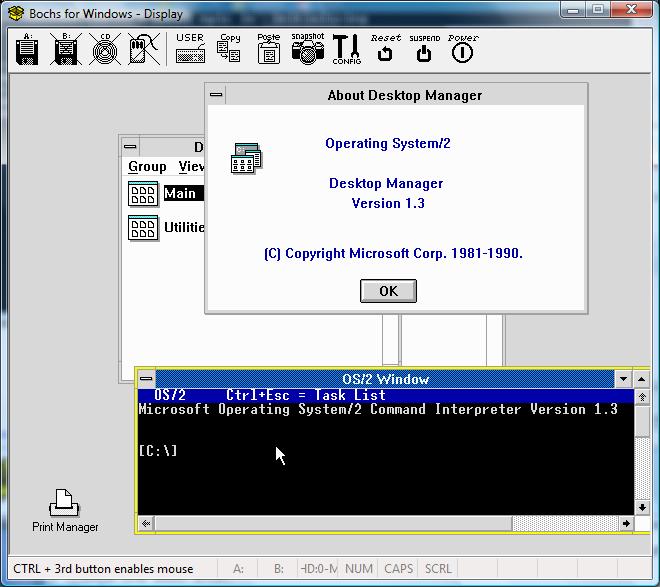
OS/2 1.3 on Bochs

OS/2 1.3 on Bochs

OS/2 1.3 does infact run under BOCHS. Here is the catch, like Xenix you currently must make an image of an existing installation, and point Bochs towards it.

Here is the flag that I used:
ata0-master: type=disk, path=”os2-1.3.img”, cylinders=919, heads=16, spt=17

Bochs will complain about the geometry not matching… Just hit the ignore button, and it boots up just fine.

Thanks to Geoff Shearer for trying, since I had figured it wouldn’t even work.

I promise, a quick tour of SLS Linux next time… Where the distro wars all started!