I was looking around for some old compilers as a side project of mine has stalled looking for some TS-11 Fortran compiler with overlays.
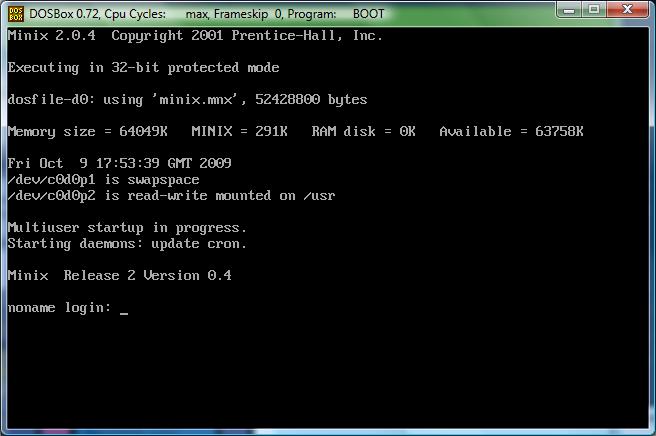
Anyways I found mention of this DOS-Minix. It does NOT comply with things like DPMI, VCPI as it will not run in nice things like emm386 & other v86 switchers. However it will run in DOSBox.
Digging through the kernel & the boot program, you’ll find the basics of a DOS Extender. The boot program will allocate as much memory as it can from the XMS driver, and then switch to protected mode & transfer control to the kernel. Likewise the kernel then uses MS-DOS & BIOS calls for video, disk access etc as you can find it’s int86 calls that switch from protect to real mode, (doshead.s) or even in the disk driver dosfile.c
Installation is SUPER simply, just download the file DOSMINIX.ZIP unzip it somewhere then either use the great DOSBox, or any other pc emulation etc that you could want to use. The NTVDM from Windows NT is not good enough as you’ll get an error message about not being able to load the 386 kernel on an 8086. This again probably stems from dosminix not using DPMI calls, but the old fashioned raw XMS calls.. I guess it *could* be updated.
Start it up is simple you just run the boot program and point it to a diskfile:
boot minix.mnx
Then you’ll get greeted by the boot loader.. For me hitting any key doesn’t do anything, so I just press escape, then type in boot.
And in NO time, you’ll be up and running MINIX!
The ‘best’ way to shut it down I’ve found is to type in ‘reboot’ then press escape like wild, and you’ll interrupt the boot loader. Then you can type in ‘exit’ and you’ll get dumped back into MS-DOS.
I think it’s an interesting example of how to use the ancient MS-DOS to bootstrap yourself into protected mode. And the source seems somewhat straight forward.
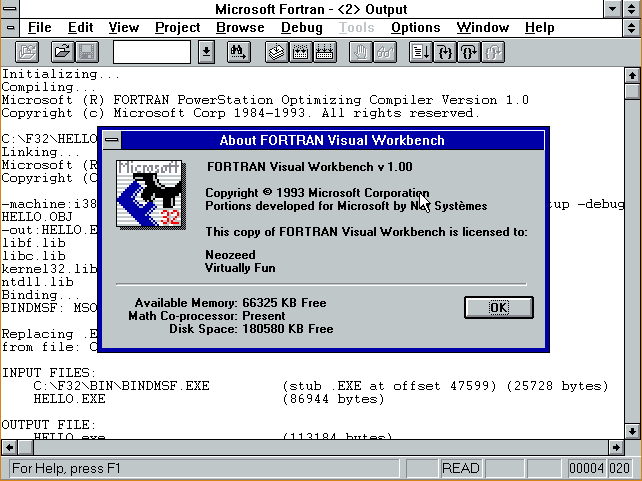
While going through my stuff, I did manage to find some diskettes for Microsoft FORTRAN PowerStation 1.0 I recall using this under Windows 3.1 but there was some reason we never really used it under Windows 95 & NT (Found it 9 years later!)
So, I loaded it up on a VM with Windows 3.1 and quickly found out why: While it produces win32 exe’s they are built with pre-release tools, and will *NOT* work under any released version of Windows NT, (Yes, including Windows NT 3.1!!).
I’m sure others may find themselves down the path with failed exe’s that crash with:
RtlExAllocateHeap not found in ntdll.dll
Microsoft had a fix, named beta2fix. It renamed the references to ntdll.dll into beta2.dll. Which sounds fun, except the resulting exe’s DONT WORK. Nothing like a ‘solution’ that took missing references into exe’s that just crash.
Naturally the ‘fix’ is to upgrade to 4.0 which.. is impossible to find, or track down Compaq fortran, or even Intel fortran. Or just run it in a MS-DOS/Windows 3.1 VM and be happy for emulation.
But I figured what the hell, perhaps it’s possible to replace some of the key parts with old versions of Visual C++ and use HX DOS as an extender instead of an ancient Phar Lap TNT.
Googling around, the issue lies with the linker, link32.exe.
Now on my Visual C++ 1.0 cd there is a link32.exe that just calls link.exe. On the Visual C++ 2.0 & 4.0 CD’s there is no link32.exe. Seeing that Visual C++ 1.0 just calls through I just made a ‘stub’ program to call link.
#include <stdio.h> #include <string.h> #include <stdlib.h> void main(int argc,char* argv[]) { char command[255]; int rc; int j;
memset(command,0x0,sizeof(command)); sprintf(command,”link “); j=1; while(j<argc) { sprintf(command,”%s %s”,command,argv[j]); j++; } printf(“running [%s]\n”,command); rc=system(command); printf(“return code was %d\n”,rc); if(rc==-1) {printf(“I think it’s too many nested DPMI things between TNT & whatnot\n”);} }
Ok, it’s not work of art, but it’ll get the job done. You’ll need some kind of MS-DOS 16 bit real mode compiler to build this thing. I would imagine Watcom’s C++ compiler can still build 16bit dos realmode exe’s, or Borland has something in their museum thing. I’m using QuickC for Windows in a Windows 3.0 VM
Ok so now with our ‘link32.exe’ replacement, copy it into the f32\bin directory overwriting the existing one.
Next we will need the link.exe from Visual C++ 2.0 (or higher I figure), and copy that into the f32\bin directory, along with its needed files dbi.dll & msvcrt20.dll.
Next, download and unzip the HX runtime And you can either place it’s bin directory onto the fl32\bin, or unzip it to it’s own directory, and add a statement in your autoexec.bat adding it’s bin directory to the path.
Reboot to pick up the hxrt’s bin directory, unless you copied its bin into fl32\bin
Now we need to alter Visual C++ 2.0’s linker to run under MS-DOS. Simply run:
pestub \f32\bin\link.exe
And now you should be able to run link.exe under MS-DOS.
Finally replace the libc.lib & kernel32.lib with ones from your Visual C++. Naturally these are in the \f32\lib directory. Visual C++ 2.0 will link without complaining, 4.0 gives some weird messages, but it still works. I never did test Visual C++ 6.0 & beyond.
So, building a simple ‘hello.for’ (mention in the prior blog post)
c:\F32>fl32 hello.for Microsoft (R) FORTRAN PowerStation Optimizing Compiler Version 1.0 Copyright (c) Microsoft Corp 1984-1993. All rights reserved.
hello.for Microsoft (R) 32-Bit Incremental Linker Version 2.50 Copyright (C) Microsoft Corp 1992-94. All rights reserved.
The only caveat here, is that because of HXDOS it *thinks* it’s running on Windows NT, (beta 2!) and will not run the bindmsf.exe program Not that it mattered as it was broken. I suppose if I were braver, I could read the link file, and scan for a ‘-out’ and run pestub on the output.. But I don’t so you will have to. Otherwise, when you run hello.exe you’ll get:
Ok, so with all this work, we’ve managed to restore the basic functionality of Microsoft Fortran here. Now the bigger question, will hello.exe run on say Windows Vista x64?
C:\Users\neozeed\dos\F32>ver
Microsoft Windows [Version 6.0.6002]
C:\Users\neozeed\dos\F32>hello HELLO!
Not too bad, eh?
Oh, and onto zork:
c:\F32\DUNGEON>fl32 *.for Microsoft (R) FORTRAN PowerStation Optimizing Compiler Version 1.0 Copyright (c) Microsoft Corp 1984-1993. All rights reserved.
ACTORS.FOR BALLOP.FOR CLOCKR.FOR DEMONS.FOR DEMONS.FOR(520) : warning F4999: RLIGHT : variable declared but not used DEMONS.FOR(520) : warning F4999: RSER : variable declared but not used DGAME.FOR DGAME.FOR(781) : warning F4999: PROTCT : variable declared but not used DMAIN.FOR DSO.FOR DSUB.FOR DVERB1.FOR DVERB2.FOR GDT.FOR MACHDEP.FOR NOBJS.FOR NP.FOR NP.FOR(397) : warning F4999: DFLAG : variable declared but not used NP.FOR(397) : warning F4999: QHERE : variable declared but not used NP.FOR(507) : warning F4999: DFLAG : variable declared but not used NP.FOR(780) : warning F4999: DFLAG : variable declared but not used NP.FOR(1154) : warning F4999: DFLAG : variable declared but not used NP.FOR(1277) : warning F4999: DFLAG : variable declared but not used NP2.FOR OBJCTS.FOR ROOMS.FOR ROOMS.FOR(1195) : warning F4999: F : variable declared but not used SVERBS.FOR VERBS.FOR VILLNS.FOR Microsoft (R) 32-Bit Incremental Linker Version 2.50 Copyright (C) Microsoft Corp 1992-94. All rights reserved.
The exe works fine on Vista, and pestub will allow it to run on MS-DOS.
*NOTE that the fortran compiler will *NOT* run on Vista/XP/NT. The compiler was also linked with bad libraries & linker and it just won’t work. I doubt forcedos would help for 32bit NT systems as the phar lap stuff is all out of date. However DOSBox will happy run the compiler.
I haven’t even tried to debug anything, as I figure the best environment would have been a virgin copy of PowerStation 1.0 running under Windows 1.0 I did say keep a copy right!!!
I don’t know why I even started down this path, but anyways I felt the urge today to break out some Fortran. The problem is that I acquired Microsoft Fortran 5.0 in university, however… it’s on 5 1/4†diskettes!!!
So that wasn’t going to happen.
So I figured there had to be some kind of GNU Fortran compiler, and there is.. G77. However it needs to be tied into a release of GCC. Which sounds great, but I was hoping to build this on a few different platforms, and on my AMD 64 platform it’s GCC 3.3 (SUA), and on my NeXT it’s 2.5.8.. Even in the notes it says you’ll need about 100MB of space to build it, which is also a nice way of saying it’ll take FOREVER.
Then I remembered something we used on the RS/6000 because it was more ‘combatable’ then the Microsoft stuff, as it was derived from the first Unix Fortran compilers… f2c.
First you’ll need the source, which thankfully is still up on the original site This part is a bit tedious as the source is not in a single easy to get file. You’ll need to get the source from here. Once you’ve downloaded the files, I’d recommend saving them somewhere else.. You don’t want to have to right click like wild to get them… Alternatively I’ll host them all here to save someone all that effort.
Building f2c is really quite simple on any UNIX’like platform. First you’ll need the f2c source, and unpack it somewhere…. Then you *MAY* have to adjust the makefile.u for the CC/CFLAGS variables as your C compiler may not be gcc or cc, also you may or may not want the –O flags (optimize). On my NeXT I turned off the optimizations, since this is a 33Mhz machine, and I don’t want to wait all day, and I ran it with –O0 -pipe. Then just simply run
make –f makefile.u f2c
bash-2.01$ make -f makefile.u f2c cc -c -O0 -pipe main.c cc -c -O0 -pipe init.c cc -c -O0 -pipe gram.c cc -c -O0 -pipe lex.c cc -c -O0 -pipe proc.c cc -c -O0 -pipe equiv.c cc -c -O0 -pipe data.c cc -c -O0 -pipe format.c cc -c -O0 -pipe expr.c cc -c -O0 -pipe exec.c cc -c -O0 -pipe intr.c cc -c -O0 -pipe io.c cc -c -O0 -pipe misc.c cc -c -O0 -pipe error.c cc -c -O0 -pipe mem.c cc -c -O0 -pipe names.c cc -c -O0 -pipe output.c cc -c -O0 -pipe p1output.c cc -c -O0 -pipe pread.c cc -c -O0 -pipe put.c cc -c -O0 -pipe putpcc.c cc -c -O0 -pipe vax.c cc -c -O0 -pipe formatdata.c cc -c -O0 -pipe parse_args.c cc -c -O0 -pipe niceprintf.c cc -c -O0 -pipe cds.c if cc sysdeptest.c; then echo ‘/*OK*/’ > sysdep.hd; elif cc -DNO_MKDTEMP sysdept est.c; then echo ‘#define NO_MKDTEMP’ >sysdep.hd; else echo ‘#define NO_MKDTEMP’ >sysdep.hd; echo ‘#define NO_MKSTEMP’ >>sysdep.hd; fi ld: Undefined symbols: _mkdtemp rm -f a.out cc -c -O0 -pipe sysdep.c cc -c -O0 -pipe version.c cc main.o init.o gram.o lex.o proc.o equiv.o data.o format.o expr.o exec.o int r.o io.o misc.o error.o mem.o names.o output.o p1output.o pread.o put.o putpcc. o vax.o formatdata.o parse_args.o niceprintf.o cds.o sysdep.o version.o -o f2c
All being well, you’ll have a new & exciting f2c executable. I manually just copy the f2c into /usr/local/bin & the f2c.h to /usr/local/include.
Next you’ll need the f2c io library. Thankfully this one IS zipped up and it’s available here. Alternatively I’ve got a copy here (better). *NOTE that the ‘official’ version of the lib doesn’t extract to a sub directory… Grr Extract the library source, and again you may need to modify the makefile to suit your compiler (CC/CFLAGS). Then go ahead and make the library.
This will take longer then f2c.. Or at least it did on my NeXT.
Then I just copied the library libf2c.a into /usr/local/lib then ran ranlib over the library again.
Ok now we should be able to build a FORTRAN program. Let’s try something small.
program hello print *, ‘Hello!’ end
I’ve tried to preserve the leading 6 blank spaces. You should be able to copy the above program, and save it as hello.f Now we should be able to translate, compile and run the program!
bash-2.01$ f2c hello.f hello.f: MAIN hello: bash-2.01$ cc hello.c -lf2c -o hello bash-2.01$ file hello hello: Mach-O executable (for architecture m68k) not stripped bash-2.01$ ./hello Hello!
Awesome! Now let’s try something much bigger, say some old Fortran source to the old ‘dungeon’ game, better known as Zork! This source is available all over the place as dungeon-2.5.6.tar.gz, and I’ll provide a link as well here.
Download, and extract the files (gzip –dc dungeon-2.5.6.tar.gz|tar –xvf –) and you’ll have your dungeon directory. Building this should be pretty simple, if the above program built and ran without errors. On my SUA (Vista) machine, I had to force the –I/usr/local/include flags to find the f2c.h.. So you may need some tweaking it all depends.
Again on my NeXT I changed the CFLAGS to –O0 –pipe. On my Vista SUA I had to specify that CC=gcc.
Once done, go ahead and run make.
\ar d libdungeon.a dmain.o np2.o \ranlib libdungeon.a cc -s -o dungeon dmain.o np2.o -L. -ldungeon -lf2c -lm f2c -A -C -Nn802 textcnv.f textcnv.f: MAIN: cc -O0 -pipe -c textcnv.c cc -o textcnv textcnv.o –lf2c
If all went well that should be how the last lines look. We should now have a dungeon executable!
bash-2.01$ ./dungeon Welcome to Dungeon. This version created 30-AUG-90. You are in an open field west of a big white house with a boarded front door. There is a small mailbox here. >
So, now we have built the f2c translation package, and managed to build a trivial hello world program, and something a little more complex like Dungeon/Zork.
Now I can play with my numerical recipes book with my pseudo Fortran kit.
And frankly the bigger thing to behold is just how FAST Google chrome is at java script. On my Intel Centrino laptop the google benchmark (http://v8.googlecode.com/svn/data/benchmarks/v5/run.html) scores 105 in Internet Explorer 8, while Google Chrome scores 3330.
That’s not a typo, Google Chrome is more then 31x faster than IE at executing Java Script.
I’ve got to find out where that whole NaCL thing went to, and where it is.
But seriously, go check it out! Mario in a browser without flash!
Just as there is HECNet for DECNET, there isn’t anything comperable for NetBIOS… would anyone even be interested in such a thing?
I would be trivial to modify the hecnet bridge program to transport netbios… And I’ve done SIMH, I suppose other emulators (qemu) could be modified to talk to a hecnet style bridge with netbios….
And I must say, it’s an excellent way to make older machines more ‘accessible’ to everyone. I know it’s only going to encourage ‘kids’ to get into VAX’s etc, and of course as many are aware, Vista and beyond have removed the telnet client.. (and hyperterm for that matter!!!).
We are now living in a world devoid of telnet & rs232.
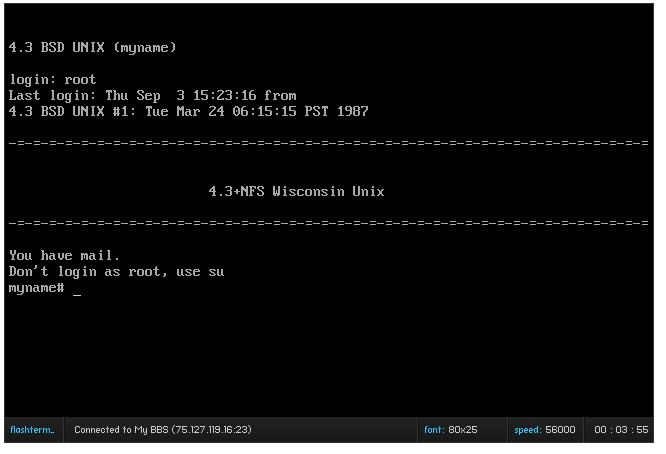
Flashterm, is one of those fancy GCC for flash projects that uses the flash socket API to create a telnet client! Right now they are focused on ANSI emulation geared towards BBS’s. But if you’ve got a firewall to redirect ports, or if you are running the ‘policy’ server directly you can let people into your machine, and all they need is a modern browser/flash combination which you can safely say all ‘kids’ machines will have (and yes even my parents, as they LOVE those silly flash games, and dancing cats).
Anyways, the control key is NOT captured, so there is no control+d to kill your session, but a ‘reload’ of the browser, or closing the tab will do it just as well. Robots doesn’t work correctly, but all & all it’s a super simple way to get back to your machines!
I’ve set one up in the meantime as a test…
http://vpsland.superglobalmegacorp.com/telnet
Although I don’t know how long I’ll keep it online. But it does create the possibility now of having not only information on various ancient UNIX but to allow others to use them!.. And for most internet users, with no real downloads as that flash thing is EVERYWHERE…
Well I started playing some more with the Quake source, looking to get a dedicated server at least running on Windows NT 3.1 . The problem is that every time someone connected I got this error:
SV_ReadClientMessage: NET_GetMessage failed
And they were disconnected. Some digging thru the source code revelaed that they were being dropped because they had ‘timed out’. But they did not timeout, the real cause is that the null_sys driver is TOO FAST!!! So this gave me a good excuse to re-use my failed SDL build for NT 3.1 (it has no video) but the timer works great! So with a little fun with the linker & Visual C++ 1.0 I managed to get it running!
I’ve put the source and build script for building the dedicated quake server here
The SDL.lib will probably link with every version of Visual C++, but I’m no promising. Also it wont work video wise on NT 3.1 so don’t get all excited.
Anyways no I havent put one on the internet… I dont know if there are enough people even slightly excited about quake… but it’s FYI….