Updated Qemu for MIPS emulation

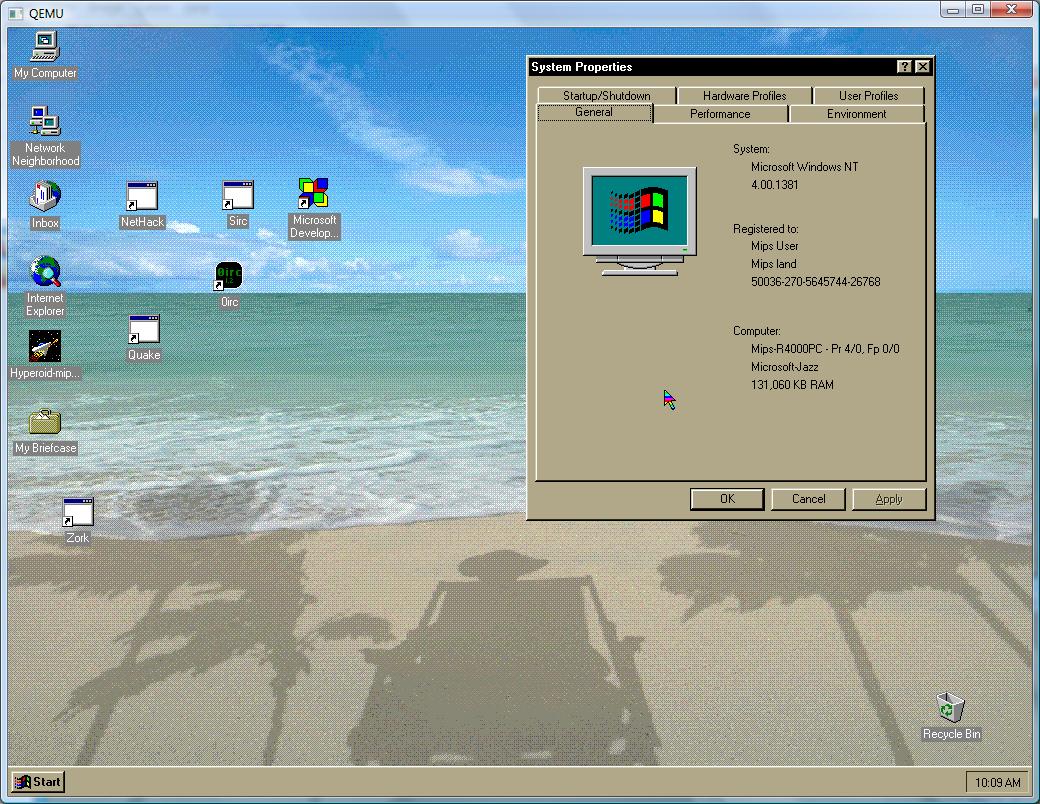
Today I found out that the latest ‘git’ repository version can run Windows NT in color, and with corrected mouse support! The NVRAM is still corrupting and you’ll have to fix the time/date but a usable mouse, and being able to see what you are doing go a long way!

I’ve put the updated binaries here.

If you feel adventurous you too can compile the emulator, I’ve downloaded todays snapshot to here in the off chance this won’t be build able for some time.

I don’t know if there is any good way to enable sound, but things like Visual C++ 4.0 & Quake 1 are usable in that you can actually see what is going on!

Here’s a screen shot of my NT 4.0 workstation….

Qemu MIPS Windows NT color

Qemu MIPS Windows NT color

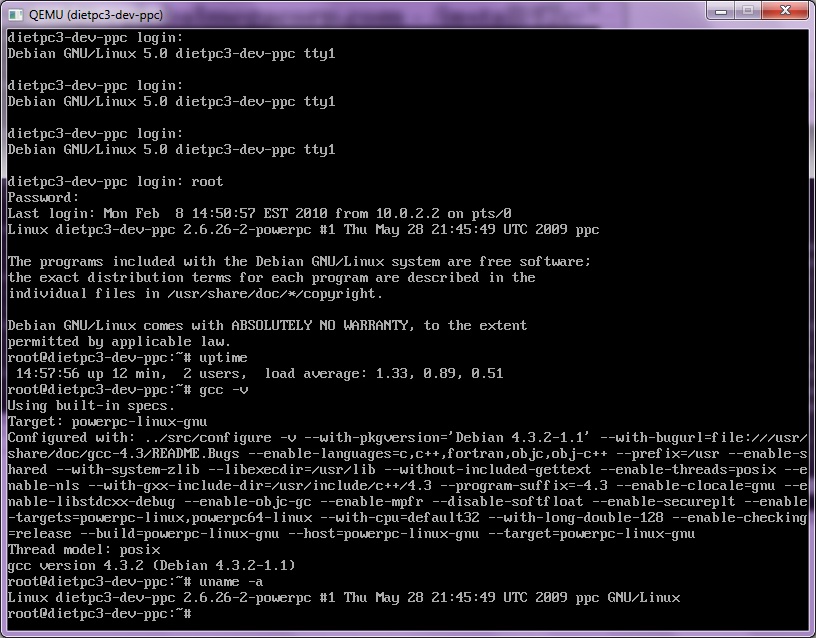
Qemu ARM, MIPS & PowerPC images…

Well I was thinking of building something like this, but someone did the work for me….

You can find various images here.

So needless to say, a special thank you goes to the dietpc guy… These are all set for MS Windows users, just download the VM you want, and you are ready to go. The only ‘issue’ I had with the PowerPC one, is that I needed to run fsck on the root and reboot it…. (remember the root password is foobar).

Other then that it seems happy as it can be.

root@dietpc3-dev-ppc:/usr/src/f2c# cat /proc/cpuinfo
processor : 0
cpu : 740/750
temperature : 62-64 C (uncalibrated)
clock : 1000.000000MHz
revision : 3.1 (pvr 0008 0301)
bogomips : 40.44
timebase : 16605783
platform : PowerMac
model : Power Macintosh
machine : Power Macintosh
motherboard : AAPL,PowerMac G3 MacRISC
detected as : 49 (PowerMac G3 (Silk))
pmac flags : 00000000
pmac-generation : OldWorld

I wouldn’t dream of really benching it, but this is better then blindly cross compiling as you can check your work…

The downloads are quite sizable about 450mb each… but it is a complete run & go linux environment.

And here is a gratuitous screenshot:


Qemu 12.2

Well while I was busy playing with my DEC Alpha (lol) there has been a few updates on the Qemu front…. There is some super basic Dec alpha support going in, but no system support yet….

One can only hope that one day it’ll run NT!!!

Anyways, I’ve built up the latest version here for win32, Windows users.

As much as it kills me, the MIPS version still CANNOT boot NT 4.0… the ARC Bios runs great, but now the program crashes on the loader….

I did however do some basic tests with the i386 version and it seems ok.

Well today I got my new Dec Alpha running!

Ok, my friends say I’m insane to have bought this… but I couldn’t resist.

It’s a DEC Alpha 221164 machine, with 64MB of ram, and a 4GB disk!

It’s the best technology of 1996-1997!

So I’ve gone ahead and installed Windows NT 4.0 on the beast… at 600Mhz it’s pretty dammed fast… considering how old it is. Although I suspect a Pentium III I found in the garbage with a 1Ghz cpu is 2x faster…..

But at any rate, this is a DEC Alpha, the long time geek cpu of dreams etc…
What makes this slightly useful for me, is that I do have Visual C++ 4.0 & 6.0 for the Alpha. So at least I can build *SOME* stuff to run on the thing….

So I’ve been fighting the compiler, and it seems it’s default blended optimizations do *NOT* work on my machine.. I’m sure this will be fun down the road. However it seems setting the target cpu to the 21064 produces ok code.. I’ve got to bench the stuff, but at least my exe’s are not crashing.

So what have I manage to produce today so far?

Well…

unzip is a major one.. It’s hard to use a machine today without it.

The other thing I’ve manage to get running, is Quake! I’ve included my source & project trees as it was a feisty little thing to build..

I’m currently building & testing over terminal services so I don’t know what the speed is on the console… Also, this build does not include networking… I’m sure the winsock code will work just fine, I’m just not in a good position physically to test it, as Quake1 will *NOT NAT* correctly.. Also the SDL sound doesn’t actually output anything, so I’ve built it with the null sound driver..

I’d love to get that m68k->C build of frontier elite to go on the Alpha but I’m afraid my 64mb of ram will be a major constraint..

I know this isn’t much of an emulation thing, as the only emulator that possibly can run Windows NT for the Alpha costs upwards of $16,000 USD… It’s cheaper to score an alpha on ebay for $100 USD.

Well here is the screen shot…
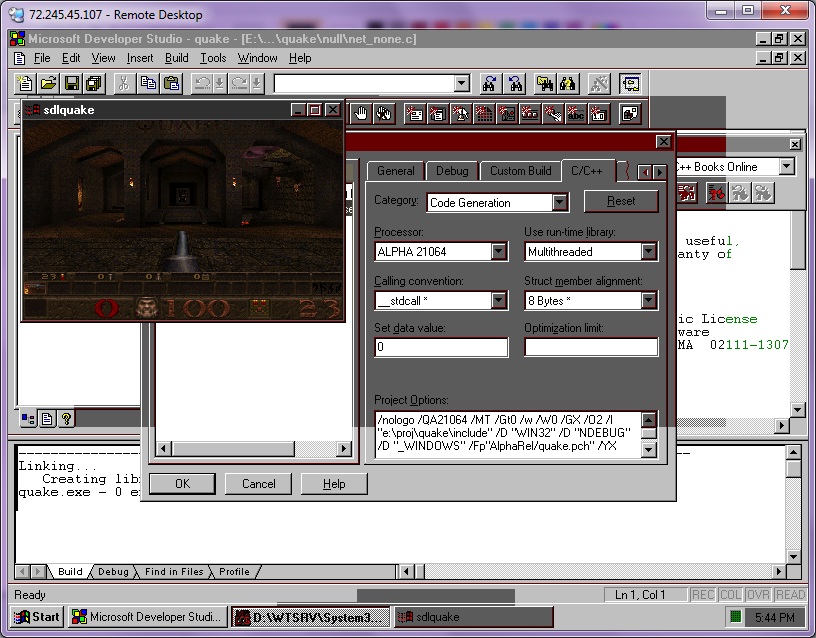
Quake on the Dec Alpha


I know it’s not much to ‘look’ at, but the pallet is correct, because it’s a real Alpha!.. Unlike the MIPS thing.

Proxmox 1.4 is out

I’ve been rooting for proxmox for a while now, and I’ve just installed it on a DL385 with a 1.7 TB FC NAS…. This version is SO MUCH BETTER then the prior ones with regards to storage….

I’m installing a Windows 2003 server right now for some basic tests, but I’ll have to post back later with far more testing…

So far, so good though.

Also if you are going to install with a SAN of some kind, make sure to have it disconnected on install.

Some updates..

I had a request for the qemu 0.90 binaries to run NeXTSTEP… I don’t own Vaxenrule.com anymore so for now I’ll put them here:

http://dl.dropbox.com/u/1694005/qemu090%20for%20nextstep.zip

Sorry for the bitrot stuff… 😐 At least I’m still here.

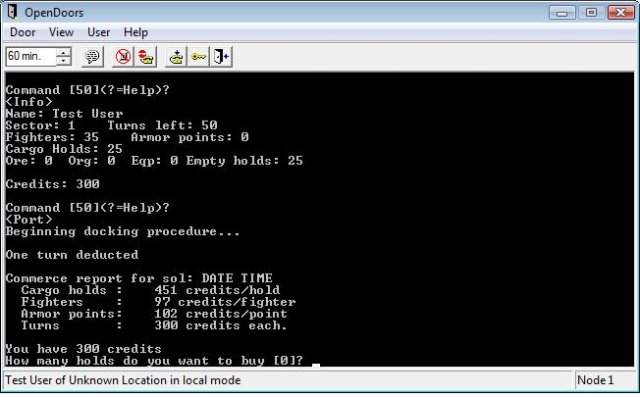
Also while working on Tradewars C today, I came across this great package called OpenDoors. Even better is that it’s under the LGPL. The only “downside” is that OpenDoors requires Visual C++ 6.0 or higher to build, because of the toolbar.. Also I’m not sure if going from VC 1.0 to 9.0 didn’t flake some stuff out as well… I’m not 100% sure about it, but the trading part of the game feels.. weird.

The examples are pretty straight forward, and it took a few hours on & off for me to convert the standalone tradewars into a door program. I like the feel of it so much I may try to see about converting SIMH to run with it.. Maybe even dumbfrotz.

OpenDoors trade wars

OpenDoors trade wars

Above is a picture of what the console looks like.

Printing within Qemu

For a while I was unsure of the syntax of printing from within Qemu. I know for the Xenix crowd this is kind of ‘a big deal’. Along with more serial ports for consoles & stuff…

Anyways for the printer I found an example on line, and it’s quite easy:

qemu xenix_hard_disk.vhd -parallel file:lpt1: -M isapc -m 16 -k en-us

Now I’ve seen it actually spool stuff to the printer once the emulator is exited… I’m sure there is some way to kick these jobs better… I’ve also been trying to keep it as dumb as possible and there is a chance my HP printer /scanner thing doesn’t talk like a 1970’s style printer.. I’ll know more tomorrow..

But at the moment this should serve enough to get people started. Also you could redirect the parallel port out to a file, and then open that file in say word and print from there as well.
This is becoming a bigger deal now that future versions of Virtual PC no longer support things like parallel ports, floppy disks & sound blasters…. Qemu will be the only out for a few people.