Qemu OS/2 TCP/IP networking

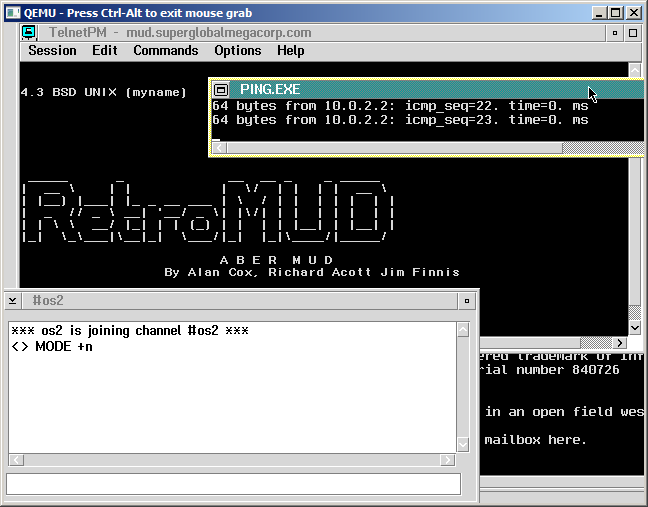
Well this should have been ‘easy’ but let me assure you it was not.  However this may save someone LOTS of effort if they ever want to get TCP/IP running in a fossil like OS/2 2.0.

First of all OS/2 2.0 will not install in new versions of Qemu.  I had to go all the way back to Qemu 0.9.0!  Although there is a tonne of floppy images to shuffle, OS/2 2.0 will install somewhat straightforwardly.  Once OS/2 is installed, You will almost surely want the xr06100 service pack.  I found I was unable to run MS-DOS or WinOS/2 sessions at all without either crashing the system, or trapping the entire OS.  But after loading the service pack it works as expected.

Now Qemu supports all kinds of network cards, from the NE2000 ISA, a PCI version of the NE2000, the rtl8139, an AMD PcNET adapter, and a bunch of Intel adapters.  And the annoying thing is that the OS/2 driver I have for the AMD PcNET adapter does not work at all.  It can’t find the card no matter how much I tried.  Which is funny when Netware 3.12 of all things can see it…

I tried all kinds of NE2000 drivers set for 0x300 irq 3 or irq 9 (I changed hw/pc.c to reflect what it was set to) to either not loading, or it’d load and transmit packets, but NEVER receive any packets.

The rtl8039 (ne2k_pci) and rtl8139 would also either not find the card, crash on binding, or send packets and again receive nothing.  To say it was very annoying was an understatement.

So I almost gave up, I found some update for the TCP/IP, u64092 went through the needed fun with loaddskf, and finally got working diskettes, and … It still didn’t work.

So in a fit of rage, I removed the 0x300/9 ne2000 in the config, so the next one, the 0x320, IRQ 10 one is in order, and….. It worked!  It even works with the Microsoft NE2000 driver!

So I go ahead and modify Qemu 0.14.1 to force the ne2000 to 0x320/IRQ 10, and it works great on the latest version!  It’s a shame it doesn’t install… But hopefully you only need to do that once!

So there we go, saved by the NE2000 again.

For anyone crazy enough to reproduce this, here is my config.sys & protocol.ini … I’ve also installed EMX, but I don’t think that really matters…


Qemu 0.14.1 released!

I just found out that a new version of Qemu has hit the street!  From the changelog:

  • Version 0.14.1 (commit)
  • virtio-blk: fail unaligned requests (commit)
  • qed: Fix consistency check on 32-bit hosts (commit)
  • exit if -drive specified is invalid instead of ignoring the “wrong” -drive (commit)
  • vhost: fix dirty page handling (commit)
  • Do not delete BlockDriverState when deleting the drive (commit)
  • vnc: tight: Fix crash after 2GB of output (commit)
  • lan9118: Ignore write to MAC_VLAN1 register (commit)
  • Don’t allow multiwrites against a block device without underlying medium (commit)
  • lsi53c895a: add support for ABORT messages (commit)
  • virtio-pci: fix bus master work around on load (commit)
  • fix applesmc REV key (commit)
  • rbd: don’t link with -lcrypto (commit)
  • net: Add the missing option declaration of “vhostforce” (commit)
  • lsi53c895a: Update dnad when skipping MSGOUT bytes (commit)
  • Revert “prep: Disable second IDE channel, as long as ISA IDE emulation doesn’t support same irq for both channels” (commit)
  • isa-bus: Remove bogus IRQ sharing check (commit)
  • virtio-net: Fix lduw_p() pointer argument of wrong size (commit)
  • hw/sd.c: Add missing state change for SD_STATUS, SEND_NUM_WR_BLOCKS (commit)
  • vnc: Fix fatal crash with vnc reverse mode (commit)
  • qemu-char: Check for missing backend name (commit)

I’ve also included my patches to enable ctrl+alt+d for a quick control alt delete, ctrl+alt+r for reset, and the ISA Cirrus adapter.

As always, I’ll have win32 builds up in the usual spot.  i386/x86_64 and everything else.  I’ve tested these on Windows 7 x86_64, and they should work on XP & Vista i386 as well.

Also I’ve switched this to 7zip to save space.


Dead end on the ISA disks.

Well I really thought I was going to make some headway on this.

But the answer was no.

However for the sake of completeness, let me at least document what I did.. The IBMPC hardware is initalized in hw/pc_piix.c

You’ll find this little GEM:

if (pci_enabled) {
PCIDevice *dev;
dev = pci_piix3_ide_init(pci_bus, hd, piix3_devfn + 1);
idebus[0] = qdev_get_child_bus(&dev->qdev, “ide.0”);
idebus[1] = qdev_get_child_bus(&dev->qdev, “ide.1”);
} else {
for(i = 0; i < MAX_IDE_BUS; i++) { ISADevice *dev; dev = isa_ide_init(ide_iobase[i], ide_iobase2[i], ide_irq[i], hd[MAX_IDE_DEVS * i], hd[MAX_IDE_DEVS * i + 1]); idebus[i] = qdev_get_child_bus(&dev->qdev, “ide.0”);
}
}

So I did the obvious thing and just wrapped it with a ‘pci_enabled=0;’ and a ‘pci_enabled=1’, basically turning off PCI for the IDE initialization so it’d load the isa_ide_init proc. Well that just then crashed Qemu when it was reconciling geometry for the NVRAM. 20 minutes with GDB and I figure that the code has morphed enough that it’s basically expecting 2 IDE controllers, and the ISA thing just isn’t building out what it wants so it’s just a quick fix in hw/pc.c

static void pc_cmos_init_late(void *opaque)

ide_get_bs(hd_table, arg->idebus0);
ide_get_bs(hd_table + 2, arg->idebus1);

So I comment out the second ide_get_bs and lo Qemu doesn’t crash anymore! But the BIOS says there is no hard disks?! So I’m figuring it’s a SeaBIOS issue, so checking their changelog, I see that there is something about not trusting ISA controllers on PCI systems.

So I’ll just have to back out that change, or just hack the thing to re-enable ISA IDE controllers. Luckily this was kind of easy to spot, as someone had left the magical words ‘isapc’ in ata.c

if (!CONFIG_COREBOOT && !pcicount) {
// No PCI devices found – probably a QEMU “-M isapc” machine.
// Try using ISA ports for ATA controllers.
init_controller(0, -1, IRQ_ATA1
, PORT_ATA1_CMD_BASE, PORT_ATA1_CTRL_BASE, 0);
init_controller(1, -1, IRQ_ATA2
, PORT_ATA2_CMD_BASE, PORT_ATA2_CTRL_BASE, 0);
}

So all I had to do was ensure that this was called, no matter what (comment out the if, leave the block). Sadly MinGW couldn’t build SeaBIOS so I spent the better part of an hour downloading Slackware 13.37 (which was … less then expected) fighting with it’s frame buffer, then the linker gave me this exciting bit.

cannot move location counter backwards (from 00000000000067e0 to 0000000000000000)

Good grief.

The fix is to apparently use binutils 2.20.51 . Slackware came with 2.21.51 .. Which apparently broke this needed function (again). So I wound up downloading the source from the MinGW project of all things (I know, wth?) having fun with p7zip (it installs a 7za?!) then I could FINALLY build my BIOS. First a generic test to make sure it works, then the modified one.

And into the crash. To verify I at least was doing what I thought, I turned on some debugging in the BIOS, which seamed normal, and then just fired up qemu with this flag:

-monitor telnet:127.0.0.1:2023,server,nowait

So I can telnet in, and capture the full device tree. Which you get with…

info qtree

And you can see, the IDE is indeed on the ISA bus.

bus: main-system-bus
type System
dev: hpet, id “”
gpio-in 1
dev-prop: timers = 3
dev-prop: msi = off
mmio fed00000/00000400
dev: i440FX-pcihost, id “”
bus: pci.0
type PCI
dev: PIIX4_PM, id “”
dev-prop: smb_io_base = 45312
bus-prop: addr = 01.3
bus-prop: romfile =
bus-prop: rombar = 1
bus-prop: multifunction = off
bus-prop: command_serr_enable = on
class Bridge, addr 00:01.3, pci id 8086:7113 (sub 1af4:1100)
bus: i2c
type I2C
dev: smbus-eeprom, id “”
bus-prop: address = 87
dev: smbus-eeprom, id “”
bus-prop: address = 86
dev: smbus-eeprom, id “”
bus-prop: address = 85
dev: smbus-eeprom, id “”
bus-prop: address = 84
dev: smbus-eeprom, id “”
bus-prop: address = 83
dev: smbus-eeprom, id “”
bus-prop: address = 82
dev: smbus-eeprom, id “”
bus-prop: address = 81
dev: smbus-eeprom, id “”
bus-prop: address = 80
dev: PIIX3, id “”
bus-prop: addr = 01.0
bus-prop: romfile =
bus-prop: rombar = 1
bus-prop: multifunction = on
bus-prop: command_serr_enable = on
class ISA bridge, addr 00:01.0, pci id 8086:7000 (sub 1af4:1100)
bus: isa.0
type ISA
dev: isa-ide, id “”
dev-prop: iobase = 0x170
dev-prop: iobase2 = 0x376
dev-prop: irq = 15
isa irq 15
bus: ide.0
type IDE
dev: ide-drive, id “”
dev-prop: unit = 0
dev-prop: drive = ide1-cd0
dev-prop: logical_block_size = 512
dev-prop: physical_block_size = 512
dev-prop: min_io_size = 0
dev-prop: opt_io_size = 0
dev-prop: bootindex = -1
dev-prop: discard_granularity = 0
dev-prop: ver = “0.14.0”
dev-prop: serial = “QM00003”
dev: isa-ide, id “”
dev-prop: iobase = 0x1f0
dev-prop: iobase2 = 0x3f6
dev-prop: irq = 14
isa irq 14
bus: ide.0
type IDE
dev: ide-drive, id “”
dev-prop: unit = 0
dev-prop: drive = ide0-hd0
dev-prop: logical_block_size = 512
dev-prop: physical_block_size = 512
dev-prop: min_io_size = 0
dev-prop: opt_io_size = 0
dev-prop: bootindex = -1
dev-prop: discard_granularity = 0
dev-prop: ver = “0.14.0”
dev-prop: serial = “QM00001”
dev: isa-fdc, id “”
dev-prop: driveA = floppy0
dev-prop: driveB =
dev-prop: bootindexA = -1
dev-prop: bootindexB = -1
isa irq 6
dev: port92, id “”
dev: i8042, id “”
isa irqs 1,12
dev: isa-parallel, id “”
dev-prop: index = 0
dev-prop: iobase = 0x378
dev-prop: irq = 7
dev-prop: chardev = parallel0
isa irq 7
dev: isa-serial, id “”
dev-prop: index = 0
dev-prop: iobase = 0x3f8
dev-prop: irq = 4
dev-prop: chardev = serial0
isa irq 4
dev: mc146818rtc, id “”
dev-prop: base_year = 2000
dev: i440FX, id “”
bus-prop: addr = 00.0
bus-prop: romfile =
bus-prop: rombar = 1
bus-prop: multifunction = off
bus-prop: command_serr_enable = on
class Host bridge, addr 00:00.0, pci id 8086:1237 (sub 1af4:1100)
dev: ioapic, id “”
gpio-in 24
mmio fec00000/00001000
dev: fw_cfg, id “”
dev-prop: ctl_iobase = 0x510
dev-prop: data_iobase = 0x511
mmio ffffffff/00000002
dev: apic, id “”
dev-prop: id = 0
mmio fee00000/00100000

So while it didn’t do what I wanted, this kind of was a good way to see that I could at least enable ISA IDE hard disks on Qemu.

I can only wonder why on earth they are still broken with regards to Netware.

ISA Cirrus Logic for Qemu

So after some annoyance with control-alt-delete in Qemu, I figured I’d try to tackle another thing that’s been driving me nuts, which is no ISA Cirrus video card.

This is a far cry from restoring the -M isapc in Qemu but it’s a step in the right direction. I guess the IDE is the only big thing to do next (I haven’t even looked) but anyways… babysteps.

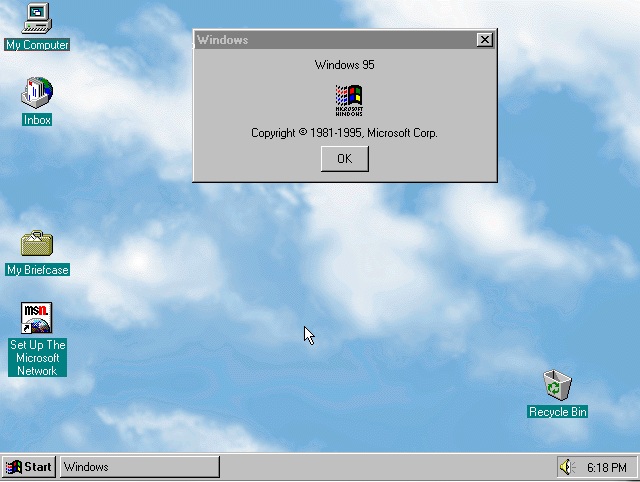
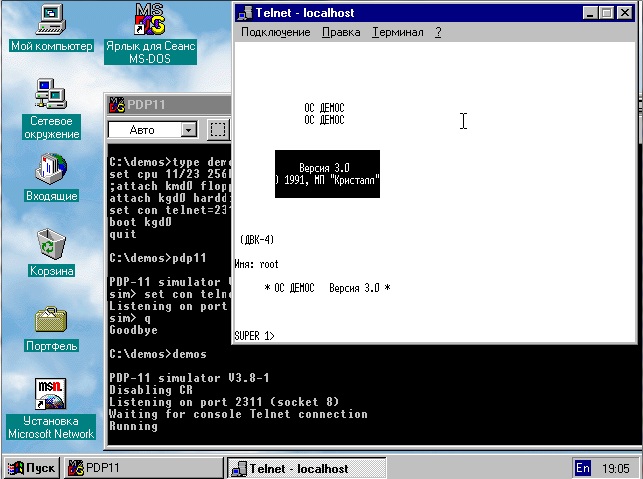
So why would you want this? Well if you have an ancient non PCI supported OS (Windows 95) you have to suffer through the standard VGA because the Cirrus mapping won’t work. Sure you can load the PCI driver set, but as I found out with the ДЕМОС/DEMOS & Russian thing, it won’t load on Windows 95 Russian.

So I’ve updated the Qemu 0.14.0 download (again). And here is the gobbed up diff that I’m working from that changes the keyboard to support more ancient stuff from Royatm, moves the ne2000 ISA to 0x300 IRQ 3 (like the real thing). I’ve also put the AdLib sound card back in (why is it optional?) so you can have sb16,adlib sounds. It also includes ctrl-alt-delete as Control+Alt+d and now addes -vga isacirrus.

Anyways, my mangled Qemu 0.14.0 download is here.

Oh one more tip, for Windows if the hardware cursor doesn’t work, and your mouse is a white square, turn on mouse trails, then set it for the shortest setting. This way it forces the mouse to be blitted normally, and it’ll look fine.

Minor update for Qemu 0.14.0

I simply can’t take the ‘sendkey ctrl-alt-delete’ shuffle anymore. So I investigated the ui/sdl.c and it seemed somewhat easy to do…

keycode = sdl_keyevent_to_keycode(&ev->key);
switch(keycode) {
case 0x20: /* ‘d’ key on US keyboard */
kbd_put_keycode(0x1d); /* left ctrl key */
kbd_put_keycode(0x38); /* left alt key */
kbd_put_keycode(0xd3); /* delete key */
break;
case 0x21: /* ‘f’ key on US keyboard */
toggle_full_screen(ds);
gui_keysym = 1;
break;
case 0x16: /* ‘u’ key on US keyboard */

So what does this mean? Hitting ctrl-alt-d will now send a contrl-alt-delete. Woo. I’ve updated my binary for Qemu 0.14.0 here.

It certainly makes logging into Windows NT & friends significantly easier.

——-
As an update the CAD worked for some things, but not others.. so after some printf’s in the input module I came up with this…

kbd_put_keycode(56);
kbd_put_keycode(29);
kbd_put_keycode(157);
kbd_put_keycode(184);
kbd_put_keycode(29);
kbd_put_keycode(56);
kbd_put_keycode(224);
kbd_put_keycode(83);
kbd_put_keycode(224);
kbd_put_keycode(211);
break;

which basically is slamming every possible combination of control/alt/delete. And the rest of you will have to download yet again for this update.

Qemu disk image conversion

I see that there is some confusion over how to convert disk images from various popular emulators, and I thought I’d try to clear some of this up. Without a doubt, the best free tool available for this is qemu-img. And it’s free! Currently as I write this, that makes Qemu 0.14.0 the current version. I’ll cover the common ones that I use.

For the most part for Qemu I used the qcow2 format. Naturally you can use any of these formats in Qemu… While others are limited.

Converting from..

Virtual PC source image..
To convert to a qcow2:

qemu-img convert source.vhd -O qcow2 destination.qcow2

To convert to VMDK for VMWare:

qemu-img convert source.vhd -O vmdk destination.vmdk

And to convert to a raw image, suitable for BOCHS.

qemu-img convert source.vhd -O raw destination.raw

And of couese you can mix and match from there… Say take your qcow2 and convert it for VPC like this:

qemu-img convert source.qcow2 -O vpc destination.vpc

Or convert a Virtual PC/Virtual Server/Hyper-V vhd (as long as the hyper-v image is consolodated) and convert it to VMWare like this:

qemu-img convert source.vhd -O vmdk destination.vmdk

Note that these VMWare VMDK’s are not for ESX/ESXi, they use more of a raw partition set… But of course you can always convert them to RAW then dd them into the target partition… But I’ll leave that exercise to you. Honestly that vmware converter thing is much easier as it’ll inject the needed drivers.

Speaking of which, this only converts image formats, don’t forget about pre-loading the needed drivers!

I hope this helps out anyone trying to move disk images around.

Recording QEMU’s VNC output to a flash file

First off it doesn’t do sound… I’ll have to search further for something that will let me do something more.. involved, but for now, this works well enough.

First I’m going to use Qemu 0.14.0 for this, earlier ones will work, but if it’s too old, there isn’t any support for VNC output. I figured I’d start with something simple, Lemmings, from the Win32s demo a while back. Now VNC doesn’t like it when you change resolutions, so I find it’s best to start out in the video mode you plan on recording. So once the VM is fired up I go ahead and load Windows. Qemu can support multiple outputs so I’m going to specify that it listens on the default VNC port (TCP 5900), and bind it to my IPv4 loopback. I’m also going to open up the SDL Window, because I like to see what I’m doing. If you want to get more sophisticated, you can even use a multiplexer program like VNC Reflector which will allow multiple people (or programs) to connect to the VNC port.

qemu -L pc-bios -m 32 -hda win31.qcow2 -vnc 127.0.0.1:0 -sdl -soundhw sb16,adlib

Now a minor word about audio.. I am currently having issues aligning this up.. no doubt I’m doing something wrong, or I should just break down and use some proper editing tools but it kind of works for now. Also to get a ‘clean’ capture of the audio from the VM, I use Virtual Audio Cable. By simply changing my default sound device to a VAC, and my default Mic to the same VAC I don’t have to worry about background noises, or anything else. Not to mention in Vista or Windows 7, you can mute other programs so you won’t have instant pestering bleeding into it.

I’m using the awesome program vnc2flv to record this. Now it is a python program, but thankfully us windows users don’t have to go through too much hell to run this, I just downloaded it from ‘RT’s Free Software‘.

I just kick it off like this:

flvrec -C 640×480+0+0 -o video.flv 127.0.0.1:0

And it’ll start recording. I then kicked off sox to record the audio like this:

sox -4 -b 16 -d audio.wav

Then once I’m done doing what I’m going to record, kill both programs.

While sox can record mp3’s if you find libmad, or build it yourself, I found it was just easier to use lame.

lame -r -x -s 44.1 –bitwidth 16 audio.wav

And yes, you *DO* need to output at 44100Hz or 44.1Khz for the audio. Any other level and you can’t combine the flv & audio. Yes I tried and tried, but don’t fight it, and thank me for finding the flags to pass to lame.

Then use flvaddmp3 to combine the audio and the flv video into a final.flv.

flvaddmp3.exe video.flv audio.wav.mp3 final.flv

Now you can upload it to youtube, and from there embed or share it as you wish.

I had originally used pyvnc2swf, which will create a flash file directly, however it doesn’t deal that well with screen refreshes. But if anyone wants to use it, remember the default VNC port is 5900, and you must pick a file to ‘save as’ first then you can start the recording. Also in things like windows, I found having notepad open to full screen then minimizing it was a good way to force a screen redraw.

The first appearance of Windows NT

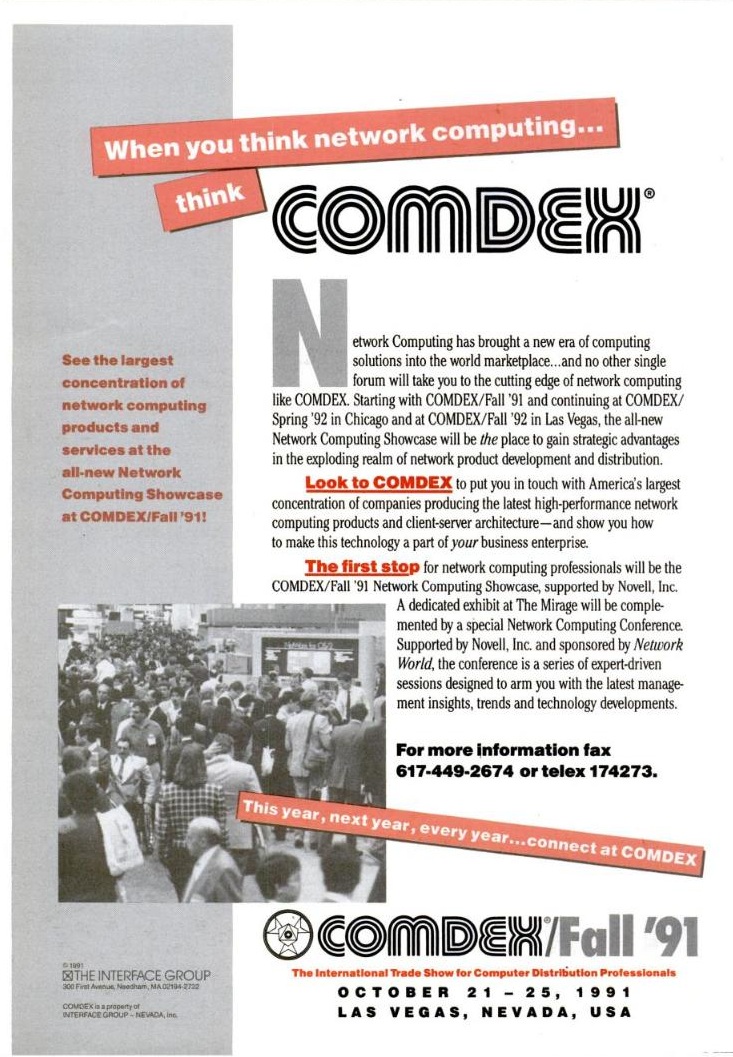
As mentioned in the great book Showstopper!, the first public demonstration of Windows NT was at the 1991 Fall Comdex.

And apparently it must have been quite a show.. In retrospect, but for stuff written down at the time there isn’t a heck of a lot to go on. I do find snip its like this after the fact:

“At the COMDEX show, Microsoft gives the first public demonstration of Windows NT. [909.232]”

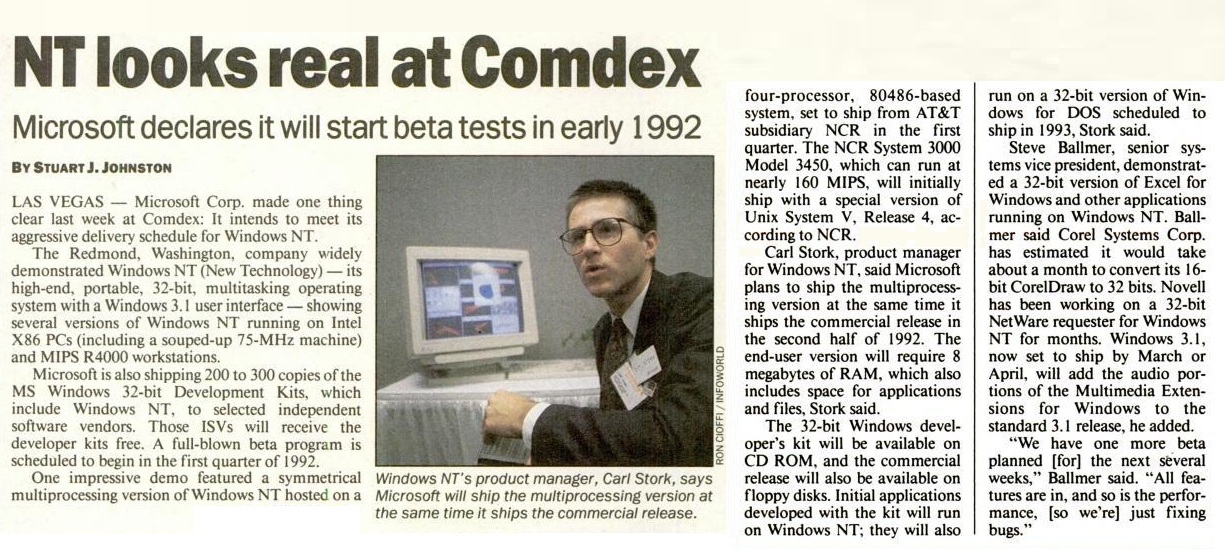
But how about a good review? How about someone to kick the tires? I guess it was just too far fetched? Anyways I did find this ONE writeup in Infoworld:

Windows NT looks real at Comdex.


And it is just gushing about SMP support. But if you think about it, SMP support around 1991 was almost non existent. It either fell into people who took UNIX and tried to make it more SMP friendly (ie giant spinlocks) or people who offloaded specific tasks to different CPU’s (Novell Netware). NT was like Mach in that it was going to be something totally different written for SMP hardware in mind, and presenting a personality much like an old trusty OS, be it POSIX, Win32 or the NTVDM running other stuff. The other thing the article mentions is that 300 of these developer discs were made.

So with some luck, someone actually sent me an installed copy of this historic version of Windows, so let’s take a look shall we?

The only thing I really can compare this to is the later December 1991 release, but here goes.


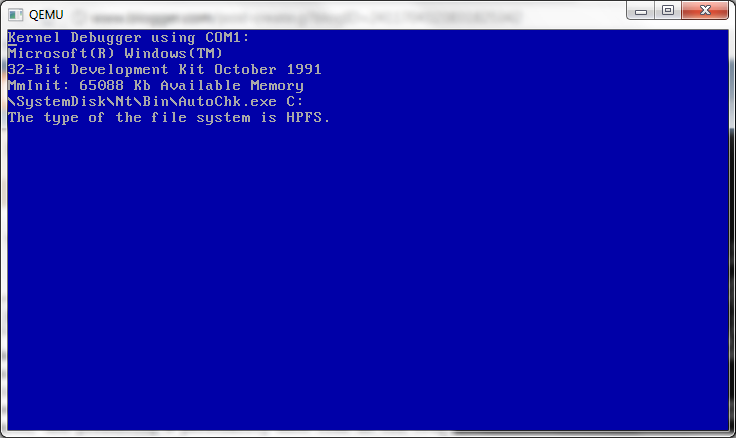
So first here we are booting up. Not surprisingly, like all version of Windows NT we start with a blue screen. And here we know it’s the official “32-Bit Development Kit October 1991.” version. I wonder if they even sold/gave these out at Comdex to some selected people… But I’d imagine they didn’t.

And here we are at the login screen. Just like the December 1991 version there is no passwords, and you can even login as SYSTEM. The background & color scheme was set in the image, I bet changing them is trivial.

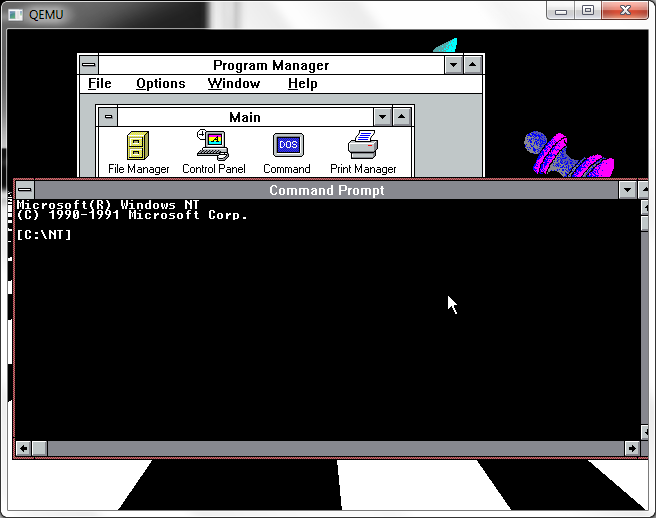
Here we are at the desktop. It feels more like Windows 3.0 then 3.1, it may very well be mixed in with the beta Windows 3.1 program manager for all I know.

Here is the command prompt. It looks very OS/2 like with the square brackets around the prompt. Just like December.

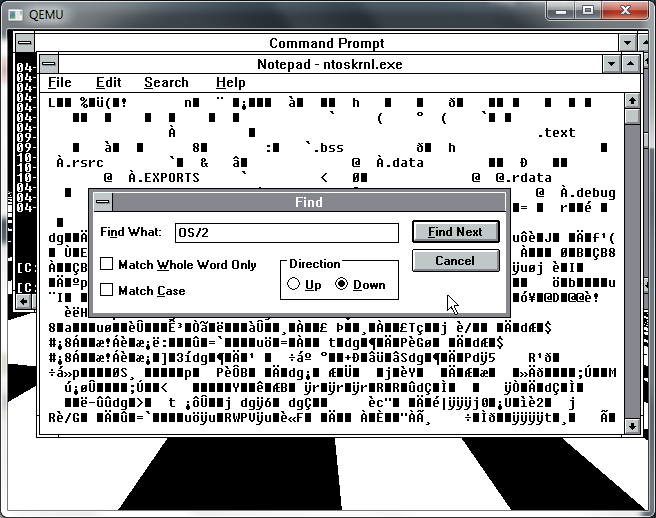
So I figured, let’s search through ntoskrnl.exe for any trace of OS/2…

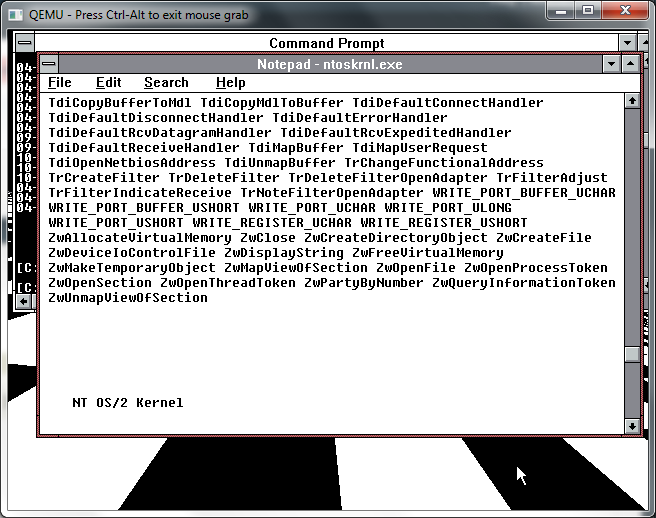
And here it is!

Buried in the binary is the true name of Windows NT, NT OS/2. Not that it matters. Also notice all the NT api calls. It looks like these early kernels weren’t to scared to share their interface names..

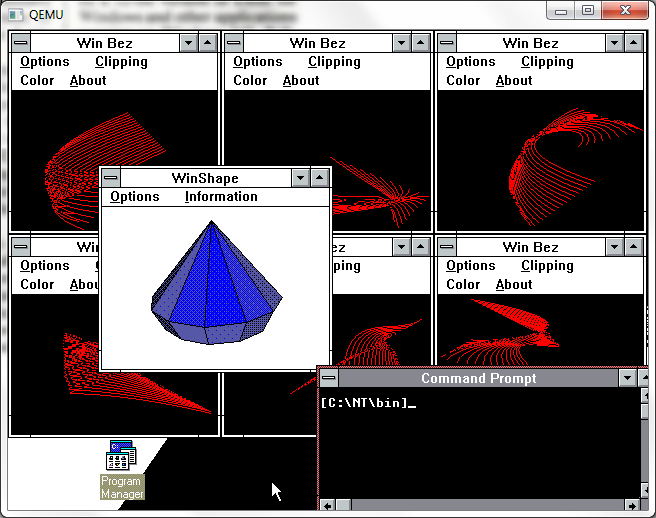
Now this is a big deal, look at all the multitasking! In 1991 getting this kind of tasking out of Windows 3.0 was an impossibility! I’ve got 6 copies of WinBez open, along with Winshap bounding around minimized. I’ve got a command prompt open, and I compile some code, and it keeps on going.

But really pictures don’t speak words for it, here is it in action!


I know it’s small, it’s blogspot’s formatting, but you can always view the direct video on youtube here. And you too can watch me compile & kill a troll. Very exciting!

I’ll have to write up later how I did this….

Installing Windows 2000 on Qemu 0.14.0

Well good news on the Qemu front, I haven’t tried Windows 2000 in a while, but it installs without any major issues on Qemu 0.14.0.

First I created a 4GB disk..

qemu-img.exe create -f qcow2 win2.disk 4G
Formatting ‘win2.disk’, fmt=qcow2 size=4294967296 encryption=off cluster_size=0

Then I’m firing up Qemu like this:

qemu.exe -L pc-bios -m 512 -hda win2k.disk -net nic,model=pcnet -net user -redir tcp:4444::3389 -cpu pentium -soundhw sb16,adlib -cdrom windows2000.iso -boot d

I’ve setup the AMD PCNet ethernet adapter, and some soundblaster/adlib fun. What the heck.

Since I’m using my MSDN stuff, I figured I’d install Advanced Server.. not that I need the clustering or anything, but what the hell, it sounds exciting. Anyways in the old days we needed to add this -win2k-hack which forced the disks into extra slow mode (PIO). The good news is that we don’t have to worry about that anymore.

And the installer comes up without any issues….

And for the hell of it, let’s go NTFS. Go ahead and go thru the rest of the install steps, and then it’ll be ready to reboot.

The only ‘issue’ I’ve seen, and it goes for physical installs to is you’ll come up to when it’s detecting physical hardware and it’ll freeze right here.

Move the mouse hit some keys… And it’ll move. Otherwise, you’ll be sitting on this screen for a long long time. But Windows 2000 did the same thing on physical hardware too. Also it’s best to be moving the mouse around when the GUI boot completes otherwise it may just seemingly lock. I’ve had this issue on ‘fine’ Dell equipment too..

I like the terminal services & remote administration mode…

Even though with Qemu you can send the frame buffer out via VNC, but RDP is more robust.. not to knock VNC. Anyways Windows 2000 will continue to do it’s thing… So sit back and it’ll keep on chugging…

Registering components takes a while… Windows 2000 had a BIG push moving everything into COM objects, which sounded like a great idea, but it takes a while to register all this stuff… And it gave us the incredible DCOM protocol to go forward. Too bad it doesn’t NAT for crap, but it’s amusing watching it ‘MEOW’ around the network.

Then we are on to saving the settings…

Which isn’t too fast either. Waggle the mouse a bit, for the hell of it. And keep on waiting.

And then…

And we are done!

So now Qemu will reboot the image.. The Windows 2000 ISO’s can optionally not boot so ignore it, and..

Hopefully no inaccessible boot device errors…

And now starting up…

And here we are! Now just to send a control alt delete…

I know this is hard for some people, but there is no ‘clean’ way to hit control alt delete, you just hit control+alt+2 which will bring you to the console which then you can send in the command by typing in…

sendkey ctrl-alt-delete

And then to switch back, it’s control+alt+1 … Easy, right?

And then you can login and all is well.

Another tip is to use a USB tablet once Windows 2000 is installed. This allows for a ‘seamless’ pointer, so you don’t have to worry with the control+alt to release the window.

-usbdevice tablet

Well although netware 3.x & 4.x seem to have catastrophic issues, Windows 2000 certainly works well!