Unix/32V multiuser…

Well I was reading through this post:

 
When it made mention that for multiuser operations to work on Unix v7 you have to enable modem control… I’ve never gotten the DZ to work on 32v so seeing that it’s basically just Unix v7 on the VAX it probably worked in the same manner.
 
So I changed the following line from my 32v’s dboot.ini from:
 
set dz lines=8
 
to
set dz lines=16
att dz -m 2311
And now SIMH will listen on TCP port 2311 and allow me to connect into it’s serial ports!
Another minor note, regarding porting SIMH to the SUA/SFU environment for Windows regarding the nanosleep debacle:
In sim_timer.c the lines:
(void) nanosleep (&treq, NULL);
will fail as SUA/SFU don’t have nanosleep, however you can replace it with usleep and it’ll work… I use this:
(void) usleep (milliseconds*1000);
And for some reason some time structures don’t get defined so above the defintion of uint32 sim_os_msec to satisfy ‘foo’, simply place in:
struct timezone {
int tz_minuteswest;
int tz_dsttime;
};
And above the definition of uint32 sim_os_ms_sleep_init (void) I placed in:
struct timespec {
time_t tv_sec; /* seconds */
long tv_nsec; /* nanoseconds */
};
In the file sim_sock.c the line:
timerclear (&tz);
will fail as there is no timerclear… So I just replaced it with the following:
memset(&tz,0x0,sizeof(tz));
I then downloaded & build gnu make 3.81 and I’ve confirmed that 32v will load on the VAX11/780 emulator and it will idle ‘correctly’……
I know this is ‘clear as mud’ but it’ll help some people!

Windows 7 shipped….

I don’t know how you could have missed it as it’s been everywhere…..

To commemorate the occasion Burger King of Japan is releasing…. a 7 patty burger.
Windows 7 Whopper

Windows 7 Whopper

Yeah, i know… weird.
Anyways for the people that will be upset about the whole XP mode thing, when they find out they need a cpu that supports visualization extensions (as not all new ones do!) Don’t forget that Virtual PC 2007 sp1 is still an option.
Another interesting thing is that you can install from a USB stick instead of the DVD media if you have some machines without working DVD ROM’s or perhaps NO optical media at all…
Follow the instructions here.
Although it’s terribly simple. Run diskpart, youll probably want to do a list disk to make sure your USB is indeed disk’1′. it is for me, but it may be anything else. DONT ZAP YOUR HARD DISKS!!

DISKPART

SELECT DISK 1

CLEAN

CREATE PARTITION PRIMARY

SELECT PARTITION 1

ACTIVE

FORMAT FS=NTFS QUICK

(Format process may take few seconds)

ASSIGN

EXIT

Then from the Windows 7 DVD go to the boot directory and run:

BOOTSECT.EXE/NT60 K:

 
Assuming that K is your flash drive.
 
Then finally copy the DVD onto the flash card

XCOPY D:\ K:\ /E/C/H/Q/K


Then you just have to adjust your boot priority and you’ll be off and installing… I got my machine installed in under 20 min this way.
 
Sorry this isn’t all so emulation but that’s life…. Anyways Qemu 0.90 runs on the release version!.. I’m hoping other stuff does as well.

Printing within Qemu

For a while I was unsure of the syntax of printing from within Qemu. I know for the Xenix crowd this is kind of ‘a big deal’. Along with more serial ports for consoles & stuff…

Anyways for the printer I found an example on line, and it’s quite easy:

qemu xenix_hard_disk.vhd -parallel file:lpt1: -M isapc -m 16 -k en-us

Now I’ve seen it actually spool stuff to the printer once the emulator is exited… I’m sure there is some way to kick these jobs better… I’ve also been trying to keep it as dumb as possible and there is a chance my HP printer /scanner thing doesn’t talk like a 1970’s style printer.. I’ll know more tomorrow..

But at the moment this should serve enough to get people started. Also you could redirect the parallel port out to a file, and then open that file in say word and print from there as well.
This is becoming a bigger deal now that future versions of Virtual PC no longer support things like parallel ports, floppy disks & sound blasters…. Qemu will be the only out for a few people.

More FORTRAN/PDP11/Dungeon/Zork fun

Thanks to the countless comments on the SIMH list, and the final missing step from Peter Schorn One of the source copies of Dungeon now builds.

If you want to follow along, you’ll need the pdp11 emulator from SIMH, and the following disk images (local mirror):

Then create an ini file like this:

set cpu 256k
set rq0 rx50
set rq1 rx50
set rq2 rx50
set rq3 rx50

att rk0 rtv4_rk.dsk
att rk1 dunsrc.dsk

boot rk0

Then go ahead and run it:

PDP-11 simulator V3.8-1
Disabling CR

RT-11SJ V04.00C

.D 56=5015

.TYPE V4USER.TXT
Welcome to RT-11 Version 4. RT-11 V04 provides new hardware support
and some major enhancements over Version 3B.

Please use the HELP command; it describes the new options in many
of the utilities.

If you are using a terminal that requires fill characters,
modify location 56 with a Deposit command before proceeding with
system installation. LA36 DECwriter II and VT52 DECscope terminals
do NOT require such modification.

.D 56=0

.

Hit Control+E and “insert” the first Fortran disk

Simulation stopped, PC: 156070 (MOV (SP)+,R2)
sim> att rx0 fortran-iv-v021-compiler-files.img
RX: buffering file in memory
sim> c

Then we are going to do the following:

.ASSIGN RK0: OUP

.ASSIGN DX0 INP

.R PIP
*SY:*.*=INP:FORTRA.HLP,DEMO.FOR
*^C

.RUN INP:FORGEN
Answer questions with:
“?” or carriage return (<CR>) for information,
YES(Y) for affirmation, anything else for NO.

A maximum of 56 lines are allowed per listing page.
Is this acceptable? Y
A maximum of 136 characters are allowed in a formatted
(ASCII) record. Is this acceptable? Y
A maximum of 6 channels may be open at a given time.
Is this acceptable? Y
The FORTRAN compiler can compile system-specific OPEN and CLOSE
statement keywords for RT-11, RSX-11, and RSTS/E systems. These
statements are currently compiled for the following system: RT-11
Is this acceptable? Y
FORTRAN can produce inline code for EAE, EIS or FIS hardware,
or it can produce threaded (THR) code which is hardware independent.
Should the compiler produce EAE code? N
Should the compiler produce EIS code? N
Should the compiler produce FIS code? N
Should the compiler produce THR code? Y
The inline compiler can optimize for SPEED or for SIZE. These
optimizations are mutually exclusive. Do you want
the optimization to be for SPEED? N
Do you wish a threaded only compiler? Y
Compiler options selection complete.

.@INP:F4LTHR

.R LINK
*OUP:FORTRA=INP:FROOT///S
*INP:F0,INLINE,OUP:DEFLTS/O:1
*INP:F1/O:1
*INP:F2/O:1
*INP:F3/O:1
*INP:F4/O:1
*INP:F5/O:1
*INP:F6/O:1
*INP:F7/O:1
*INP:F8/O:1
*INP:F9/O:1
*INP:F10/O:1
*INP:LOOP/O:1
*INP:F11/O:1
*INP:F12/O:1
*INP:F13/O:1
*INP:F14/O:1
*INP:F15/O:1
*INP:F16/O:1
*INP:F17/O:1
*INP:CDUMP/O:1//
*^C

.

Ok, now the compiler should be created. We next need to interrupt the emulator again (control+e) and insert the objecttime diskette. We will now build our Fortran library.

Simulation stopped, PC: 151412 (ASL R3)
sim> att rx0 fortran-iv-v021-objecttime-system.img
RX: writing buffer to file
RX: buffering file in memory
sim> c


.R LIBR

*OUP:FORLIB=INP:NHD,OTSCOM,NOVIR,V2NS/G
Global? $ERRS
Global? $ERRTB
Global? $VRINT
Global?
*^C

Now with that out of the way, we build a test program to make sure our compiler & library are working.

.COMPILE DEMO.FOR
.MAIN.

.LINK DEMO,FORLIB

.RUN DEMO
***** RT11 FORTRAN IV V2 DEMONSTRATION TEST *****

INSTALLATION SUCCESSFUL IF NO ERROR MESSAGES
WERE PRINTED ABOVE.

**** FORTRAN DEMONSTRATION TEST COMPLETE *****

Ok everything looks fine! Now onward to Dungeon! First we copy everything to the RK0 disk…

.COPY RK1:*.* *.*
Files copied:
RK1:ACTORS.FTN to DK:ACTORS.FTN
RK1:CLOCKR.FTN to DK:CLOCKR.FTN
RK1:DEMONS.FTN to DK:DEMONS.FTN
RK1:DGAME.FTN to DK:DGAME.FTN
RK1:DINIT.FTN to DK:DINIT.FTN
RK1:DMAIN.FTN to DK:DMAIN.FTN
RK1:DSUB.FTN to DK:DSUB.FTN
RK1:DUNGEO.DOC to DK:DUNGEO.DOC
RK1:DVERB1.FTN to DK:DVERB1.FTN
RK1:DVERB2.FTN to DK:DVERB2.FTN
RK1:GDT.FTN to DK:GDT.FTN
RK1:OBJCTS.FTN to DK:OBJCTS.FTN
RK1:RRND.MAC to DK:RRND.MAC
RK1:RSXTIM.MAC to DK:RSXTIM.MAC
RK1:SVERBS.FTN to DK:SVERBS.FTN
RK1:VERBS.FTN to DK:VERBS.FTN
RK1:VMSRND.MAC to DK:VMSRND.MAC
RK1:BALLOP.FOR to DK:BALLOP.FOR
RK1:DINDX.DAT to DK:DINDX.DAT
RK1:DSO1.FOR to DK:DSO1.FOR
RK1:DSO2.FOR to DK:DSO2.FOR
RK1:DSO3.FOR to DK:DSO3.FOR
RK1:DSO4.FOR to DK:DSO4.FOR
RK1:DSO5.FOR to DK:DSO5.FOR
RK1:DSO6.FOR to DK:DSO6.FOR
RK1:DSO7.FOR to DK:DSO7.FOR
RK1:LIGHTP.FOR to DK:LIGHTP.FOR
RK1:NOBJS.FOR to DK:NOBJS.FOR
RK1:NP.FOR to DK:NP.FOR
RK1:NP1.FOR to DK:NP1.FOR
RK1:NP2.FOR to DK:NP2.FOR
RK1:NP3.FOR to DK:NP3.FOR
RK1:NROOMS.FOR to DK:NROOMS.FOR
RK1:ROOMS.FOR to DK:ROOMS.FOR
RK1:RTTIM.FOR to DK:RTTIM.FOR
RK1:SOBJS.FOR to DK:SOBJS.FOR
RK1:VILLNS.FOR to DK:VILLNS.FOR
RK1:VMSTIM.FOR to DK:VMSTIM.FOR
RK1:D.ODL to DK:D.ODL
RK1:DTEXT.DAT to DK:DTEXT.DAT
RK1:RSTSCB.CTL to DK:RSTSCB.CTL
RK1:RSXBLD.CMD to DK:RSXBLD.CMD
RK1:RSXCMP.CMD to DK:RSXCMP.CMD
RK1:RTBLD.COM to DK:RTBLD.COM
RK1:RTCMP.COM to DK:RTCMP.COM
RK1:VMSBLD.COM to DK:VMSBLD.COM
RK1:VMSCMP.COM to DK:VMSCMP.COM

Then we need to make some space…

.DELETE *.DAT
Files deleted:
DK:DINDX.DAT ? Y
DK:DTEXT.DAT ? Y

Now we can compile the fortran

.@RTCMP

.COM/NOLINE DMAIN.FTN,DGAME.FTN,DSUB.FTN
DUNGEO
GAME
XENDMV
XVEHIC
RSPEAK
RSPSUB
RSPSB2
OBJACT
BUG
NEWSTA
QHERE
QEMPTY
JIGSUP
?FORTRAN-I-[JIGSUP] Errors: 0, Warnings: 4
OACTOR
PROB
RMDESC
RAPPLI

.COM/NOLINE DINIT.FTN
INIT
PROTCT

.COM/NOLINE NP,NP1,NP2,NP3
RDLINE
PARSE
ORPHAN
LEX
SPARSE
?FORTRAN-I-[SPARSE] Errors: 0, Warnings: 1
GETOBJ
?FORTRAN-I-[GETOBJ] Errors: 0, Warnings: 1
SCHLST
?FORTRAN-I-[SCHLST] Errors: 0, Warnings: 2
THISIT
SYNMCH
UNPACK
SYNEQL
TAKEIT
GWIM

.COM/NOLINE/NOVEC GDT.FTN
GDT

.COM/NOLINE VERBS.FTN,OBJCTS.FTN
VAPPLI
?FORTRAN-I-[VAPPLI] Errors: 0, Warnings: 1
CLOCKD
OAPPLI

.COM/NOLINE SVERBS.FTN,DVERB1.FTN,DVERB2.FTN,ACTORS.FTN,DEMONS.FTN,CLOCKR.FTN
SVERBS
TAKE
DROP
PUT
VALUAC
SAVEGM
RSTRGM
WALK
CXAPPL
AAPPLI
THIEFD
?FORTRAN-I-[THIEFD] Errors: 0, Warnings: 3
FIGHTD
BLOW
SWORDD
?FORTRAN-I-[SWORDD] Errors: 0, Warnings: 1
INFEST
CEVAPP
?FORTRAN-I-[CEVAPP] Errors: 0, Warnings: 4
LITINT

.COM/NOLINE ROOMS.FOR,NROOMS.FOR
RAPPL1
?FORTRAN-I-[RAPPL1] Errors: 0, Warnings: 2
RAPPL2
?FORTRAN-I-[RAPPL2] Errors: 0, Warnings: 1
LOOKTO
EWTELL

.COM/NOLINE SOBJS.FOR,NOBJS.FOR,BALLOP.FOR,LIGHTP.FOR,VILLNS.FOR
SOBJS
?FORTRAN-I-[SOBJS ] Errors: 0, Warnings: 1
NOBJS
?FORTRAN-I-[NOBJS ] Errors: 0, Warnings: 2
MIRPAN
BALLOP
LIGHTP
TROLLP
CYCLOP
THIEFP
?FORTRAN-I-[THIEFP] Errors: 0, Warnings: 2

.COM/NOLINE DSO1.FOR,DSO2.FOR,DSO3.FOR,DSO4.FOR,DSO5.FOR,DSO6.FOR,DSO7.FOR
PRINCR
?FORTRAN-I-[PRINCR] Errors: 0, Warnings: 2
INVENT
?FORTRAN-I-[INVENT] Errors: 0, Warnings: 1
PRINCO
MOVETO
SCORE
SCRUPD
FINDXT
FWIM
YESNO
ROBADV
?FORTRAN-I-[ROBADV] Errors: 0, Warnings: 1
ROBRM
?FORTRAN-I-[ROBRM ] Errors: 0, Warnings: 1
WINNIN
FIGHTS
VILSTR
GTTIME
OPNCLS
LIT
?FORTRAN-I-[LIT ] Errors: 0, Warnings: 1
WEIGHT
?FORTRAN-I-[WEIGHT] Errors: 0, Warnings: 1
GHERE
MRHERE
ENCRYP
CPGOTO
?FORTRAN-I-[CPGOTO] Errors: 0, Warnings: 1
CPINFO

.COM/NOLINE RTTIM.FOR
ITIME

.COM RRND.MAC
ERRORS DETECTED: 0

So far so good. Now we can delete the source from our primary disk, take note that we don’t delete the demo program:

.DELETE *.FOR
Files deleted:
DK:DEMO.FOR ? N
DK:BALLOP.FOR ? Y
DK:RTTIM.FOR ? Y
DK:VMSTIM.FOR ? Y
DK:DEMOF1.FOR ? Y
DK:DSO3.FOR ? Y
DK:TEST55.FOR ? Y
DK:GETSTR.FOR ? Y
DK:PUTSTR.FOR ? Y
DK:DSO1.FOR ? Y
DK:DSO2.FOR ? Y
DK:DSO4.FOR ? Y
DK:DSO5.FOR ? Y
DK:DSO6.FOR ? Y
DK:DSO7.FOR ? Y
DK:LIGHTP.FOR ? Y
DK:NOBJS.FOR ? Y
DK:NP.FOR ? Y
DK:NP1.FOR ? Y
DK:NP2.FOR ? Y
DK:NP3.FOR ? Y
DK:NROOMS.FOR ? Y
DK:ROOMS.FOR ? Y
DK:SOBJS.FOR ? Y
DK:VILLNS.FOR ? Y

Next we need to remove the ftn files:

.DEL *.FTN
Files deleted:
DK:ACTORS.FTN ? Y
DK:CLOCKR.FTN ? Y
DK:DEMONS.FTN ? Y
DK:DGAME.FTN ? Y
DK:DINIT.FTN ? Y
DK:DMAIN.FTN ? Y
DK:DSUB.FTN ? Y
DK:DVERB1.FTN ? Y
DK:DVERB2.FTN ? Y
DK:GDT.FTN ? Y
DK:OBJCTS.FTN ? Y
DK:SVERBS.FTN ? Y
DK:VERBS.FTN ? Y

Now we are going to link our executable dungeo.sav . However the default link procedures will not work for us, it’s just easier to paste this entire thing into the console.

.LINK/INCLU/PRO/MAP:NL:/BOT:1200/EXE:DUNGEO DMAIN,DGAME,DSUB,RRND,RTTIM
*DINIT,GDT/O:1
*NP,NP1,NP2,NP3/O:1
*VERBS,OBJCTS/O:1
*SVERBS/O:2
*DVERB1/O:2
*DVERB2/O:2
*ACTORS/O:2
*DEMONS/O:2
*CLOCKR/O:2
*ROOMS/O:3
*NROOMS/O:3
*SOBJS/O:3
*NOBJS/O:3
*BALLOP,LIGHTP,VILLNS/O:3
*DSO1/O:4
*DSO2/O:4
*DSO3/O:4
*DSO4/O:4
*DSO5/O:4
*DSO6/O:4
*DSO7/O:4
*SY:FORLIB//
Library search? $SHORT
Library search?

Now we don’t need the object files anymore they can be deleted. However we are NOT going to delete the system objects so this isn’t a wholesale deletion.

.DEL *.OBJ
Files deleted:
DK:SYSLIB.OBJ ? N
DK:ODT.OBJ ? N
DK:VDT.OBJ ? N
DK:VTHDLR.OBJ ? N
DK:PLOT55.OBJ ? N
DK:DEFLTS.OBJ ? N
DK:FORLIB.OBJ ? N
DK:DEMO.OBJ ? Y
DK:DMAIN.OBJ ? Y
DK:DGAME.OBJ ? Y
DK:DSUB.OBJ ? Y
DK:DINIT.OBJ ? Y
DK:NP.OBJ ? Y
DK:NP1.OBJ ? Y
DK:NP2.OBJ ? Y
DK:NP3.OBJ ? Y
DK:GDT.OBJ ? Y
DK:VERBS.OBJ ? Y
DK:OBJCTS.OBJ ? Y
DK:SVERBS.OBJ ? Y
DK:DVERB1.OBJ ? Y
DK:DVERB2.OBJ ? Y
DK:ACTORS.OBJ ? Y
DK:DEMONS.OBJ ? Y
DK:CLOCKR.OBJ ? Y
DK:ROOMS.OBJ ? Y
DK:NROOMS.OBJ ? Y
DK:SOBJS.OBJ ? Y
DK:NOBJS.OBJ ? Y
DK:BALLOP.OBJ ? Y
DK:LIGHTP.OBJ ? Y
DK:VILLNS.OBJ ? Y
DK:DSO1.OBJ ? Y
DK:DSO2.OBJ ? Y
DK:DSO3.OBJ ? Y
DK:DSO4.OBJ ? Y
DK:DSO5.OBJ ? Y
DK:DSO6.OBJ ? Y
DK:DSO7.OBJ ? Y
DK:RTTIM.OBJ ? Y
DK:RRND.OBJ ? Y

Now with enough disk space free’d we can copy back the database files needed

.COPY RK1:*.DAT *.*
Files copied:
RK1:DINDX.DAT to DK:DINDX.DAT
RK1:DTEXT.DAT to DK:DTEXT.DAT

And now we can run dungeon!

.R DUNGEO
Welcome to Dungeon. This version created 18-JUL-80.
You are in an open field west of a big white house with a boarded
front door.
There is a small mailbox here.
>HISTORY
Revision history:

18-JUL-80 Transportable data base file (V2.5A).
28-FEB-80 Compressed text file (V2.4A).
15-NOV-79 Bug fixes (V2.3A).
18-JAN-79 Revised DECUS version (V2.2A).
10-OCT-78 Puzzle Room (V2.1A).
10-SEP-78 Endgame (V2.0A).
10-AUG-78 DECUS version (V1.1B).
14-JUN-78 Public version with parser (V1.1A).
4-MAR-78 Debugging version (V1.0A).
>QUIT
Your score would be 0 [total of 585 points], in 2 moves.
This gives you the rank of Beginner.
Do you wish to leave the game?
Y

.

You can always hit control+e to exit SIMH.

Well there you have it, the Fortran installation, compilation, linking & execution of the oldest source version I can find at the moment of Dungeon/Zork. Who knows, maybe someday this may help someone revive other old programs.

DOS-Minix 2.04

I was looking around for some old compilers as a side project of mine has stalled looking for some TS-11 Fortran compiler with overlays.

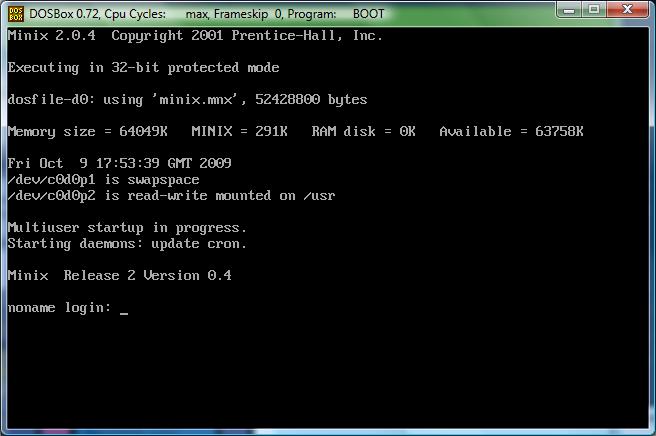
Anyways I found mention of this DOS-Minix.  It does NOT comply with things like DPMI, VCPI as it will not run in nice things like emm386 & other v86 switchers.  However it will run in DOSBox.

Digging through the kernel & the boot program, you’ll find the basics of a DOS Extender.  The boot program will allocate as much memory as it can from the XMS driver, and then switch to protected mode & transfer control to the kernel.  Likewise the kernel then uses MS-DOS & BIOS calls for video, disk access etc as you can find it’s int86 calls that switch from protect to real mode, (doshead.s) or even in the disk driver dosfile.c

Installation is SUPER simply, just download the file DOSMINIX.ZIP unzip it somewhere then either use the great DOSBox, or any other pc emulation etc that you could want to use. The NTVDM from Windows NT is not good enough as you’ll get an error message about not being able to load the 386 kernel on an 8086.  This again probably stems from dosminix not using DPMI calls, but the old fashioned raw XMS calls.. I guess it *could* be updated.

Start it up is simple you just run the boot program and point it to a diskfile:

boot minix.mnx

Then you’ll get greeted by the boot loader..  For me hitting any key doesn’t do anything, so I just press escape, then type in boot.

And in NO time, you’ll be up and running MINIX!

The ‘best’ way to shut it down I’ve found is to type in ‘reboot’ then press escape like wild, and you’ll interrupt the boot loader.  Then you can type in ‘exit’ and you’ll get dumped back into MS-DOS.

I think it’s an interesting example of how to use the ancient MS-DOS to bootstrap yourself into protected mode. And the source seems somewhat straight forward.

dosminix on DOSBox.

dosminix on DOSBox.

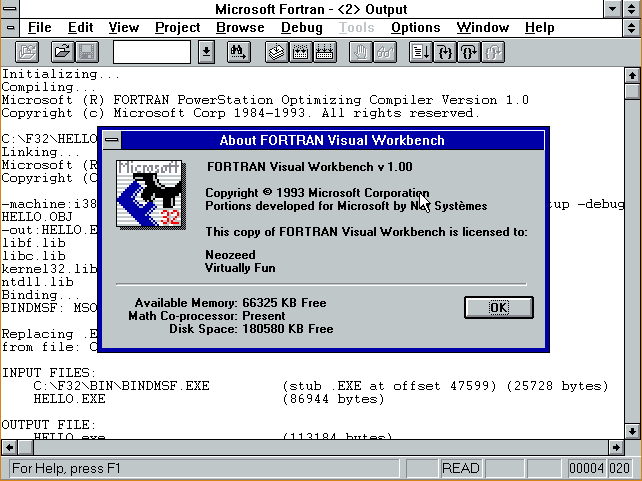
Microsoft Fortran Powerstation 1.0

PowerStation Fortran for Windows 3.1

While going through my stuff, I did manage to find some diskettes for Microsoft FORTRAN PowerStation 1.0   I recall using this under Windows 3.1 but there was some reason we never really used it under Windows 95 & NT (Found it 9 years later!

So, I loaded it up on a VM with Windows 3.1 and quickly found out why:  While it produces win32 exe’s they are built with pre-release tools, and will *NOT* work under any released version of Windows NT, (Yes, including Windows NT 3.1!!).

I’m sure others may find themselves down the path with failed exe’s that crash with:

RtlExAllocateHeap not found in ntdll.dll

Microsoft had a fix, named beta2fix.  It renamed the references to ntdll.dll into beta2.dll.  Which sounds fun, except the resulting exe’s DONT WORK. Nothing like a ‘solution’ that took missing references into exe’s that just crash.

Naturally the ‘fix’ is to upgrade to 4.0 which.. is impossible to find, or track down Compaq fortran, or even Intel fortran.  Or just run it in a MS-DOS/Windows 3.1 VM and be happy for emulation.

But I figured what the hell, perhaps it’s possible to replace some of the key parts with old versions of Visual C++ and use HX DOS as an extender instead of an ancient Phar Lap TNT.

Googling around, the issue lies with the linker, link32.exe.

Now on my Visual C++ 1.0 cd there is a link32.exe that just calls link.exe.  On the Visual C++ 2.0 & 4.0 CD’s there is no link32.exe.  Seeing that Visual C++ 1.0 just calls through I just made a ‘stub’ program to call link.

#include <stdio.h>
#include <string.h>
#include <stdlib.h>
void main(int argc,char* argv[])
{
char command[255];
int rc;
int j;

memset(command,0x0,sizeof(command));
sprintf(command,”link “);
j=1;
while(j<argc)
{
sprintf(command,”%s %s”,command,argv[j]);
j++;
}
printf(“running [%s]\n”,command);
rc=system(command);
printf(“return code was %d\n”,rc);
if(rc==-1)
{printf(“I think it’s too many nested DPMI things between TNT & whatnot\n”);}
}

Ok, it’s not work of art, but it’ll get the job done.  You’ll need some kind of MS-DOS 16 bit real mode compiler to build this thing.  I would imagine Watcom’s C++ compiler can still build 16bit dos realmode exe’s, or Borland has something in their museum thing.  I’m using QuickC for Windows in a Windows 3.0 VM

Ok so now with our ‘link32.exe’ replacement, copy it into the f32\bin directory overwriting the existing one.

Next we will need the link.exe from Visual C++ 2.0 (or higher I figure), and copy that into the f32\bin directory, along with its needed files dbi.dll & msvcrt20.dll.

Next, download and unzip the HX runtime And you can either place it’s bin directory onto the fl32\bin, or unzip it to it’s own directory, and add a statement in your autoexec.bat adding it’s bin directory to the path.

Reboot to pick up the hxrt’s bin directory, unless you copied its bin into fl32\bin

Now we need to alter Visual C++ 2.0’s linker to run under MS-DOS. Simply run:

pestub \f32\bin\link.exe

And now you should be able to run link.exe under MS-DOS.

Finally replace the libc.lib & kernel32.lib with ones from your Visual C++. Naturally these are in the \f32\lib directory. Visual C++ 2.0 will link without complaining, 4.0 gives some weird messages, but it still works.  I never did test Visual C++ 6.0 & beyond.

So, building a simple ‘hello.for’ (mention in the prior blog post)

c:\F32>fl32 hello.for
Microsoft (R) FORTRAN PowerStation Optimizing Compiler Version 1.0
Copyright (c) Microsoft Corp 1984-1993. All rights reserved.

hello.for
Microsoft (R) 32-Bit Incremental Linker Version 2.50
Copyright (C) Microsoft Corp 1992-94. All rights reserved.

-out:hello.exe
-debug:none
-machine:i386
-base:0x00010000
-subsystem:console
-entry:mainCRTStartup
-stack:32768,4096
-defaultlib:libf.lib,libc.lib,kernel32.lib,ntdll.lib
hello.obj
running [link  -link @C:\TEMP\003635lk]
return code was 0

The only caveat here, is that because of HXDOS it *thinks* it’s running on Windows NT, (beta 2!) and will not run the bindmsf.exe program Not that it mattered as it was broken. I suppose if I were braver, I could read the link file, and scan for a ‘-out’ and run pestub on the output.. But I don’t so you will have to.  Otherwise, when you run hello.exe you’ll get:

This program cannot be run in DOS mode.

But running pestub.exe:

c:\F32>pestub hello.exe
pestub: hello.exe modified successfully

C:\F32>hello
HELLO!

Ok, so with all this work, we’ve managed to restore the basic functionality of Microsoft Fortran here.  Now the bigger question, will hello.exe run on say Windows Vista x64?

C:\Users\neozeed\dos\F32>ver

Microsoft Windows [Version 6.0.6002]

C:\Users\neozeed\dos\F32>hello
HELLO!

Not too bad, eh?

Oh, and onto zork:

c:\F32\DUNGEON>fl32 *.for
Microsoft (R) FORTRAN PowerStation Optimizing Compiler Version 1.0
Copyright (c) Microsoft Corp 1984-1993. All rights reserved.

ACTORS.FOR
BALLOP.FOR
CLOCKR.FOR
DEMONS.FOR
DEMONS.FOR(520) : warning F4999: RLIGHT : variable declared but not used
DEMONS.FOR(520) : warning F4999: RSER : variable declared but not used
DGAME.FOR
DGAME.FOR(781) : warning F4999: PROTCT : variable declared but not used
DMAIN.FOR
DSO.FOR
DSUB.FOR
DVERB1.FOR
DVERB2.FOR
GDT.FOR
MACHDEP.FOR
NOBJS.FOR
NP.FOR
NP.FOR(397) : warning F4999: DFLAG : variable declared but not used
NP.FOR(397) : warning F4999: QHERE : variable declared but not used
NP.FOR(507) : warning F4999: DFLAG : variable declared but not used
NP.FOR(780) : warning F4999: DFLAG : variable declared but not used
NP.FOR(1154) : warning F4999: DFLAG : variable declared but not used
NP.FOR(1277) : warning F4999: DFLAG : variable declared but not used
NP2.FOR
OBJCTS.FOR
ROOMS.FOR
ROOMS.FOR(1195) : warning F4999: F : variable declared but not used
SVERBS.FOR
VERBS.FOR
VILLNS.FOR
Microsoft (R) 32-Bit Incremental Linker Version 2.50
Copyright (C) Microsoft Corp 1992-94. All rights reserved.

-out:ACTORS.exe
-debug:none
-machine:i386
-base:0x00010000
-subsystem:console
-entry:mainCRTStartup
-stack:32768,4096
-defaultlib:libf.lib,libc.lib,kernel32.lib,ntdll.lib
ACTORS.obj
BALLOP.obj
CLOCKR.obj
DEMONS.obj
DGAME.obj
DMAIN.obj
DSO.obj
DSUB.obj
DVERB1.obj
DVERB2.obj
GDT.obj
MACHDEP.obj
NOBJS.obj
NP.obj
NP2.obj
OBJCTS.obj
ROOMS.obj
SVERBS.obj
VERBS.obj
VILLNS.obj
running [link  -link @C:\TEMP\000731lk]
return code was 0

The exe works fine on Vista, and pestub will allow it to run on MS-DOS.

*NOTE that the fortran compiler will *NOT* run on Vista/XP/NT.  The compiler was also linked with bad libraries & linker and it just won’t work.  I doubt forcedos would help for 32bit NT systems as the phar lap stuff is all out of date.  However DOSBox will happy run the compiler.

I haven’t even tried to debug anything, as I figure the best environment would have been a virgin copy of PowerStation 1.0 running under Windows 1.0 I did say keep a copy right!!!

Zork via FORTRAN

I don’t know why I even started down this path, but anyways I felt the urge today to break out some Fortran.  The problem is that I acquired Microsoft Fortran 5.0 in university, however… it’s on 5 1/4” diskettes!!!

So that wasn’t going to happen.

So I figured there had to be some kind of GNU Fortran compiler, and there is.. G77.  However it needs to be tied into a release of GCC.  Which sounds great, but I was hoping to build this on a few different platforms, and on my AMD 64 platform it’s GCC 3.3 (SUA), and on my NeXT it’s 2.5.8..  Even in the notes it says you’ll need about 100MB of space to build it, which is also a nice way of saying it’ll take FOREVER.

Then I remembered something we used on the RS/6000 because it was more ‘combatable’ then the Microsoft stuff, as it was derived from the first Unix Fortran compilers… f2c.

First you’ll need the source, which thankfully is still up on the original site  This part is a bit tedious as the source is not in a single easy to get file.  You’ll need to get the source from here.  Once you’ve downloaded the files, I’d recommend saving them somewhere else.. You don’t want to have to right click like wild to get them…  Alternatively I’ll host them all here to save someone all that effort.

Building f2c is really quite simple on any UNIX’like platform.  First you’ll need the f2c source, and unpack it somewhere….  Then you *MAY* have to adjust the makefile.u for the CC/CFLAGS variables as your C compiler may not be gcc or cc, also you may or may not want the –O flags (optimize).  On my NeXT I turned off the optimizations, since this is a 33Mhz machine, and I don’t want to wait all day, and I ran it with –O0 -pipe.  Then just simply run

make –f makefile.u f2c

bash-2.01$ make -f makefile.u f2c
cc -c -O0 -pipe main.c
cc -c -O0 -pipe init.c
cc -c -O0 -pipe gram.c
cc -c -O0 -pipe lex.c
cc -c -O0 -pipe proc.c
cc -c -O0 -pipe equiv.c
cc -c -O0 -pipe data.c
cc -c -O0 -pipe format.c
cc -c -O0 -pipe expr.c
cc -c -O0 -pipe exec.c
cc -c -O0 -pipe intr.c
cc -c -O0 -pipe io.c
cc -c -O0 -pipe misc.c
cc -c -O0 -pipe error.c
cc -c -O0 -pipe mem.c
cc -c -O0 -pipe names.c
cc -c -O0 -pipe output.c
cc -c -O0 -pipe p1output.c
cc -c -O0 -pipe pread.c
cc -c -O0 -pipe put.c
cc -c -O0 -pipe putpcc.c
cc -c -O0 -pipe vax.c
cc -c -O0 -pipe formatdata.c
cc -c -O0 -pipe parse_args.c
cc -c -O0 -pipe niceprintf.c
cc -c -O0 -pipe cds.c
if cc sysdeptest.c; then echo ‘/*OK*/’ > sysdep.hd; elif cc -DNO_MKDTEMP sysdept
est.c; then echo ‘#define NO_MKDTEMP’ >sysdep.hd; else echo ‘#define NO_MKDTEMP’
>sysdep.hd; echo ‘#define NO_MKSTEMP’ >>sysdep.hd; fi
ld: Undefined symbols:
_mkdtemp
rm -f a.out
cc -c -O0 -pipe sysdep.c
cc -c -O0 -pipe version.c
cc  main.o init.o gram.o lex.o proc.o equiv.o data.o format.o  expr.o exec.o int
r.o io.o misc.o error.o mem.o names.o  output.o p1output.o pread.o put.o putpcc.
o vax.o formatdata.o  parse_args.o niceprintf.o cds.o sysdep.o version.o  -o f2c

All being well, you’ll have a new & exciting f2c executable.  I manually just copy the f2c into /usr/local/bin & the f2c.h to /usr/local/include.

Next you’ll need the f2c io library.  Thankfully this one IS zipped up and it’s available here.  Alternatively I’ve got a copy here (better). *NOTE that the ‘official’ version of the lib doesn’t extract to a sub directory… Grr  Extract the library source, and again you may need to modify the makefile to suit your compiler (CC/CFLAGS).  Then go ahead and make the library.

make –f makefile.u

cc -c -DSkip_f2c_Undefs -O0 -pipe etime_.c
ld -r -x -o etime_.xxx etime_.o
mv etime_.xxx etime_.o
ar r libf2c.a f77vers.o i77vers.o main.o s_rnge.o abort_.o exit_.o getarg_.o iar
gc_.o getenv_.o signal_.o s_stop.o s_paus.o system_.o cabs.o ctype.o derf_.o der
fc_.o erf_.o erfc_.o sig_die.o uninit.o pow_ci.o pow_dd.o pow_di.o pow_hh.o pow_
ii.o pow_ri.o pow_zi.o pow_zz.o c_abs.o c_cos.o c_div.o c_exp.o c_log.o c_sin.o
c_sqrt.o z_abs.o z_cos.o z_div.o z_exp.o z_log.o z_sin.o z_sqrt.o r_abs.o r_acos
.o r_asin.o r_atan.o r_atn2.o r_cnjg.o r_cos.o r_cosh.o r_dim.o r_exp.o r_imag.o
r_int.o r_lg10.o r_log.o r_mod.o r_nint.o r_sign.o r_sin.o r_sinh.o r_sqrt.o r_
tan.o r_tanh.o d_abs.o d_acos.o d_asin.o d_atan.o d_atn2.o d_cnjg.o d_cos.o d_co
sh.o d_dim.o d_exp.o d_imag.o d_int.o d_lg10.o d_log.o d_mod.o d_nint.o d_prod.o
d_sign.o d_sin.o d_sinh.o d_sqrt.o d_tan.o d_tanh.o i_abs.o i_dim.o i_dnnt.o i_
indx.o i_len.o i_mod.o i_nint.o i_sign.o lbitbits.o lbitshft.o h_abs.o h_dim.o h
_dnnt.o h_indx.o h_len.o h_mod.o h_nint.o h_sign.o l_ge.o l_gt.o l_le.o l_lt.o h
l_ge.o hl_gt.o hl_le.o hl_lt.o ef1asc_.o ef1cmc_.o f77_aloc.o s_cat.o s_cmp.o s_
copy.o backspac.o close.o dfe.o dolio.o due.o endfile.o err.o fmt.o fmtlib.o fte
ll_.o iio.o ilnw.o inquire.o lread.o lwrite.o open.o rdfmt.o rewind.o rsfe.o rsl
i.o rsne.o sfe.o sue.o typesize.o uio.o util.o wref.o wrtfmt.o wsfe.o wsle.o wsn
e.o xwsne.o dtime_.o etime_.o
ar: creating libf2c.a
ranlib libf2c.a

This will take longer then f2c.. Or at least it did on my NeXT.

Then I just copied the library libf2c.a into /usr/local/lib then ran ranlib over the library again.

Ok now we should be able to build a FORTRAN program.  Let’s try something small.

      program hello
      print *, ‘Hello!’
      end

I’ve tried to preserve the leading 6 blank spaces.  You should be able to copy the above program, and save it as hello.f  Now we should be able to translate, compile and run the program!

bash-2.01$ f2c hello.f
hello.f:
   MAIN hello:
bash-2.01$ cc hello.c -lf2c -o hello
bash-2.01$ file hello
hello:  Mach-O executable (for architecture m68k) not stripped
bash-2.01$ ./hello
Hello!

Awesome!  Now let’s try something much bigger, say some old Fortran source to the old ‘dungeon’ game, better known as Zork!  This source is available all over the place as dungeon-2.5.6.tar.gz, and I’ll provide a link as well here.

Download, and extract the files (gzip –dc dungeon-2.5.6.tar.gz|tar –xvf –) and you’ll have your dungeon directory.  Building this should be pretty simple, if the above program built and ran without errors.  On my SUA (Vista) machine, I had to force the –I/usr/local/include flags to find the f2c.h..  So you may need some tweaking it all depends.

Again on my NeXT I changed the CFLAGS to –O0 –pipe.  On my Vista SUA I had to specify that CC=gcc.

Once done, go ahead and run make.

\ar d libdungeon.a dmain.o np2.o
\ranlib libdungeon.a
cc -s -o dungeon dmain.o np2.o -L. -ldungeon -lf2c -lm
f2c -A -C -Nn802 textcnv.f
textcnv.f:
   MAIN:
cc -O0 -pipe -c textcnv.c
cc -o textcnv textcnv.o –lf2c

If all went well that should be how the last lines look.  We should now have a dungeon executable!

bash-2.01$ file dungeon
dungeon:        Mach-O executable (for architecture m68k)

Awesome!

So let’s enter the game, shall we?

bash-2.01$ ./dungeon
Welcome to Dungeon.                    This version created 30-AUG-90.
You are in an open field west of a big white house with a boarded
front door.
There is a small mailbox here.
>

So, now we have built the f2c translation package, and managed to build a trivial hello world program, and something a little more complex like Dungeon/Zork.

Now I can play with my numerical recipes book with my pseudo Fortran kit.

NES emulator written in JAVASCRIPT.

Well I guess we have officially crossed the bridge, where multiple Ghz machines can run scripts that can emulate a 1.8Mhz 6502 in realtime.

behold JNES.

And frankly the bigger thing to behold is just how FAST Google chrome is at java script. On my Intel Centrino laptop the google benchmark (http://v8.googlecode.com/svn/data/benchmarks/v5/run.html) scores 105 in Internet Explorer 8, while Google Chrome scores 3330.

That’s not a typo, Google Chrome is more then 31x faster than IE at executing Java Script.

I’ve got to find out where that whole NaCL thing went to, and where it is.

But seriously, go check it out! Mario in a browser without flash!