New versions of Qemu!

While I’ve been playing with 386BSD, it seems a bunch of new versions of Qemu have been released. Sadly they all crash at the same point on 386BSD so it’s kind of moot. Also my OS/2 2.0 image doesn’t work on the new Qemu, it hangs at the switch to graphical mode…. So I suspect there will be more quick revisions to Qemu.

At any rate, they have added all kinds of features and stuff to it, I’d say check it out, but hold on tightly to older versions that you have working now…

You can find the source code to Qemu here.

The win32 binary is lagging, so you’ll have to build it yourself. I’ve been using my old MinGW environment that I had detailed it’s setup here.

The new Qemu works with GCC’s greater than version 3 which is a good thing for the many platforms with ONLY GCC 4.

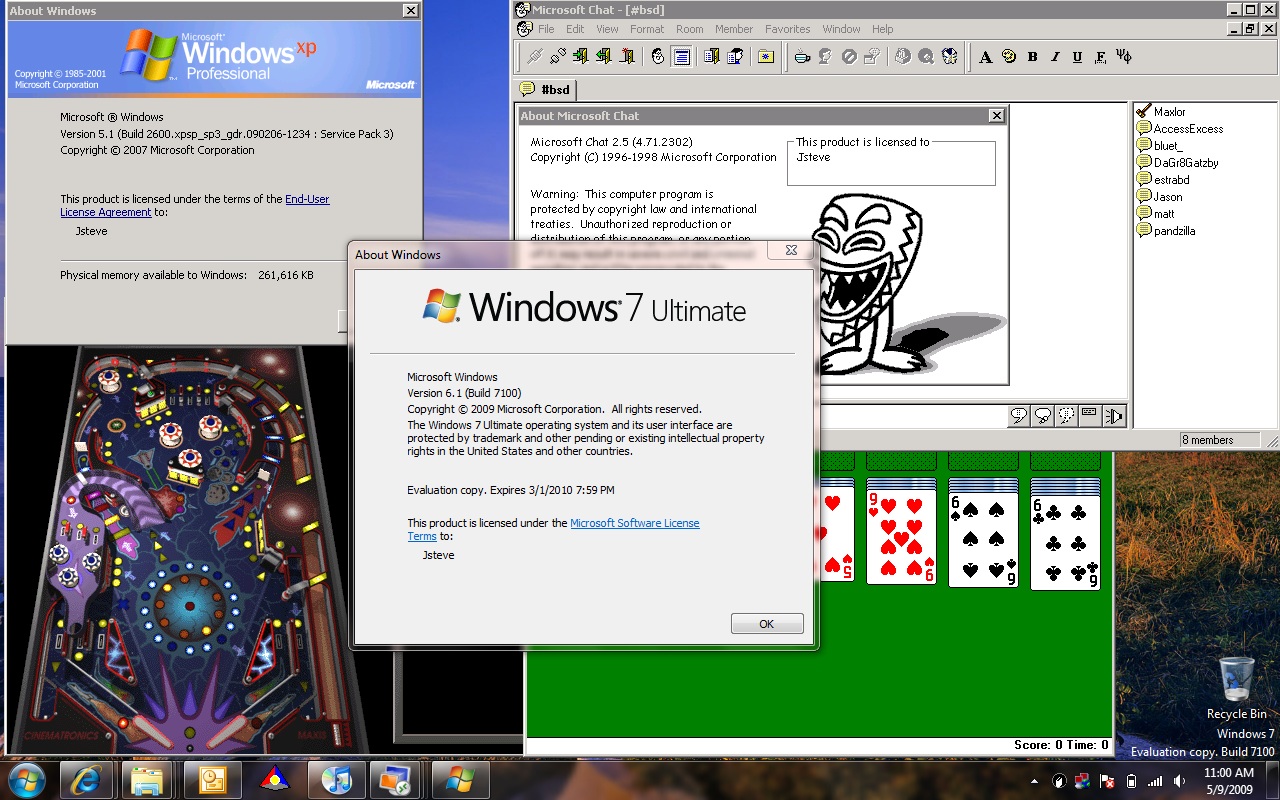
Windows XP Mode in Windows 7

Well it seems to be all the rage in the world of emulation on Windows 7. Windows XP mode, from the user standpoint is just like the old days of WIN/OS2 from OS/2 2.0 and above.

While WIN/OS2 used specialized device drivers that could ‘punch thru’ the virtual machine, and render each window on the OS/2 PM display, Windows XP mode, takes the Citrix like approach of using Terminal Services (RDP) to initiate a remote display to the local desktop.

Since RDP is the mechanism used, only XP and above will work, sorry Windows 2000 users. Another minor (is it?) annoyance is that the new version of Virtual PC has NO floppy driver support! It also seems to not have sound support, although it’s totally unverified at the moment. I’ll have to snag a VHD with MS-DOS pre-installed along with whatever integration tools I have around.

Anyways, the install is a snap, you can find all the components here.

Setup is straight forward, just install the Virtual PC component, then Windows 7 will want to reboot. Then install the Windows XP msi file (it’s over 450MB) and you’ll get a fully installed copy of Windows XP ready to go, and best of all you don’t have to configure anything. Start Windows XP in a “normal” desktop environment, install whatever it is you want to run. Publishing apps to the Windows 7 desktop is easy, just paste a shortcut under the “all users” start menu, and the screen will blink and it’s available.

The down side, is that other OS’s seem to perform poorly under this version of VPC. The mouse is very erratic on RHEL 4 that I had to setup to emulate a production environment. Also you need to have a CPU with the new virtualization extensions. It seems this VPC version is more like the hypervisor in 2008, then like the old Virtual PC we all knew. I almost wonder if there is a way to run VPC 2004 or 5 on Windows 7 natively for running older stuff…

It will be interesting to see where Microsoft goes with this, as this could leave a major rift in their product lineup. And as I’m sure a few people will find out, just because you have a ‘new’ machine doesn’t mean the CPU is up to the task… Not all new CPUs have the virtualization environment built in…

Another issue I’ve been having is that the network from time to time disconnects and will remain disconnected… It seems if you shut down & power the VM on/off (no hibernation!) eventually the NAT adapter will reconnect. Clearly it’s a beta. Also it won’t let you publish solitary, pinball, nor any of the other games. However it will let you publish cmd.exe so you can run them that way.



OS/2 vs Windows 7

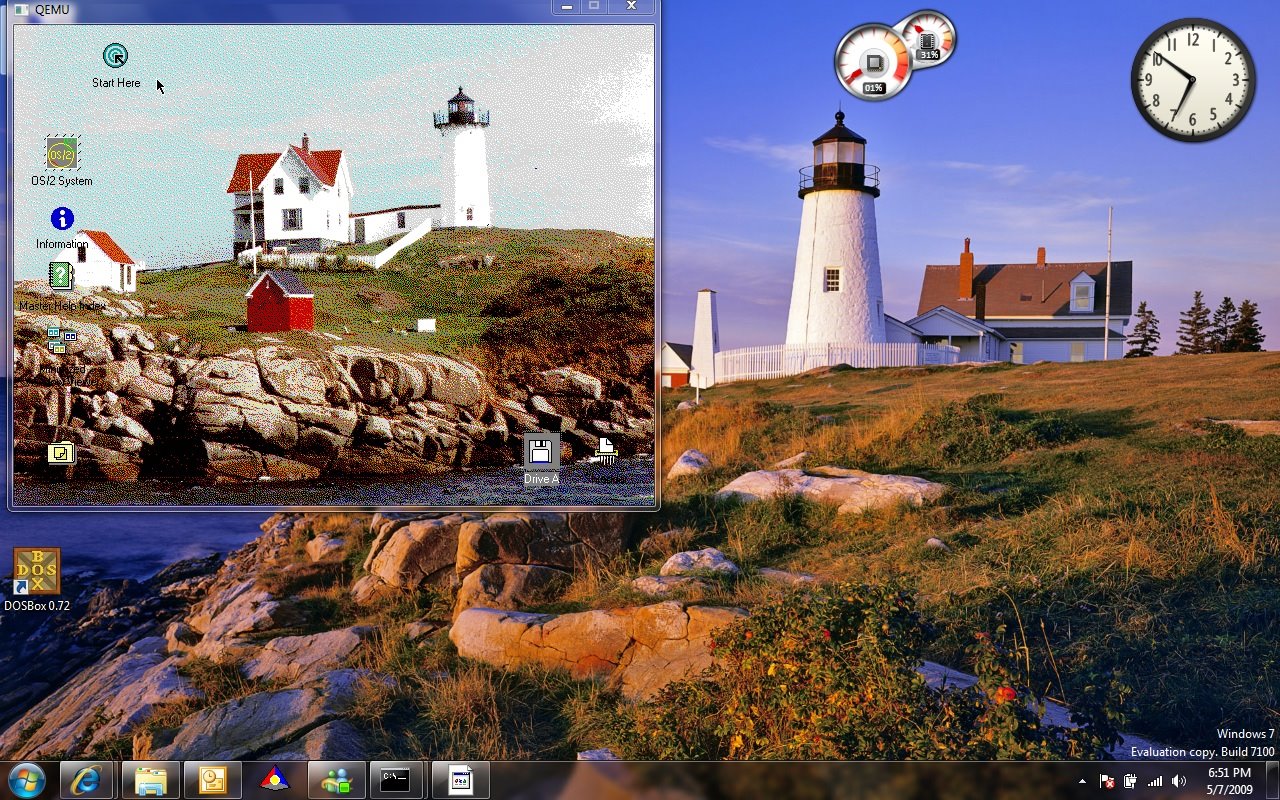
I installed the latest RC of Windows 7 x64 today, and while going thru the latest wall papers I saw one that looked surpisngly familiar…..

Then it hit me, this looks a LOT like the old light house from OS/2 2.0! To check I quickly installed a copy of OS/2 2.0 on Qemu 0.90 (which works on Vista, unlike 0.91).

Lighthouses into the new world...


While it may be the same place from a different angle, the similarity is kind of funny. At the time OS/2 2.0 was the new striking consumer 32bit OS, and here I am on the new striking consumer 64bit OS… with more or less the same wall paper from a different perspective.

The more things change, the more they stay the same!

386BSD & Bochs

386BSD

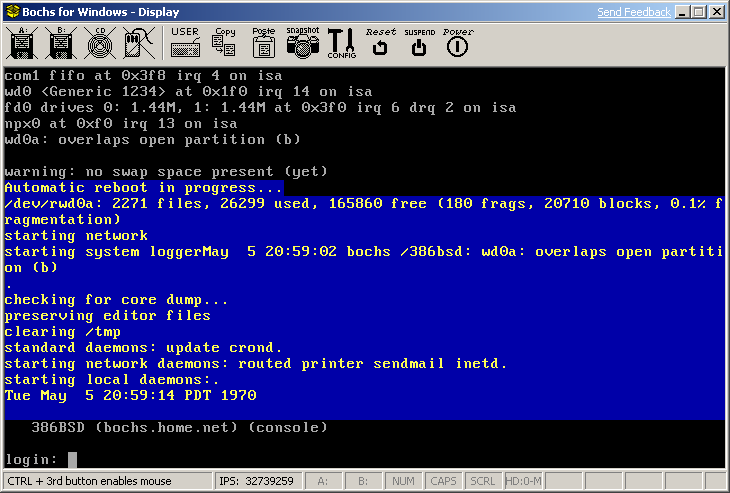
386BSD on Bochs

While checking around on wikipedia for something related to 4.2BSD, I found out that bochs 2.4 can run 386BSD!

Now the significance of 386BSD is that it was the real first time that BSD had been given to the masses, in that it *could* run on commodity hardware (read 386’s!), come with full source code and be free. It is no wonder that the initial 0.0 release had well over 100,000 downloads!

It is getting harder and harder to track down a download source for 386BSD as it too was swept up in the great lawsuit of AT&T vs BSDI/CSRG although it was never named in the suit. Not to mention it was quickly superseded by the FreeBSD & NetBSD projects. It is very unstable in the 0.1 release, there is clearly some issues with it’s “install” program with regards to allocating swap space, and in general with the OS’s swapping routines. Also because of the overlap any attempt to install on a disk larger then 100MB results in a corrupted file system that will no longer boot after the eventual file corruption. It’s quite sad, but if you search the news group at the time, there was all kinds of issues with the install process, and with it’s stability.

The installation process does involve quite a bit of floppy shuffling, and will almost result in lots of trial & error to get it going. While there is an install guide on the install disk, it isn’t worded into exactly how to do it. Needless to say the Free/Net BSD releases have improved on the install greatly.

On the other hand it sure is interesting to see a Net/2 BSD to see how far we have come, and how so much is the same.

You can find 386BSD on the mirror site oldlinux.org.

Just watch out that the install floppy (dist.fs) is only 1.2MB.. So be sure to alter your bochsrc file accordingly.

Announcing Research Unix v1 for Windows


Today I have decided that I should make a windows installer for the Unix v1 restoration project’s efforts on getting Unix v1 running.

For windows users this is a simple click & install project. This version of Unix v1 will support up to 8 simultaneous users on the system. Please note that this is a ‘rework’ of the v1 kernel from printouts to run a v2 userland, and the earliest C compiler from somewhere around v3-v4. It is not ‘pure’ per say as almost all v1 Unix documentation, tapes have been lost.

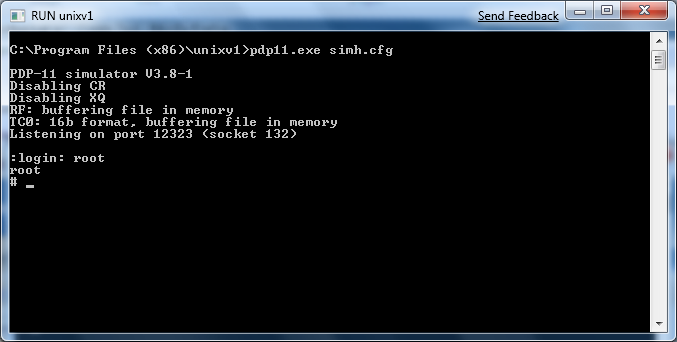
Simply install with all options, then click on the “RUN unixv1” link, and the kernel will load up (quickly!) to a login prompt. Login as root, and you should be good to go. Additional users can telnet into the host PC on port 12323 and they will be prompted to login. You can also use the “attach a pty” link, and it will launch teraterm pro onto the port 12323.

Because of the age of this system lots of commands that you take for granted did not exist back in 1972. A quick survey of my own use led to this:

Sync –doesn’t exist-
Reboot –doesn’t exist-
Vi –doesn’t exist-
Clear –doesn’t exist-
Cd –it’s actually chdir
Finger –doesn’t exist-
UUCP –doesn’t exist-
TCP/IP –doesn’t exist-

Remember it’s on a system with 32kb of ram. Don’t confuse Unix’s humble beginnings with the later v7 on the VAX, or the BSD releases that added TCP/IP networking.

I have included the PDF for the 2nd edition programmers guide. Since the userland is from this generation it is as close as you will get to a system manpage.

To exit the emulator, you can just close the SIMH process window, or hit Control+E then q to quit. I’m not sure of a ‘clean’ way to reset a Unix v1 machine. If there is significant disk corruption, I’d just recommend un-installing this program, then re-installing. It is no doubt the saving grace about running this emulated. As far as I know nobody has run this on a physical PDP-11. You would require an actual 11/20 because of how the multiply / divide instruction is handled. I won’t run on any of the bigger PDP-11’s.

The project page is:

http://sourceforge.net/projects/bsd42/

You can download this release from here:
https://sourceforge.net/project/downloading.php?group_id=204974&filename=Research-unixv1-0.3.exe&a=32102074

Pointless update of the day (iPhone fun!)

I got a used iPhone while on vacation, and I managed to jailbreak it, and load up the CLI tools, including gcc onto it… It feels VERY unixy now with the 2.0 os, all the good stuff like screen, lynx, vi .. So I decided to build SIMH on it. It takes FOREVER to build anything… But then I don’t think the iPhone was built to compile.. -O2 seems to break so sadly it’s without optimizations but it runs!

For the heck of it, I copied in my 4.2 BSD disk image, and rebuilt SIMH with SLiRP support, and now I have a hand held VAX!

It’s cool, and pointless at the same time… I’ll probably make some binaries available on sourceforge later.. I guess as iPhones eventually get phased out (1st gen ones for sure) it’d be cool to let them become servers or something useful along those lines…

Here is a screen shot for the curious…

And yes, you can telnet into it, via the magic of SLiRP… I’ve tried building some irc clients, really old stuff does build and “work” but I think the server protocol has drifted as it cannot join any rooms…. So close & yet so far away.. I’ll probably have to move to 4.3 BSD..

I also should add that the iPhone VAX feels like an 11/780.. In that it takes several minutes to boot… Don’t expect a FAST machine…!

Yet another update! networking for 4.2 BSD

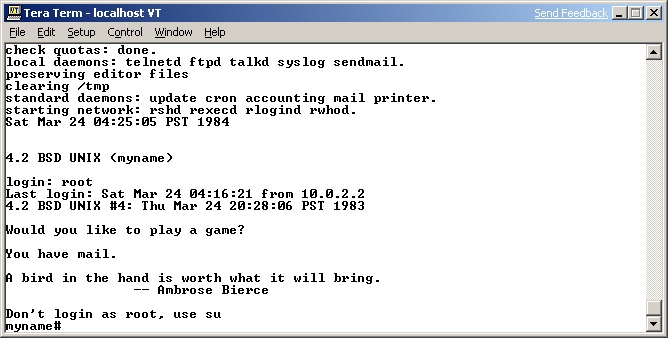
4.2BSD telnetI have released yet another interim update to my VAX BSD on Windows installer package.

I redid the 4.2BSD package, so anyone that has downloaded, will want to download again (there were 2 downloads… )

Anyways I found a source tree of 4.2 BSD with the if_de.c and the same fix for the 4.3 BSD’s worked fine for this one as well. Now you can telnet into 4.2 BSD!

You can download it from here:

https://sourceforge.net/project/showfiles.php?group_id=204974&package_id=245145

It is worth noting that I didn’t even look at the TCP/IP stack so it’s possible that you could be hit with issues with negative numbers in the TCP sequencing, and other weird 4.2 to 4.3 bugs.

Also attempting to fix locore.s to allow more then 8mb of ram seems to have a kernel that hangs right after mounting the root partition.. If anyone remembers what to do to fix it, I’d appreciate it. I see in google’s usenet cache, they had the same issue at Nova University, but I didn’t see any follow up for a fix.

This update now brings all of the 4BSD packages on Windows up to a network operational level. Also please note that they all use the same user mode mapping ports (ie 42323 to 23 into the VM) so you currently cannot operate all of them at the same time. If that is an issue for anyone you can regen the exe’s from the SIMH project page:

https://sourceforge.net/project/showfiles.php?group_id=154308&package_id=244757

Otherwise you can just contact me.


And update on the update

Well I was playing around with a version of 4.3 BSD I’d never heard of, that was from the University of Wisconsin, when I figured out a quick hack to get the 4.3 BSD’s networking operational under SIMH’s 11/780 emulator. I simply removed the error checking from the recv portion in the if_de.c file, and it now works!

So I have updated some packages on the sourceforge site:

https://sourceforge.net/project/showfiles.php?group_id=204974&package_id=245145

4.3 BSD & UWisc 4.3 BSD have been added, and both are ready to run with SLiRP (User mode networking/nat).

As for the Wisconsin release, it may interest people as they had taken the NFS & VFS code from SunOS and integrated them into 4.3 BSD before the RENO time frame. From there it seems that most of the hackers at UWisconsin went on to either Legato or SUN to continue their work, leaving this release as a single event… The tape image seems to have last been used January 12th, 1987. This release does not appear on the UNIX family tree’s.. It’s like a long forgotten offshoot, but still I think it’s kind of cool. And it shows just how networking was done back then with nearly 4000 enteries in the hosts file!

I’ve been trying to track down some more info from the TUHS list, but if anyone else passing by wants to add anything, feel free to let me know!

Otherwise, the installer package on sourceforge should run on any Windows 98 or above machine.

Updates on my sourceforge BSD/SIMH packages

On my project page I have made some new packages for 4.3BSD & 4.2BSD. Both of which can be downloaded here.

The updates include:
-moving to 3.8-1 of SIMH
-turning off unnecessary services in BSD
-moving from putty to Tera Term
-fixing PDF documentation links..

While not a major update, I figure since people are still downloading the 4.3 BSD RENO version as of TODAY I figure an update for these people wouldn’t be such a bad thing…

As before they are windows install packages, although I guess if you were so motivated you could extract them on some kind of *nix box..

NASA space probe data

While nothing to do with emulation, I came across this ftp server with all kinds of data from NASA probes.

nssdcftp.gsfc.nasa.gov

It’s got all kinds of readings, and even some programs to interpret the data.. (FORTRAN from what I saw). It’s got to be one of the better clearing houses of space probe data available… I suppose later on I’ll see what’s involved in running some of these programs.. But I wouldn’t hold your breath…!

Even for the less inclined, there is jpeg & tiff data!

For example here is a picture from the viking project on Mars:
ftp://nssdcftp.gsfc.nasa.gov/miscellaneous/planetary/viking/images/vom_sj05s070.jpg

Stunning to say the least.