Well I screwed up the Proxmox VE thing and I needed to test some x64 stuff… Sadly the VM I used to build the x64 stuff was the proxmox… And I need it now!
However for Windows 2003 x64 R2 it seems that those binaries crash on ‘starting windows’, apparently they were compiled with GCC 4 while the ancient qemu 0.90 built with GCC 3 works…
I’ve also found a source ‘fix’ for why 0.91 crashes on vista…:
patch hw/ide.c:
just replace all ‘free(buf)’ in guess_disk_lchs function to ‘qemu_free(buf)’.
Sounds easy enough. I’ll have to get a working toolchian.
Ok, I’m still unpacking stuff in the new apt, so I don’t have anything that exciting.
I’m hoping that this blog will become more interesting as the guy fills out content… Ah yeah, remember the ‘good’ old days of 16 bit development? Ok they weren’t *THAT* good, but we all know the pain of legacy code.
I don’t know if it’s worth mentioning, but yet another version of Qemu has been released, 0.15..
And it would appear that proxmox has been updated to 1.3… I’m going to have to upgrade and give it a whirl… I just hope it doesn’t trash my raid.
And finally you can view Warren Toomey’s presentation about recovering an ancient version of UNIX…
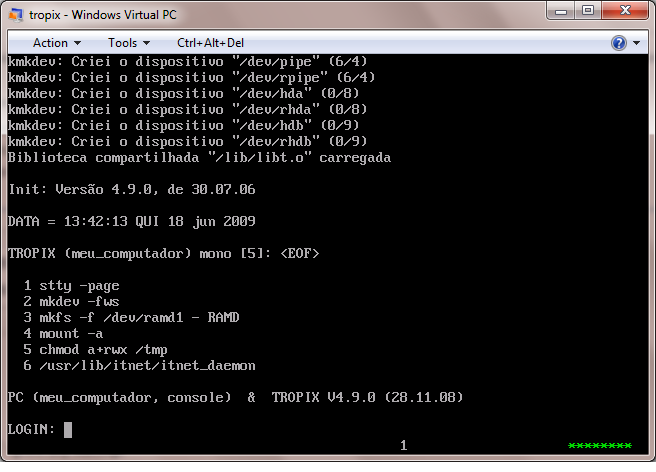
So I was browsing some stuff, and playing with a few other emulators getting something together when I found an article briefly mentioning TROPIX.
Now TROPIX is interesting as some people from Brazil tried to get a UNIX license in the 1970’s but they were denied. Not to take that as a loss, they bought ‘a’ UNIX system (some kind of v7 box) and built their own OS around the v7 ‘feel’. The result is a multiprocessor, real time UNIX clone written in Portuguese!
Now what is interesting is during the time of TROPIX (the mid 80’s) Brazil was still a dictatorship, and they would refuse to import western things, if there was a local equivalent.. So UNIX vendors never could get a foothold in Brazil because of TROPIX, well back then it was called Plurix. Conversely TROPIX/Plurix never got out because it’s all localalized in Portuguese. Which is too bad, as if it had the ability to spread on the internet I’m pretty sure it would have been popular..
However it’s all in Portuguese, so you’ll probably want to use a translator. http://www.google.com/translate is what I’m using.
The latest release was in December of 2008, and added support for USB 2.0 & SATA. So while it may feel dated, it’s being updated to support modern hardware. They even dedicate it to Newton Faller who’s a big name IT wise in Brazil, they even give out awards similar to the Turing award in his honor.
Now onwards to the install!
I am using Qemu as it can emulate the required hardware. Virtual PC will work, but the networking will NOT.
First download the ISO image from here . You’ll need a copy of gzip & tar for whatever your platform is to extract the ISO image. The install is actually somewhat straight forward once I translated the install document, which can be found here.
Basically the following input got me to a working system…
TROPIX CD boot
>
enter
boot>
-f
n
r
s
s
s
s
fdisk>
w
s
q
boot>
-i
login root
password tropix
mkfs /dev/rhda1
mount /dev/hda1 /aroot
cd /usr/etc/install
install
s
hda1
s
n (it’ll copy files)
s
reboot
I’m still trying to figure out the DHCP or the default gateway as neither appear to be working at the moment… Take note that the TCP/IP in TROPIX was written by them, it is *NOT* a 4.3 BSD derived thing. So there is no ifconfig / route / arp commands. Not to be disapointing but it also needs it’s first partition somewhere in the first 512mb as it seems to have some old BIOS booting issues.. Now it could be Qemu, but I’m not sure, a 10gig disk didn’t boot from the HD, although the CD could be make to use the HD for a root…
Right now the only ‘fun’ program to run is coremap & fortune.
But it’s very interesting to see a UNIX developed from another part of the world, and just how similar and different it is… Oh and it’s Si/Non, not YES/NO.
While I’ve been playing with 386BSD, it seems a bunch of new versions of Qemu have been released. Sadly they all crash at the same point on 386BSD so it’s kind of moot. Also my OS/2 2.0 image doesn’t work on the new Qemu, it hangs at the switch to graphical mode…. So I suspect there will be more quick revisions to Qemu.
At any rate, they have added all kinds of features and stuff to it, I’d say check it out, but hold on tightly to older versions that you have working now…
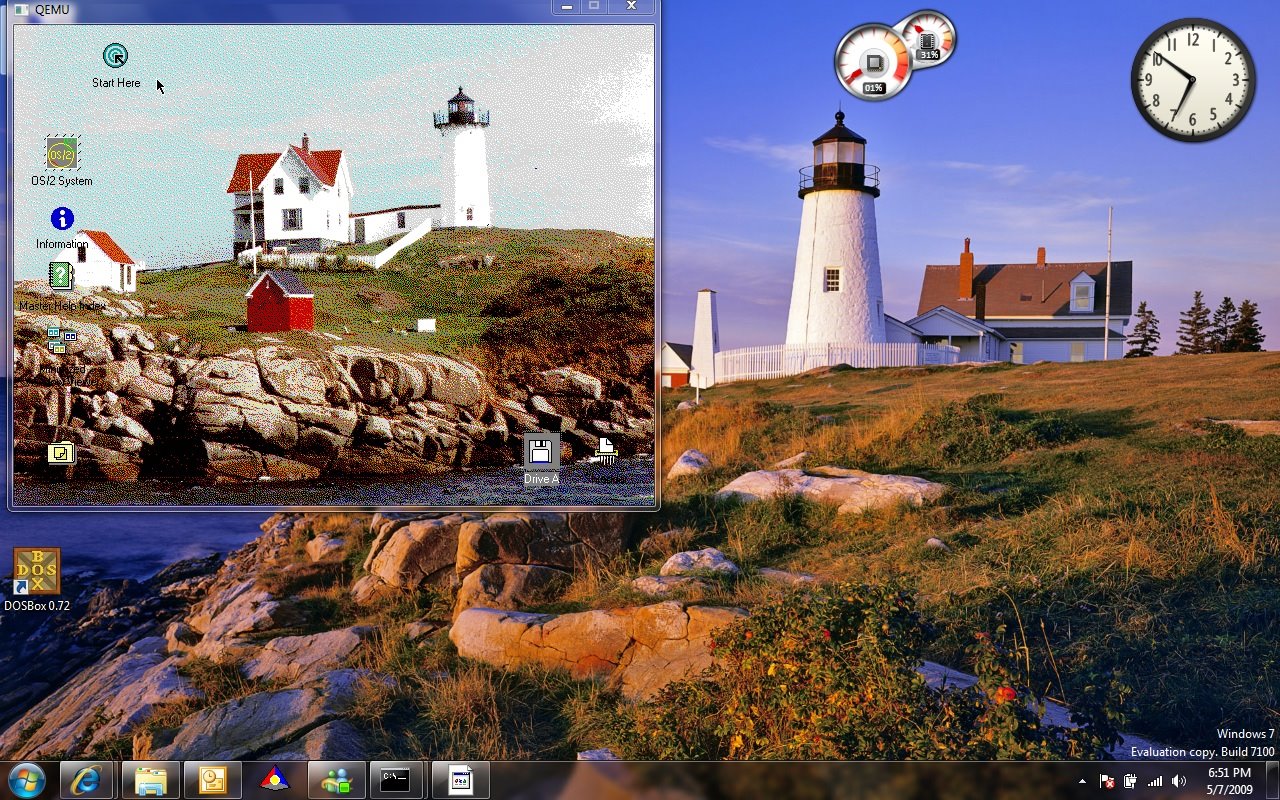
I installed the latest RC of Windows 7 x64 today, and while going thru the latest wall papers I saw one that looked surpisngly familiar…..
Then it hit me, this looks a LOT like the old light house from OS/2 2.0! To check I quickly installed a copy of OS/2 2.0 on Qemu 0.90 (which works on Vista, unlike 0.91).
Lighthouses into the new world...
While it may be the same place from a different angle, the similarity is kind of funny. At the time OS/2 2.0 was the new striking consumer 32bit OS, and here I am on the new striking consumer 64bit OS… with more or less the same wall paper from a different perspective.
The more things change, the more they stay the same!
Well anonet moved client ports, and I was getting some questions about the whole thing. The client port has finally been well… finalized as far as I can tell. I don’t use it all that much but I figured that the ‘bar’ needed lowering for people curious about this anonet thing.
So what I’ve done for windows people is to setup an installable version of DSL linux that is just click and run that is configured for anonet. It’s got the DNS information all ready to go so you can run nirc and join the main irc server (don’t forget to edit the .nirc file if you so wish) and the dillo & firefox web browsers are also setup & working. However firefox is SLOW… But I figure this will allow people to easily see what’s what without installing any device drivers… And it’s more fun in a VM.
Currently I’m just sharing this in a torrent which you can download here:
Naturally you can use things like utorrent (http://utorrent.com/) to download it.
It’s all setup in a nsis script that I’ve been evolving from the BSD4.2 on windows thing.. so it’ll be straightforward to install & uninstall. Vista & Windows 7 users need to remember that the disk image will re-appear in their:
I was playing around with NeXTSTEP under a snapshot of qemu and I noticed that my arrow keys were not working correctly. After a few hours of digging about I found the fix was easy enough: -k en-us That’s it, just append that to your boot string, and away you go! Another annoyance has been my quest to install AROS onto a P4 computer.. I picked up a new 320GB IDE disk (WD Caviar Blue) .. which the BIOS & AROS promptly refused to acknowledge corectly. Everything was going to hell until I gave up and read the manual. Once again it was simple, there is a jumper setting for ‘older’ OS’s to see only 32gb, and naturally the BIOS is now happier. If only I could say the same of AROS…
Ok I wanted to do this eventually but now I’ve finally done it. I have constructed something a little complex but it works surprisingly well.
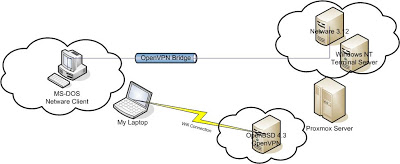
Let me draw a picture so i’ll be a little easier to follow:
proxmox Netware diagram
All of the machines in clouds are virtual!
Ok I’m going to assume you can install & configure OpenVPN on your own. I did a really simple install on Proxmox VE, just be sure to use the e1000 network adapters. All the others gave me tones of errors with any sizable traffic. Also, I should point out that I’m using OpenBSD 4.3 which is the latest as of today.
dev tun0
dev-type tap
ca /etc/openvpn/ca.crt
cert /etc/openvpn/server.crt
dh /etc/openvpn/dh1024.pem
key /etc/openvpn/server.key
server-bridge 192.168.6.33 255.255.255.224 192.168.6.50 192.168.6.62
push “route 192.168.6.0 255.255.255.0”
push “dhcp-option DNS 192.168.6.34”
client-to-client
duplicate-cn
keepalive 10 120
max-clients 100
persist-key
persist-tun
status /var/log/openvpn-status.log
verb 3
tun-mtu 1500
fragment 1300
mssfix
float
Again, I just followed the example from the OpenVPN site to set this up. What makes this different though is the fact that I’m using this in a bridge mode. As you can see, I have told OpenVPN that it is to use the tun0 interface as a tap driver.
My hostname.tun0 is this:
Link0 up
Likewise the bridgename.bridge0 is:
add em1
add tun0
up
And finally for this example my bridgename.em1 is:
inet 192.168.6.33 255.255.255.224 NONE
So using this setup I have a private 192.168.6.32/27 network in which I’ve got a few virtual machines running and space for my laptop to VPN into. Now one of the virtual servers on my Proxmox server is Windows NT 4.0 Terminal Server, Yeah, I know I got it cheap on ebay, and I kind of like it. Anyways I’m running Qemu on it, which is running Netware 3.12. I installed the libpcap then I had to find out what my Ethernet devices are called. I used wireshark (it was ethereal) and i’s a cool program to have around. The last version to run under Windows NT 4.0 was 0.99.4 so that’s the one I used. Once I have done this I found my device and was able to setup a string for Qemu (which was \Device\NPF_RTL80291)
This sets up an ISA computer with 16 megabytes of ram and a single ISA nic that will utilize libpcap to send out frames on the rtl80291 that’s being emulated to my NT terminal server by proxmox.
dev tap
ca ca.crt
cert client1.crt
key client1.key
client
proto udp
remote 192.168.1.75 1194
resolv-retry infinite
nobind
persist-key
persist-tun
;comp-lzo
mssfix
tun-mtu 1500
fragment 1300
Ok, so far so good. Now I do have Virtual PC 2007 on my laptop, and I have made sure that the “Virtual Machine Network Services” were bound to the “TAP-Win32 Adapter V9” interface.
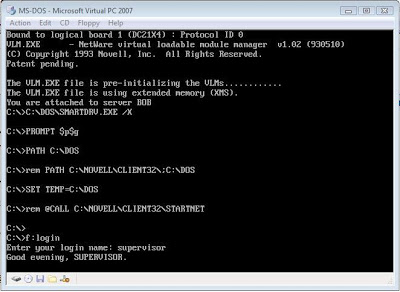
The it’s a simple matter of connecting to the VPN, then loading up the virtual PC with MS-DOS & the Novell Netware client.
Then you should be able to ‘bind’ to the server & login!
dos netware client
The ‘cool’ thing about this setup is that it will work over things like Wi-Fi, and easily allow you to add clients near & far. Oh and the best part for the Wi-Fi crowd is that it will use REAL encryption since WEP/WPA have all been shown to be useless. Oh yes, and it should allow you to host your DOOM, Quake 1, Rise of the Triad, Warcraft II, and Descent games…. Along with people playing at home! Using this you too can build your own IPX/Internet network!
I do hope this clears some of the uses & versility of Virtual servers, Qemu & Virtual Networking.