Build a DLL

Well this is leading up to a new release of my SIMH projects. The issue that I’ve had with the SLiRP code (usermode NAT) is that it only works when built with GCC, and ONLY when you have no optimizations. Naturally you will loose all optimizations with SIMH if you build the entire project like that. And of course you cannot use Visual C++ to build SIMH, because while it’s faster they use different object files.

So while thinking about what a bummer it is, and how to try to debug SLiRP with Visual Studio, today I had a ‘better’ idea. Well ‘better’ in that I can do this way quicker.

Instead I’ll build SLiRP as a DLL, and have Visual C++ call that!

Ok, now that sounds crazy, but the first thing I’d need is a simple ‘test’ case. First let’s build a dll in MinGW. It took a bit of googling but then I found this super simple example.

dll.c

__declspec(dllexport) int hi(void)
{
return 3;
}

Ok, it doesn’t do that much, but you get the idea. Now we have to compile this with MinGW.

gcc -c dll.c
gcc -shared -o test.dll dll.o

Ok, now this will first compile the C file into an object file, then the linker will set it up as a DLL. Notice that I’m not building the ‘.a’ export file for this DLL. Visual C++ wouldn’t like it anyways, so I don’t need it.

Next, using Visual C++ (I would *assume* just about every version can do this..) I re-build the DLL to create the export library. Yes I know this is weird, but it is the quickest way I know to do this.

cl /c /LD dll.c
link /DLL dll.obj

Cool, now we’ve built dll.c as a DLL under both MinGW & Visual C++. Now for a ‘test’ program to drive our ‘staticly linked’ dynamic link library.

test.c

void main(void)
{
int j=hi();
printf(“%d\n”,j);
}

Ok, now with that out of the way, let’s compile & link!

cl test.c dll.lib

Cool, now we’ll have a test.exe!

Let’s run it!

c:\msys\1.0\src\dlltest>cl test.c dll.lib
Microsoft (R) 32-bit C/C++ Optimizing Compiler Version 15.00.21022.08 for 80×86
Copyright (C) Microsoft Corporation. All rights reserved.

test.c
Microsoft (R) Incremental Linker Version 9.00.21022.08
Copyright (C) Microsoft Corporation. All rights reserved.

/out:test.exe
test.obj
dll.lib

c:\msys\1.0\src\dlltest>test
3

Wow that was exciting! Now for the people paying attention, you’ll remember that the test.exe was linked against dll.lib which was built with the Microsoft compiler, and is calling the Microsoft generated dll.dll. Yes you are correct. But always test with a known positive, before you throw in the negative I say…

c:\msys\1.0\src\dlltest>move test.dll dll.dll
Overwrite c:\msys\1.0\src\dlltest\dll.dll? (Yes/No/All): y
1 file(s) moved.

c:\msys\1.0\src\dlltest>test
3

Holy crap! It worked!!!!

That’s right, now I have built a very simple test program that’ll call a DLL function built with MinGW!

And that, is how you can get around a kooky problem where some programs build with one version of a compiler tweaked one way, and you want to use those bits in another program built another way.

Just ask any language refugee from the 1980’s how hard this was to do on the PC platform.. While VMS had a common library spec for all languages, not every platform (MS-DOS,UNIX) was as lucky. But with the rise of things like Windows with DLL’s, and of course NT thanks to the VMS crew it’s in modern systems today.

Let me tell you, linking Quick Basic to C was… not all that much fun. And Turbo C++ was right out!

Anyways I’ll leave you with this much, and at the worst case, much like making bootable CD’s, it’s a good note for me to find this stuff later when I need it.

DJGPP on DOSBOX…

Well I was originally looking around at the new & exciting 16bit support for HX, but so far I’m having little luck… It seems all the ‘cool’ OS/2 stuff it should do just crashes out on me…

I’m hoping to get something going eventually.

In the meantime, I had to check to see if an old MS-DOS favorite, DJGPP was still around.. And not only is it still there, but they now support GCC 4.42!

DJGPP, is simply put a port of GCC to MS-DOS. The best part, is that the compiler, libraries, and even the dos extender are all FREE. The sad thing is that DJGPP hit popularity around the mid 90’s with the rise of Windows 95, and the internet… Kind of killing 32bit MS-DOS applications… However Quake 1 shipped as a djgpp/cwsdpmi application… I’m sure there are others.

So at any rate, I was intrigued that it was still around, so I fired up DOSBox, then downloaded the zips according to the zip picker, read the readme, setup the environment, and I was off and away compiling my trivial hello world.

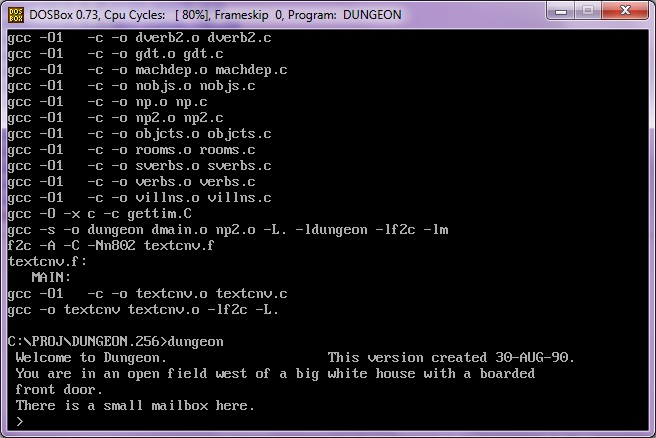
Sadly for me, I couldn’t sleep, so I then just grabbed the f2c/dungeon stuff and did a compile… I only had to tweak a few things, mostly a garbled long file name thing, but in no time… It was running.


I did manage to crash dosbox building the libf2c, but luckily changing gcc to use the -O0 (no optimizations) it was able to build the library… It’s kind of sad generating a 150kb ‘hello world’ type application, but thats the price for essentially statically linking everything….

MS-DOS isn’t the most modern thing out there…. I always wonder if those kids writing a 32bit ms-dos like os ever got anywhere…

Zork via FORTRAN

I don’t know why I even started down this path, but anyways I felt the urge today to break out some Fortran.  The problem is that I acquired Microsoft Fortran 5.0 in university, however… it’s on 5 1/4” diskettes!!!

So that wasn’t going to happen.

So I figured there had to be some kind of GNU Fortran compiler, and there is.. G77.  However it needs to be tied into a release of GCC.  Which sounds great, but I was hoping to build this on a few different platforms, and on my AMD 64 platform it’s GCC 3.3 (SUA), and on my NeXT it’s 2.5.8..  Even in the notes it says you’ll need about 100MB of space to build it, which is also a nice way of saying it’ll take FOREVER.

Then I remembered something we used on the RS/6000 because it was more ‘combatable’ then the Microsoft stuff, as it was derived from the first Unix Fortran compilers… f2c.

First you’ll need the source, which thankfully is still up on the original site  This part is a bit tedious as the source is not in a single easy to get file.  You’ll need to get the source from here.  Once you’ve downloaded the files, I’d recommend saving them somewhere else.. You don’t want to have to right click like wild to get them…  Alternatively I’ll host them all here to save someone all that effort.

Building f2c is really quite simple on any UNIX’like platform.  First you’ll need the f2c source, and unpack it somewhere….  Then you *MAY* have to adjust the makefile.u for the CC/CFLAGS variables as your C compiler may not be gcc or cc, also you may or may not want the –O flags (optimize).  On my NeXT I turned off the optimizations, since this is a 33Mhz machine, and I don’t want to wait all day, and I ran it with –O0 -pipe.  Then just simply run

make –f makefile.u f2c

bash-2.01$ make -f makefile.u f2c
cc -c -O0 -pipe main.c
cc -c -O0 -pipe init.c
cc -c -O0 -pipe gram.c
cc -c -O0 -pipe lex.c
cc -c -O0 -pipe proc.c
cc -c -O0 -pipe equiv.c
cc -c -O0 -pipe data.c
cc -c -O0 -pipe format.c
cc -c -O0 -pipe expr.c
cc -c -O0 -pipe exec.c
cc -c -O0 -pipe intr.c
cc -c -O0 -pipe io.c
cc -c -O0 -pipe misc.c
cc -c -O0 -pipe error.c
cc -c -O0 -pipe mem.c
cc -c -O0 -pipe names.c
cc -c -O0 -pipe output.c
cc -c -O0 -pipe p1output.c
cc -c -O0 -pipe pread.c
cc -c -O0 -pipe put.c
cc -c -O0 -pipe putpcc.c
cc -c -O0 -pipe vax.c
cc -c -O0 -pipe formatdata.c
cc -c -O0 -pipe parse_args.c
cc -c -O0 -pipe niceprintf.c
cc -c -O0 -pipe cds.c
if cc sysdeptest.c; then echo ‘/*OK*/’ > sysdep.hd; elif cc -DNO_MKDTEMP sysdept
est.c; then echo ‘#define NO_MKDTEMP’ >sysdep.hd; else echo ‘#define NO_MKDTEMP’
>sysdep.hd; echo ‘#define NO_MKSTEMP’ >>sysdep.hd; fi
ld: Undefined symbols:
_mkdtemp
rm -f a.out
cc -c -O0 -pipe sysdep.c
cc -c -O0 -pipe version.c
cc  main.o init.o gram.o lex.o proc.o equiv.o data.o format.o  expr.o exec.o int
r.o io.o misc.o error.o mem.o names.o  output.o p1output.o pread.o put.o putpcc.
o vax.o formatdata.o  parse_args.o niceprintf.o cds.o sysdep.o version.o  -o f2c

All being well, you’ll have a new & exciting f2c executable.  I manually just copy the f2c into /usr/local/bin & the f2c.h to /usr/local/include.

Next you’ll need the f2c io library.  Thankfully this one IS zipped up and it’s available here.  Alternatively I’ve got a copy here (better). *NOTE that the ‘official’ version of the lib doesn’t extract to a sub directory… Grr  Extract the library source, and again you may need to modify the makefile to suit your compiler (CC/CFLAGS).  Then go ahead and make the library.

make –f makefile.u

cc -c -DSkip_f2c_Undefs -O0 -pipe etime_.c
ld -r -x -o etime_.xxx etime_.o
mv etime_.xxx etime_.o
ar r libf2c.a f77vers.o i77vers.o main.o s_rnge.o abort_.o exit_.o getarg_.o iar
gc_.o getenv_.o signal_.o s_stop.o s_paus.o system_.o cabs.o ctype.o derf_.o der
fc_.o erf_.o erfc_.o sig_die.o uninit.o pow_ci.o pow_dd.o pow_di.o pow_hh.o pow_
ii.o pow_ri.o pow_zi.o pow_zz.o c_abs.o c_cos.o c_div.o c_exp.o c_log.o c_sin.o
c_sqrt.o z_abs.o z_cos.o z_div.o z_exp.o z_log.o z_sin.o z_sqrt.o r_abs.o r_acos
.o r_asin.o r_atan.o r_atn2.o r_cnjg.o r_cos.o r_cosh.o r_dim.o r_exp.o r_imag.o
r_int.o r_lg10.o r_log.o r_mod.o r_nint.o r_sign.o r_sin.o r_sinh.o r_sqrt.o r_
tan.o r_tanh.o d_abs.o d_acos.o d_asin.o d_atan.o d_atn2.o d_cnjg.o d_cos.o d_co
sh.o d_dim.o d_exp.o d_imag.o d_int.o d_lg10.o d_log.o d_mod.o d_nint.o d_prod.o
d_sign.o d_sin.o d_sinh.o d_sqrt.o d_tan.o d_tanh.o i_abs.o i_dim.o i_dnnt.o i_
indx.o i_len.o i_mod.o i_nint.o i_sign.o lbitbits.o lbitshft.o h_abs.o h_dim.o h
_dnnt.o h_indx.o h_len.o h_mod.o h_nint.o h_sign.o l_ge.o l_gt.o l_le.o l_lt.o h
l_ge.o hl_gt.o hl_le.o hl_lt.o ef1asc_.o ef1cmc_.o f77_aloc.o s_cat.o s_cmp.o s_
copy.o backspac.o close.o dfe.o dolio.o due.o endfile.o err.o fmt.o fmtlib.o fte
ll_.o iio.o ilnw.o inquire.o lread.o lwrite.o open.o rdfmt.o rewind.o rsfe.o rsl
i.o rsne.o sfe.o sue.o typesize.o uio.o util.o wref.o wrtfmt.o wsfe.o wsle.o wsn
e.o xwsne.o dtime_.o etime_.o
ar: creating libf2c.a
ranlib libf2c.a

This will take longer then f2c.. Or at least it did on my NeXT.

Then I just copied the library libf2c.a into /usr/local/lib then ran ranlib over the library again.

Ok now we should be able to build a FORTRAN program.  Let’s try something small.

      program hello
      print *, ‘Hello!’
      end

I’ve tried to preserve the leading 6 blank spaces.  You should be able to copy the above program, and save it as hello.f  Now we should be able to translate, compile and run the program!

bash-2.01$ f2c hello.f
hello.f:
   MAIN hello:
bash-2.01$ cc hello.c -lf2c -o hello
bash-2.01$ file hello
hello:  Mach-O executable (for architecture m68k) not stripped
bash-2.01$ ./hello
Hello!

Awesome!  Now let’s try something much bigger, say some old Fortran source to the old ‘dungeon’ game, better known as Zork!  This source is available all over the place as dungeon-2.5.6.tar.gz, and I’ll provide a link as well here.

Download, and extract the files (gzip –dc dungeon-2.5.6.tar.gz|tar –xvf –) and you’ll have your dungeon directory.  Building this should be pretty simple, if the above program built and ran without errors.  On my SUA (Vista) machine, I had to force the –I/usr/local/include flags to find the f2c.h..  So you may need some tweaking it all depends.

Again on my NeXT I changed the CFLAGS to –O0 –pipe.  On my Vista SUA I had to specify that CC=gcc.

Once done, go ahead and run make.

\ar d libdungeon.a dmain.o np2.o
\ranlib libdungeon.a
cc -s -o dungeon dmain.o np2.o -L. -ldungeon -lf2c -lm
f2c -A -C -Nn802 textcnv.f
textcnv.f:
   MAIN:
cc -O0 -pipe -c textcnv.c
cc -o textcnv textcnv.o –lf2c

If all went well that should be how the last lines look.  We should now have a dungeon executable!

bash-2.01$ file dungeon
dungeon:        Mach-O executable (for architecture m68k)

Awesome!

So let’s enter the game, shall we?

bash-2.01$ ./dungeon
Welcome to Dungeon.                    This version created 30-AUG-90.
You are in an open field west of a big white house with a boarded
front door.
There is a small mailbox here.
>

So, now we have built the f2c translation package, and managed to build a trivial hello world program, and something a little more complex like Dungeon/Zork.

Now I can play with my numerical recipes book with my pseudo Fortran kit.

Running Windows 2003 r2 x64 on Qemu 0.9.0

This took me a LOT longer then it should have to figure out. So for anyone else wanting to run the 64bit versions of Windows on Qemu (I havent tested Vista/2008/7 yet) Only version 0.9.0 will work.

Because sourceforge is still giving me errors I’ll provide direct links…

Anyways to buidl Qemu you’ll need a MinGW/MSYS enviroment. The new stuff works on Vista x64 so that’s good to me, as it’ll run natively.

You’ll need the following files:

MinGW-5.1.4.exe
MSYS-1.0.11-rc-1.exe
msysDTK-1.0.1.exe
w32api-3.13-mingw32-dev.tar.gz
mingwrt-3.15.2-mingw32-dev.tar.gz

First, install MinGW by choosing the ‘current’ version, then check the following options:

*MinGW Base tools
*G++ compiler
*MinGW make

Allow it to instal into c:\MinGW

Next install MSYS with the default options. Then it’ll ask you the following, respond as I have:

Do you wish to continue with the post install? [yn ] y

Do you have MinGW installed? [yn ] y

Please answer the following in the form of c:/foo/bar.
Where is your MinGW installation? c:/mingw

Install msysDTK with the default options.

Now you should be able to run the msys CLI
Start -> run -> mingw -> msys -> msys

Let’s expand out the win32api & mingw32 dev updates:

cd /mingw
tar -zxvf /c/install/qemu-build/w32api-3.13-mingw32-dev.tar.gz
tar -zxvf /c/install/qemu-build/mingwrt-3.15.2-mingw32-dev.tar.gz

Now your ‘gcc -v’ should return something like this:

Reading specs from c:/mingw/bin/../lib/gcc/mingw32/3.4.5/specs
Configured with: ../gcc-3.4.5-20060117-3/configure –with-gcc –with-gnu-ld –wi
th-gnu-as –host=mingw32 –target=mingw32 –prefix=/mingw –enable-threads –dis
able-nls –enable-languages=c,c++,f77,ada,objc,java –disable-win32-registry –d
isable-shared –enable-sjlj-exceptions –enable-libgcj –disable-java-awt –with
out-x –enable-java-gc=boehm –disable-libgcj-debug –enable-interpreter –enabl
e-hash-synchronization –enable-libstdcxx-debug
Thread model: win32
gcc version 3.4.5 (mingw-vista special r3)

Ok, now let’s build the prerequisits, zlib & SDL.

zlib-1.2.3.tar.gz

cd /
mkdir -p /usr/src
cd /usr/src
tar -zxvf /c/install/qemu-build/zlib-1.2.3.tar.gz
./configure
make
make install

Now SDL.

SDL-1.2.13.tar.gz

tar -zxvf /c/install/qemu-build/SDL-1.2.13.tar.gz
cd SDL-1.2.13
./configure
make
make install

Now we need to tweak some things that MinGW seems to have issues finding in the /usr/local path.. I’m sure there is a better ‘fix’ but hell, this is quick & cheap!

cd /mingw/include
ln -s /usr/local/include/zconf.h .
ln -s /usr/local/include/zlib.h .
ln -s /usr/local/include/SDL .
cd /mingw/lib
ln -s /usr/local/lib/libSDL.a .
ln -s /usr/local/lib/libz.a .
cd /bin
ln -s true.exe texi2html.exe
ln -s true.exe pod2man.exe

Ok, now we just need the source to Qemu 0.9.0…. It’s becoming something RARE which is weird considering just how compatable this version is… So I’d recommend keeping a copy in email or something.

qemu-0.9.0.tar.gz

cd /usr/src
tar -zxvf /c/install/qemu-build/qemu-0.9.0.tar.gz
cd qemu-0.9.0
./configure –target-list=x86_64-softmmu
make

Now instead of the usual Qemu 32bit x86 emulator, you’ll get qemu-system-x86_64.exe in the x86_64-softmmu directory. Running it is just like the regular Qemu. So first I’m going to create a 16GB disk to boot from like this:

qemu-img create -f qcow win64.disk 16G

*NOTE if you have any issues where it just doesn’t work, use the qemu-img from here. I’ve had issues with the one that I’ve built, but the emulator works…. go figure.

Now let’s boot from the disc:

$ x86_64-softmmu/qemu-system-x86_64.exe -m 1024 -L pc-bios/ -hda win64.disk -cdrom en_win_srv_2003_r2_enterprise_x64_cd1.iso -net nic,model=rtl8139 -net user -boot d

Now if you don’t have the ISO files, and have physical discs don’t fret! It’s easy to have Qemu point to them… Let’s say your CD-ROM (DVD/BR disk) is D: then it’s just a matter of running:

$ x86_64-softmmu/qemu-system-x86_64.exe -m 1024 -L pc-bios/ -hda win64.disk -cdrom \\.\d: -net nic,model=rtl8139 -net user -boot d

Easy, right? Remember the -m flag for memory, otherwise your VM will run in a TINY 128mb of ram.. And it’ll be insanely SLOW.

And then you’ll get this!
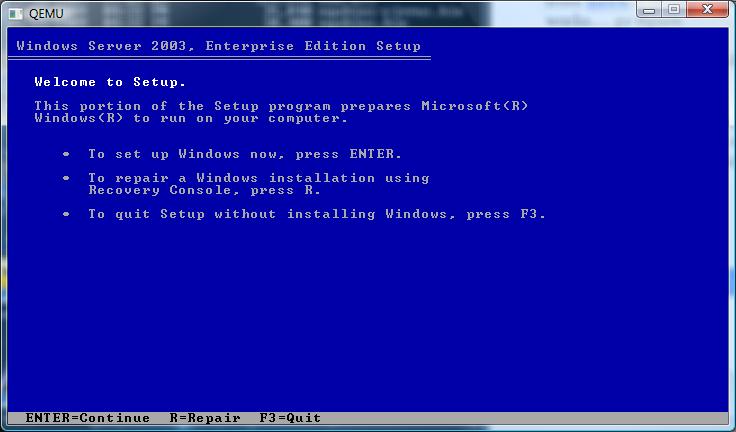
The first screen.. It doesn’t sound all that 64 bit does it?
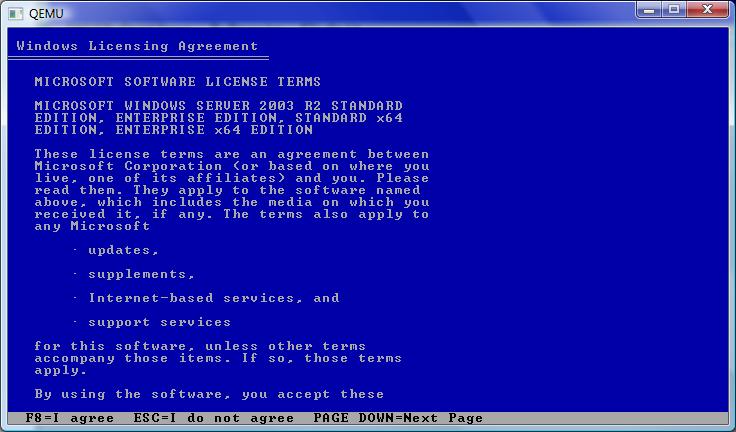

Now we are talking! It certainly is the 64 bit version… It reminds me of the PowerPC/MIPS/Alpha builds where once the Kernel has loaded, it’s all Windows NT..
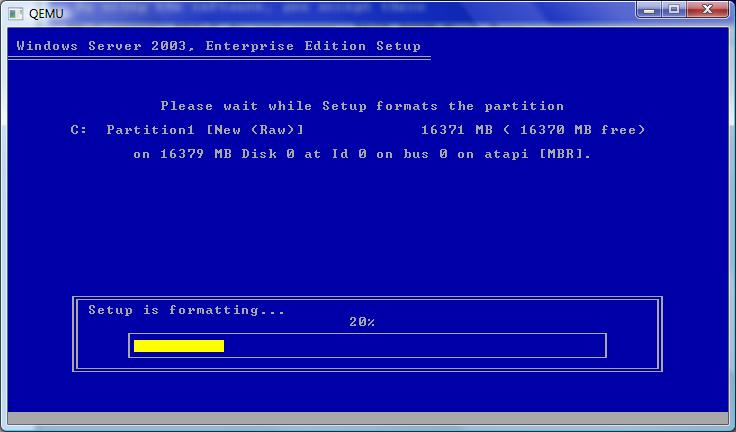

Select your partition, and let’s format away!
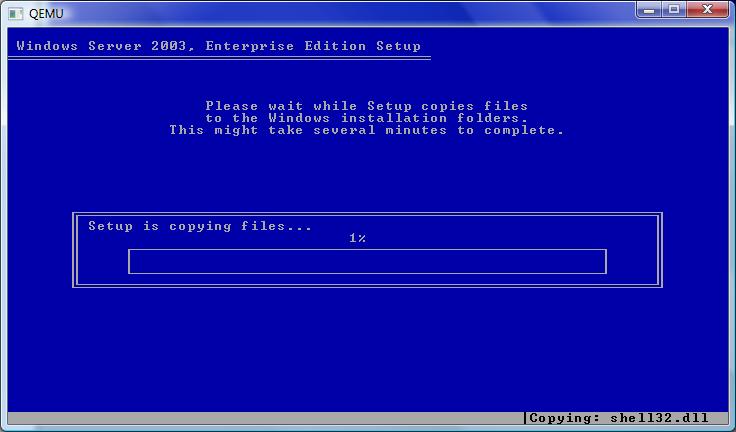

Time for the file copy… This will take a while.
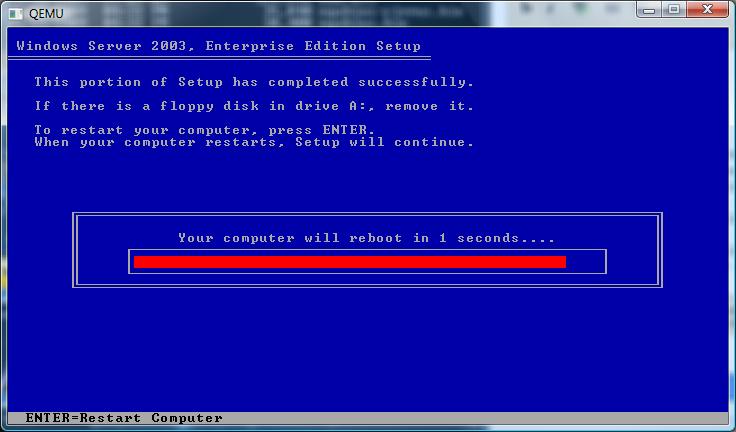

Finally!

Then it’ll reboot, and you’ll get the happy bootloader!
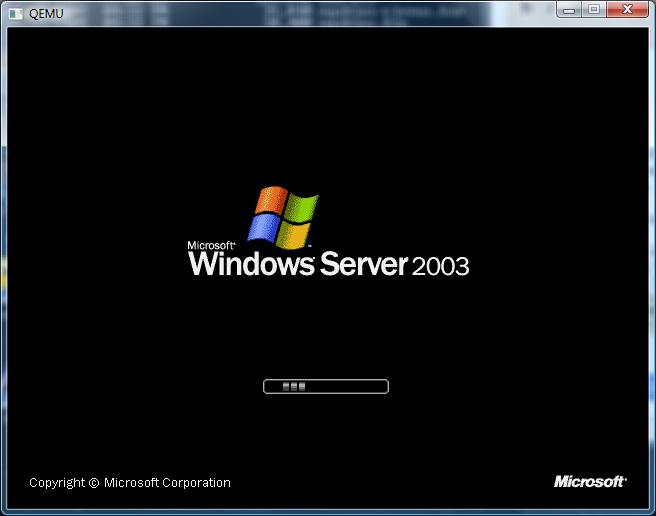

Bootloader in action..
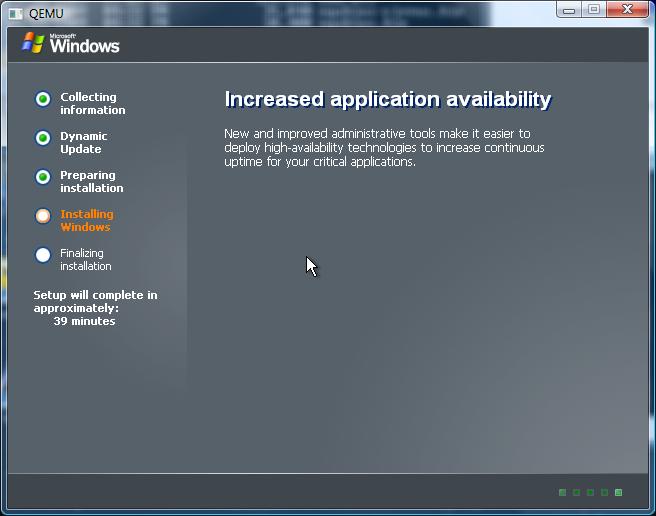

I haven’t timed it, but I suspect it’ll be longer then 39 minutes.

As you can see with the right version of Qemu it’s trivial to get Windows 2003 r2 x64 running… It’s good for doing some .net 32/64 bit testing… Which reminds me of another tidbit..

Some things in .net land will NOT work on IIS running in 64 bit mode. You’ll have to throw the switch to get a 32bit .net on IIS. The good news though is that this can take advantage of 2GB for a normal exe, and if you tag it, 3GB to under 4GB of ram.. So the 64bit version is not without waste.

%SystemRoot%\Microsoft.NET\Framework\v2.0.50727\aspnet_regiis -i -enable
iisreset
CScript “%SystemDrive%\InetPub\AdminScripts\adsutil.vbs” set w3svc/AppPools/Enable32bitAppOnWin64 1
iisreset

I did verify that this would get sharepoint to run on 2003 x64.. As I always feel better trashing a VM then real iron…

And don’t forget the flexibility of the -redir command on Qemu to allow you to redirect ports into the VM…

Say you want to use terminal server into your VM, you can redirect say port 1000 into the vm by adding:

-redir tcp:10000:10.0.2.15:3389

Then it’s a simple matter of using a terminal server client to localhost:10000

I hope this clears up how easy it is to build your own Qemu, and of course how to run something other then the ‘normal’ 32bit version of Qemu.

Sourceforge issues


Well they are changing the UI to something not quite as krusty, but in the meantime expect a WHOLE LOT OF 500 errors.

I’m trying to download a MinGW enviroment to test up some Qemu builds but that seems to be going nowhere quick…

Anyways for anyone who stumbles on this looking for my ancient BSD stuff, here is a link to my server with a newer build… I’d love to crank out all that stuff as well, but I’ve had MAJOR stability issues with SIMH 3.8-1 & Visual C++ 2008.. I’m in the middle of getting a copy from work of the ‘standard’ version which should be here soon enough… Maybe it’s just the express tools freaking out on me.

Oh well not to throw sourceforge under the bus, they have saved me a fortune in bandwidth bills in getting my stuff out to other people, and in all fairness a ‘holiday’ is a great time to do an upgrade… Well usually if you are a bank, but I think for geeks today is the day to hack.

I hate to say it, but 4.3 BSD RENO sucks.

Ok so I spent the day building stuff on RENO, I thought maybe I could bring it up to par package wise, like the UWisc 4.3 BSD… Oh boy what a PITA!

First the syscalls changed to RENO so hardly any of the packages built on Uwisc work on reno.. expect LOTS of unhandled syscalls. Wow, that’s lame.

I got bash 2.0 to build without much pokeing, but get this.. Control+C kills it!

myname# bash
bash-2.00# Bus error (core dumped)

Yeah. Nice.

gcc 2.5.8 can build binutils 2.8.1 & gcc 2.7.2.2 so I thought that was cool to go onwards to gzip & lynx…

Well launching lynx on ANYTHING other then file:// gives me this:

Alert!: Unsupported URL scheme!

Alert!: Unsupported URL scheme!

lynx: Start file could not be found or is not text/html or text/plain
Exiting…

Oh yeah, and it built dammed near clean except for adding a va_list definition….

I was going to try to build more stuff, but it just feels so futile. Since adventure (zork) had been removed in RENO I was going to try to build GNU Fortran 77 & get a build of that going, but now it’s most likely it won’t work at all. I guess I’ll do some kind of update on RENO but why would anyone actually want to load it? Why is it so popular?

I wonder if there is an easy accessable 4.4 BSD release, all that is on TUSH is 4.4 Alpha… At this point I wonder if Net/2 would be better…

Anyways that’s been my day.

Packages so far on Uwisc 4.3BSD

I’ve been compiling quite a bit of stuff.. Looking back it was something I intended to do back in October of 2007… Well no time like the present then! I’ve done my best to include all the relevant bits for each of the following packages. It’s entirely possible I’ve missed stuff, so feel free to re-build the stuff as you wish. Some of the packages require you to build them with GCC as the default CC won’t work. However if you are going to build it yourself you won’t be able to jump to gcc 2.7.2.2 as it requires gperf which in turn requires a working c++ compiler. So far here are the following packages:

bash-1.14.7
bash-2.0
binutils-2.8.1
bison-1.25
flex-2.5.4
gcc-1.42
gcc-2.4.5
gcc-2.5.8
gcc-2.7.2.2
gdb.3.1
gzip-1.2.4
hack.1.0.3
irc2.8.21
ircii-4.4
lynx-2.8.2
make-3.75
pine-3.87
screen-3.7.1
unzip522

All of these can be downloaded from here. I’m keeping all the source code (unaltered) in tap format for the SIMH emulator right here.

To get the C compilers going I had to build gcc 1.42 with the system compiler (cc/PCC) then use that version of GCC to build the next version. Once I had gcc 2.5.8 building, then I was able to build binutils 2.8.1 without issues, then rebuild gcc 2.5.8 to use binutils instead of the default system assembler so that I could build lynx and it wouldn’t barf because of the massive switch statement…

And no, -J didn’t help.

Speaking of lynx the search ability is broken because the function simply isn’t in 4.3 BSD (bsearch), and for pine, I had to make a fake tmpfile function that uses the /tmp/pinebox directory.

The gcc 2.5.8 package includes the C++ components, and I’m pretty sure I did with 2.7.2.2 as well. I’m not sure if GCC 3.x kept the VAX cpu so I haven’t pushed forward, but seeing that the cc1 exe is over 1mb it doesn’t seem worth it to push ahead.

I’ll have to see about including more games. The selection in this 4.3 release is kind of weak,

aardvark* boggle* hack@ monop* snake*adventure* ching* hangman* quiz* snscore*backgammon* cribbage* hunt* robots* teachgammon*battlestar* doctor* lib/ rogue* trek*bogdict* fortune* mille* sail* zork*

I’ll have to see what’s missing from where.. Also I notice that the arrow key bindings in terraterm are not working… I’ll have to dive into that as well. It may end up with a new re-relase of the emulator or a patch thing. I’ll have to see.

I should add a quick note on how to unpack these tap files. First you will need bzip2 on your native pc. You should be able to get one here.

Now just uncompress the file..

C:\Program Files (x86)\uwiscbsd>bzip2 -d lynx-2.8.2.binary.BSD-4.3.Uwisc.tap.bz2

Now you need to go to the SIMH console window. It will say something like this in it:

VAX780 simulator V3.8-1
Listening on port 42221 (socket 376)
Waiting for console Telnet connection
Running

Hit Control+E and it’ll interrupt the simulator. Then we need to attach the tap file like so:

Simulation stopped, PC: 800018A3 (MTPR #0,#12)
sim> att ts0 lynx-2.8.2.binary.BSD-4.3.Uwisc.tap
sim> c

the att command will attach the tap file to the ts0 device. the c will tell the simulator to continue. Now just switch to a tty windows (or attach a pty), then it’s a simple matter of running the following commands:

myname# cd /
myname# mt rew
myname# tar -xvmf /dev/rmt12
x /usr/local/bin/gzip, 66560 bytes, 130 tape blocks
x /usr/local/bin/lynx, 949248 bytes, 1854 tape blocks
x /usr/local/lib/lynx.cfg, 97203 bytes, 190 tape blocks
myname# rehash

Thats about all it takes, now you can run lynx. If you so wish, you can run back to the SIMH console, and tell it to “det ts0” which will detach the tape image.

Update for HACK

I just found out that hack will run properly if it’s built with the default compiler PCC (cc). However there is a single file that will not build, but gcc can be used to build the single file, and the build process can continue as normal.

Here is a quick log:

myname# make
cc -g -c hack.Decl.c
cc -g -c hack.apply.c
cc -g -c hack.bones.c
cc -g -c hack.c
hack.c: 799: missing endif
*** Error code 1

Stop.
myname# gcc -g -c hack.c
myname# make
cc -g -c hack.cmd.c

cc -g -c rnd.c
cc -g -c alloc.c
Loading …
myname# size hack
text data bss dec hex
158720 47104 30404 236228 39ac4
myname# ls -l hack
-rwxrwxr-x 1 root 694272 May 10 10:23 hack
myname# strip hack
myname# ls -l hack
-rwxrwxr-x 1 root 206848 May 10 10:23 hack

And with that being said, it seems just about any version of GCC will do… from 1.27 to 2.45. I’ve test played it, and you get the tombstone when you die, not a core dump. This applies to 4.2 BSD and all the 4.3 BSD’s. I’ve updated the sourceforge binary packages that I have made for Hack to include this hybrid exe that seems to work just fine.

Happy hacking!

Pointless update of the day (iPhone fun!)

I got a used iPhone while on vacation, and I managed to jailbreak it, and load up the CLI tools, including gcc onto it… It feels VERY unixy now with the 2.0 os, all the good stuff like screen, lynx, vi .. So I decided to build SIMH on it. It takes FOREVER to build anything… But then I don’t think the iPhone was built to compile.. -O2 seems to break so sadly it’s without optimizations but it runs!

For the heck of it, I copied in my 4.2 BSD disk image, and rebuilt SIMH with SLiRP support, and now I have a hand held VAX!

It’s cool, and pointless at the same time… I’ll probably make some binaries available on sourceforge later.. I guess as iPhones eventually get phased out (1st gen ones for sure) it’d be cool to let them become servers or something useful along those lines…

Here is a screen shot for the curious…

And yes, you can telnet into it, via the magic of SLiRP… I’ve tried building some irc clients, really old stuff does build and “work” but I think the server protocol has drifted as it cannot join any rooms…. So close & yet so far away.. I’ll probably have to move to 4.3 BSD..

I also should add that the iPhone VAX feels like an 11/780.. In that it takes several minutes to boot… Don’t expect a FAST machine…!