Well anonet moved client ports, and I was getting some questions about the whole thing. The client port has finally been well… finalized as far as I can tell. I don’t use it all that much but I figured that the ‘bar’ needed lowering for people curious about this anonet thing.
So what I’ve done for windows people is to setup an installable version of DSL linux that is just click and run that is configured for anonet. It’s got the DNS information all ready to go so you can run nirc and join the main irc server (don’t forget to edit the .nirc file if you so wish) and the dillo & firefox web browsers are also setup & working. However firefox is SLOW… But I figure this will allow people to easily see what’s what without installing any device drivers… And it’s more fun in a VM.
Currently I’m just sharing this in a torrent which you can download here:
Naturally you can use things like utorrent (http://utorrent.com/) to download it.
It’s all setup in a nsis script that I’ve been evolving from the BSD4.2 on windows thing.. so it’ll be straightforward to install & uninstall. Vista & Windows 7 users need to remember that the disk image will re-appear in their:
Well I planned on doing an update, but I didn’t get around to it. I’ll post my fun thru dec alpha fun later.
In the meantime, I was combing ebay, and I saw a cheap copy of Watcom C++ version 11. Now back in college I had 10.0, and it was AWESOME! It does 16bit & 32bit development of OS/2 MS-DOS and even Windows… For some reason the guy who sold the Watcom 11 included some techsupport thing he had going on, and included a tidbit about their being a ‘Default-windows application [-bw]’ (it’s on page 7 of C compiler settings) and it’s like the old Borland C++ for windows, or QuickC for windows days… It’s too bad I never knew it was there, as it allows for easy text mode stuff to win32 enviroments like … Win32s.
Now Win32s was one of those funny things, in which some smart people noticed that for the most part the ‘core’ of Win32 was a superset of Win16, and all they needed to do was hook the program loader, load the win32 exe into a relocatable space, then thunk all the win32 calls into win16 calls allowing a bunch of win32 applications to run on Windows 3.1! This was somewhat popular as most peoples machines at the time were not powerfull enough to run Windows NT 3.1, or they simply wished not to. And Windows 95 was going to be nearly another 2 years away…
Anyways, I’ve always thought SIMH was cool in that it’s super portable, so spending 20 minutes clearing out the ‘win32 console’ specific stuff from the code, I was able to build up a version that not only runs on Win32s on Windows 3.1, but also supports the TCP/IP remote console.
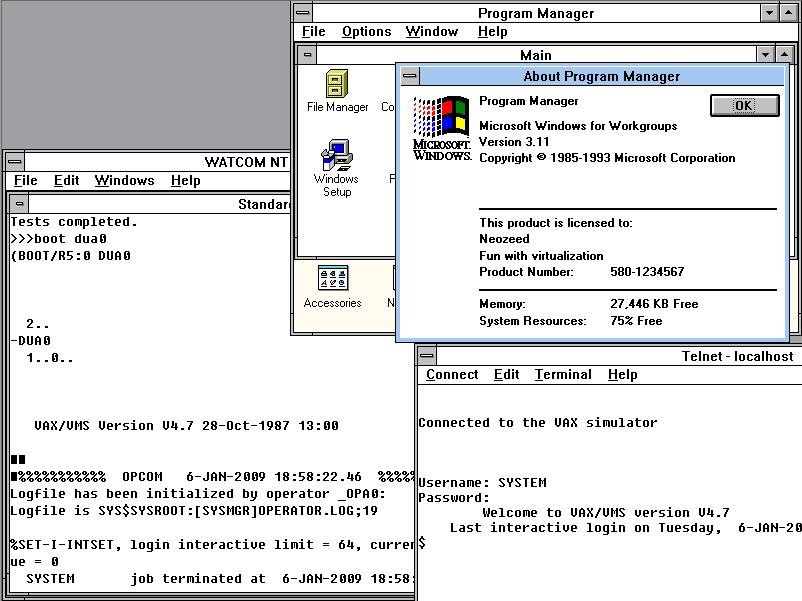
Here is a screen shot of my Windows 3.1 running under Virtual PC, telnetted to itself running the simh microvax running VMS 4.7
A Win32s VAX!
Anyways it’s too little too late, but I think it’s still cool. The neat thing about this is since it’ll run on Win32s is that it’ll run on dammed near any emulator as it’ll conform to such a subset.. Or so I’m hoping. I imagine it should also run under OS/2 3.0’s win32s emulation as well… And yes I’ve tested it with Win32s 1.25a that’s before Microsoft ‘fixed’ it to break all the OS/2 users out there…
I came across this site on a google quest for information about the Xerox Star… It’s even got an emulator for us Win32 folk!
Check it out! Don’t forget to extract the disk image in the same directory as the emulator. Once it’s started click on the icon on the far right (the one tagged 8000) and you’ll be greeted with this:
Woohoo, a minimal boot!… You can find more information on Star here. I’ve got to search around some more for some games & other stuff….
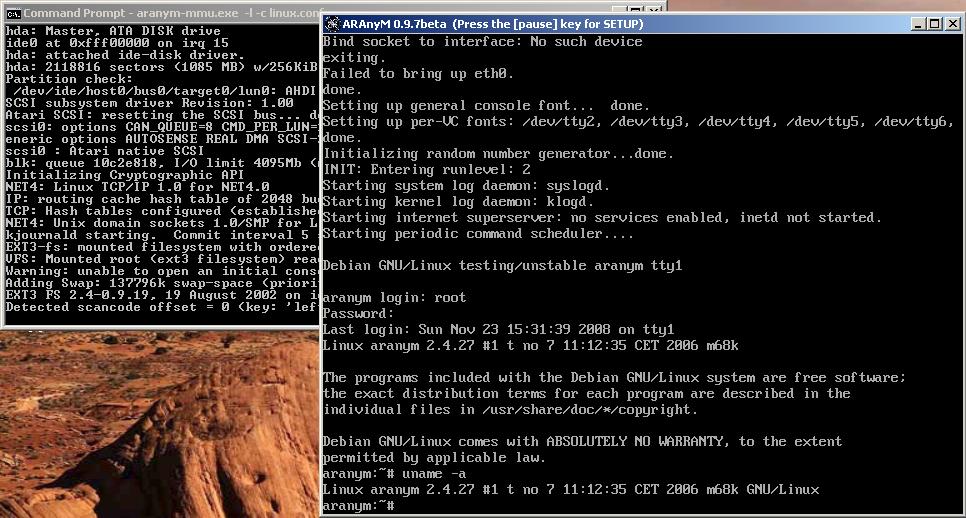
Well it was the weekend, and I was playing with FORTRAN (Language systems fotran to be exact, all 30lb of it!) and anyways to check to FPU & crash issues I though I’d check it out on an actual m68k Macintosh. So as I was using Basilisk II for some stuff, I was wondering if anyone ever did upgrade the CPU emulation to 68040/mmu emulation. And it turns out that the Basilisk II emulation is taken from UAE, which in turn has been used in a few other emulators including aranym.Aranym is “Atari runs on any machineâ€, and what these guys have done, is fleshed out the UAE 68000 emulation enough to where it will run m68k linux!
[IDE0]
Present = Yes
IsCDROM = No
ByteSwap = No
ReadOnly = No
Path = etch.img
Cylinders = 2102
Heads = 16 SectorsPerTrack = 63
ModelName = Master
—8<——8<——8<—
Then finally run it like this:
aranym-mmu.exe -l -c linux.conf
I’ll have to play some with the networking to get it going, it seemed straight forward the FAQ here, however I had no luck.
Anyways, it’s no A/UX, but it’s a *NIX like thing on the m68k. Now we just have to beg the Mac people to flesh out the hardware on their emulators to support Linux, OpenBSD, NetBSD & A/UX….
Proxmox – VE has hit the 1.0 today! Without fail, I’d say this is the best combination of full system emulation, and logical partitioning available as of today. I have been playing with Xen on Solaris 10, and frankly it SHOULD have been better, but it’s been so much worse.
Although Solaris Zones, coupled with ZFS & Xen should be a clear winner, you’ll find out real quick that Zones do *NOT* easily allow for independant tcp/ip stacks (hope you have v3 nic drivers), the Xen networking again is a mess (v3 drivers anyone? Also those interfaces better be TCP/IP enabled on the host!) and get ready to edit the /var/lib/xend/domains directory files a LOT…. And be ready for gegrep fun. Afterall domain names like “0aa811ef-3bd0-9140-583f-d5e09f93658e” make life all the easier. I will say that Xen does use Qemu disk images so there is an easy ‘upgrade’ path to/from KVM (the linux hypervisor found in ProxmoxVE). What I don’t get is the massive disconnect between virsh & the xend process.
And if you are running Xen, the you’ll want SOME print documentation… I just wish I didn’t think it’d be that intuitive. So at least creating this:
(device (vif (bridge iprb0) (uuid c0e47a99-70e5-1ebe-44a4-54895cb24a15) (script vif-vnic) (mac 00:16:3e:56:df:81) (model ne2k_pci) (backend 0) ) ) would have been easier. From my notes, how to tell if your nic is new enough to drive Xen/Zones:
/usr/lib/vna NIC MAC bash-3.2# /usr/lib/vna e1000g0 0:2:a5:4c:76:74 vnic5
If you don’t get something similar, you are screwed. Additionally this guide is invaluable as it’ll be your ONLY quick guide on how to get around xen on Solaris 10.
Anyways enough Xen bashing for now, but I have to say I’m excited about going back to ProxMox VE. Just remember to leave your base OS alone…. like a mainframe.
I was playing around with NeXTSTEP under a snapshot of qemu and I noticed that my arrow keys were not working correctly. After a few hours of digging about I found the fix was easy enough: -k en-us That’s it, just append that to your boot string, and away you go! Another annoyance has been my quest to install AROS onto a P4 computer.. I picked up a new 320GB IDE disk (WD Caviar Blue) .. which the BIOS & AROS promptly refused to acknowledge corectly. Everything was going to hell until I gave up and read the manual. Once again it was simple, there is a jumper setting for ‘older’ OS’s to see only 32gb, and naturally the BIOS is now happier. If only I could say the same of AROS…
Well it’s about that time, and OpenBSD has now just released version 4.4! I’m a big fan of OpenBSD, and of course I wanted to load it up on my laptop. I’ve been wanting to do some tests with Quake1 so I have setup a test server, and now I was needing a client, so I figured OpenBSD should be able to do this.
I installed OpenBSD 4.4, ran ‘startx‘ and naturally had a completely deformed screen.
I did find out that manually running ‘xorgconfig‘ and setting up the wsmouse (protocol & port!), and then selecting the S3 driver “** S3 (not ViRGE or Savage) (generic) [s3]” Option number 25 I think… Anyways from there I told it to use 800×600 16bit depth, and now I’m able to use X11 no worries!
Ok I wanted to do this eventually but now I’ve finally done it. I have constructed something a little complex but it works surprisingly well.
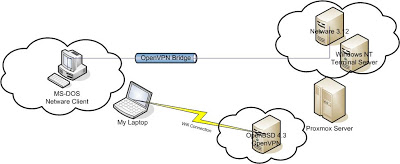
Let me draw a picture so i’ll be a little easier to follow:
proxmox Netware diagram
All of the machines in clouds are virtual!
Ok I’m going to assume you can install & configure OpenVPN on your own. I did a really simple install on Proxmox VE, just be sure to use the e1000 network adapters. All the others gave me tones of errors with any sizable traffic. Also, I should point out that I’m using OpenBSD 4.3 which is the latest as of today.
dev tun0
dev-type tap
ca /etc/openvpn/ca.crt
cert /etc/openvpn/server.crt
dh /etc/openvpn/dh1024.pem
key /etc/openvpn/server.key
server-bridge 192.168.6.33 255.255.255.224 192.168.6.50 192.168.6.62
push “route 192.168.6.0 255.255.255.0”
push “dhcp-option DNS 192.168.6.34”
client-to-client
duplicate-cn
keepalive 10 120
max-clients 100
persist-key
persist-tun
status /var/log/openvpn-status.log
verb 3
tun-mtu 1500
fragment 1300
mssfix
float
Again, I just followed the example from the OpenVPN site to set this up. What makes this different though is the fact that I’m using this in a bridge mode. As you can see, I have told OpenVPN that it is to use the tun0 interface as a tap driver.
My hostname.tun0 is this:
Link0 up
Likewise the bridgename.bridge0 is:
add em1
add tun0
up
And finally for this example my bridgename.em1 is:
inet 192.168.6.33 255.255.255.224 NONE
So using this setup I have a private 192.168.6.32/27 network in which I’ve got a few virtual machines running and space for my laptop to VPN into. Now one of the virtual servers on my Proxmox server is Windows NT 4.0 Terminal Server, Yeah, I know I got it cheap on ebay, and I kind of like it. Anyways I’m running Qemu on it, which is running Netware 3.12. I installed the libpcap then I had to find out what my Ethernet devices are called. I used wireshark (it was ethereal) and i’s a cool program to have around. The last version to run under Windows NT 4.0 was 0.99.4 so that’s the one I used. Once I have done this I found my device and was able to setup a string for Qemu (which was \Device\NPF_RTL80291)
This sets up an ISA computer with 16 megabytes of ram and a single ISA nic that will utilize libpcap to send out frames on the rtl80291 that’s being emulated to my NT terminal server by proxmox.
dev tap
ca ca.crt
cert client1.crt
key client1.key
client
proto udp
remote 192.168.1.75 1194
resolv-retry infinite
nobind
persist-key
persist-tun
;comp-lzo
mssfix
tun-mtu 1500
fragment 1300
Ok, so far so good. Now I do have Virtual PC 2007 on my laptop, and I have made sure that the “Virtual Machine Network Services” were bound to the “TAP-Win32 Adapter V9” interface.
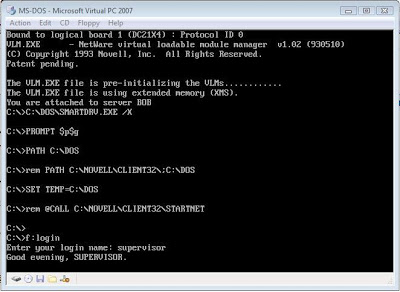
The it’s a simple matter of connecting to the VPN, then loading up the virtual PC with MS-DOS & the Novell Netware client.
Then you should be able to ‘bind’ to the server & login!
dos netware client
The ‘cool’ thing about this setup is that it will work over things like Wi-Fi, and easily allow you to add clients near & far. Oh and the best part for the Wi-Fi crowd is that it will use REAL encryption since WEP/WPA have all been shown to be useless. Oh yes, and it should allow you to host your DOOM, Quake 1, Rise of the Triad, Warcraft II, and Descent games…. Along with people playing at home! Using this you too can build your own IPX/Internet network!
I do hope this clears some of the uses & versility of Virtual servers, Qemu & Virtual Networking.
Well the last while I have ‘rediscovered’ the fun of BBS’ing. There is a resurgence of popularity of the Synchronet BBS software. The cool thing about it is the ease to setup the QWK messages (it just uses ftp!) and within 30 minutes of downloading and installing I had myself a node VERT’squicknet!
You too can download your very own BBS software here.
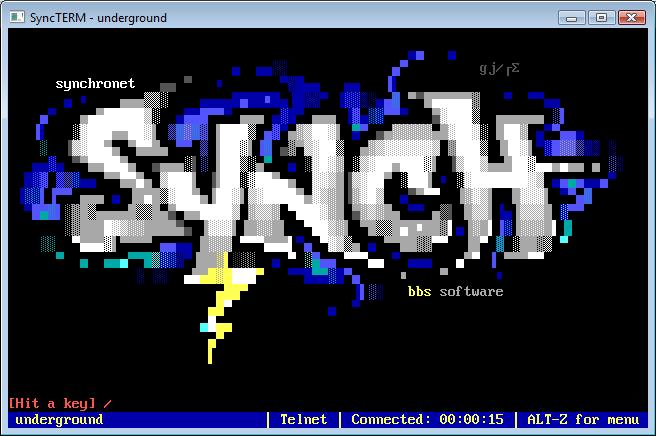
There is even a GREAT terminal emulator suitably named Syncterm that completes the experence. It supports rsh, telnet, ssh, x/y/z modem and cool ANSI graphics!
Another exciting aspect of the whole thing is that you can easily link up USENET servers with this BBS software… And of course it provides some involved web server wirtten in javascript.
The source to the whole thing is GPL’d so there is some hope that this will allow BBS’s to continue out there for some time.
Oh yeah and I did get a VPS so I do plan on hosting some of the old files from vaxenrule.com .. In ther interim though you can connect to the ‘underground’ BBS @ 75.127.119.16 … You could telnet in with any old telnet client, but I’d suggest Syncterm!