Installing OS/2 1.x in VirtualBox

OS/2 Museum just published this great article detailing what is needed to run older versions of OS/2 on VirtualBox. The ‘skinny’ is that Microsoft OS/2 is the way to go as they included the 386 method of switching from protected mode to real mode in their product, while 1.0 and 1.1 from IBM relied on the 286 triple fault.

Almost all versions have timing issues however. And again they are covered.

I may finally have that excuse to dig around and install OS/2 1.0!

Javascript MIPS

Hot on the heels of the javascript 80386 emulator, I found this javascript MIPS syscall emulator, jsmips.

What is cool about this one, is that commands are downloaded on demand.  And it supports more browsers, like Internet Explorer (well modern ones, IE 5.5sp2 didn’t work).

Vi works, but you’ll need to reset the terminal afterwards.  At least with this on demand filesystem it’d make it easier to add new binaries…

It’s amazing how far the world of javascript has come, but at the same time, it’s scary how precarious it is perched on browsers where stuff only seems to work at the moment and on select browsers.  But then that’s the way things seem to go.


Sysadmin rosetta stone.

A friend passed this link on to me, and it’s a good place to turn for some old/foreign OS’s.

It’s covers some basic tasks with the following OS’s:

  • AIX
  • A/UX
  • DG/UX
  • FreeBSD
  • HP-UX
  • IRIX
  • Linux
  • Mac OS X
  • NCR Unix
  • NetBSD
  • OpenBSD
  • Reliant
  • SCO OpenServer
  • Solaris
  • SunOS 4
  • Tru64
  • Ultrix
  • UNICOS

Always a good thing to have handy if you run into a supercomputer…..

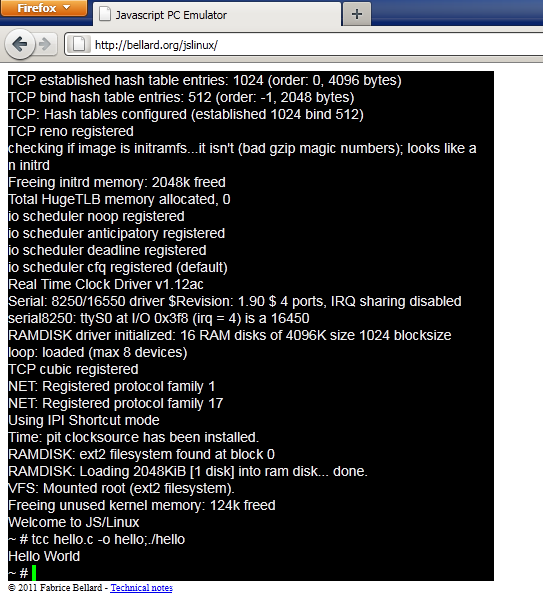
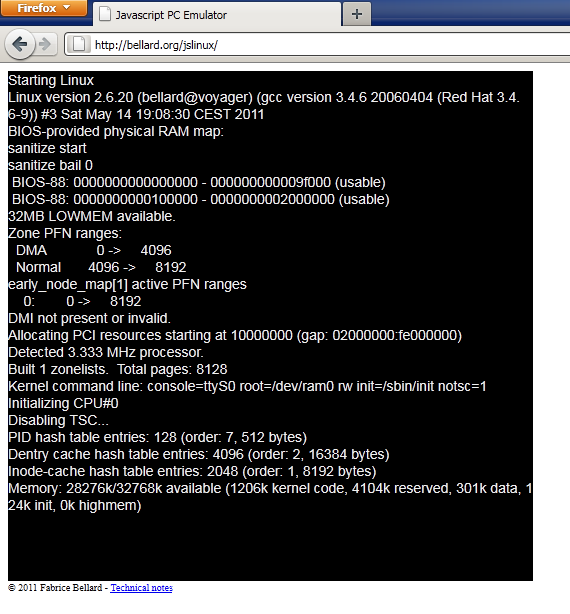
Javascript PC! / Linux in a browser!

That’s right.  Fabrice Bellard, has done it again, he’s given us such great things like TCC, Qemacs, and of course, Qemu.  But now he’s written a x86 emulator in javascript.

Thats right, javascript.

Behold jslinux (works in Chrome 11 & Firefox 4).

I must say, it’s fast.  A lot faster than I would have ever expected.

The hardware is a basic CPU, clock chip, and a UART.  however it’ll run things like vi just fine.  If you have either browser, give it a shot, it’s nothing short of amazing.

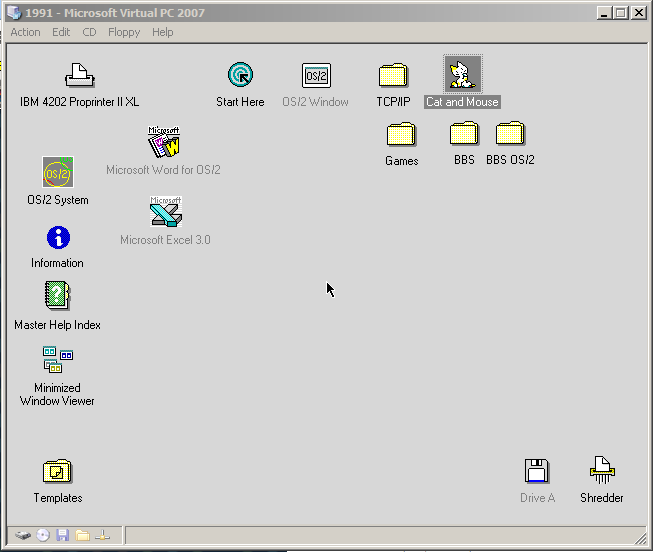
Spot the difference….

Picture A

Picture B

I know, it’s hard they both look identical.  Well they kind of are, Picture A is the installed OS/2 2.0 image that I’ve been playing around with.  It’s a 500MB IDE disk formatted with the HPFS filesystem.  For the heck of it, I used the qemu-img tool to convert it from a qcow2 into a vhd (qemu-img convert 500M.disk -O vpc 500M.vhd) and then tried to boot it up on Virtual PC.  I know in the past it’d fail with some weird error as something on HPFS wouldn’t transfer and it’d be the end.

But it worked!

This is really a great victory for Qemu!

Qemu starts to add more Dec Alpha support.

From the mailing list:

Since virtio devices intentionally access memory directly, we
are not actually dependant on the iommu patches in order to 
make progress.  Merely fixing the PCI interrupt setup was 
enough to get the virtio-pci interface working.

We now make it quite a long way into the Debian Lenny install.

At some random point during the install, it hangs.  I assume
we're somehow losing an interrupt or something, but it's very
hard to tell.  The cpu is still running, servicing timer
interrupts, but the userland process is stuck.

I hope to get the vga console working next.  That should allow
me multiple vt's, which should allow me to poke at the install
process from within the VM.

And..

$ ./alpha-softmmu/qemu-system-alpha -nographic -kernel 
../../linux/linux-git/vmlinux -append 'console=ttyS0 rdinit=/bin/sh' -initrd 
../alpha-test/initrd.gz
[    0.000000] Initializing cgroup subsys cpuset
[    0.000000] Initializing cgroup subsys cpu
[    0.000000] Linux version 2.6.39-rc4+ (address@hidden) (gcc version 4.7.0 
20110408 (experimental) (GCC) ) #18 SMP Thu Apr 28 10:11:46 PDT 2011
[    0.000000] Booting GENERIC on Tsunami variation Clipper using machine 
vector Clipper from MILO
[    0.000000] Major Options: SMP MAGIC_SYSRQ 
[    0.000000] Command line: console=ttyS0 rdinit=/bin/sh
[    0.000000] memcluster 0, usage 1, start        0, end        8
[    0.000000] memcluster 1, usage 0, start        8, end    16384
[    0.000000] freeing pages 8:2048
[    0.000000] freeing pages 3813:16384
[    0.000000] reserving pages 3813:3814
[    0.000000] Initial ramdisk at: 0xfffffc0007b26000 (5079886 bytes)
[    0.000000] SMP: 1 CPUs probed -- cpu_present_map = 1
[    0.000000] PERCPU: Embedded 6 pages/cpu @fffffc0000126000 s12608 r8192 
d28352 u49152
[    0.000000] Built 1 zonelists in Zone order, mobility grouping on.  Total 
pages: 16272
[    0.000000] Kernel command line: console=ttyS0 rdinit=/bin/sh
[    0.000000] PID hash table entries: 512 (order: -1, 4096 bytes)
[    0.000000] Dentry cache hash table entries: 16384 (order: 4, 131072 bytes)
[    0.000000] Inode-cache hash table entries: 8192 (order: 3, 65536 bytes)
[    0.000000] allocated 524288 bytes of page_cgroup
[    0.000000] please try 'cgroup_disable=memory' option if you don't want 
memory cgroups
[    0.000000] Memory: 110088k/131072k available (3489k kernel code, 20920k 
reserved, 8487k data, 384k init)
[    0.000000] SLUB: Genslabs=16, HWalign=64, Order=0-3, MinObjects=0, CPUs=1, 
Nodes=1
[    0.000000] Hierarchical RCU implementation.
[    0.000000]  RCU-based detection of stalled CPUs is disabled.
[    0.000000] NR_IRQS:32784
[    0.000000] Console: colour dummy device 80x25
[    0.000000] console [ttyS0] enabled
[    0.000000] Calibrating delay loop... 10138.40 BogoMIPS (lpj=158408704)
[    1.343750] pid_max: default: 32768 minimum: 301
[    1.343750] Mount-cache hash table entries: 512
[    1.343750] Initializing cgroup subsys ns
[    1.343750] ns_cgroup deprecated: consider using the 'clone_children' flag 
without the ns_cgroup.
[    1.343750] Initializing cgroup subsys cpuacct
[    1.343750] Initializing cgroup subsys memory
[    1.343750] Initializing cgroup subsys devices
[    1.343750] Initializing cgroup subsys freezer
[    1.343750] Initializing cgroup subsys blkio
[    1.343750] SMP mode deactivated.
[    1.343750] Performance events: Supported CPU type!
[    1.343750] Brought up 1 CPUs
[    1.343750] SMP: Total of 1 processors activated (10138.56 BogoMIPS).
[    1.343750] devtmpfs: initialized
[    1.343750] atomic64 test passed
[    1.343750] NET: Registered protocol family 16
[    1.375000] EISA bus registered
[    1.375000] bio: create slab <bio-0> at 0
[    1.375000] vgaarb: loaded
[    1.375000] Switching to clocksource qemu
[    1.375000] NET: Registered protocol family 2
[    1.375000] IP route cache hash table entries: 1024 (order: 0, 8192 bytes)
[    1.375000] IPv4 FIB: Using LC-trie version 0.409
[    1.375000] TCP established hash table entries: 4096 (order: 3, 65536 bytes)
[    1.375000] TCP bind hash table entries: 4096 (order: 3, 65536 bytes)
[    1.375000] TCP: Hash tables configured (established 4096 bind 4096)
[    1.375000] TCP reno registered
[    1.375000] UDP hash table entries: 256 (order: 0, 8192 bytes)
[    1.375000] UDP-Lite hash table entries: 256 (order: 0, 8192 bytes)
[    1.375000] NET: Registered protocol family 1
[    1.375000] Trying to unpack rootfs image as initramfs...
[    1.406250] Switched to NOHz mode on CPU #0
[    1.625000] Freeing initrd memory: 4960k freed
[    1.656250] srm_env_init: This Alpha system doesn't know about SRM (or 
you've booted SRM->MILO->Linux, which gets misdetected)...
[    1.687500] VFS: Disk quotas dquot_6.5.2
[    1.687500] Dquot-cache hash table entries: 1024 (order 0, 8192 bytes)
[    1.687500] ROMFS MTD (C) 2007 Red Hat, Inc.
[    1.687500] msgmni has been set to 224
[    1.687500] Block layer SCSI generic (bsg) driver version 0.4 loaded (major 
253)
[    1.687500] io scheduler noop registered
[    1.687500] io scheduler deadline registered
[    1.687500] io scheduler cfq registered (default)
[    1.687500] Serial: 8250/16550 driver, 4 ports, IRQ sharing disabled
[    2.093750] serial8250: ttyS0 at I/O 0x3f8 (irq = 4) is a 16550A
[    2.125000] brd: module loaded
[    2.125000] mousedev: PS/2 mouse device common for all mice
[    2.125000] TCP cubic registered
[    2.125000] NET: Registered protocol family 17
[    2.156250] drivers/rtc/hctosys.c: unable to open rtc device (rtc0)
[    2.156250] Freeing unused kernel memory: 384k freed

BusyBox v1.10.2 (Debian 1:1.10.2-2) built-in shell (ash)
Enter 'help' for a list of built-in commands.

/bin/sh: can't access tty; job control turned off
~ # mount -t proc none /proc
~ # cat /proc/cpuinfo
cpu                     : Alpha
cpu model               : EV67
cpu variation           : 0
cpu revision            : 0
cpu serial number       : 
system type             : Tsunami
system variation        : Clipper
system revision         : 0
system serial number    : MILO QEMU
cycle frequency [Hz]    : 250000000 
timer frequency [Hz]    : 1024.00
page size [bytes]       : 8192
phys. address bits      : 40
max. addr. space #      : 255
BogoMIPS                : 10138.40
kernel unaligned acc    : 0 (pc=0,va=0)
user unaligned acc      : 0 (pc=0,va=0)
platform string         : N/A
cpus detected           : 0
cpus active             : 1
cpu active mask         : 0000000000000001
L1 Icache               : 64K, 2-way, 64b line
L1 Dcache               : 64K, 2-way, 64b line
L2 cache                : n/a
L3 cache                : n/a
~ # QEMU: Terminated

It’s incredible isn’t it?  I know the VMS crowd will be thrilled, even the legacy Digital UNIX folk.. Heck maybe one day it’ll even run Windows NT!

OS/2 and virtual COM ports.

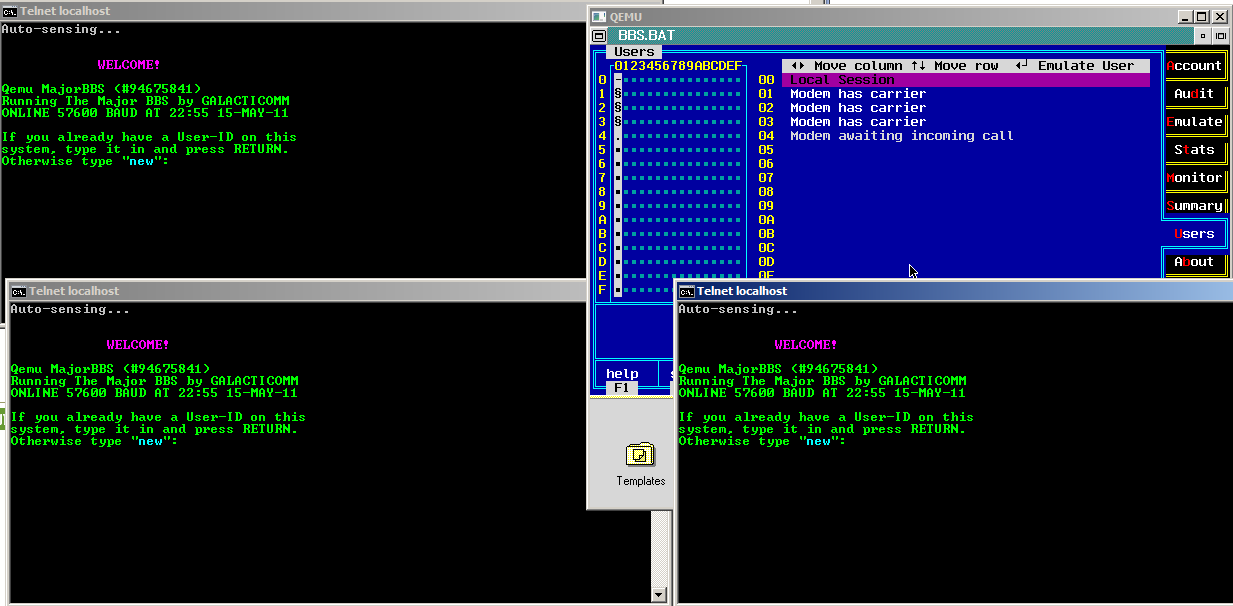
With TCP/IP working under OS/2 I went looking for the next thing that I’ve always wanted, and that is a good modem emulator.  Funny enough SIO the COM driver replacement for OS/2 actually includes this functionality.

And has for years… I just never knew it.

I know in the NT centric would we live in today, it’s all moot, but I thought it was really interesting for those of us that still hinge on modems… And freaky hardware, since OS/2 can let some things talk directly to the hardware without OS/2 drivers (IOPL=YES).

So for the sake of it, I downloaded version 1.60 of SIO, went through the install, then added a virtual modem as described to my config.sys .. And I placed a test ‘call’ with OS/2’s terminal program, and I was talking to my MUD!

So I thought I’d try something crazier, like load up a BBS, then configure it for four modems!


And it worked!

Sure there are some slightly easier to configure ways to achieve this (DOSBox includes modem support), and I suppose the better thing to do would be to give virtual modems to Qemu.  Then OS’s with no TCP/IP can benefit from this.

Qemu OS/2 TCP/IP networking

Well this should have been ‘easy’ but let me assure you it was not.  However this may save someone LOTS of effort if they ever want to get TCP/IP running in a fossil like OS/2 2.0.

First of all OS/2 2.0 will not install in new versions of Qemu.  I had to go all the way back to Qemu 0.9.0!  Although there is a tonne of floppy images to shuffle, OS/2 2.0 will install somewhat straightforwardly.  Once OS/2 is installed, You will almost surely want the xr06100 service pack.  I found I was unable to run MS-DOS or WinOS/2 sessions at all without either crashing the system, or trapping the entire OS.  But after loading the service pack it works as expected.

Now Qemu supports all kinds of network cards, from the NE2000 ISA, a PCI version of the NE2000, the rtl8139, an AMD PcNET adapter, and a bunch of Intel adapters.  And the annoying thing is that the OS/2 driver I have for the AMD PcNET adapter does not work at all.  It can’t find the card no matter how much I tried.  Which is funny when Netware 3.12 of all things can see it…

I tried all kinds of NE2000 drivers set for 0x300 irq 3 or irq 9 (I changed hw/pc.c to reflect what it was set to) to either not loading, or it’d load and transmit packets, but NEVER receive any packets.

The rtl8039 (ne2k_pci) and rtl8139 would also either not find the card, crash on binding, or send packets and again receive nothing.  To say it was very annoying was an understatement.

So I almost gave up, I found some update for the TCP/IP, u64092 went through the needed fun with loaddskf, and finally got working diskettes, and … It still didn’t work.

So in a fit of rage, I removed the 0x300/9 ne2000 in the config, so the next one, the 0x320, IRQ 10 one is in order, and….. It worked!  It even works with the Microsoft NE2000 driver!

So I go ahead and modify Qemu 0.14.1 to force the ne2000 to 0x320/IRQ 10, and it works great on the latest version!  It’s a shame it doesn’t install… But hopefully you only need to do that once!
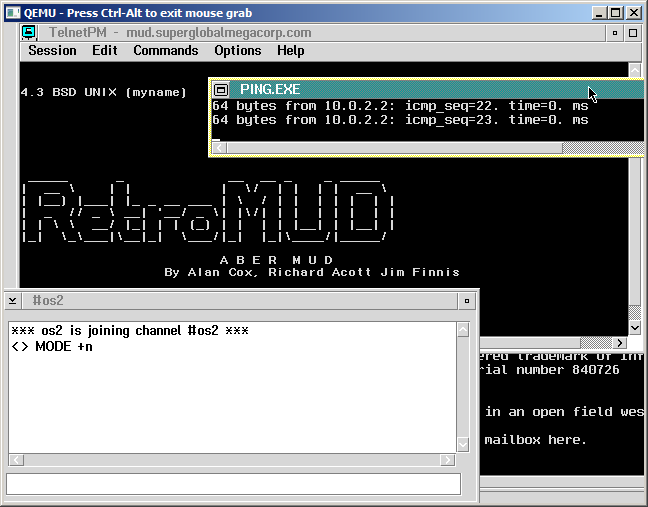
So there we go, saved by the NE2000 again.

For anyone crazy enough to reproduce this, here is my config.sys & protocol.ini … I’ve also installed EMX, but I don’t think that really matters…

 

Looks like more outages ahead..

“We’re moving most of our servers from SVTIX[1] to Market Post Tower[2] this
weekend. we’ve got layer 2 between the two locations already, so we’ll
be bringing down servers in batches of five and moving them five at a shot.
each user should experience something like two hours of downtime, if all
goes well.”

Well at least luke is transparent on the whole thing so it looks like there will be more bumps ahead. But I do have a full backup so worst case I can bring this online elsewhere if this goes down.

If anything the blogger outage made me finally break down and get that squared away.