
Well this is going to be a seemingly pointless post but you know I love stuff like this. I’d already gotten GCC 1.40 to run on the Windows NT 1991December Pre-Release, but that’s all Win32, what about the much vaunted POSIX subsystem?
Well what is it? Basically it’s just enough of the UNIX/POSIX standard to check a box that gave Windows NT an in for US Government contracts that required a POSIX checkbox. And nothing else more. It’s basically agreed that it’s just enough to run ‘vi’ and that’s basically it.
But surely we can probably do more with this?
The first fun part is that setting up the environment is basically UNDOCUMENTED. It was a nightmare back. then, as you need to setup a termcap environment that again is not mentioned. The only hint is is an old KB article Q108581, which sets out the vauge guide. I do know that back in the day I did have vi running, but I can’t remember how I did it exactly but wow.
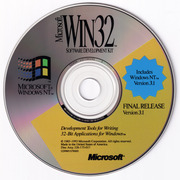
The first thing you need to do, naturally is install Windows NT 3.1. I did have access to this fun CD back in the day, it’s a combination Windows NT 3.1 Workstation +SDK CD-ROM. This way you not only get the operating system, but you also now have the C compiler, libraries and headers. Once setup, there is even a POSIX sample program. Great? Well, no. Because this doesn’t include the OS environment, there is no previous ‘vi’ either. Very sad. Naturally you need another CD to install, which of course back in the day if you were going to use or support Windows NT, you’d naturally run out or order the Windows NT Resource Kit. These were absolutely required back in the day as the ‘task manager’ only at best would show you named windows, it doesn’t show you the actual processes, making managing NT a nightmare without pviewer. (process viewer), among others.
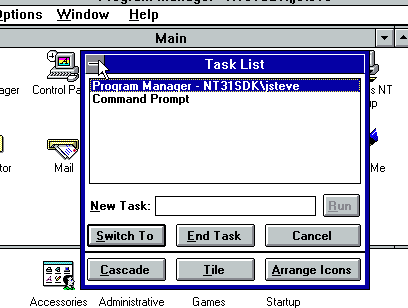
On the Resource Kit is not only a tiny ‘userland’ but also it includes Elvis a vi clone, along with a much needed ‘cc’ wrapper that will let you invoke the SDK C compiler as if it’s the Unix cc C compiler command.
Elvis was written by Steve Kirkendall, back in the day, and even on Linux back in the day, I was using Elvis as well. Remember ‘real’ vi was tied to needing a 32v / BSD source license so it wasn’t free.
/* Author:
 *      Steve Kirkendall
 *      14407 SW Teal Blvd. #C
 *      Beaverton, OR 97005
 *      [email protected]
 */
It’s just how things were back then.
To make things weird, I installed Windows NT onto a HPFS partition, because I wanted long file names, but I didn’t want to have a case preserving filesystem, as these old things have so much UPPERCASE/lowercase naming conflicts, because YES as a feature of NTFS & POSIX it really does support Mixed case naming. And I don’t feel like dealing with it, and it’s 1993, and HPFS is still a popular filesystem for us OS/2 users.
Okay, so you’ve installed both the SDK & the resource kit, surely you can just run vi?
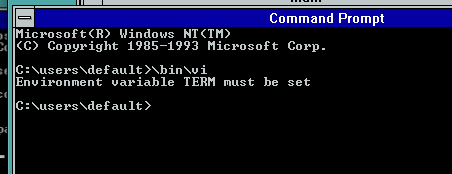
No. No you cannot. Remember you need that TERM variable and termcap library!
Now to save you the hassle you’ll go back and check Q108581 and you’ll see this example:
li|ansi|psx_ansi|:\

            :co#80:li#25:\
            :am:pt:ms:bw:\
            :cl=\E[2J:cm=\E[%i%d;%dH:ce=\E[K:cd=\E[J:\
            :sf=\E[S:sr=\E[T:\
             :ho=\E[H:sc=\E[s:rc=\E[u:up=\E[A:d=^J:nd=\E[C:le=^H:\
             :ku=\E[A:kd=\E[V:kr=\E[C:kl=\E[D:kb=^H:\
             :so=\E[7m:se=\E[m:mr=\E[7m:me=\E[0m:\
copy paste and and, yeah IT DOESNT WORK. Like something being passed endlessly through a photocopier, it got mangled in usenet (maybe where I found it?) , and yeah you need to ‘fix’ it up as it should look more like this.
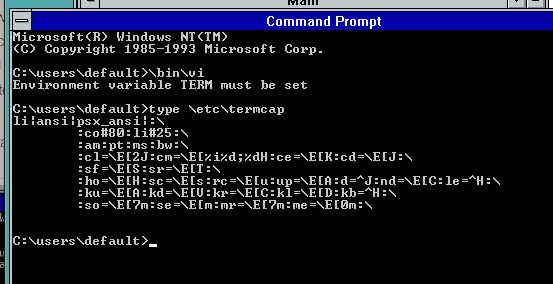
Or for anyone hoping to copy/paste:
li|ansi|psx_ansi|:\
	:co#80:li#25:\
	:am:pt:ms:bw:\
	:cl=\E[2J:cm=\E[%i%d;%dH:ce=\E[K:cd=\E[J:\
	:sf=\E[S:sr=\E[T:\
	:ho=\E[H:sc=\E[s:rc=\E[u:up=\E[A:d=^J:nd=\E[C:le=^H:\
	:ku=\E[A:kd=\E[V:kr=\E[C:kl=\E[D:kb=^H:bc=^H:\
	:so=\E[7m:se=\E[m:mr=\E[7m:me=\E[0m:\
Note that the leading ‘tab’ actually matters and there should be NO empty spaces at the tail backslash! If that tab or ending \ is padded or wrong it just plain will not work. I wasted so much time before realizing the craziness of this setup.
Okay.
Thinking that’s enough you have to keep reading, as the POSIX environment has no idea what c: is, or how to set variables, so you need to specify the full NT path, not the Win32 path
To save the adventure some time this is what I end up just putting into a CMD file so I can just click and go!
@stitle posix
@set PATH=c:\bin;%PATH%
@set Lib=c:\mstools\posix\lib;%lib%
@set Include=c:\mstools\posix\h;%include%
@set TERM=ansi
@set TERMCAP=//C/etc/termcap
@set _POSIX_TERM=on
@set TEMP=
@set tmp=
@set INCLUDE=
@set include=
@set lib=/usr/lib
@set tmp=//C/tmp
@set temp=//C/temp
@set MAKEPATH=//C/posix/src/MK-RULES
@cls
@sh
Now with a corrected environment for POSIX and a termcap file, now we can actually run VI/Elvis!
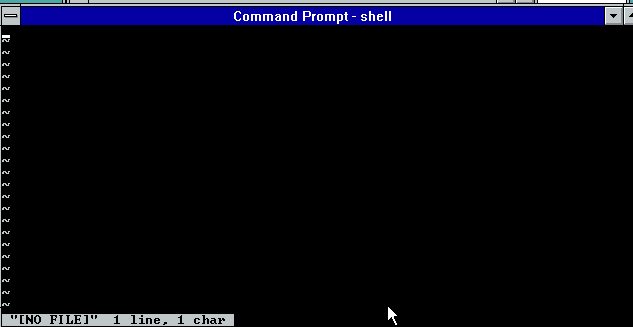
This is what success looks like!
Now I know what you’re thinking okay, were setup now, we can just build something simple like say a hello world style program right? I made a simple Makefile, and let’s go ahead and try to invoke the ‘cc’ compiler wrapper:
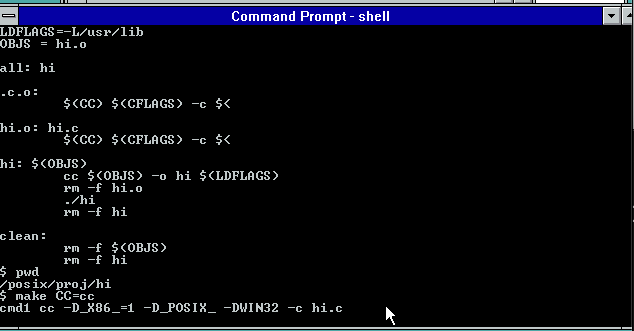
And it just hangs, doing nothing. As it turns out that the ‘cc’ wrapper uses a file for IPC to talk between POSIX & WIN32. Remember they are separate personalities on the NTOKS kernel, and they cannot directly communicate with eachother.
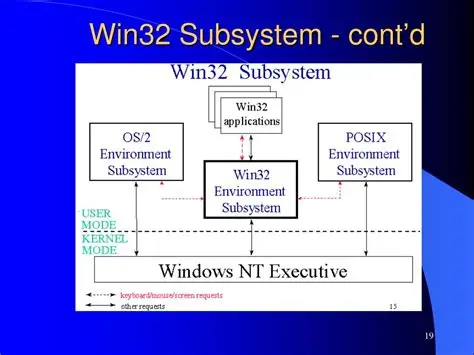
I don’t know why they didn’t use a named pipe, maybe POSIX cannot write to them? Maybe when they were writing the POSIX subsystem, named pipes weren’t working yet? It’s hard to say, and the early NT 3.1 pre-releases don’t included the POSIX, or OS/2 subsystem. Actually they don’t even have the NTVDM/MS-DOS/WoW either.
So you need to run something called ‘devsrv’ which is a Win32 program that looks for c:\tmp\ for devsem.ini file telling it what Win32 program to run and how. For example, in this case it looks like this:
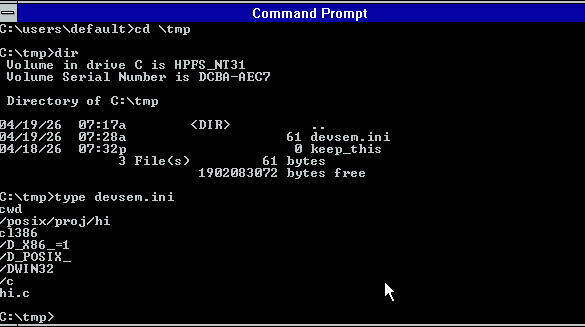
Now if you think you can just blindly run devrv, you’ll 99% of the time be in for a bad time as you need to initialize a working Win32->POSIX cross environment. Me being, me I just put this into another CMD file:
title devsrv
@set PATH=c:\bin;c:\mstools\bin;%PATH%
@set Lib=c:\mstools\posix\lib;c:\usr\lib
@set Include=c:\mstools\posix\h;c:\usr\include
@set TEMP=c:\temp
@set tmp=c:\tmp
@c:\bin\devsrv
I’ve already started to place headers & libraries into a more ‘UNIX’ like path structure with /usr/include & /usr/lib although by default the MSFT scripts expect things to live in the SDK world. But I do have goals of running GCC and dealing with weird paths isn’t my goal as the less I have to fight, the better.
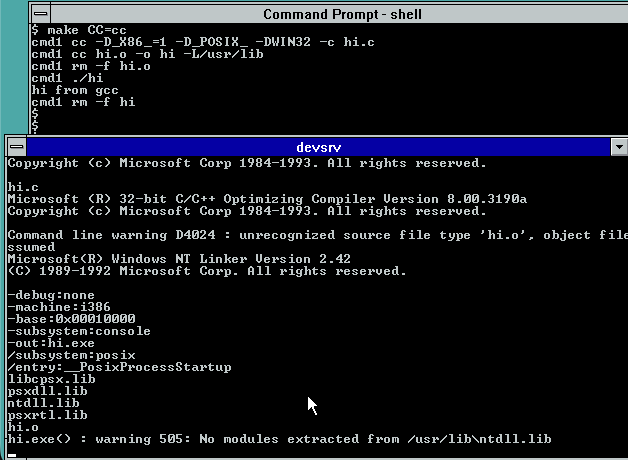
Now with devsrv running it cannot call the C compiler, and the linker. It will fail at first as it’s expecting to link against NTDLL.LIB as in the Pre-release/Beta days there was a ‘ntdll’ you had to link against. It isn’t there in the RTM Windows NT, so it’s kind of clear that although POSIX shipped it was basically abandonded during the development cycle, and nobody expected anyone to actually do anthying with it. Or at best find the KB article and maybe run vi.
Or you could just fix & rebuild the linker proxy, ld.c and remove the offending line:
char *def_lib[] = /* Default library */
{
   "libcpsx.lib",
   "psxdll.lib",
   "ntdll.lib",
   "psxrtl.lib",
   SNULL
};
And re-compile. Which of course is time to show yet another CMD file that sets up a Win32 environment enough to cross compile to POSIX:
title posix cross
@set CPU=i386
@set PATH=c:\posix\bin;c:\mstools\bin;%PATH%
@set Lib=c:\mstools\posix\lib;c:\usr\lib;%lib%
@set Include=c:\mstools\posix\h;c:\usr\include;%include%
@set TERM=ansi
@set TERMCAP=//C/etc/termcap
@set _POSIX_TERM=on
@set TEMP=c:\temp
@set tmp=c:\tmp
@set MAKEPATH=C:\posix\src\MK-RULES
So now I can build things from the Win32 side of life, like the LD proxy, or even ‘cross compile’ a simple enough hello world from Win32:
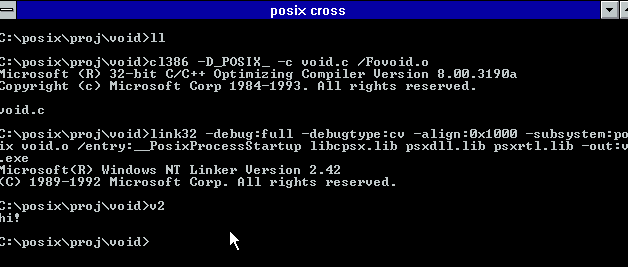
See wasn’t that fun?!
Since I already have a version of GCC-1.40 building with the Microsoft C compiler this seemed like a great leg up on building a POSIX version. And naturally to make it more complete building bison-1.16 is also required. Since I have Bison building on normal Win32, this wasn’t much of a problem. The weird hurdle came in the C Preprocessor where I found out that POSIX is missing some seemingly vital stuff like fstat!
int
file_size_and_mode (fd, mode_pointer, size_pointer)
     int fd;
     int *mode_pointer;
     long int *size_pointer;
{
#if 0
//this is missing from posix
  struct stat sbuf;

  if (fstat (fd, &sbuf) < 0) return (-1);
  if (mode_pointer) *mode_pointer = sbuf.st_mode;
  if (size_pointer) *size_pointer = sbuf.st_size;
#endif
  return 0;
}
Also, for some reason I can’t link any real programs that call unlink, I have to proxy that to a stub file that has no includes, define unlink as Xunlink, then link against that stube and it all links fine. I know WTF?! I don’t get it ether. But I wanted to build stuff so these are… tradeoffs that I made to just short-cut the whole thing. Maybe I’ll go back and look and try to figure it out. As I see in the POSIX util source mutiple things call fstat, so maybe it’s happier when linked from Win32?
To complete the round trip, since we already know the Link386 from the SDK and early Visual C++ will happily accept Xenix OMF files, I can use the GNU Assembler that targets Xenix, and then get a round tripped GCC on POSIX NT!
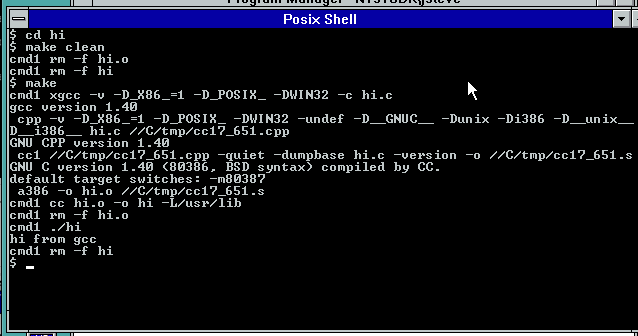
And there we have it!
Installing it for the BRAVE
I’ve gone ahead and uploaded my working directories to archive.org here: POSIX-4.
I guess I could have found my old zip/unzip for NT 3.1 but I didn’t I stuck to PAX which surprisingly is in NT 3.1. It’s not quite as friendly as TAR but you can copy posix4.tar to the C: drive and just extract it with ‘pax -r -f posix4.tar’
I should note for some reason trying to extract it from my tranfer disk, causes a BLUESCREEN in the HPFS device driver on NT 3.1… Bummer.
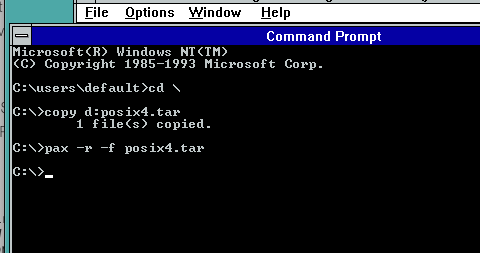
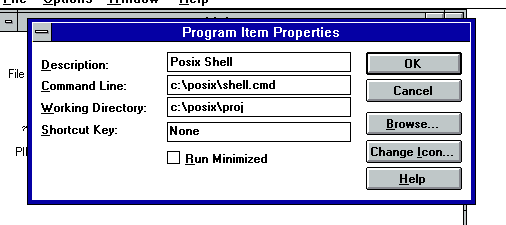
Once all the files are unpacked the first thing I do is make a Program Item on Program Manager for the Posix shell. All the hard work is done, you just have to path it to c:\posix\shell.cmd
This is how I setup mine, so YMMV
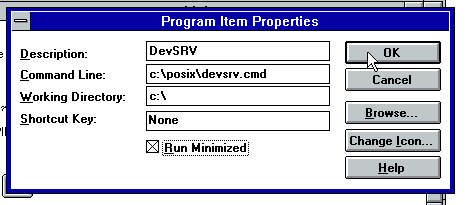
And the last part is the DEVSRV. This is how I setup mine, with the emphasis on running minimized. It does and can crash from time to time so I wouldn’t try to wrap it as a service or anything that creative.
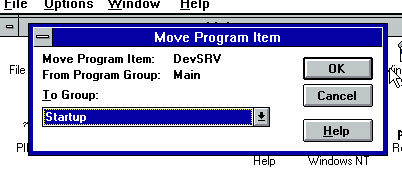
And then I move mine to the startup items, so that way, every time I login, I now have the devsrv all ready for my POSIX experiments!
Now you can just logoff/log back in, and you are ready for some POSIX GCC adventures.
It’s a shame that back then I just was totally unaware of that Xenix OMF GAS version. I pretty much had given up on Xenix 386 back then, as I never could find the developer’s kit, as they had gatekept people off the platform. Linux is where all the excitement was, as not only did it have GCC, but you also had full source. Even if I’d had access to GCC on Xenix, with no libc no headers it wasn’t going to go very far.
Credit to Microsoft though, they did learn with that $3,000 OS/2 SDK, that if you paywall the low end developers away, nobody writes for your platform. Although Microsoft did lose their way on this when they stopped QuickC, forcing new users to pay for the full thing. They didn’t realize how much territory they ceded by charging for the C compiler to GCC until it was too late, as all ‘starving university’ kids are GNU kids now (Yes I know CLANG is where it’s at today, thats’s Apple’s lesson I guess in there). By the time they did free as in beer limited “Visual C++ Toolkit 2003” it was already far too late.
The POSIX subsystem was never going to be all that useful, as it was pretty clear if NT became a competent UNIX, nobody would write Win32 server software. But considering one of the best features to be added to Windows 10/Server 2016 was the WSL subsystem, we already crossed that bridge.
Addendum
I thought it’d be ‘fun’ to do this from Citrix as it easily allows me to map drives making life MUCH easier, but nothing worked. I went thorugh installing NT 3.5 it’s SDK and Visual C++ 2 and noticed that nothing ran on that either. Maybe it’s Qemu?
So I just jumped forward to NT 4.0, because why not??
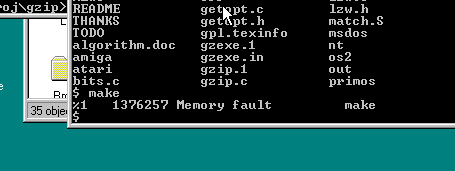
Turns out it doesn’t work either.
Well sure vi does work, but the whole ‘cc’ cross thing is just plain deprecated after 3.1… It’s like whatever attempt at POSIX being useable was fully given up on. The only other interesting thing on the NT 3.5 resource kit, is that it does mention GCC being part of the kit, but obviously that never happened. Politics I suppose.
So now I really remember why I never really bothered with the environment, as it basically became unusable by Windows NT 3.5
Running at home!
I’ve gone ahead, and uploaded the source to github, and included a binary release. So you can try this on your own Windows NT 3.1 machine, or try the fight with NT 3.5 or higher and go through the fight yourself.
https://github.com/neozeed/windowsnt31_posix
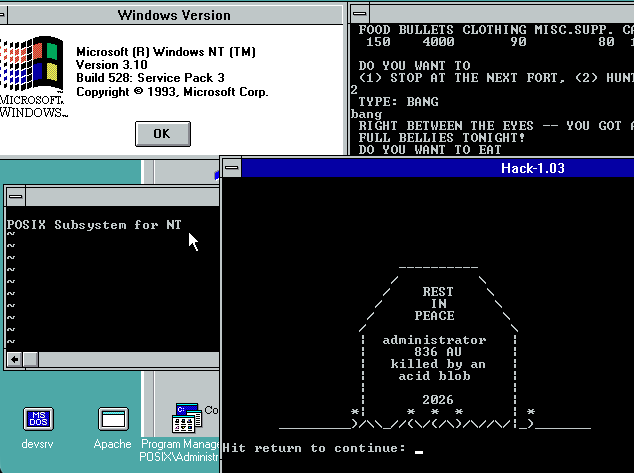
And yes, I did get hack-1.03 running!