
(This is a guest post by Antoni Sawicki aka Tenox)
Previously I have cobbled up this FIrefox+VNC Docker container – “VNCFOX” to address some shortcomings of web browsing on vintage computers.
It worked quite good but I did not particularly like some of the Firefox/Mozilla foundation controversies and policies. Started looking for alternatives, but the situation was quite grim. Ladybird Browser is still in active development. Chrome exterminated Ad Blockers. Brave was over bloated with crapware.
TIL Brave has released “Origin” version which is minimal and void of all the garbage features, but still has a fully functional Ad Block! Normally Origin asks for a one time license purchase, however Linux version is free. Since Docker is Linux… a perfect fit for the use case! VNCBRAVE was born.
https://github.com/tenox7/vncbrave
https://hub.docker.com/r/tenox7/vncbrave
Running:
docker run -d \
    --name vncbrave \
    -p 5900:5900 \
    tenox7/vncbrave:latest
You may also want to create a volume to store settings, cache etc.
docker volume create vncbrave
docker run -d \
    --name vncbrave \
    -v vncbrave:/home/vncbrave/.config/BraveSoftware \
    -p 5900:5900 \
    tenox7/vncbrave:latest
In practice is so nice that I wrote this article on HPUX 10.20 with VUE desktop:
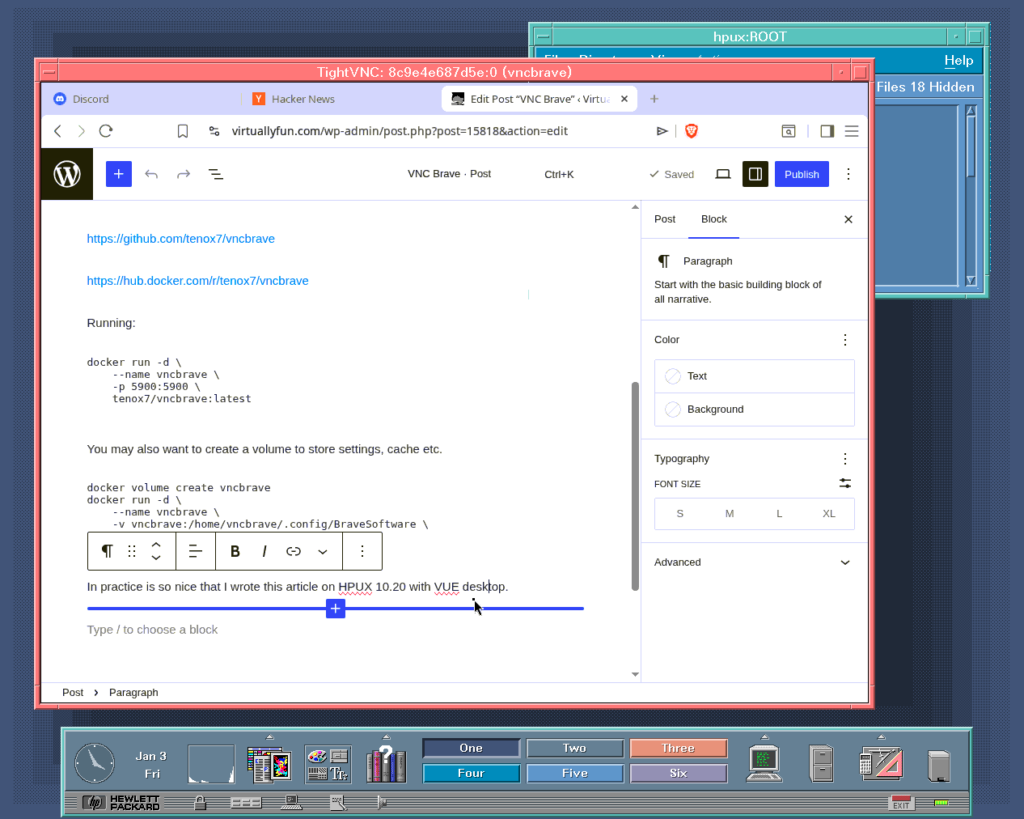
I also added routing of Brave active tab title in to VNC “Desktop Name” so it shows in the client window if supported.
I also typically switch to compact mode to save some real estate and make some other settings like solid background color, tab suspension and aggressive ad blocking.
A collection of TightVNC ports for old OS is available here.
If you can, please suport folks at Brave with one time license purchase!
Brave does not deserve a single cent of anybody’s money: https://www.spacebar.news/stop-using-brave-browser/